
Introduction
This manual provides detailed instructions for the setup, operation, and maintenance of your Bistee Wireless Doorbell Receiver. This unit is designed to work as an add-on receiver for existing Bistee wireless doorbell systems, providing an additional chime point in your home or business. Please read this manual thoroughly before use.
Note: This package includes only one receiver and does not come with a transmitter (push button or sensor). It is designed to pair with existing Bistee transmitters.
Features
- Plug-in Design: No batteries required for the receiver; simply plug into a standard 110V outlet.
- Adjustable Volume: 5 levels of volume control, ranging from 0dB (mute) to 110dB.
- Extensive Ringtones: Choose from 58 distinct melodies.
- LED Indicator: Visual alert for incoming signals.
- Expandable System: Each receiver can be paired with up to 58 transmitters (e.g., push buttons, door sensors, motion sensors) allowing for a customizable alert system.
- Durable Material: Constructed from ABS material for longevity.

Image: Overview of the Bistee Wireless Doorbell Receiver, highlighting its 5 volume levels and 58 total chime tones, with visual examples of sound levels in different environments.
Package Contents
- 1 x Bistee Wireless Doorbell Receiver
Note: Transmitters (doorbell push buttons, door sensors, etc.) are sold separately.
Setup and Pairing
Before installation, it is recommended to perform the pairing process. Ensure the receiver is plugged into a standard 110V outlet.
- Select Ringtone: Press the melody button on the receiver to cycle through and select your desired ringtone.
- Enter Pairing Mode: Long press the volume control button on the receiver for approximately 5 seconds. You will hear a sound, and the LED indicator will begin flashing, indicating the receiver is in pairing mode.
- Activate Transmitter: Within 5 seconds of the receiver entering pairing mode, activate your Bistee transmitter. This means pressing the push button, or separating the door sensor and its magnet.
- Confirmation: Upon successful pairing, the receiver will automatically play the selected ringtone. If pairing is not successful within 5 seconds, the receiver will exit pairing mode, and you will need to repeat the steps.
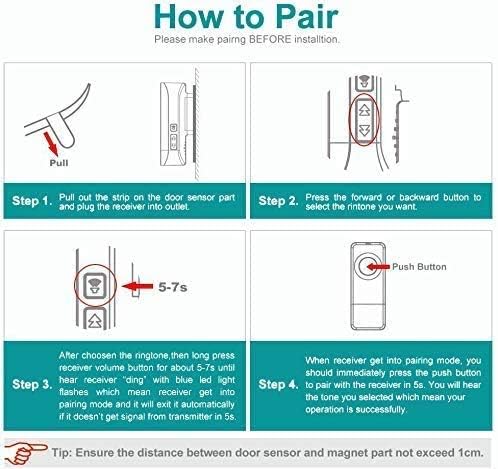
Image: Visual guide detailing the four steps for pairing the receiver with a transmitter, including selecting a ringtone, entering pairing mode, activating the transmitter, and confirming successful pairing.
Important Tip: When pairing a door sensor, ensure the distance between the door sensor part and the magnet part does not exceed 1cm during activation for successful pairing.
Operating Instructions
Volume Control
The receiver features 5 adjustable volume levels. Press the volume control button briefly to cycle through the available volume settings (0dB, 25dB, 45dB, 90dB, 110dB). The 0dB setting mutes the chime.
Ringtone Selection
To change the ringtone, press the melody button on the side of the receiver. Each press will advance to the next available melody. Once you find a desired melody, it will be saved automatically for future alerts.
Expanding Your System
The Bistee Wireless Doorbell Receiver is expandable. You can pair multiple transmitters (up to 58) to a single receiver, and you can also pair multiple receivers to a single transmitter. This allows for a customized alert system throughout your property. Each paired push button can have a different ringtone assigned to it.

Image: Illustration demonstrating how the Bistee receiver can be expanded to pair with various types of transmitters, including push buttons, SOS buttons, door/window sensors, driveway sensors, and home sensors.
Ringtone List
The Bistee Wireless Doorbell Receiver offers 58 unique ringtones. Below is a list of the available melodies:

Image: A comprehensive list displaying all 58 available chime tones, categorized for easy reference.
Specifications
| Manufacturer | Bistee |
| Model | 1 Receiver |
| Voltage (Plug-in Receiver) | 110V |
| Volume Range | 20~110dB (5 levels) |
| Ringtones | 58 |
| Expandability | Up to 58 transmitters per receiver |
| Material | ABS |
| Color | Black |
| Item Weight | 4.2 ounces |
| Product Dimensions | 1 x 1 x 1 inches |
Troubleshooting
- Receiver not ringing:
- Ensure the receiver is properly plugged into a live 110V outlet.
- Check if the volume is set to 0dB (mute). Adjust the volume using the volume button.
- Re-attempt the pairing process with your transmitter. Ensure the transmitter is functioning correctly.
- Verify that the transmitter and receiver are within operational range and not obstructed by thick walls or metal objects.
- Difficulty pairing:
- Ensure the receiver is in pairing mode (LED flashing) before activating the transmitter.
- Activate the transmitter immediately after the receiver enters pairing mode (within 5 seconds).
- For door sensors, confirm the magnet is brought close to the sensor (within 1cm) during activation.
- Try resetting the receiver by unplugging it for a few seconds and then plugging it back in, then re-attempt pairing.
- Interference:
- Keep the receiver away from large metal objects, microwave ovens, or other strong electromagnetic interference sources.
Warranty and Support
Bistee products are designed for reliability and performance. For any questions regarding pairing, installation, or troubleshooting, please contact Bistee customer service directly. Refer to your product packaging or the official Bistee website for the most current contact information.
Please retain your proof of purchase for warranty claims.