
1. Introduction
Thank you for choosing the Axloie Wireless Sport Earbuds. This manual provides detailed instructions for setting up, operating, and maintaining your earbuds to ensure optimal performance and longevity. Please read this manual thoroughly before use.
2. Package Contents
Please verify that all items are present in your package:
- Axloie Wireless Sport Earbuds (Left and Right)
- Charging Case
- Ear Cushions (various sizes)
- USB Charging Cable
- User Manual (this document)
3. Product Overview
Familiarize yourself with the components of your Axloie Wireless Sport Earbuds.
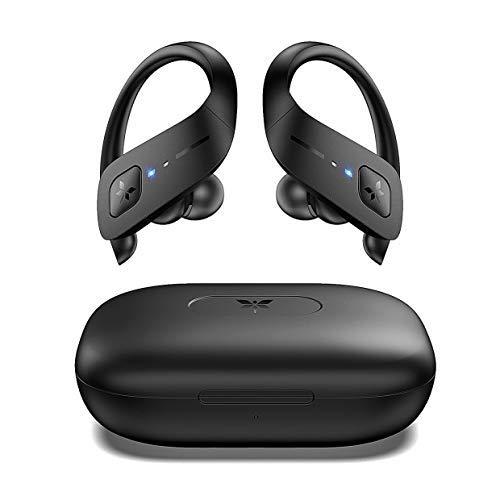
Image: Axloie Wireless Sport Earbuds (left and right) with their charging case. The earbuds feature ear hooks for a secure fit and LED indicators.

Image: Close-up of an earbud worn in an ear, illustrating its ergonomic shape, unshakable fit, comfortable wearing, drag reduction, and skin-friendly materials.
Key Features:
- Ergonomic Ear Hooks: Designed for stable and comfortable wear during physical activity.
- IPX7 Waterproof Rating: Provides protection against sweat and rain.
- Bluetooth 5.0: Ensures stable and fast wireless connection.
- One-Button Control: Simplifies operation for various functions.
- Long Playtime: Up to 35 hours total with the charging case.
- Hi-Fi Stereo Sound: Features A2DP protocol and dynamic speakers for enhanced audio.
4. Setup
4.1 Charging the Earbuds and Case
Before first use, fully charge the earbuds and the charging case.
- Place the earbuds into the charging case. Ensure they are correctly seated.
- Connect the charging case to a power source using the provided USB cable.
- The LED indicators on the earbuds and case will show charging status. Refer to the LED indicator section for details (not provided in input, general instruction).
- A full charge for the earbuds provides approximately 5 hours of playtime. The 600mAh charging case provides an additional 6 full charges, totaling 35 hours.

Image: Diagram illustrating the 35-hour ultra-long playtime, with 600mAh charging case, 5 hours per earbud charge, and 1.5 hours fast charging.
4.2 Pairing with a Device
The earbuds utilize Bluetooth 5.0 for a stable connection.
- Initial Pairing:
- Take both earbuds out of the charging case. They will automatically power on and enter pairing mode.
- On your device (smartphone, tablet, etc.), enable Bluetooth.
- Search for available Bluetooth devices and select "Axloie G2" (or similar model name).
- Once connected, the earbud LED indicators will change, typically turning off or blinking slowly.
- Reconnection:
- After initial pairing, the earbuds will automatically reconnect to the last paired device when taken out of the case, provided Bluetooth is enabled on the device.
- Mono Mode:
- Either earbud can be used independently. Simply take one earbud out of the case, and it will enter mono pairing mode.

Image: Internal view of an earbud highlighting the Bluetooth 5.0 chip, indicating universal compatibility, robust connection, and lightning speed.
5. Operating Instructions
The Axloie Wireless Sport Earbuds feature a multi-function button on each earbud for easy control.

Image: Diagram showing the multi-function button on an earbud and its various controls: Auto On/Off, Play/Pause, Volume +/-, Previous/Next track, Answer/Hang up/Reject calls, Activate Voice Assistant.
5.1 Basic Controls:
- Power On/Off: Automatically powers on when removed from the case, and off when placed back in. Manual power on/off may be available via long press (refer to specific product guide for exact duration).
- Play/Pause: Single press the multi-function button on either earbud.
- Volume Control: Specific presses (e.g., long press left for volume down, long press right for volume up) or multiple presses (e.g., double tap) may control volume. Refer to the detailed product guide for your specific model.
- Next Track: Double press the right earbud's multi-function button.
- Previous Track: Double press the left earbud's multi-function button.
5.2 Call Management:
- Answer/End Call: Single press the multi-function button on either earbud.
- Reject Call: Long press the multi-function button on either earbud.
5.3 Voice Assistant:
- Activate Voice Assistant: Triple press the multi-function button on either earbud (e.g., Siri, Google Assistant).
5.4 Sound Quality:
The earbuds support A2DP protocol for high-quality wireless audio streaming and feature dynamic speakers for rich bass and clear treble.

Image: Diagram illustrating the components contributing to supreme surround sound, including A2DP Protocol, Dynamic Speaker, and Separated Acoustic Chamber.
6. Wearing Instructions
For optimal sound quality and secure fit, ensure the earbuds are worn correctly.
- Choose the correct size of ear cushions for a comfortable and snug fit.
- Place the earbud into your ear canal.
- Adjust the silicone ear hook over the top of your ear until it feels secure and comfortable.
- Ensure the earbud forms a good seal in your ear canal to maximize bass response and noise isolation.

Image: A person exercising, with water splashing, demonstrating the IPX7 sweatproof and waterproof capabilities of the earbuds, allowing enjoyment of sports in various conditions.
7. Maintenance
Proper maintenance ensures the longevity and performance of your earbuds.
- Cleaning: Regularly clean the earbuds and charging case with a soft, dry, lint-free cloth. Do not use harsh chemicals or abrasive materials.
- Ear Cushions: Remove and clean ear cushions periodically with mild soap and water, then dry thoroughly before reattaching.
- Water Resistance: While IPX7 rated (protected against immersion in water up to 1 meter for 30 minutes), avoid prolonged submersion. Ensure the charging port is dry before charging.
- Storage: Store the earbuds in their charging case when not in use to protect them and keep them charged.
- Temperature: Avoid exposing the earbuds to extreme temperatures (hot or cold) or high humidity.
8. Troubleshooting
If you encounter issues, refer to the following common solutions:
| Problem | Solution |
|---|---|
| Earbuds not pairing |
|
| Only one earbud working |
|
| No sound |
|
| Charging issue |
|
9. Specifications
Detailed technical specifications for the Axloie Wireless Sport Earbuds Model 173362.
- Model Name: TWS Stereo
- Model Number: 173362
- Connectivity Technology: Wireless (Bluetooth)
- Bluetooth Version: 5.0
- Water Resistance Level: IPX7 Waterproof
- Control Type: Touch, Volume Control
- Microphone: Built-In, Noise Cancellation (CVC)
- Earbud Playtime: Up to 5 hours per charge
- Charging Case Battery: 600mAh
- Total Playtime (with case): Up to 35 hours
- Material: Silicone (ear hooks)
- Item Weight: 440 g (total package weight, not individual earbuds)
- Form Factor: In Ear with Ear Hooks
- Special Features: Android compatible, Microphone Included, Noise Cancellation, Sweatproof, Sports-and-exercise, Water-resistant, Wireless
10. Warranty and Support
For warranty information and customer support, please refer to the official Axloie website or contact their customer service directly. Keep your purchase receipt as proof of purchase for warranty claims.
Manufacturer: Axloie
Date First Available: 1 February 2020