
1. Product Overview
The GE-branded Décor Series 4-Device Universal Remote, model 46577, is designed to consolidate control of up to four audio/video devices. Its soft-touch cobalt blue finish complements various home décors. This remote is preprogrammed for immediate use with Samsung TVs and Roku boxes and is compatible with all major brands, offering a comprehensive code library for thousands of the latest audio/video devices. It features a master volume control that adjusts audio regardless of the active device.
Key Features
- Stylish Soft Touch Finish: Features an attractive silky-smooth cobalt blue finish for a sophisticated look.
- Multi-Device Control: Operates up to 4 different audio and video components, including TVs, Blu-ray/DVD players, cable/satellite receivers, Roku boxes, other streaming media players, and soundbars.
- Best Remote Code Library: Works with all major brands and supports thousands of the latest audio/video equipment. Includes a code-search feature for automatic device code scanning.
- Connectivity Technology: Utilizes Radio Frequency (RF) for reliable communication.
- Preprogrammed for Samsung TVs and Roku Boxes: Ready to use with these devices without additional programming.

2. Setup and Programming
2.1 Installing Batteries
The GE Universal Remote requires 2 AAA batteries (not included). To install:
- Locate the battery compartment on the back of the remote.
- Slide the battery cover downwards and lift to remove.
- Insert two AAA batteries, ensuring the positive (+) and negative (-) terminals align with the markings inside the compartment.
- Replace the battery cover by sliding it back into place until it clicks securely.
2.2 Programming Your Devices
Follow these steps to program your GE Universal Remote to control your devices:

- Find the remote codes for your device. You can find a comprehensive list of codes at www.jascoproducts.com/remotecodes.
- Press the SETUP button on the remote until the red indicator light turns on, then release.
- Press and release the desired device button on the remote (e.g., TV, DVD, STRM, AUX). The red indicator light will blink once and remain on.
- Starting with the first code from your list, key in the code using the number buttons on the remote. The red indicator light will turn off after the last digit is entered.
- Point your remote at the device and test different buttons (e.g., Power, Volume, Channel) to see if the device responds.
- If the device does not respond, repeat the process with the next code from your list until you find the correct one.
Note: The remote is preprogrammed for immediate use with Samsung TVs and Roku boxes via the TV and STRM device buttons, requiring no additional programming for these specific brands.
3. Operating Your Remote
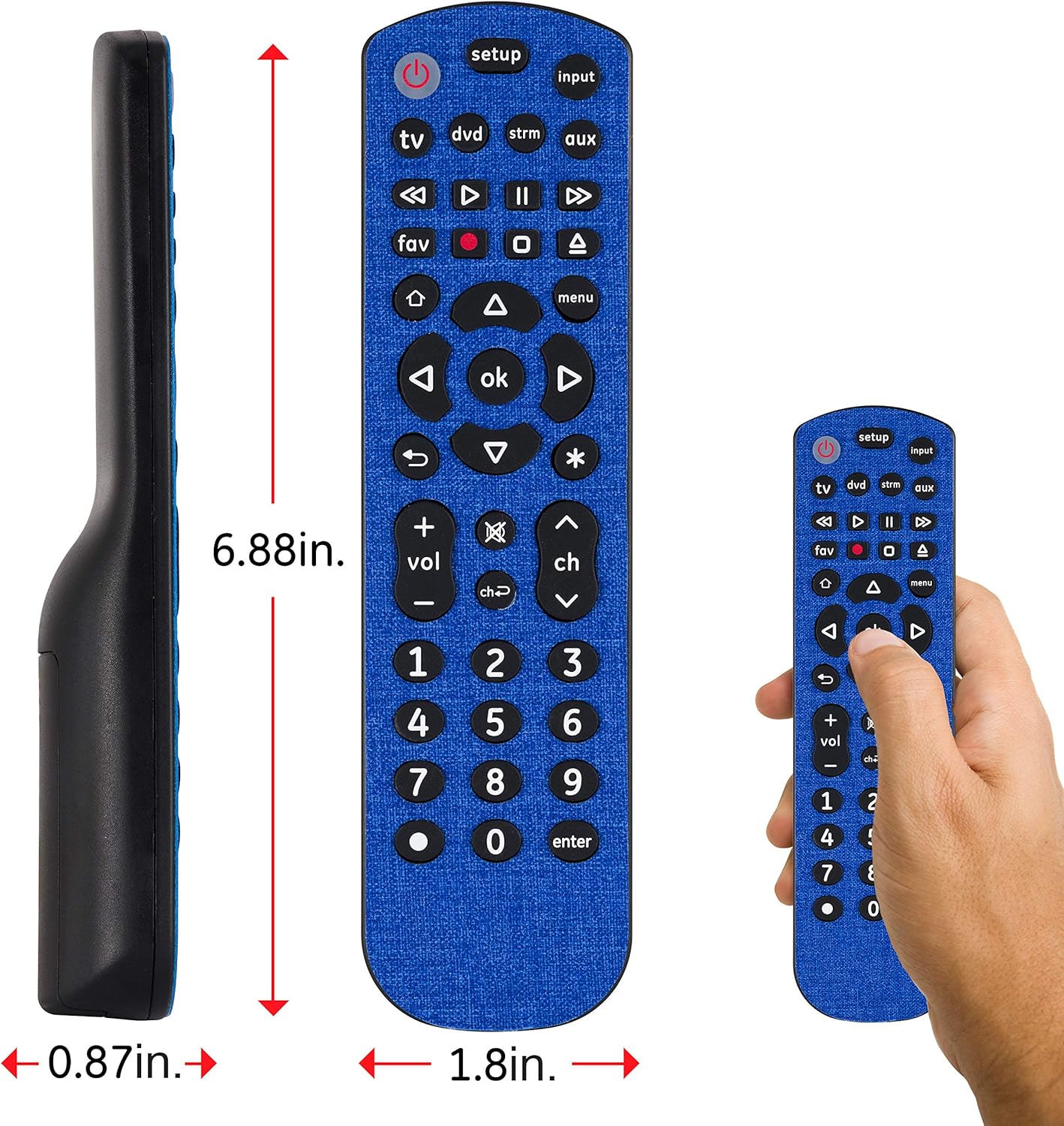
Once programmed, your GE Universal Remote can control up to four different devices. Familiarize yourself with the button layout for optimal use.

3.1 Device Selection
To control a specific device, press the corresponding device button at the top of the remote:
- TV: Controls your television.
- DVD: Controls DVD or Blu-ray players.
- STRM: Controls streaming media players (e.g., Roku, Apple TV).
- AUX: Controls auxiliary devices such as soundbars, cable boxes, or satellite receivers.
3.2 Basic Functions
- Power (⏻): Turns the selected device on or off.
- Input: Cycles through the input sources on your TV.
- Volume (+/-): Adjusts the volume of the selected device. The master volume control feature allows these buttons to always control the audio output, regardless of the selected device.
- Channel (CH +/-): Changes channels on your TV or cable/satellite box.
- Mute (🔇): Mutes the audio.
- Number Buttons (0-9): Used for direct channel entry or code programming.
- Navigation (▲▼◀▶, OK): Used to navigate menus and confirm selections.
- Menu: Opens the menu of the selected device.
- Playback Controls (Play, Pause, Stop, Rewind, Fast Forward, Skip): Controls media playback on DVD/Blu-ray players or streaming devices.
4. Care and Maintenance
To ensure the longevity and optimal performance of your GE Universal Remote, follow these simple care guidelines:
- Cleaning: Wipe the remote with a soft, slightly damp cloth. Avoid using abrasive cleaners, solvents, or harsh chemicals, as they may damage the finish or internal components. The remote features an easy-clean, soft-touch finish.
- Battery Replacement: Replace batteries when the remote's performance diminishes or the indicator light does not illuminate during button presses. Always replace both batteries at the same time with new AAA alkaline batteries. Do not mix old and new batteries or different types of batteries.
- Storage: Store the remote in a cool, dry place away from direct sunlight and extreme temperatures.
- Avoid Drops: Protect the remote from drops and impacts, which can damage internal circuitry.
5. Troubleshooting
If you encounter issues with your GE Universal Remote, try the following solutions:
| Problem | Possible Cause | Solution |
|---|---|---|
| Remote does not operate your device. | Incorrect code entered; batteries are low or dead; remote is not pointed correctly. | Verify the device code and re-enter it. Replace batteries. Ensure the remote is pointed directly at the device's sensor. |
| Red indicator light does not turn on when pressing buttons. | Batteries are dead or inserted incorrectly. | Check battery orientation (+/-). Replace batteries with new AAA alkaline batteries. |
| Some buttons work, but others do not. | The code may be partially compatible or an incorrect device button is selected. | Try other codes for your device. Ensure you have selected the correct device button (TV, DVD, STRM, AUX) for the function you are trying to perform. |
| Cannot find a code for my device. | Device is not in the code library or is an RF-only device. | Visit www.jascoproducts.com/remotecodes for the most up-to-date code list. Note that this remote does not work with Roku streaming stick, Fire TV stick, or other RF streaming devices that do not use IR signals. |
6. Specifications
| Feature | Detail |
|---|---|
| Model Number | 46577 |
| Brand | GE |
| Color | Cobalt Blue |
| Max Number of Supported Devices | 4 |
| Compatible Devices | Stereo System, Television (and other devices as listed in description) |
| Connectivity Technology | Radio Frequency |
| Controller Type | Button Control |
| Maximum Range | 30 Feet |
| Batteries Required | 2 AAA batteries (not included) |
| Product Dimensions | 3.43 x 11.3 x 26.04 cm (1.35 x 4.45 x 10.25 inches) |
| Item Weight | 104.33 g (3.68 oz) |
| Date First Available | 9 January 2020 |
7. Warranty and Support
For product support, warranty information, or to access the latest code lists, please visit the manufacturer's official website or contact their customer service. Refer to the packaging or the manufacturer's website for specific warranty details applicable to your region.
Manufacturer: GE
Online Support & Code Library: www.jascoproducts.com/remotecodes