
Lenyes S805BK
Lenyes S805BK Portable Bluetooth Speaker User Manual
Model: S805BK
Introduction
Thank you for purchasing the Lenyes S805BK Portable Bluetooth Speaker. This manual provides essential information for setting up, operating, and maintaining your speaker. Please read it carefully before use to ensure optimal performance and longevity of your device.
Product Overview
The Lenyes S805BK is a compact, portable Bluetooth speaker designed for high-quality audio playback. It features IPX6 waterproofing, 360° sound, and a robust design suitable for various environments.
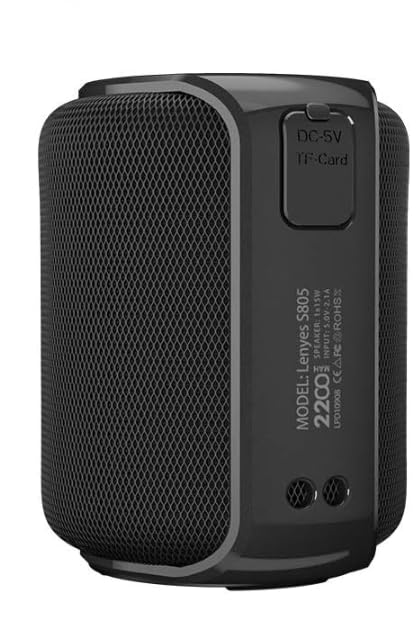
Figure 1: Front view of the Lenyes S805BK Portable Bluetooth Speaker, showcasing its compact design and speaker grille.
Component Identification
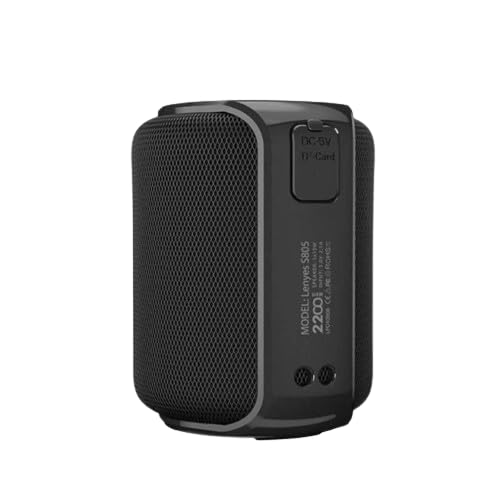
Figure 2: Side panel of the speaker, indicating the DC-5V charging port and the TF-Card slot for local music playback.

Figure 3: Top panel of the speaker, showing the integrated control buttons for power, volume, and playback functions.
Familiarize yourself with the following components:
- Power Button: Used to turn the speaker on or off.
- Volume Up/Next Track Button: Increases volume or skips to the next track.
- Volume Down/Previous Track Button: Decreases volume or goes to the previous track.
- Play/Pause Button: Controls music playback and answers/ends calls.
- Mode Button: Switches between Bluetooth and TF Card modes.
- DC-5V Charging Port: For charging the speaker's internal battery.
- TF-Card Slot: For inserting a MicroSD card with audio files.
Setup
1. Charging the Speaker
- Locate the DC-5V charging port on the side of the speaker (refer to Figure 2).
- Connect the provided USB charging cable to the speaker's DC-5V port and the other end to a compatible USB power adapter (5V) or a computer's USB port.
- The charging indicator light will illuminate during charging. It typically takes approximately 3 hours for a full charge.
- Once fully charged, the indicator light may change color or turn off, depending on the speaker's design.
Note: For optimal battery life, fully charge the speaker before first use.
2. Bluetooth Pairing
- Ensure the speaker is fully charged.
- Press and hold the Power Button to turn on the speaker. A voice prompt or indicator light will confirm it is in Bluetooth pairing mode.
- On your mobile device (smartphone, tablet, etc.), navigate to the Bluetooth settings.
- Enable Bluetooth and search for available devices.
- Select "Lenyes S805BK" from the list of found devices.
- Once paired, the speaker will provide an audible confirmation, and the Bluetooth indicator light will typically become solid.
Note: The speaker has a Bluetooth range of approximately 11 meters (36 feet) in an open environment.
3. True Wireless Stereo (TWS) Function
The TWS function allows two Lenyes S805BK speakers to be paired together for a stereo sound experience.

Figure 4: Illustration of two Lenyes S805BK speakers utilizing the True Wireless Stereo (TWS) function for enhanced audio.
- Turn on both Lenyes S805BK speakers. Ensure they are not connected to any other Bluetooth device.
- On one of the speakers (this will be the primary speaker), press and hold the Play/Pause button for a few seconds until you hear a confirmation tone, indicating TWS pairing mode.
- The two speakers will automatically search for and connect to each other. Once connected, you will hear another confirmation tone.
- Now, connect your mobile device to the primary speaker via Bluetooth as described in the "Bluetooth Pairing" section.
- Audio will now play in stereo through both speakers.
Note: TWS function requires two identical Lenyes S805BK speakers.
Operating Instructions
Power On/Off
- Power On: Press and hold the Power Button for approximately 2-3 seconds until the indicator light illuminates and you hear a power-on sound.
- Power Off: Press and hold the Power Button for approximately 2-3 seconds until the indicator light turns off and you hear a power-off sound.
Music Playback (Bluetooth Mode)
- Play/Pause: Press the Play/Pause Button once.
- Next Track: Press and hold the Volume Up/Next Track Button.
- Previous Track: Press and hold the Volume Down/Previous Track Button.
- Volume Up: Short press the Volume Up/Next Track Button.
- Volume Down: Short press the Volume Down/Previous Track Button.
TF Card Playback
- Insert a MicroSD (TF) card with MP3 audio files into the TF-Card slot (refer to Figure 2).
- The speaker will automatically switch to TF Card mode or you may need to press the Mode Button to select it.
- Use the Play/Pause, Volume Up/Next Track, and Volume Down/Previous Track buttons to control playback as described above.
Call Handling
- Answer Call: When a call comes in, press the Play/Pause Button once to answer.
- End Call: During a call, press the Play/Pause Button once to end the call.
- Reject Call: When a call comes in, press and hold the Play/Pause Button for approximately 2 seconds to reject the call.
Maintenance
- Cleaning: Use a soft, dry cloth to clean the speaker's surface. Do not use abrasive cleaners or solvents.
- Water Resistance (IPX6): The speaker is IPX6 waterproof, meaning it can withstand powerful water jets. However, it is not designed for submersion. Ensure the charging port and TF card slot covers are securely closed before exposure to water.
- Storage: Store the speaker in a cool, dry place away from direct sunlight and extreme temperatures. If storing for an extended period, charge the battery periodically to maintain its health.
- Battery Care: Avoid fully discharging the battery frequently. Recharge the speaker when the low battery indicator or voice prompt is activated.
Troubleshooting
| Problem | Possible Solution |
|---|---|
| Speaker does not turn on. | Ensure the battery is charged. Connect the speaker to a power source using the charging cable. |
| Cannot pair via Bluetooth. |
|
| No sound or low volume. |
|
| TWS pairing fails. |
|
Specifications
| Feature | Detail |
|---|---|
| Model Name | S805BK |
| Brand | Lenyes |
| Connectivity Technology | Bluetooth |
| Speaker Type | Outdoor, Portable |
| Special Feature | Waterproof (IPX6) |
| Power Source | Battery Powered |
| Battery Capacity | 2200mAh |
| Charging Time | Approximately 3 hours |
| Playing Time | 10+ hours |
| Bluetooth Range | 11 Meters |
| Output Power | 15 Watt |
| Sound Features | 360° Sound, BassUp Technology |
| Control Method | Touch (Buttons) |
| Compatible Devices | Smartphone, Tablet |
| Item Weight | 450 g |
| Package Dimensions | 14 x 13 x 13 cm |
Warranty and Support
The Lenyes S805BK Portable Bluetooth Speaker comes with a 1 Year Warranty from the date of purchase. This warranty covers manufacturing defects under normal use.
For warranty claims, technical support, or any inquiries, please contact your retailer or visit the official Lenyes website for customer service information.
Please retain your proof of purchase for warranty validation.
Ask a question about this manual
Ask about setup, troubleshooting, compatibility, parts, safety, or missing instructions. Manuals+ will review the question and use this page’s manual context to help answer it.