Introduction
This manual provides instructions for the installation, maintenance, and care of your iMartine RB01 Replacement Roller Brush. This roller brush is designed to maintain the cleaning performance of your compatible robotic vacuum cleaner.
Compatibility
The iMartine RB01 Replacement Roller Brush is compatible with the following robotic vacuum cleaner models:
- iMartine C800
- iMartine C900
- iMartine R3500A
- iMartine D900
- iMartine D900C
- iMartine R3500S
- iMartine G1061
- Coredy R3500
Please Note: This roller brush is not compatible with the iMartine SG50 model.
Installation Instructions
Follow these steps to replace the roller brush in your robotic vacuum cleaner:
- Power Off: Ensure your robotic vacuum cleaner is powered off and disconnected from its charging base before beginning any maintenance.
- Access Brush Compartment: Turn the vacuum cleaner upside down. Locate the brush compartment cover, usually secured by latches or screws. Open or remove the cover.
- Remove Old Brush: Carefully lift out the worn or damaged roller brush from its housing. Note its orientation for correct installation of the new brush.
- Clean Compartment: Remove any hair, debris, or dust accumulated in the brush compartment and around the brush bearings.
- Install New Brush: Insert the new iMartine RB01 Replacement Roller Brush into the compartment. Ensure the ends of the brush align correctly with the slots or bearings in the vacuum cleaner. The brush should rotate freely once installed.
- Secure Cover: Close and secure the brush compartment cover. Ensure it is properly latched or screwed back into place.
- Test: Place the vacuum cleaner back on its wheels and power it on to confirm proper operation.
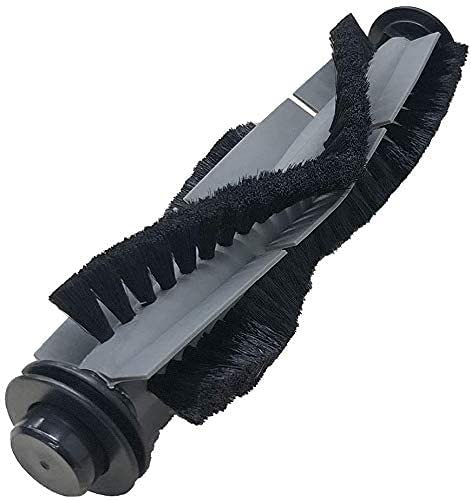
Image: The iMartine RB01 Replacement Roller Brush, showing its bristles and end caps. This brush is designed for easy installation into compatible robotic vacuum models.
Maintenance
Regular maintenance of your roller brush is crucial for optimal cleaning performance and extending the life of your vacuum. It is recommended to inspect and clean the roller brush weekly, or more frequently depending on usage and pet hair presence.
- Remove Hair and Debris: Use a cleaning tool (often provided with your vacuum) or scissors to cut and remove any hair, string, or fibers wrapped around the brush bristles and ends.
- Clean Bearings: Ensure the brush bearings (the parts at the ends of the brush that fit into the vacuum) are free of debris.
- Inspect for Wear: Check the bristles for signs of wear, such as bending, fraying, or missing sections. Replace the brush if significant wear is observed to maintain cleaning effectiveness.
Troubleshooting
If your robotic vacuum's cleaning performance decreases or the roller brush is not functioning correctly, consider the following:
- Brush Not Spinning: Check if hair or debris is tangled around the brush or its bearings, preventing rotation. Ensure the brush is correctly installed and the compartment cover is securely closed.
- Reduced Cleaning: A worn-out brush with flattened or missing bristles will reduce cleaning efficiency. Replace the brush if it shows significant wear.
- Unusual Noise: Debris caught in the brush mechanism or a damaged brush can cause unusual noises. Inspect and clean the brush and its compartment thoroughly.
Specifications
| Model Number | RB01 |
| Product Dimensions | 6.5 x 2.36 x 1.38 inches |
| Item Weight | 2.39 ounces |
| Included Components | 1 x Roller Brush |
Warranty and Support
For warranty information or technical support regarding your iMartine RB01 Replacement Roller Brush, please refer to the documentation provided with your original robotic vacuum cleaner or visit the official iMartine website. You may also contact iMartine customer service directly for assistance.
iMartine Official Website: Visit the iMartine Store on Amazon