
1. Introduction
This manual provides essential instructions for the safe and effective use of your FITHOOD replacement battery, model CS-GM10SL, designed for the Xplova G3 GPS device. Please read this manual thoroughly before installation and use to ensure optimal performance and safety.
It is crucial to confirm that this battery's model and part number match your device's requirements before purchase and installation. If unsure, consult your device's original manual or contact support.
2. Product Overview
The FITHOOD CS-GM10SL is a high-quality Lithium-Ion replacement battery specifically designed for Xplova G3 GPS devices. It provides reliable power with a capacity of 1100mAh.
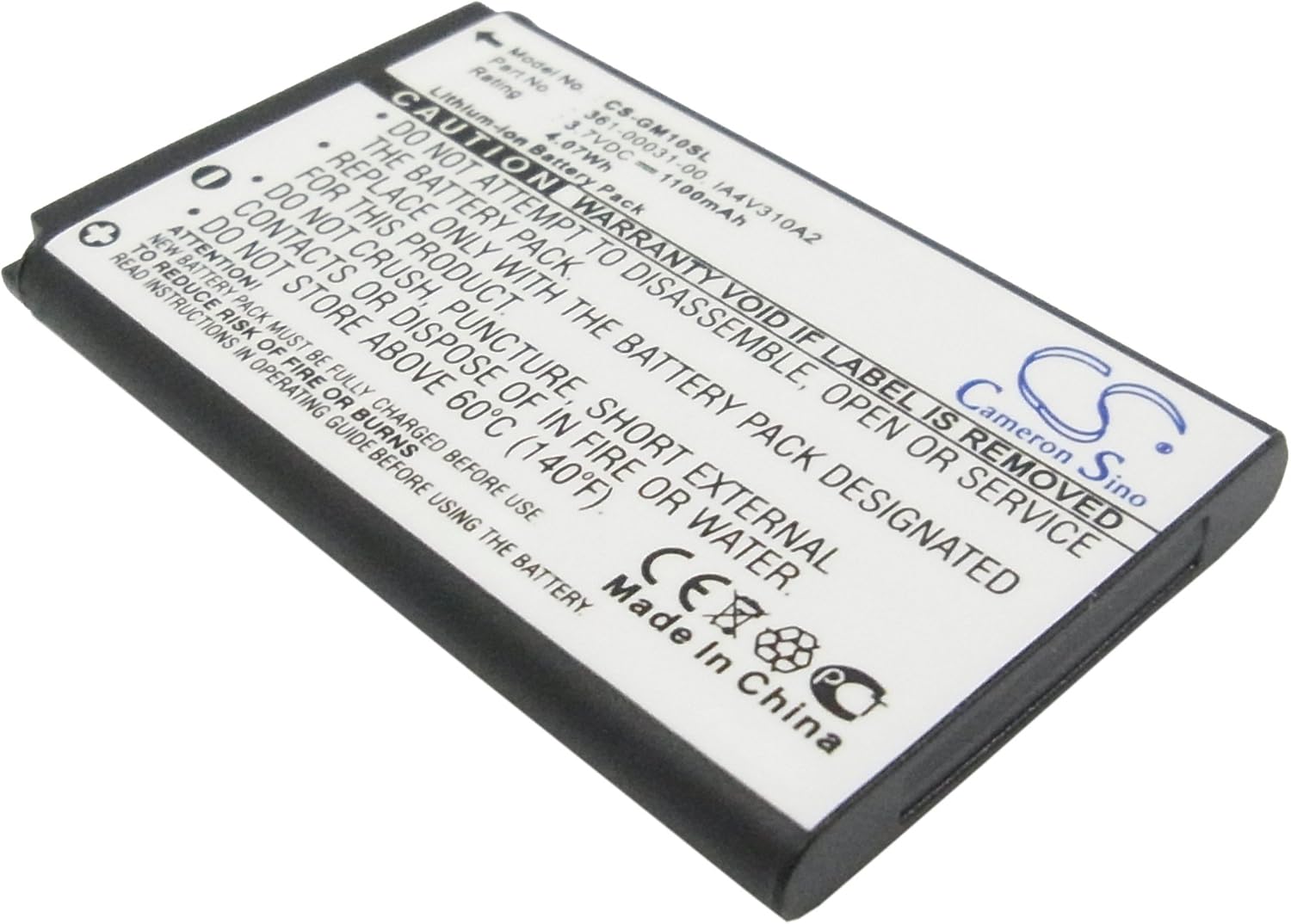
Image 1: Top view of the FITHOOD CS-GM10SL replacement battery. The label clearly displays the model number CS-GM10SL, part number 361-00031-00 / A4V310A2, and electrical ratings of 3.7VDC and 1100mAh (4.07Wh). Safety warnings are also visible on the label.
Key features include:
- High-quality Lithium-Ion cell composition.
- Capacity: 1100mAh (4.07Wh).
- Voltage: 3.7V.
- Certifications: ISO9001, RoHS, CE, UN38.3, and MSDS.
3. Setup and Installation
Before attempting to replace the battery, ensure your Xplova G3 device is powered off and disconnected from any charging source. Refer to your Xplova G3's original instruction manual for specific battery compartment access and removal procedures.
- Power Off Device: Completely power down your Xplova G3 GPS device.
- Locate Battery Compartment: Identify and open the battery compartment on your Xplova G3. This may require a small screwdriver or prying tool, depending on the device design.
- Remove Old Battery: Carefully disconnect and remove the old battery. Note its orientation.
- Insert New Battery: Align the FITHOOD CS-GM10SL replacement battery with the connectors in the device's battery compartment. Gently press it into place, ensuring a secure connection.
- Close Compartment: Securely close the battery compartment cover.
- Initial Charge: Connect your Xplova G3 device to its charger and allow the new battery to fully charge before first use. A new battery pack must be fully charged before use.

Image 2: Angled view of the FITHOOD CS-GM10SL battery, highlighting the electrical contacts. Proper alignment of these contacts is essential during installation.
Caution: Only replace with the battery pack designated for this product. Do not attempt to disassemble, open, or service the battery pack yourself. Warranty is void if the label is removed.
4. Operating and Charging
After installation, your Xplova G3 device should power on normally. For optimal battery performance and longevity, follow these guidelines:
- First Use: Fully charge the battery before its first use. This helps calibrate the battery's charge indicator.
- Charging: Use only the original charger or a certified compatible charger for your Xplova G3 device. Overcharging or using incompatible chargers can damage the battery.
- Charging Indicators: Refer to your Xplova G3 device's manual for information on its charging status indicators.
- Discharge Cycles: For best results, avoid frequently discharging the battery completely. Partial discharges and more frequent charges are generally better for Lithium-Ion batteries.
5. Maintenance and Storage
Proper care and storage can extend the life of your FITHOOD replacement battery:
- Temperature: Store the battery in a cool, dry place, away from direct sunlight and extreme temperatures. Do not store above 60°C (140°F).
- Cleaning: If necessary, gently wipe the battery's exterior with a dry, soft cloth. Do not use liquids or abrasive cleaners.
- Long-Term Storage: If storing the battery for an extended period, charge it to approximately 50-60% capacity. Recharge it every 3-6 months to prevent deep discharge.
- Avoid Physical Damage: Do not crush, puncture, or short external contacts of the battery.
6. Troubleshooting
If you encounter issues with your new battery, consider the following:
- Device Not Powering On:
- Ensure the battery is correctly installed and fully charged.
- Verify that the battery contacts are clean and making proper connection.
- Confirm the battery is compatible with your Xplova G3 model.
- Battery Not Charging:
- Check the charging cable and adapter for damage.
- Ensure the charging port on your Xplova G3 device is clean and functional.
- Try charging with a different compatible charger if available.
- Short Battery Life:
- Ensure the battery has undergone a full charge cycle after installation.
- Review your Xplova G3 device's settings for power-saving options.
- Environmental factors (e.g., extreme cold) can affect battery performance.
If problems persist, refer to the "Support" section for further assistance.
7. Specifications
| Attribute | Value |
|---|---|
| Brand | FITHOOD |
| Model Number | CS-GM10SL |
| Compatible Device | Xplova G3 GPS Device |
| Battery Type | Lithium Ion |
| Capacity | 1100 mAh |
| Voltage | 3.7 V |
| Watt-Hours (Wh) | 4.07 Wh |
| Dimensions (L x W x H) | 53.09 x 33.78 x 5.7 mm (2.09 x 1.33 x 0.22 inches) |
| Weight | 50.0 g (1.76 ounces) |
| Certifications | ISO9001, RoHS, CE, UN38.3, MSDS |
8. Safety Information
WARNING: Failure to follow these safety instructions could result in fire, electric shock, injury, or damage to the product or property.
- DO NOT attempt to disassemble, open, or service the battery pack.
- DO NOT crush, puncture, short external contacts, or dispose of in fire or water.
- DO NOT store above 60°C (140°F).
- Replace only with the battery pack designated for this product (Xplova G3).
- Warranty is void if the battery label is removed.
- New battery packs must be fully charged before use.
- Read instructions in the operating guide before using the battery to reduce the risk of fire or burns.
- Keep the battery out of reach of children.
- Dispose of used batteries according to local regulations. Do not dispose of with household waste.
9. Warranty and Support
For warranty information or technical support regarding your FITHOOD replacement battery, please contact the seller or manufacturer directly. Ensure you have your purchase details and the battery's model number (CS-GM10SL) available when contacting support.
If you are unsure about compatibility or have specific questions, you may send an email to the seller with your battery details or pictures for professional suggestions.