
1. Introduction
Thank you for choosing the Security-01 AC 100-240V to DC 12V 2A Power Supply Adapter with 4-Way Splitter Cable. This manual provides essential information for the proper installation, operation, and maintenance of your power supply system. Please read this manual thoroughly before use to ensure safe and efficient operation.
2. Product Overview
The Security-01 power supply adapter is designed to convert AC input (100-240V) to a stable DC 12V 2A output, suitable for various electronic devices. It includes a 4-way splitter cable, allowing a single power source to supply up to four compatible devices simultaneously. The adapter features a 5.5mm x 2.1mm DC plug with center positive polarity.

Image 2.1: The Security-01 12V 2A Power Supply Adapter and 4-Way Splitter Cable.

Image 2.2: Detailed view of the DC jack, showing 5.5mm outer diameter and 2.1mm inner diameter, with center positive polarity.
This power supply is compatible with a range of devices including security cameras, DVRs, NVRs, LED strip lights, routers, monitors, and keyboards that require a 12V DC input with a 5.5mm x 2.1mm plug.

Image 2.3: Examples of devices compatible with the power adapter, such as IP dome cameras, DVRs, NVRs, routers, and LED IR illuminators.
3. Specifications
| Feature | Specification |
|---|---|
| Model Number | FJ-SW126G1202000U |
| Input Voltage | AC 100-240V, 50/60Hz |
| Output Voltage | DC 12V |
| Output Current | 2A (Max) |
| Maximum Power | 24W |
| DC Plug Size | 5.5mm x 2.1mm |
| Polarity | Center Positive (+) |
| DC Cable Length | 1.5 meters (4.92 ft) |
| Splitter Cable Length | 0.35 meters (1.15 ft) |
| Product Dimensions (Adapter) | 4 x 3 x 2 inches |
| Item Weight | 3.2 ounces |
| Certifications | UL, FCC, ETL, RoHS, WEEE |
| Included Components | 1x 12V 2A Power Adapter, 1x 4-Way Splitter Cable |
4. Setup Instructions
- Verify Compatibility: Ensure your devices require a 12V DC input and have a 5.5mm x 2.1mm DC power input jack with center positive polarity. Using this adapter with incompatible devices may cause damage.
- Connect Splitter (Optional): If powering multiple devices, connect the female end of the 4-way splitter cable to the male DC plug of the power adapter.
- Connect Devices: Plug the male DC plugs from the splitter cable (or directly from the adapter if using one device) into the power input jacks of your compatible devices (e.g., security cameras, DVRs).
- Plug into Power Outlet: Insert the AC plug of the power adapter into a standard AC 100-240V wall outlet or surge protector.
- Power On: Your devices should now receive power. Check for any power indicators on your devices to confirm successful connection.

Image 4.1: Step-by-step connection guide for the power adapter and 4-way splitter to multiple security cameras.
5. Operating Instructions
Once properly connected, the power adapter operates automatically. It provides a continuous 12V DC power supply to all connected devices. No user intervention is required for its basic operation. Ensure all connections remain secure during use.
6. Maintenance
- Cleaning: Disconnect the adapter from the power outlet before cleaning. Use a dry, soft cloth to wipe the surface. Do not use liquid cleaners or aerosols.
- Storage: Store the adapter and splitter in a cool, dry place away from direct sunlight and extreme temperatures when not in use.
- Cable Care: Avoid bending or crimping the cables excessively. Do not place heavy objects on the cables.
- Inspection: Periodically inspect the adapter and cables for any signs of damage, such as frayed wires or cracked casings. Discontinue use if damage is found.

Image 6.1: The cable is designed for high resistance to withstand repeated bending and unplugging, ensuring durability.
7. Troubleshooting
- No Power to Devices:
- Ensure the power adapter is securely plugged into a working AC outlet.
- Check all DC connections between the adapter, splitter, and devices.
- Verify that your devices are compatible with 12V DC input and the 5.5mm x 2.1mm plug size.
- Test the AC outlet with another device to confirm it is functional.
- Intermittent Power:
- Check for loose connections.
- Ensure the total current draw of all connected devices does not exceed 2A. Overloading can cause intermittent power or damage.
- Adapter is Hot:
- A slight warmth is normal during operation. However, if the adapter becomes excessively hot, disconnect it immediately. This may indicate an overload or internal fault.
8. Safety Information
This power adapter is designed with multiple safety features to protect your devices and ensure reliable operation. It is UL Listed, indicating compliance with safety standards.
- Short Circuit Protection: Prevents damage in case of a short circuit.
- Temperature Protection: Guards against overheating.
- Over Load Protection: Protects against excessive current draw.
- Over Voltage Protection: Shields devices from voltage spikes.
- Over Current Protection: Limits current to safe levels.
- Over Charge Protection: (Applicable for devices with rechargeable batteries, though this adapter is primarily for direct power supply).
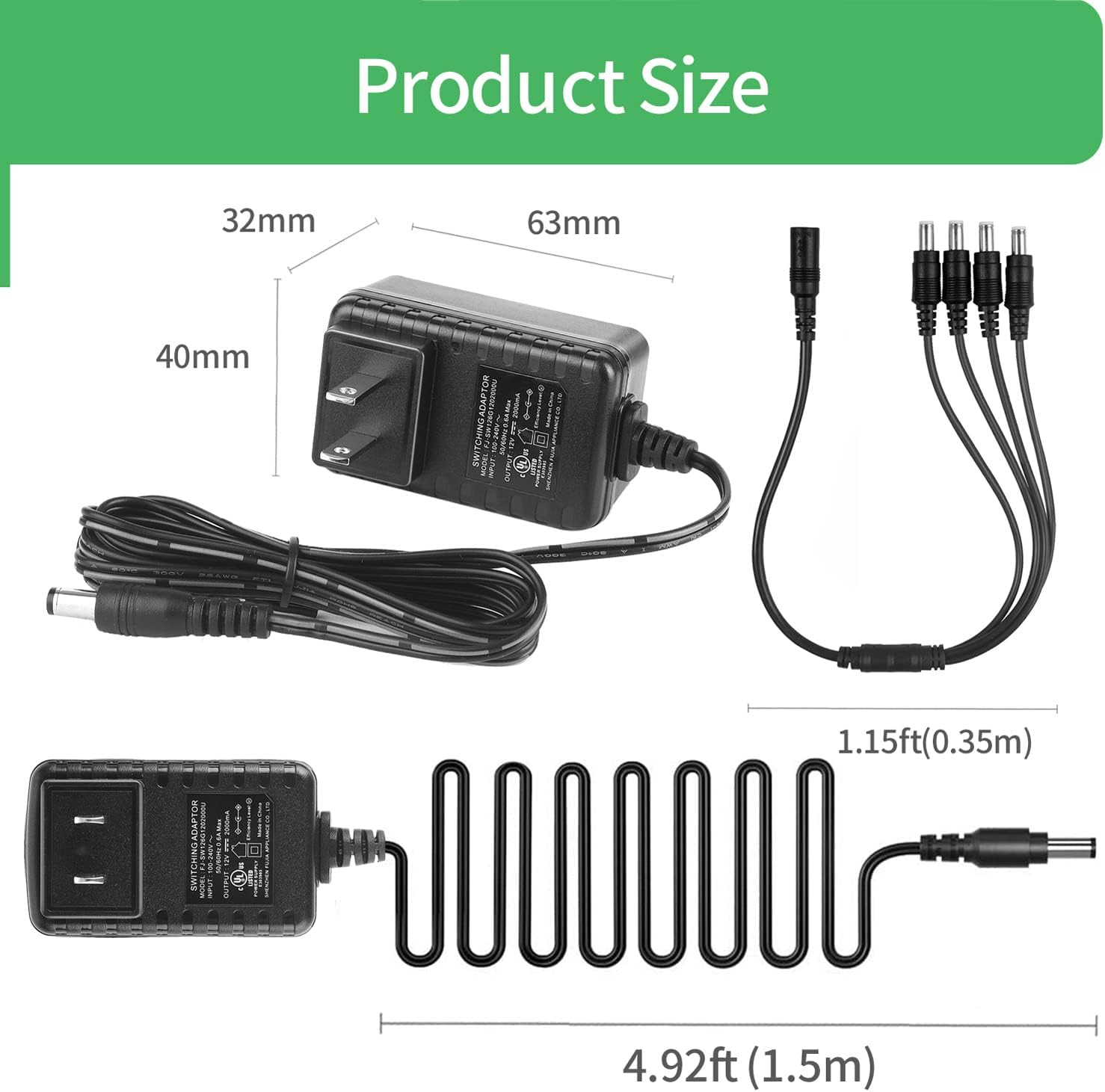
Image 8.1: The product holds multiple safety and compliance certifications, including UL, FCC, Efficiency Level VI, and RoHS.

Image 8.2: Internal design incorporates multiple protection mechanisms such as over charge, over load, over current, over voltage, temperature, and short circuit protection.
Important Safety Precautions:
- Do not expose the adapter to water or moisture.
- Do not disassemble or modify the adapter.
- Use only with devices that match the specified voltage and current requirements.
- Keep out of reach of children.
9. Warranty and Support
The Security-01 power supply adapter comes with a comprehensive warranty and support:
- 30 Days Return: Return without reason within 30 days of purchase.
- 48 Months Exchange: Product exchange available for 48 months from the date of purchase for manufacturing defects.
- Lifetime Tech Support: Technical assistance is available for the lifetime of the product.
For technical support or warranty claims, please contact Security-01 customer service through the retailer's platform or the official brand website.