
1. Introduction and Overview
The Crown CT44032 is a digital laser distance meter designed for accurate and efficient measurement of distances up to 40 meters. This device is ideal for various applications in construction, interior design, and DIY projects, providing quick and reliable measurements. Its compact design and user-friendly interface make it a valuable tool for professionals and enthusiasts alike.
2. Safety Information
Please read and understand all safety instructions before operating the device. Failure to follow these instructions may result in laser radiation exposure, electric shock, fire, or serious injury.
- Laser Radiation: This device uses a Class 2 laser (650 nm). Do not stare directly into the laser beam. Avoid pointing the laser at people or animals. Direct eye exposure to the laser beam may cause eye injury.
- General Use: Do not modify or disassemble the device. Repairs should only be performed by authorized service personnel. Keep the device out of reach of children.
- Environment: Do not operate the device in explosive atmospheres, such as in the presence of flammable liquids, gases, or dust. Avoid exposing the device to extreme temperatures, humidity, or direct sunlight.
- Batteries: Use only the specified battery type (2 x 1.5V AAA). Ensure correct polarity when inserting batteries. Do not mix old and new batteries or different types of batteries. Remove batteries if the device is not used for extended periods.
3. Package Contents
Upon unpacking, please verify that all the following items are included in your package:
- Crown CT44032 Digital Laser Distance Meter
- Owner's Manual (this document)
- 2 x 1.5V AAA Batteries
- Hand Strap
4. Product Features and Components
The Crown CT44032 features a robust and ergonomic design for comfortable and reliable use. Familiarize yourself with the main components:
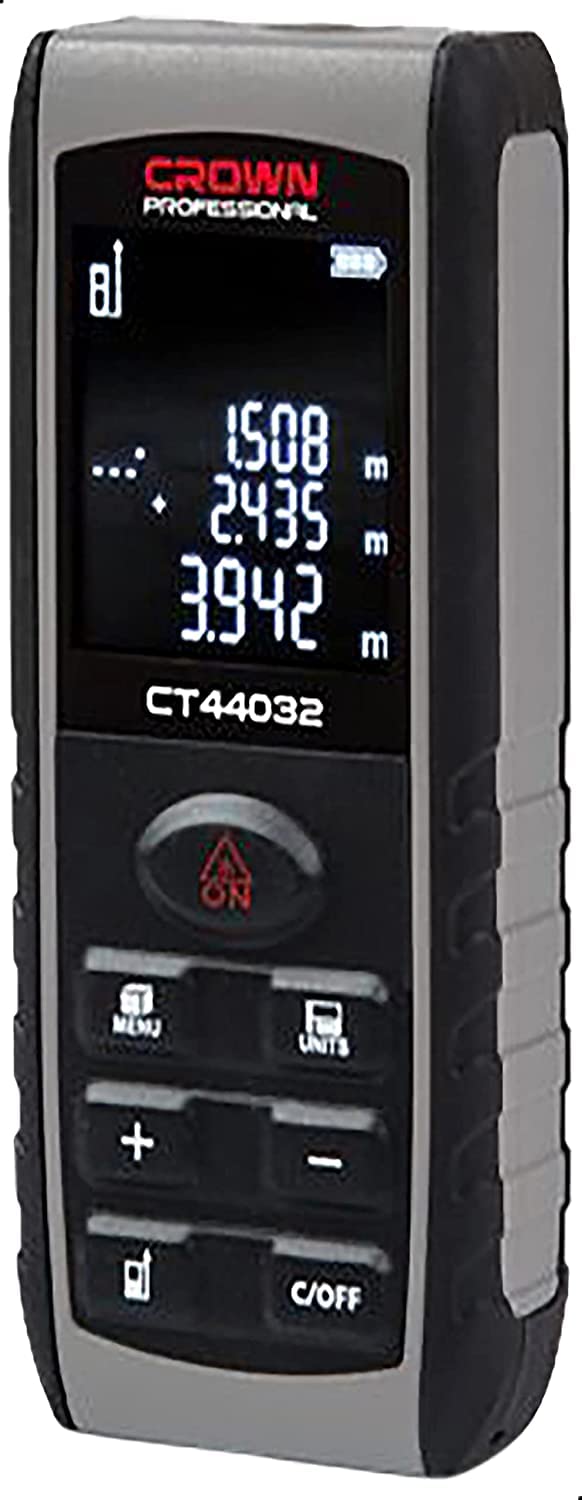


The device features a clear digital display for measurement readings, an intuitive button layout for various functions, and a durable casing. The laser emitter and receiver are located at the top of the device.
5. Setup
Before first use, follow these steps to set up your laser distance meter:
- Battery Installation: Locate the battery compartment cover on the back of the device. Slide or open the cover. Insert two 1.5V AAA batteries, ensuring that the positive (+) and negative (-) terminals match the indicators inside the compartment. Close the cover securely.
- Attaching Hand Strap: If desired, thread the provided hand strap through the small loop located on the side or bottom of the device. This helps prevent accidental drops during use.
6. Operating Instructions
This section details the basic operation of your Crown CT44032.
- Power On/Off: Press the 'ON' button to power on the device. The display will illuminate. To power off, press and hold the 'C/OFF' button for a few seconds. The device will also automatically power off after a period of inactivity to save battery.
- Single Distance Measurement:
- Press the 'ON' button once to activate the laser pointer. A red laser dot will appear.
- Aim the laser dot at your desired target point.
- Press the 'ON' button again to take the measurement. The measured distance will be displayed on the screen.
- Continuous Measurement:
- From standby mode, press and hold the 'ON' button to activate continuous measurement. The device will continuously measure and update the distance as you move it.
- The display will show real-time distance readings, often including minimum and maximum values during the continuous scan.
- Press the 'ON' button again to stop continuous measurement and hold the last reading.
- Changing Measurement Units: Press the 'UNITS' button to cycle through the available measurement units (e.g., meters (m), feet (ft), inches (in)). The selected unit will be indicated on the display.
- Adding/Subtracting Measurements: Use the '+' and '-' buttons to perform addition or subtraction of measurements. Follow the on-screen prompts to combine or differentiate measurements.
Product Demonstration Video
This video demonstrates the basic operation and features of the Crown CT44032 Digital Laser Distance Meter, including powering on, taking measurements, and highlighting its compact size and 40-meter range.
7. Maintenance
Proper maintenance ensures the longevity and accuracy of your device.
- Cleaning: Use a soft, dry, or slightly damp cloth to clean the device's exterior. Do not use abrasive cleaners, solvents, or immerse the device in water. Keep the laser emission and reception lenses clean and free of dust or smudges for accurate measurements.
- Battery Care: Always remove the batteries if the device will not be used for an extended period (e.g., several weeks or months) to prevent potential battery leakage and damage. Replace batteries promptly when the low battery indicator appears on the display.
- Storage: Store the laser distance meter in a cool, dry place, away from direct sunlight, extreme temperatures, and high humidity. Use the original packaging or a protective case if available.
8. Troubleshooting
If you encounter issues with your device, refer to the following common problems and solutions:
| Problem | Possible Cause | Solution |
|---|---|---|
| Device does not power on. | Depleted or incorrectly inserted batteries. | Check battery polarity and replace with fresh AAA batteries. |
| Inaccurate measurements. | Dirty laser lens, unsuitable target surface, or strong light interference. | Clean the laser lens. Ensure the target surface is solid and reflective. Avoid measuring in direct sunlight or very bright conditions. |
| Laser beam not visible. | Device not powered on, or operating in very bright conditions. | Ensure the device is powered on. The laser beam may be less visible in bright environments; try shading the target area. |
| Error message on display. | Measurement out of range, or internal error. | Ensure the target is within the 0.05-40m range. Power off and restart the device. If the error persists, contact support. |
9. Specifications
Technical specifications for the Crown CT44032 Digital Laser Distance Meter:
- Measuring Range: 0.05 - 40 meters
- Measurement Accuracy: ±2 mm
- Single Measurement Time: 0.25 seconds
- Laser Type: Class 2, 650 nm
- Operating Temperature Range: 0°C to +40°C
- Storage Temperature Range: -20°C to +65°C
- Battery Type: 2 x 1.5V AAA (Alkaline recommended)
- Battery Life (Individual Measurements): >5000 measurements
- Battery Life (Continuous Measurements): >90 minutes
- Weight: 0.107 kg
- Product Dimensions (L x W x H): 17.6 x 13.4 x 4.2 cm (approx.)
- Water Resistance: IP54 (Dust protected and splash proof)
- Model Number: CT44032
- Manufacturer: Crown
10. Warranty and Support
For detailed warranty information, terms, and conditions, please refer to the warranty card or documentation included with your purchase. If you require technical assistance, have questions about product operation, or need to report a defect, please contact your retailer or the official Crown customer service department. Keep your purchase receipt as proof of purchase for warranty claims.