
1. Product Overview
The Aexit PM-1210 is an F-type female connector designed as a C-Band single cable solution. It operates with an LO frequency of 5150/5750 MHz, with a tolerance of ±2 MHz across a temperature range of -40°C to +70°C. This device is engineered for reliable signal reception and conversion in satellite communication systems.
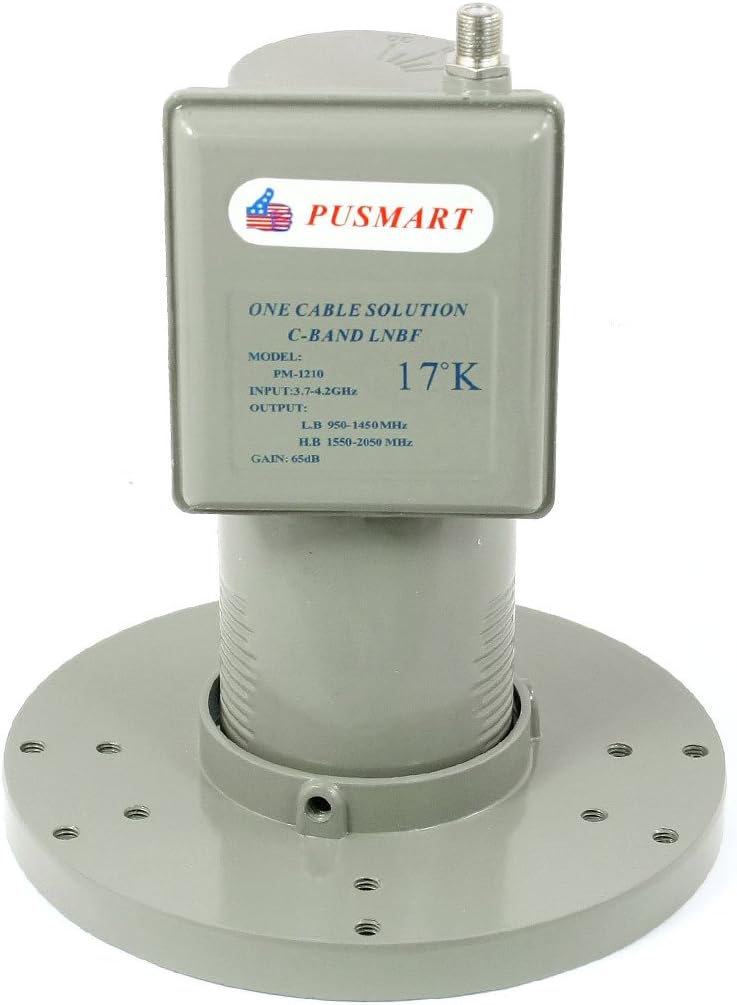
Figure 1: Aexit PM-1210 C-Band Single Cable Solution LNB. This image displays the primary unit, highlighting its robust construction and key operational labels.
2. Key Features
- Product Name: C-Band One Cable Solution LNB.
- Model: PM-1210.
- Input Frequency: 3.7-4.2 GHz.
- L.O. Frequency: 5150/5750 MHz with ±2 MHz stability (-40°C to +70°C).
- Lo Leakage Input Port: -45 dBm.
- Output Frequency: 950 to 1450 MHz, 1550 to 2050 MHz.
- Conversion Gain: 65 dB (minimum).
- Gain Flatness: ±1 dB / 36 MHz.
- Power Supply Voltage: AC 13 ~ 24 V / 150 mA (maximum).
- Output Connector: F-type Female Connector.
- Noise Level: 17 K.
- Dimensions: 200 x 75 x 80 mm / 7.8'' x 3'' x 3.14'' (L*W*H).
- Net Weight: 355g.
- Package Contents: 1 x C-Band One Cable Solution LNB, 7 x Mounting Screws.
3. Technical Specifications
| Attribute | Value |
|---|---|
| Manufacturer | Aexit |
| Part Number | 9d84c15a-2a46-6dd45495ed7236 |
| Product Dimensions | 7.5 x 8 x 20 cm |
| Model Number | PM-1210 |
| Size | Large |
| Color | Multiple colors |
| Style | Manual |
| Material | Other |
| Power Source Type | Manual |
| Installation Method | Click |
| Number of Items in Package | 1 |
| Temperature Range | -40 to +70 Degrees Celsius |
| Number of Holes | 1000 |
| Tip Description | Pilot Point |
| Connection Accessory Type | Quick Connect |
| Special Features | Portable, Quiet |
| ASIN | B0838KLSYR |
| First Available Date | December 30, 2019 |
| Cable Type | USB |
4. Setup and Installation
The Aexit PM-1210 C-Band LNB is designed for straightforward installation. Proper installation is crucial for optimal performance.
4.1 Unpacking
Carefully remove all components from the packaging. Verify that all items listed in the 'Package Contents' (Section 2) are present and undamaged. The package should include the C-Band LNB unit and 7 mounting screws.

Figure 2: Aexit PM-1210 C-Band LNB components. This image illustrates the main LNB body and its separate circular mounting flange, ready for assembly.
4.2 Mounting
- Attach the circular mounting flange to the LNB unit if it is separate, ensuring a secure fit.
- Position the LNB assembly onto the satellite dish feed horn.
- Secure the LNB using the provided 7 mounting screws. Ensure the LNB is firmly attached to prevent movement due to wind or other environmental factors.
- Connect the F-type female connector of the LNB to your satellite receiver or distribution system using a compatible coaxial cable. Ensure the connection is tight to prevent signal loss.
For optimal signal reception, precise alignment of the satellite dish and LNB is required. Consult your satellite dish installation guide for specific alignment procedures.
5. Operating Instructions
The Aexit PM-1210 LNB functions as a critical component in a satellite reception system, converting high-frequency satellite signals to lower intermediate frequencies for processing by a satellite receiver.
5.1 Powering On
The LNB receives its power supply (AC 13-24V) directly from the connected satellite receiver or multi-switch via the coaxial cable. Ensure your receiver is powered on and configured to supply the necessary voltage to the LNB.
5.2 Signal Reception
Once powered, the LNB will begin receiving C-Band satellite signals (3.7-4.2 GHz). It then down-converts these signals to the specified output frequencies (950-1450 MHz and 1550-2050 MHz), which are suitable for transmission through the coaxial cable to your receiver.
5.3 Channel Tuning
Channel tuning and selection are performed on your satellite receiver, not on the LNB itself. Refer to your satellite receiver's user manual for instructions on scanning for channels and managing your satellite programming.
6. Maintenance
The Aexit PM-1210 LNB is designed for durability and requires minimal maintenance. However, periodic checks can help ensure long-term performance.
- Cleaning: Periodically inspect the LNB for any accumulation of dirt, dust, or debris. Gently clean the exterior with a soft, damp cloth. Do not use harsh chemicals or abrasive materials.
- Connections: Ensure all cable connections, especially the F-type connector, remain tight and free from corrosion. Loose or corroded connections can lead to signal degradation.
- Physical Damage: Regularly check for any signs of physical damage to the LNB casing or mounting hardware. Address any damage promptly to prevent further issues.
- Environmental Factors: While designed for outdoor use, extreme weather conditions (e.g., heavy snow, ice, or strong winds) can affect performance. Ensure the LNB is clear of obstructions and ice buildup.
Always disconnect power to the satellite receiver before performing any maintenance on the LNB or associated cabling.
7. Troubleshooting
If you experience issues with your Aexit PM-1210 LNB, consider the following common troubleshooting steps:
- No Signal / Weak Signal:
- Check all cable connections from the LNB to the receiver. Ensure they are secure and free from damage or corrosion.
- Verify that the satellite dish is correctly aligned to the target satellite. Even slight misalignment can cause significant signal loss.
- Ensure the satellite receiver is providing the correct power (AC 13-24V) to the LNB. Check receiver settings.
- Inspect the LNB for any physical damage or obstructions (e.g., tree branches, snow, ice).
- Intermittent Signal:
- This can often be caused by loose connections. Re-tighten all F-type connectors.
- Check for kinks or damage in the coaxial cable.
- Environmental factors like heavy rain or strong winds can temporarily affect signal quality.
- Picture Freezing / Pixelation:
- This indicates a weak or unstable signal. Follow the steps for "No Signal / Weak Signal".
- Ensure your receiver's software is up to date.
If problems persist after attempting these steps, it may indicate a faulty LNB, cable, or receiver. Consider consulting a professional satellite technician.
8. Warranty and Support
For information regarding warranty coverage and technical support for your Aexit PM-1210 C-Band Single Cable Solution, please refer to the documentation provided at the time of purchase or contact your retailer. Specific warranty terms may vary by region and seller.