
Introduction
Thank you for choosing the YITAHOME Gaming Chair. This manual provides detailed instructions for assembly, operation, maintenance, and troubleshooting to ensure you get the most out of your new gaming chair. Please read this manual thoroughly before assembly and use.

Figure 1: YITAHOME Gaming Chair (Blue/Black variant shown).
Setup and Assembly
Follow these steps carefully to assemble your YITAHOME Gaming Chair. It is recommended to have a second person assist with assembly for easier handling.
1. Unpacking and Part Identification
Carefully remove all components from the packaging. Verify that all parts are present according to the packing list. Refer to the images below for part identification.

Figure 2: Blue/Black YITAHOME Gaming Chair.
2. Assembly Video Guide
For a visual guide, please watch the official assembly video provided by YITAHOME. This video demonstrates each step of the assembly process.
Video 1: YITAHOME Gaming Chair Model FTGFGC-0006 Assembly Guide. This video demonstrates the step-by-step assembly of the gaming chair, including attaching the base, armrests, and backrest.
3. Step-by-Step Assembly Instructions
- Assemble the Chair Base: Insert the five casters into the holes at the end of each leg of the chair base. Ensure they are securely clicked into place.
- Install the Gas Lift: Place the gas lift cylinder into the center hole of the assembled chair base. Cover it with the telescopic plastic cover.
- Attach the Tilt Mechanism and Armrests to the Seat:
- Align the tilt mechanism with the pre-drilled holes on the underside of the seat cushion. Ensure the "FRONT" arrow on the mechanism points towards the front of the seat. Secure with screws using the provided Allen wrench.
- Attach the armrests to the sides of the seat cushion using the designated screws. Ensure they are firmly tightened.
- Connect the Seat to the Base: Carefully place the assembled seat (with tilt mechanism and armrests) onto the gas lift cylinder. Press down firmly to secure.
- Attach the Backrest to the Seat: Align the backrest with the metal brackets on the sides of the seat. Secure with screws. Ensure both sides are evenly tightened.
- Install Side Covers: Place the plastic side covers over the metal brackets connecting the backrest and seat. Secure them with the small screws.
- Attach Lumbar and Headrest Pillows: Secure the lumbar support pillow and headrest pillow using their elastic straps. Adjust their positions for optimal comfort.
Operation and Adjustments
Your YITAHOME Gaming Chair offers several adjustable features to enhance your comfort and support during long gaming or work sessions.
1. Height Adjustment
To adjust the chair's height, locate the lever on the right side beneath the seat. Pull the lever upwards while applying or releasing body weight to move the chair up or down. Release the lever to lock the height.

Figure 3: Height adjustment lever. Pull up to adjust height.
Video 2: Demonstrates the adjustable height feature of the YITAHOME Gaming Chair, showing how to raise and lower the seat.
2. Recline Function
To recline the backrest, pull the lever on the left side of the chair upwards and lean back to your desired angle (90°-155°). Release the lever to lock the backrest in position. To return to an upright position, pull the lever and lean forward.
Video 3: Shows the recline function of the YITAHOME Gaming Chair, demonstrating the range of motion from 90 to 155 degrees.
3. Tilt Tension Adjustment
The tilt tension knob is located directly under the front of the seat. Turn the knob clockwise to increase tension (making it harder to recline) or counter-clockwise to decrease tension (making it easier to recline).
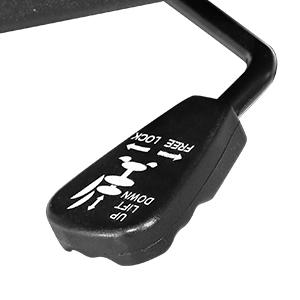
Figure 4: Tilt tension adjustment knob. Turn to adjust rocking resistance.
4. Armrest Adjustment
The armrests can be adjusted vertically. Press the button on the side of each armrest and move it up or down to your preferred height. Release the button to lock the armrest.

Figure 5: Armrest height adjustment mechanism.
Maintenance and Care
Proper maintenance will extend the life and appearance of your YITAHOME Gaming Chair.
- Cleaning: For general cleaning, wipe the chair with a soft, damp cloth. For tougher stains on the PU leather, use a mild soap solution and wipe dry immediately. Avoid harsh chemicals or abrasive cleaners.
- Hardware Check: Periodically check all screws and bolts to ensure they are tight. Re-tighten if necessary to prevent wobbling or instability.
- Caster Care: Keep the casters clean from dust, hair, and debris to ensure smooth rolling. You may occasionally lubricate the caster stems with a silicone-based lubricant.
- Avoid Direct Sunlight: Prolonged exposure to direct sunlight can cause the PU leather to fade or crack. Position your chair away from direct sunlight when possible.
- Weight Limit: Do not exceed the maximum weight recommendation of 350 pounds to prevent damage to the chair and ensure user safety.
Troubleshooting
If you encounter any issues with your YITAHOME Gaming Chair, refer to the following common problems and solutions:
| Problem | Possible Cause | Solution |
|---|---|---|
| Chair wobbles or is unstable. | Loose screws or uneven assembly. | Check and tighten all screws and bolts. Ensure the chair is assembled on a flat surface. |
| Chair does not adjust height. | Gas lift cylinder malfunction or lever not engaged. | Ensure the height adjustment lever is fully pulled. If the issue persists, the gas lift may need replacement. Contact customer support. |
| Backrest does not recline or lock. | Recline mechanism jammed or lever not engaged. | Ensure the recline lever is fully pulled and released. Check for any obstructions in the mechanism. |
| Casters do not roll smoothly. | Debris caught in casters or lack of lubrication. | Remove any hair or debris from the casters. Apply a small amount of silicone lubricant to the caster stems. |
| Armrests are loose. | Loose screws connecting armrests to seat. | Tighten the screws securing the armrests to the seat. |
If the problem persists after attempting these solutions, please contact YITAHOME Customer Support for further assistance.
Product Specifications
| Feature | Detail |
|---|---|
| Brand | YITAHOME |
| Model Name | FTGFGC-0006 |
| Color | Blue |
| Product Dimensions | 22.26"D x 20.87"W x 54.33"H |
| Maximum Weight Recommendation | 350 Pounds |
| Material | PU Leather, Foam |
| Back Style | Solid Back |
| Special Feature | Adjustable, Reclining (2 positions) |
| Recommended Uses | Office, Gaming |
| Furniture Base Movement | Swivel |
| Item Weight | 40.8 pounds |
| UPC | 644824815350, 840265213018 |

Figure 6: Detailed dimensions of the YITAHOME Gaming Chair.
Warranty and Support
YITAHOME is committed to providing high-quality products and excellent customer service. For any questions, concerns, or warranty claims, please contact our support team.
- Customer Service: Refer to your product packaging or the YITAHOME official website for the most current contact information.
- Warranty Information: Specific warranty details may vary. Please retain your proof of purchase for any warranty claims.

Figure 7: YITAHOME Customer Support.


