1. Introduction
Thank you for choosing the XSPLENDOR 3400mAh Replacement Battery. This manual provides essential information for the safe and effective use of your new battery. Please read these instructions carefully before installation and operation.
This battery is designed as a replacement for the following devices:
- Garmin Pro 550 Handheld
- Garmin Pro 70 Dog Transmitter
- Garmin Pro 70 Handheld
- Tri-Tronics Pro 550 Dog Training Collar
- Tri-Tronics Pro 70 Dog Training Collar
Important Safety Information
ATTENTION: New battery packs must be fully charged before use. To reduce the risk of fire or burns, read all instructions in the operating guide of your device.
Do not attempt to disassemble, open, or service the battery pack. Replace only with the battery pack designated for your device. Warranty is void if the label is removed.
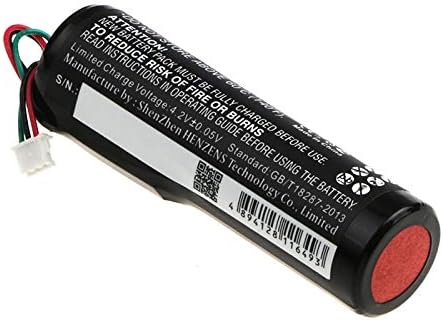
Image 1.1: Side view of the XSPLENDOR replacement battery, showing important safety warnings and specifications printed on its label.
2. Setup and Installation
Before installing the new battery, ensure your device is powered off and disconnected from any charging source. Refer to your device's original user manual for specific battery compartment access instructions.
Installation Steps:
- Carefully open the battery compartment of your Garmin or Tri-Tronics device.
- Disconnect and remove the old battery. Dispose of the old battery responsibly according to local regulations.
- Align the connector of the new XSPLENDOR battery with the port inside the device's battery compartment.
- Gently push the connector into place until it is securely seated. Do not force the connection.
- Carefully place the battery into the compartment, ensuring wires are not pinched.
- Close the battery compartment cover securely.

Image 2.1: Close-up of the battery connector, which must be securely attached to the device's port.
3. Operating Instructions
Initial Charge:
After installation, fully charge the battery before its first use. Connect your device to its original charger and allow it to charge until the device's indicator shows a full charge. This initial charge helps optimize battery performance and longevity.
Regular Charging:
Use only the charger supplied with your Garmin or Tri-Tronics device. The battery's limited charge voltage is 4.2V ± 0.05V. Avoid using third-party chargers unless explicitly approved by the device manufacturer.
Usage:
Operate your device as normal. The 3400mAh capacity provides extended usage time compared to lower capacity batteries. Monitor your device's battery indicator to determine when recharging is necessary.
4. Maintenance and Storage
Battery Care:
- Avoid exposing the battery to extreme temperatures (above 60°C / 140°F or below 0°C / 32°F).
- Do not puncture, drop, or subject the battery to strong impacts.
- Keep the battery dry and away from moisture.
- Clean battery contacts with a dry, clean cloth if necessary.
Storage:
If storing the battery for an extended period, charge it to approximately 50% capacity. Store in a cool, dry place away from direct sunlight and extreme temperatures. Recharge every 3-6 months to prevent deep discharge.
5. Troubleshooting
Common Issues and Solutions:
- Device not powering on: Ensure the battery is correctly installed and fully charged. Check the device's power button.
- Battery not charging: Verify the charger is properly connected to both the device and a power source. Ensure the charger is functional. If the issue persists, the battery or charger may need replacement.
- Shortened battery life: Over time, all rechargeable batteries experience degradation. Ensure the battery is fully charged before use. Reduce device features that consume significant power if extended life is needed.
- Battery overheating: Immediately disconnect the device from the charger and power it off. Allow the battery to cool down. If overheating persists, discontinue use and contact support.
6. Specifications
| Attribute | Detail |
|---|---|
| Model Number | CS-GMP700HL |
| Part Numbers | GARMIN 010-11864-10, 361-00023-13 |
| Battery Type | Lithium-ion (Li-ion) |
| Voltage | 3.7 VDC |
| Capacity | 3400 mAh / 12.58 Wh |
| Limited Charge Voltage | 4.2V ± 0.05V |
| Dimensions | 66.40 x 20.36 x 18.45 mm |
| Weight | 60.0 g |
| Certifications | ISO 9001, RoHS, CE |

Image 6.1: The XSPLENDOR replacement battery with its key specifications and certifications visible on the label.
7. Warranty and Support
Warranty Information:
This XSPLENDOR replacement battery comes with a 1-year warranty from the date of purchase. The warranty covers manufacturing defects. Please retain your proof of purchase for warranty claims.
The warranty is void if the battery label is removed, or if the battery has been disassembled, opened, or serviced by unauthorized personnel.
Customer Support:
For technical assistance, troubleshooting, or warranty inquiries, please contact your retailer or the XSPLENDOR customer support channel where you purchased the product. Please have your product model number (CS-GMP700HL) and proof of purchase ready.