
NWOUIIAY HU-XI-201
NWOUIIAY HU-XI-201 6A/12V Intelligent Car Battery Charger User Manual
Model: HU-XI-201
1. Introduction
This manual provides essential instructions for the safe and effective operation of your NWOUIIAY HU-XI-201 6A/12V Intelligent Car Battery Charger. Please read this manual thoroughly before first use and retain it for future reference. This charger is designed for 12V lead-acid batteries (AGM, GEL, MF, SLA, VRLA) ranging from 4AH to 100AH, suitable for cars, motorcycles, lawnmowers, and boats.
2. Safety Instructions
- Read all instructions: Before using the charger, read all instructions and cautionary markings on the charger, the battery, and the product using the battery.
- Indoor use only: This product is designed for indoor use. Do not expose to rain or moisture.
- Battery type: Do not charge lithium batteries. This charger is exclusively for 12V lead-acid batteries (AGM, GEL, MF, SLA, VRLA).
- Ventilation: Ensure adequate ventilation during charging. Batteries can produce explosive gases.
- Connection polarity: Always connect the red (+) clip to the positive battery terminal and the black (-) clip to the negative battery terminal. Reverse connection protection is built-in, but correct connection is crucial.
- Disconnecting: Always disconnect the AC power before disconnecting the battery clamps.
- Children: Keep out of reach of children.
- Damaged charger: Do not operate the charger if it has received a sharp blow, been dropped, or otherwise damaged.
- Repairs: Do not attempt to disassemble or repair the charger yourself. Contact qualified service personnel.
3. Package Contents
Upon opening the package, please verify that all items are present and undamaged:
- NWOUIIAY HU-XI-201 Battery Charger Unit
- User Manual (this document)

Figure 3.1: Front view of the NWOUIIAY HU-XI-201 battery charger packaging, showing the brand logo and key features.

Figure 3.2: Side view of the NWOUIIAY HU-XI-201 battery charger packaging, highlighting important usage considerations.
4. Product Features
The NWOUIIAY HU-XI-201 Intelligent Car Battery Charger offers several advanced features for efficient and safe battery maintenance:
- Intelligent Digital Display: Automatically shows carousel data including temperature, current, voltage, and battery capacity.
- Automatic Charging: No manual adjustment needed; the charger automatically begins charging when connected to a battery and power supply.
- Multiple Protections: Includes over-voltage, reverse connection, short circuit, over-current, over-heating, and low-voltage protection for enhanced safety.
- Battery Repair Function: Diagnoses and repairs battery problems to extend battery life.
- Voltage and Power Detection: Displays remaining battery voltage when connected without AC power, allowing you to monitor battery status.
- Automatic Shutdown: The charger automatically stops charging once the battery is fully charged.
- Winter and Summer Mode: Automatically detects ambient temperature and adjusts charging voltage accordingly for optimal performance in varying conditions.
- Cooling Fan: Integrated fan for better heat dissipation and extended service life.

Figure 4.1: Illustration of the charger's intelligent features, including LCD display, intelligent charging, battery detection, and automatic stop.

Figure 4.2: Visual representation of the multiple safety protections integrated into the charger, such as over-voltage, reverse connection, short circuit, over-current, over-temperature, and low-voltage protection.

Figure 4.3: Image showing the cooling fan on the side of the charger, designed for efficient heat dissipation and extended product lifespan.
5. Setup
Follow these steps to set up your NWOUIIAY HU-XI-201 battery charger:
- Inspect the Charger: Before each use, visually inspect the charger and its cables for any signs of damage. Do not use if damaged.
- Prepare the Battery: Ensure the battery terminals are clean and free of corrosion. If necessary, clean them with a wire brush.
- Connect to Battery:
- Connect the red (+) positive clamp to the positive battery terminal.
- Connect the black (-) negative clamp to the negative battery terminal.
Note: The charger will display the current battery voltage when connected correctly, even without AC power.
- Connect to Power: Plug the charger's AC power cord into a standard wall outlet (110-240V AC). The charger will automatically detect the battery type and begin the charging process.

Figure 5.1: The NWOUIIAY HU-XI-201 charger with its red positive and black negative battery clamps, and the AC power plug, ready for connection.

Figure 5.2: The NWOUIIAY HU-XI-201 charger connected to a car battery, showing the LCD display indicating battery status.
6. Operating Instructions
The NWOUIIAY HU-XI-201 charger operates largely automatically. Here’s how to interpret its functions:
6.1. Automatic Charging
Once connected to the battery and AC power, the charger will automatically detect the battery's state and begin charging. The LCD screen will cycle through various information:
- Temperature: Displays the ambient temperature, which influences the automatic selection of winter or summer charging mode.
- Current: Shows the charging current in Amperes (A).
- Voltage: Displays the battery voltage in Volts (V).
- Electric Quantity: Indicates the battery's charge level as a percentage.

Figure 6.1: Close-up of the charger's LCD screen displaying temperature, current, voltage, and electric quantity during operation.
6.2. Winter and Summer Mode
The charger automatically detects the outdoor temperature and switches between winter and summer charging modes. This ensures optimal charging voltage is applied based on environmental conditions, without requiring manual adjustment.
6.3. Repair Function
The "Repair" button on the charger initiates a pulse repair process designed to diagnose and potentially restore sulfated or deeply discharged batteries. This function can help extend the lifespan of your battery. Press the "Repair" button once to activate this mode. The LCD will indicate when the repair process is active.
6.4. Full Charge Indication
When the battery is fully charged, the LCD display will show "FUL" and the charger will automatically stop charging to prevent overcharging. Disconnect the AC power first, then the battery clamps.
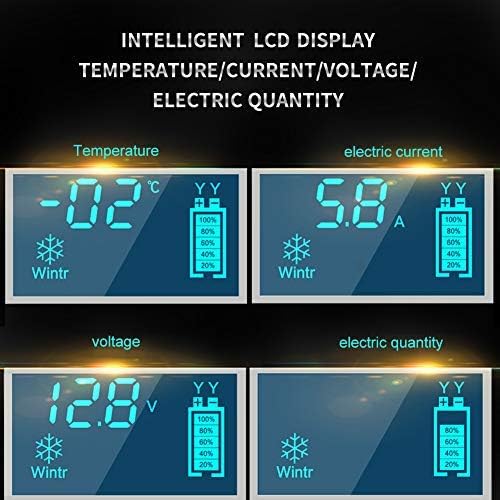
Figure 6.2: The charger's LCD screen indicating "FUL" when the battery has reached a full charge, signifying automatic shutdown.
7. Maintenance
Proper maintenance ensures the longevity and optimal performance of your charger:
- Cleaning: Wipe the charger's exterior with a soft, dry cloth. Do not use harsh chemicals or abrasive cleaners.
- Storage: Store the charger in a cool, dry place when not in use. Keep it away from direct sunlight, moisture, and extreme temperatures.
- Cable Care: Regularly check the charging cables and clamps for any signs of wear, cuts, or damage. Replace if necessary.
- Ventilation: Ensure the cooling fan vents are not obstructed during operation to allow for proper heat dissipation.
8. Troubleshooting
If you encounter issues with your NWOUIIAY HU-XI-201 charger, refer to the following common problems and solutions:
| Problem | Possible Cause | Solution |
|---|---|---|
| Charger does not turn on. | No AC power; faulty outlet; damaged power cord. | Check power outlet; ensure power cord is securely plugged in; try a different outlet. |
| Charger displays "Fault" or error code. | Reverse polarity connection; short circuit; battery fault; over-temperature. | Verify correct clamp connection (+ to +, - to -); check for short circuits; allow charger to cool down if hot; battery may be severely damaged. |
| Battery not charging or charging slowly. | Poor connection; battery too deeply discharged; battery capacity too large for charger; battery fault. | Ensure clamps are securely connected; try the "Repair" function; verify battery capacity is within 4AH-100AH range; battery may be at end of life. |
| Charger gets hot during operation. | Normal operation; obstructed ventilation. | Some heat is normal. Ensure cooling fan vents are clear and not obstructed. If excessively hot, disconnect and allow to cool. |
If the problem persists after attempting these solutions, please contact customer support.
9. Specifications
| Feature | Detail |
|---|---|
| Brand | NWOUIIAY |
| Model | HU-XI-201 |
| Input Voltage | 12 Volts (AC input not specified, assuming standard 110-240V based on typical chargers) |
| Output Voltage | 12 Volts |
| Current Rating | 6 Amps |
| Compatible Battery Types | 12V Lead-Acid (AGM, GEL, MF, SLA, VRLA) |
| Battery Capacity Range | 4AH - 100AH |
| Product Dimensions | 22 x 6 x 11 cm (8.7 x 2.4 x 4.3 inches) |
| Item Weight | 0.48 Kilograms (1.06 lbs) |
| UPC | 737798449291 |

Figure 9.1: Diagram illustrating the physical dimensions of the NWOUIIAY HU-XI-201 battery charger.
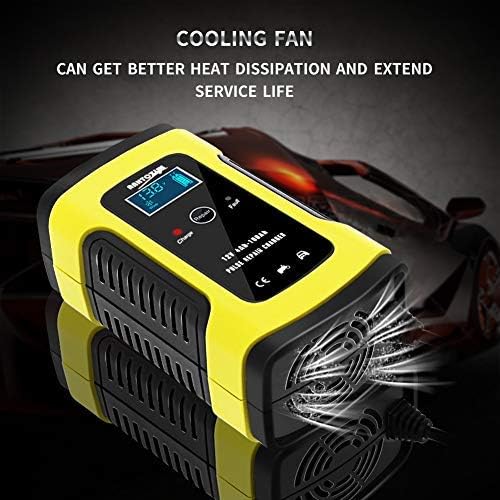
Figure 9.2: Visual guide to the various vehicle types compatible with the NWOUIIAY HU-XI-201 charger, including SUVs, motorcycles, mowers, personal watercraft, vans, and ATVs.
10. Warranty Information
NWOUIIAY products are manufactured to high-quality standards. For specific warranty details, please refer to the warranty card included with your purchase or contact NWOUIIAY customer support. Typically, a standard manufacturer's warranty covers defects in materials and workmanship under normal use.
11. Customer Support
If you have any questions, require technical assistance, or need to report an issue, please contact NWOUIIAY customer support through the retailer where you purchased the product or visit the official NWOUIIAY website for contact information.
Manufacturer: NWOUIIAY
Model: HU-XI-201
Ask a question about this manual
Ask about setup, troubleshooting, compatibility, parts, safety, or missing instructions. Manuals+ will review the question and use this page’s manual context to help answer it.