
1. Introduction and Overview
The Pioneer DMH-1500NEX is a mechless 7-inch digital media receiver designed for in-car entertainment and connectivity. This unit provides a comprehensive multimedia experience with its large LCD touchscreen, offering features such as Bluetooth hands-free calling, audio streaming, and smartphone integration. It is engineered to fit double-DIN dash openings and enhance your vehicle's audio and connectivity capabilities.

Figure 1: Front view of the Pioneer DMH-1500NEX displaying the Apple CarPlay interface. This image shows the 7-inch LCD touchscreen with various application icons, including Phone, Music, Maps, and Messages, indicating its smartphone integration capabilities.
2. Key Features
- Digital Multimedia Receiver: Features an AM/FM tuner and a 7-inch LCD touchscreen for comprehensive media control.
- Bluetooth Connectivity: Enables hands-free calling and audio streaming for safe and convenient communication and entertainment.
- Customizable Interface: Offers a customizable touchscreen interface with multi-color illumination to match your vehicle's interior.
- Smartphone Integration:
- Apple CarPlay and Android Auto compatible for seamless smartphone mirroring.
- WebLink compatible for additional app integration.
- Built-in iPhone control and playback/control of music files on compatible Android devices.
- Siri Hands Free and Google Assistant compatible for voice commands.
- Pandora and Spotify control directly from the unit.
- Advanced Audio/Video Features:
- Supports MP3, WMA, AAC, FLAC, and WAV music files, including lossless FLAC audio up to 192kHz/24-bit.
- 13-band graphic equalizer and time alignment for precise sound tuning.
- High- and low-pass filters for speaker optimization.
- Advanced Sound Retriever and Auto-EQ (requires optional mic) for enhanced audio quality.
- Expandability:
- Works with SiriusXM SXV300 tuner (supports Tune Mix, Traffic & Weather Now, Sports Flash).
- Compatible with AVIC-U280 navigation module.
- Inputs: rear USB port, rear-view camera input, 3.5mm and RCA audio/video input.
- Outputs: video output, 6-channel preamp outputs (4-volt front, rear, subwoofer).
- Vehicle Integration:
- Compatible with most factory steering wheel audio controls (adapter required).
- Built-in internal amplifier (14 watts RMS/50 peak x 4 channels).
- CTA-2006 compliant.
- Compatible with iDatalink Maestro for retaining factory features and displaying engine performance data.
3. Setup and Installation
The DMH-1500NEX is designed to fit standard double-DIN dash openings. Professional installation is recommended to ensure proper wiring and functionality.
3.1. Pre-Installation Checks
- Verify your vehicle's dash opening dimensions to ensure compatibility with the unit's square form factor. Some vehicles may require minor modifications or specific installation kits.
- Gather all necessary tools and accessories, including wiring harnesses, mounting brackets, and any required adapters for steering wheel controls (e.g., PAC conversion box) or vehicle-specific integration modules (e.g., iDatalink Maestro).
3.2. Wiring and Connections
Connect the main power harness, speaker wires, and ground wire according to your vehicle's wiring diagram and the unit's installation guide.
- USB Port: Utilize the rear USB port for connecting smartphones for Apple CarPlay/Android Auto or USB storage devices.
- Camera Input: Connect a rear-view camera to the dedicated input for enhanced safety.
- Audio/Video Inputs/Outputs: Use the 3.5mm and RCA inputs for external audio/video sources and RCA preamp outputs for connecting external amplifiers.
- Optional Modules: If using, connect the SiriusXM SXV300 tuner or AVIC-U280 navigation module as per their respective instructions.
4. Operating Instructions
4.1. Basic Operation
- Power On/Off: Press and hold the power button (usually located on the front panel) to turn the unit on or off.
- Volume Control: Adjust volume using the on-screen controls or steering wheel controls if integrated.
- Source Selection: Tap the "Source" icon on the touchscreen to switch between AM/FM radio, Bluetooth audio, USB, Apple CarPlay, Android Auto, and other connected inputs.
4.2. Bluetooth Pairing
- Ensure Bluetooth is enabled on your mobile device.
- On the DMH-1500NEX, navigate to the Bluetooth settings menu.
- Select "Pair New Device" or similar option.
- Search for "Pioneer DMH-1500NEX" on your mobile device and select it.
- Confirm the pairing code on both devices if prompted.
4.3. Smartphone Integration (Apple CarPlay / Android Auto)
Connect your compatible iPhone or Android smartphone to the rear USB port. The unit will automatically detect and launch Apple CarPlay or Android Auto, mirroring your phone's interface for navigation, music, messages, and more.
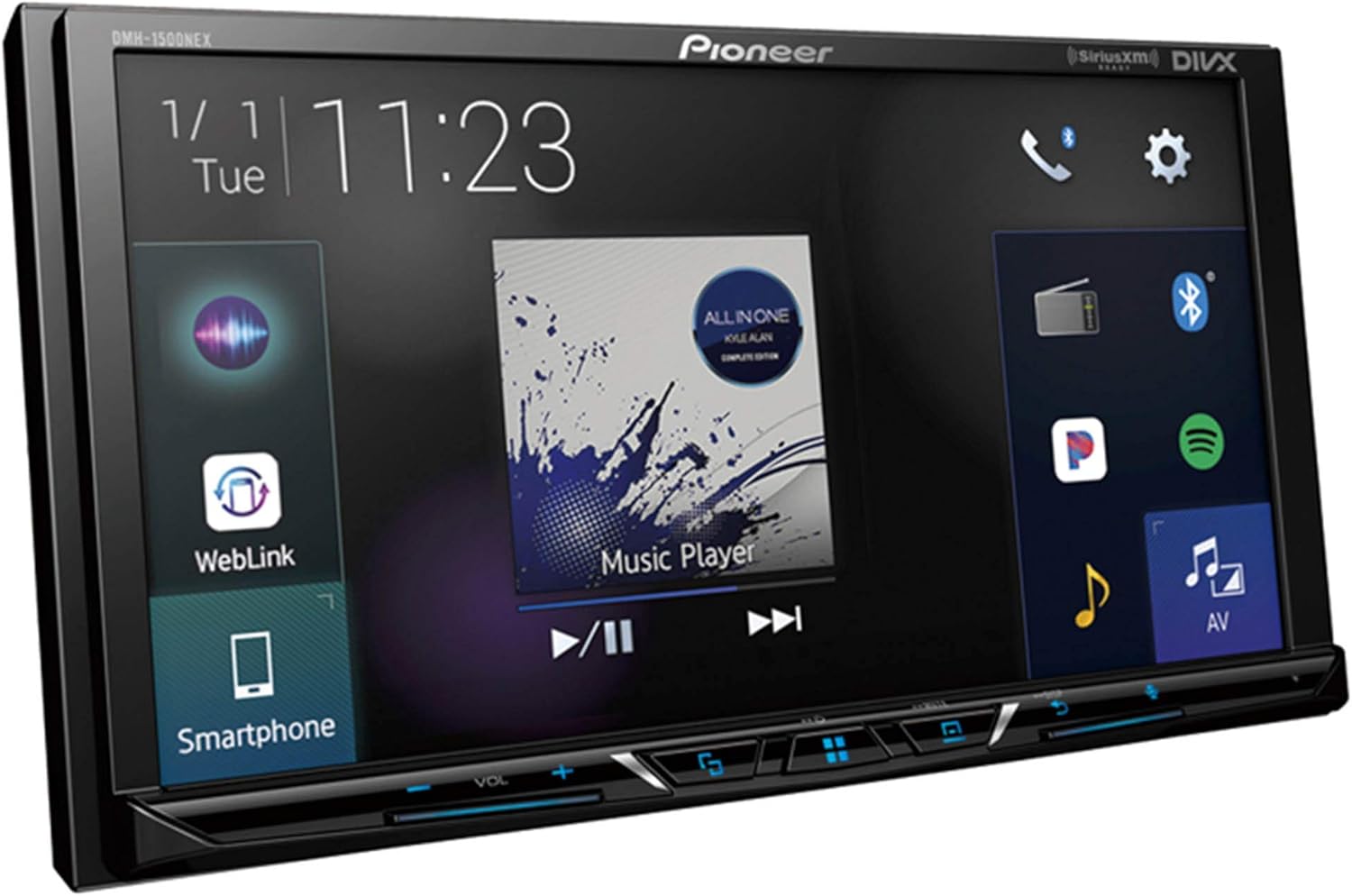
Figure 2: The DMH-1500NEX displaying a music playback screen, with options for WebLink and Smartphone connectivity visible on the left side of the interface. This illustrates the unit's multimedia capabilities and integration with mobile devices.
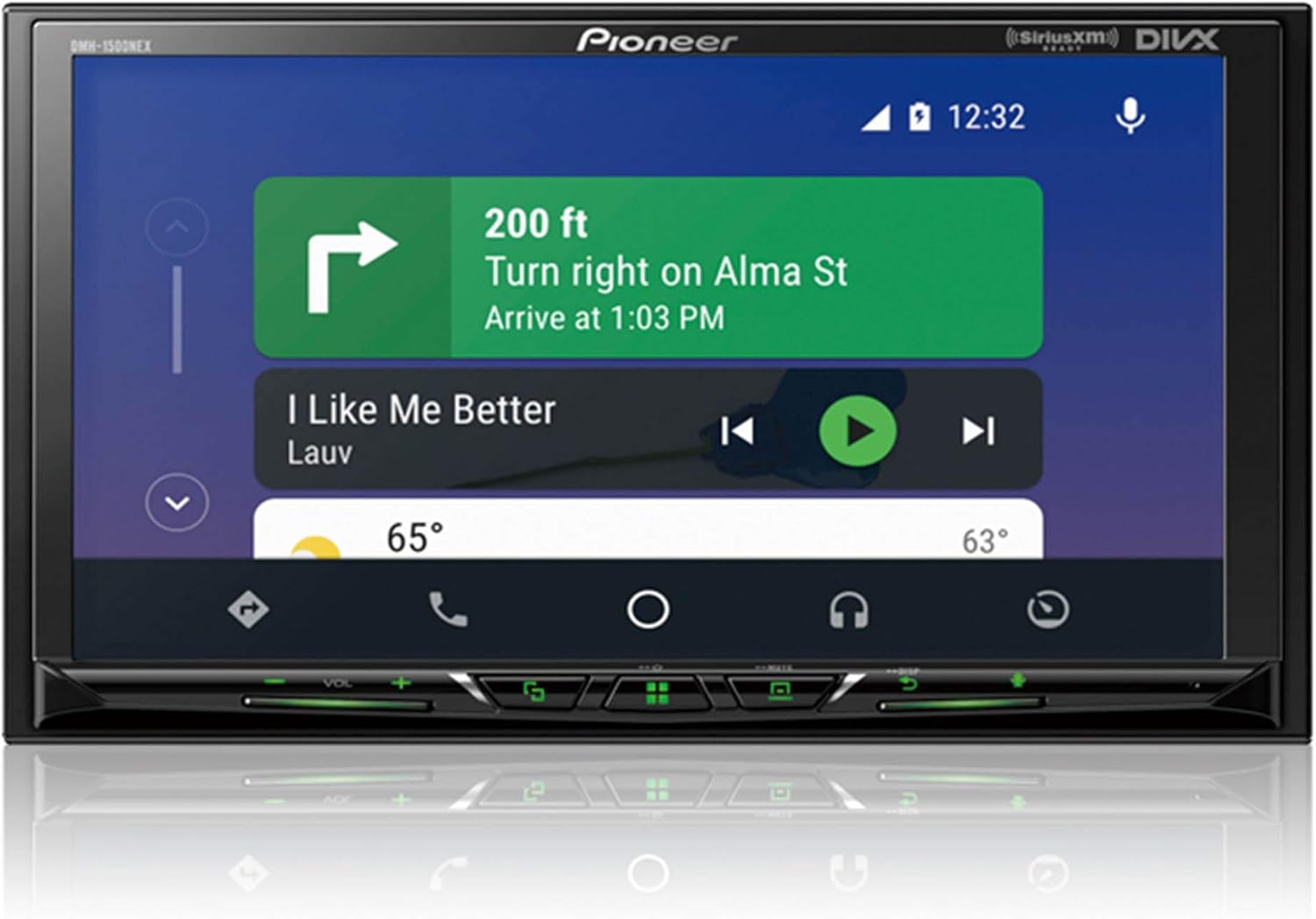
Figure 3: The DMH-1500NEX showing a navigation screen, providing turn-by-turn directions and displaying current weather conditions. This highlights the unit's utility for in-car navigation through smartphone integration.
4.4. Audio Customization
Access the audio settings to utilize the 13-band graphic equalizer, time alignment, and high/low-pass filters to fine-tune your sound. The Advanced Sound Retriever can improve the quality of compressed audio files.
5. Maintenance
To ensure the longevity and optimal performance of your Pioneer DMH-1500NEX, follow these general maintenance guidelines:
- Screen Cleaning: Use a soft, lint-free cloth to gently wipe the touchscreen. For stubborn smudges, slightly dampen the cloth with water or a screen-safe cleaner. Avoid abrasive materials or harsh chemicals.
- Dust Removal: Periodically use a soft brush or compressed air to remove dust from around the buttons and vents to prevent accumulation.
- Temperature Control: Avoid exposing the unit to extreme temperatures, both hot and cold, for extended periods.
- Software Updates: Check the Pioneer website periodically for any available firmware updates to ensure the unit operates with the latest features and bug fixes.
6. Troubleshooting
This section addresses common issues you might encounter with your DMH-1500NEX.
6.1. Common Issues and Solutions
| Problem | Possible Cause / Solution |
|---|---|
| Bluetooth Inconsistency / Disconnection |
|
| Android Auto / Apple CarPlay Disconnects Frequently |
|
| Poor Radio Signal |
|
| Unit Shuts Down Randomly |
|
7. Specifications
| Attribute | Detail |
|---|---|
| Brand | Pioneer |
| Model Number | DMH-1500NEX |
| Item Weight | 4 pounds |
| Product Dimensions | 11 x 11 x 13 inches |
| Voltage | 4 Volts |
| Connectivity Technology | Bluetooth, USB |
| Controller Type | Android, Google Assistant |
| Special Feature | Equalizer |
| Compatible Devices | Smartphone, Speaker |
| Total HDMI Ports | 2 |
| Connector Type | RCA, USB |
| Audio Output Mode | Stereo |
| Surround Sound Channel Configuration | 4 channel |
| Video Encoding | H.264, H.265/HEVC |
| Built-in Amplifier | 14 watts RMS/50 peak x 4 channels |
8. Warranty and Support
This Pioneer DMH-1500NEX unit is offered as an Amazon Renewed product. Amazon Renewed products undergo professional inspection and testing to ensure they work and look like new.
8.1. Amazon Renewed Guarantee
If you are not satisfied with your purchase of a renewed product, it is eligible for replacement or refund under the Amazon Renewed Guarantee. Please refer to the Amazon Renewed program terms and conditions for specific details regarding returns and support for renewed products.
8.2. Technical Support
For technical assistance beyond the scope of this manual, or for issues not resolved by the troubleshooting steps, please refer to the official Pioneer support resources or contact Amazon Renewed customer service for guidance on your renewed product.