
1. Introduction
The HABOTEST HT207B Digital Clamp Meter is a versatile and powerful tool designed for accurate electrical measurements. It is suitable for troubleshooting household, automotive, and industrial electrical issues, making it an essential device for electricians, DIY enthusiasts, and professionals. This manual provides comprehensive instructions for the safe and effective use of your clamp meter.

Figure 1: HABOTEST HT207B Digital Clamp Meter and included accessories.
2. Safety Information
Please read and understand all safety warnings and operating instructions before using the HABOTEST HT207B Digital Clamp Meter. Failure to follow these instructions may result in electric shock, fire, or serious injury.
- This device has passed IEC61010-1 and CAT III 600V certification, indicating its safety standards for certain electrical environments.
- The screen will turn orange to warn the user when the measured voltage exceeds 80V or the current exceeds 1A, indicating a potentially hazardous condition.
- Always ensure the meter is set to the correct function and range before making any measurements.
- Do not attempt to measure current in a circuit that exceeds the maximum rated current (400A AC).
- When measuring temperature with a thermocouple, ensure the probe does not come into contact with charged objects to prevent damage to the instrument or electric shock.
- Do not operate the meter if it appears damaged or if the test leads are compromised.
- Always disconnect power to the circuit before connecting or disconnecting test leads, especially when measuring resistance, capacitance, or continuity.
- Use caution when working with voltages above 30V AC RMS, 42V peak, or 60V DC, as these pose a shock hazard.
3. Setup
3.1 Unpacking and Inspection
Carefully unpack the HABOTEST HT207B Digital Clamp Meter and all accessories. Verify that all items listed below are present and undamaged:
- 1x HT207B AC Digital Clamp Meter
- 1x Temperature Probe
- 1x Detection Pen (NCV probe)
- 1x English Manual
- 1x Organizer Bag
- 2x 1.5V AAA batteries
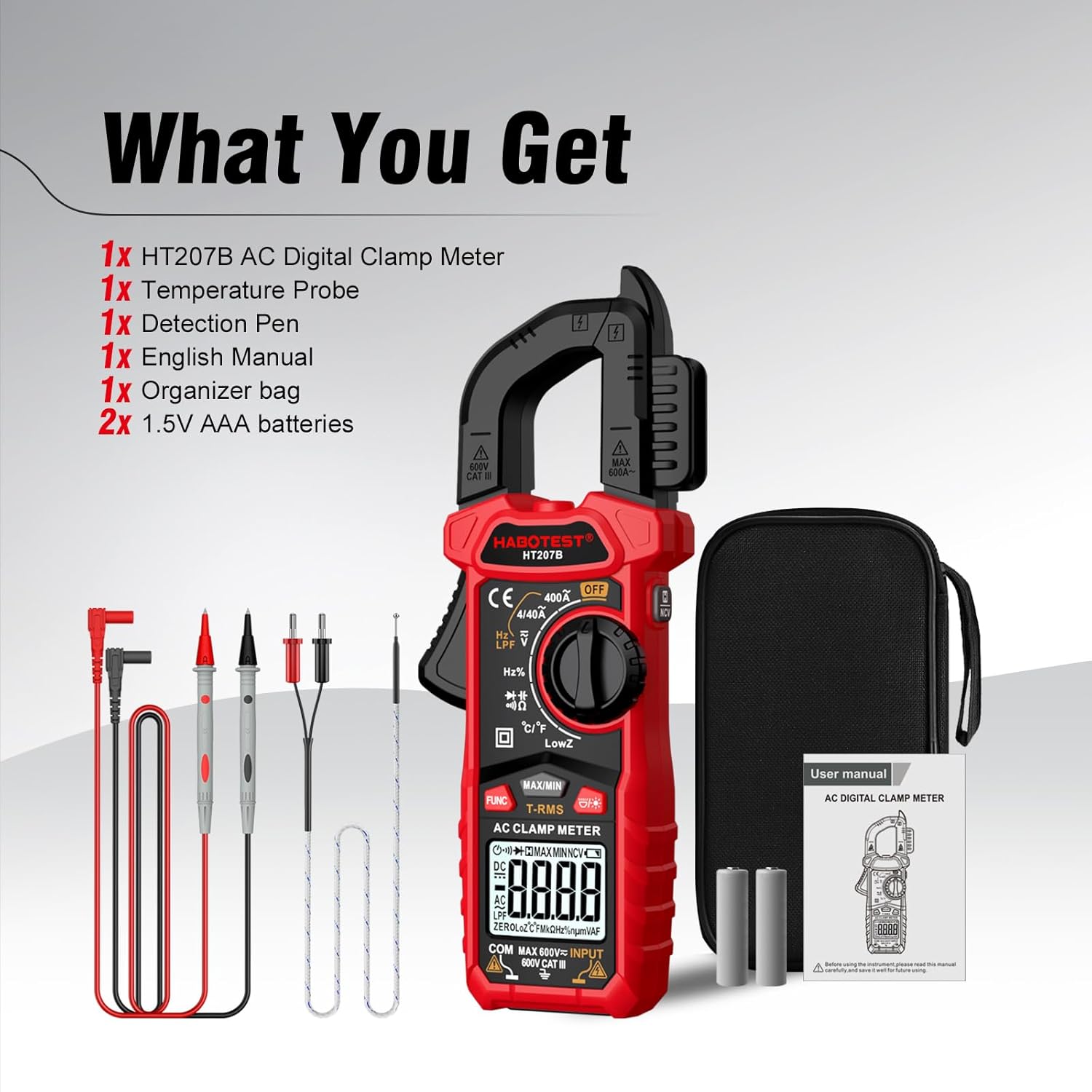
Figure 2: Included items in the HABOTEST HT207B package.
3.2 Battery Installation
The HT207B is powered by two 1.5V AAA batteries. To install or replace batteries:
- Locate the battery compartment on the back of the meter.
- Use a screwdriver to open the battery cover.
- Insert two 1.5V AAA batteries, observing the correct polarity (+/-).
- Replace the battery cover and secure it with the screw.

Figure 3: Battery compartment for 2x1.5V AAA batteries.
4. Operating Instructions
The HABOTEST HT207B offers a wide range of measurement functions. Familiarize yourself with the meter's components before operation.

Figure 4: Product Function Analysis of the HT207B.
4.1 Function Selection
Rotate the Knob Switch to select the desired measurement function. Press the FUNC button to cycle through sub-functions within a mode (e.g., AC/DC Voltage, Diode/Continuity).

Figure 5: Overview of HT207B measurement capabilities.
4.2 AC Current Measurement
To measure AC current, select the AC Current mode using the knob. Open the clamp jaw by pressing the trigger and enclose a single conductor. The large jaw opening allows measurement without interrupting the circuit. The meter will display the AC current reading.

Figure 6: Measuring AC Current with the clamp function.

Figure 7: AC Current Measurement (0-400V measurement range).
4.3 AC/DC Voltage Measurement
Connect the test leads to the appropriate input jacks (COM and VΩHz). Select the voltage mode (ACV or DCV) using the knob and FUNC button. Apply the test leads across the circuit to measure voltage.
Dual Impedance Voltage Measurement
The HT207B features dual impedance measurement capability to prevent erroneous readings caused by false voltages.
- High Impedance Voltage: Measurements are made in circuits with minimal impact on circuit performance, important for sensitive electronic or control circuits.
- Low Impedance Voltage (LowZ): Safely troubleshoots sensitive electronic or control circuits, as well as circuits that may contain spurious voltages, providing more reliable voltage detection.

Figure 8: Dual Impedance Voltage Measurement explanation.

Figure 9: Low Impedance Voltage Measurement in practice.
4.4 Non-Contact Voltage (NCV) Detection
The NCV feature allows detection of AC voltage without direct contact. Select the NCV mode. When the meter senses a weak AC signal, the green indicator light will illuminate, and the buzzer will emit a slow beep. For a strong AC signal, the red indicator light will come on, and the buzzer will emit a quick beep. This greatly reduces the risk of electric shock.
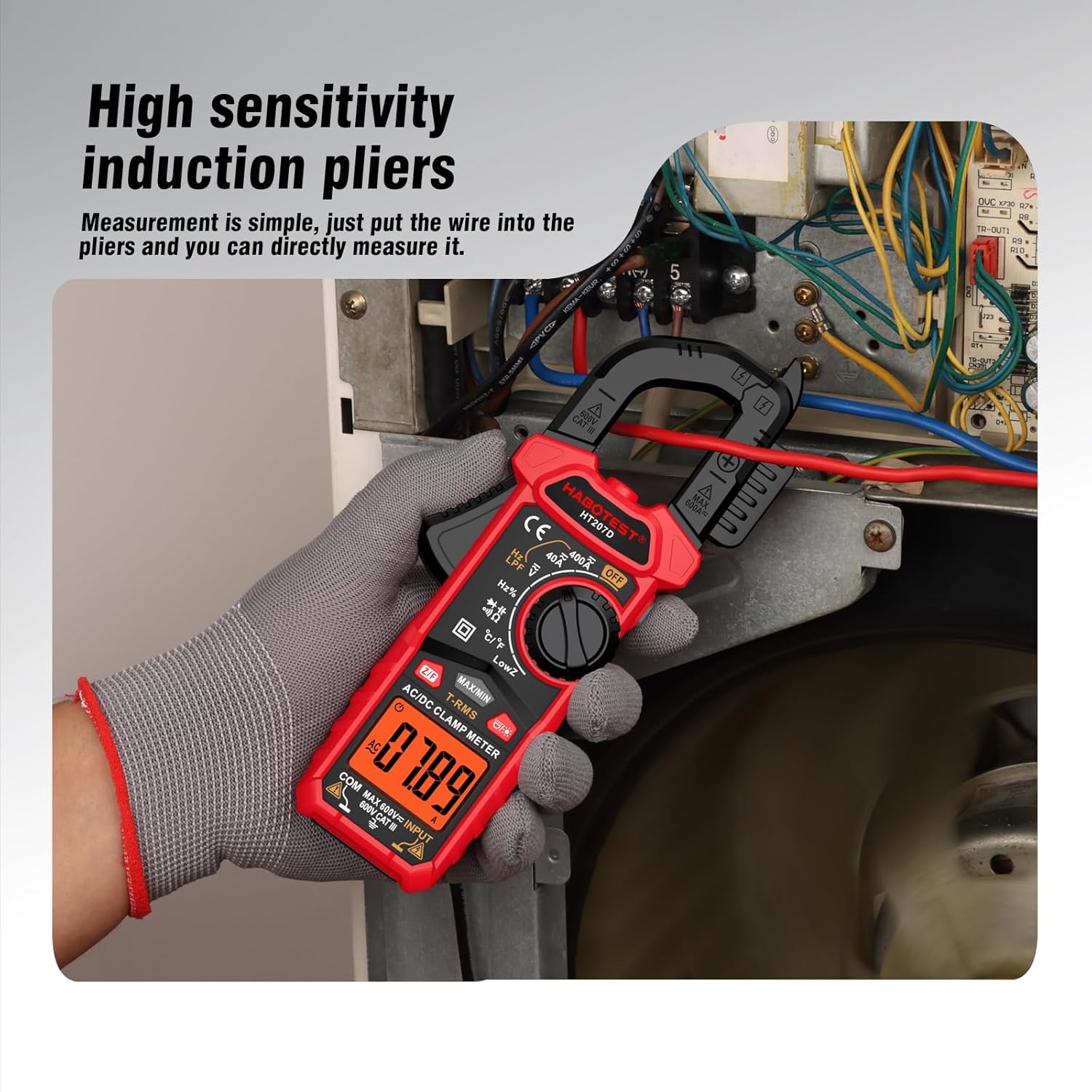
Figure 10: Non-Contact Voltage Detection in use.

Figure 11: NCV Non-Contact Voltage Detection for safety.
4.5 Resistance, Capacitance, Diode, Continuity, Frequency, Duty Cycle Measurement
Connect the test leads to the appropriate input jacks. Rotate the knob to the desired function (Ω for Resistance, F for Capacitance, Diode/Continuity, Hz% for Frequency/Duty Cycle). Use the FUNC button to toggle between these modes if they share a single knob position.
4.6 Temperature Measurement
Insert the temperature probe into the meter's input jacks. Select the temperature mode (°C/°F). Place the probe in contact with the object whose temperature you wish to measure. Ensure the probe does not touch live electrical circuits.

Figure 12: Temperature Measurement using the included probe.
4.7 Special Features
- LCD Backlight Screen and Flashlight: Press the Flashlight/Backlight button to illuminate the display for clear readings in dimly lit areas. The flashlight aids in visibility during measurements.
- Data Hold (H): Press the Data Hold / NCV key (short press) to freeze the current reading on the display for easy viewing and recording. Press again to release.
- Max/Min: Press the MAX/MIN button to record the maximum and minimum values during a measurement session.
- Auto Power Off: The meter will automatically power off after 15 minutes of inactivity to conserve battery life.
- Low Battery Indicator: An icon on the display will indicate when the batteries are low and need replacement.
- Orange Backlight High Voltage Prompt: The screen backlight automatically turns orange when voltage exceeds 80V or current exceeds 1A, serving as a visual safety warning.

Figure 13: Data Hold function for stable readings.

Figure 14: Orange Backlight High Voltage Prompt.
5. Maintenance
5.1 Cleaning
Wipe the meter's casing with a damp cloth and mild detergent. Do not use abrasives or solvents. Ensure the meter is dry before storage or use.
5.2 Battery Replacement
Replace the batteries when the low battery indicator appears on the display. Refer to Section 3.2 for battery installation instructions. Always use fresh 1.5V AAA batteries.
5.3 Storage
When not in use for extended periods, remove the batteries to prevent leakage. Store the meter in its organizer bag in a cool, dry place, away from direct sunlight and extreme temperatures.
6. Troubleshooting
If you encounter issues with your HABOTEST HT207B, refer to the following common problems and solutions:
| Problem | Possible Cause | Solution |
|---|---|---|
| Meter does not power on. | Dead or incorrectly installed batteries. | Check battery polarity or replace with new batteries. |
| Inaccurate readings. | Incorrect function selected; poor test lead connection; external interference. | Ensure correct function and range. Re-seat test leads. Move away from strong electromagnetic fields. |
| Display shows "OL" (Overload). | Measurement exceeds the selected range. | Select a higher range or ensure the measurement is within the meter's capabilities. |
| NCV not detecting voltage. | Weak signal; NCV sensor not close enough to source. | Ensure the NCV sensor is directly over the live wire. |
7. Specifications
The following table outlines the technical specifications of the HABOTEST HT207B Digital Clamp Meter:
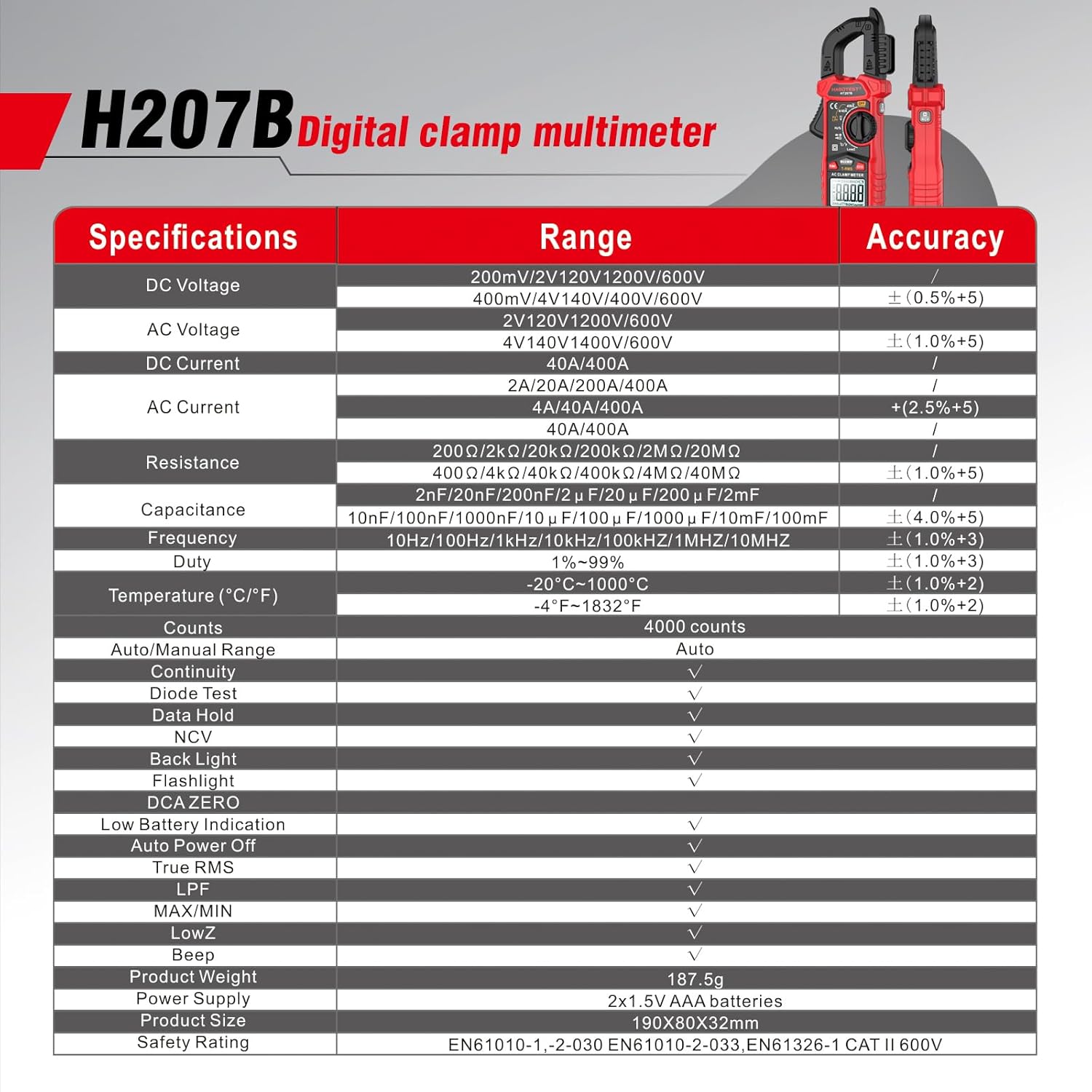
Figure 15: Detailed Specifications of the HT207B.
| Parameter | Range / Value | Accuracy |
|---|---|---|
| DC Voltage | 200mV/2V/20V/200V/600V | ±(0.5%+5) |
| AC Voltage | 2V/20V/200V/600V | ±(1.0%+5) |
| DC Current | 4A/40A/400A | ±(2.5%+5) |
| AC Current | 4A/40A/400A | ±(2.5%+5) |
| Resistance | 200Ω/2kΩ/20kΩ/200kΩ/2MΩ/20MΩ | ±(1.0%+5) |
| Capacitance | 2nF/20nF/200nF/2μF/20μF/200μF/2mF | ±(4.0%+5) |
| Frequency | 10Hz/100Hz/1kHz/10kHz/100kHz/1MHz/10MHz | ±(1.0%+3) |
| Duty Cycle | 1%~99% | ±(1.0%+3) |
| Temperature (°C/°F) | -20°C~1000°C / -4°F~1832°F | ±(1.0%+2) |
| Counts | 4000 counts | N/A |
| Auto/Manual Range | Auto | N/A |
| Diode Test | Yes | N/A |
| Data Hold | Yes | N/A |
| NCV | Yes | N/A |
| Back Light | Yes | N/A |
| Flashlight | Yes | N/A |
| DCA ZERO | Yes | N/A |
| Auto Power Off | Yes (15 minutes) | N/A |
| True RMS | Yes | N/A |
| LPF | Yes | N/A |
| MAX/MIN | Yes | N/A |
| LowZ | Yes | N/A |
| Beep | Yes | N/A |
| Product Weight | 187.5g (6.61 ounces) | N/A |
| Power Supply | 2x 1.5V AAA batteries | N/A |
| Product Size | 190x62x36mm (7.48 x 2.44 x 1.42 inches) | N/A |
| Safety Rating | EN61010-1, -2-030 EN61010-2-033, EN61326-1 CAT II 600V | N/A |
8. Warranty and Support
HABOTEST provides 36 months of high-quality service and lifetime technical support for the HT207B Digital Clamp Meter. For any inquiries, technical assistance, or warranty claims, please contact HABOTEST customer service through their official channels or the retailer where the product was purchased.
For more information, visit the official HABOTEST website or refer to the contact details provided with your purchase documentation.