
YiLaie AB-122
YiLaie LED Reading Light User Manual
Model: AB-122
Introduction
Thank you for choosing the YiLaie LED Reading Light. This portable, dimmable, and magnetic light is designed to provide versatile illumination for various settings. Crafted from solid beech wood and equipped with a 4000mAh rechargeable battery, it offers adjustable brightness from 2% to 100% and 360-degree rotation for optimal light positioning. Its wireless and magnetic design ensures easy placement wherever you need it, whether by your bedside, in your bedroom, living room, or a child's room. Beyond its functional benefits for reading, it also serves as an elegant decorative piece. This manual provides essential information for the safe and effective use of your new reading light.
Safety Information
- Do not expose the device to extreme temperatures or humidity.
- Keep out of reach of children and pets.
- Use only the provided charging cable or a certified equivalent.
- Do not attempt to disassemble or modify the light. This will void the warranty.
- Avoid direct eye exposure to the LED light for prolonged periods.
- Ensure the magnetic base is securely attached to a stable surface before mounting the light.
Package Contents
Please check the box for the following items:
- 1 x YiLaie LED Reading Light (Oval)
- 1 x Magnetic Spherical Base
- 1 x USB Charging Cable
- Mounting accessories (screws, double-sided tape, iron sheet)

Image: The YiLaie LED Reading Light, showing the main lamp unit, the spherical magnetic base, and the USB charging cable.
Product Features
- Dimmable Brightness: Adjust light intensity from 2% to 100% to suit your needs.
- 360-Degree Rotation: The magnetic spherical base allows for full rotation and angle adjustment.
- Magnetic Attachment: Easily attach and detach the light from its base.
- Portable & Wireless: Built-in 4000mAh Li-ion battery for cordless operation.
- Premium Material: Constructed with solid beech wood for a noble and aesthetic design.
- Touch Control: Simple touch interface for power and brightness adjustment.
- Long Battery Life: Provides 8 to 30 hours of continuous lighting depending on brightness setting.
- Wide Application: Ideal for reading, bedside lighting, closets, hallways, and decorative purposes.

Image: Visual representation of the light's dimming capabilities (2% to 100%) and battery performance, highlighting 48 hours of continuous lighting compared to other models.
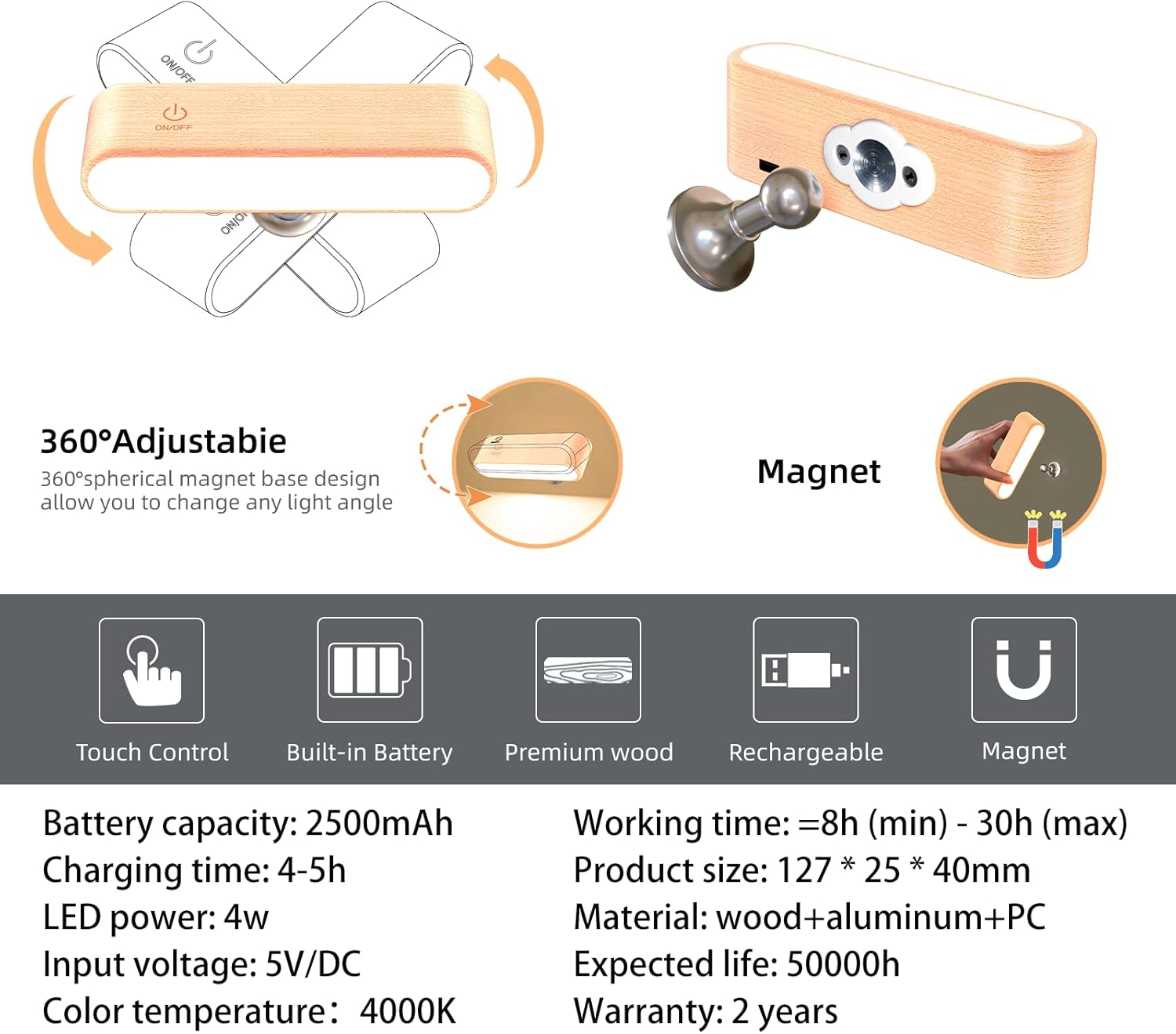
Image: Illustration of the 360-degree adjustable magnetic base and a summary of features including touch control, built-in battery, premium wood, rechargeability, and magnetic function.
Setup and Installation
The YiLaie LED Reading Light offers flexible installation options:
- Screw Installation:
For a permanent and secure mount, use the provided screws and wall plugs. Mark the desired location, drill pilot holes, insert wall plugs, and then screw the magnetic spherical base into place. Once the base is secure, the light can be magnetically attached.
- Installation with Double-Sided Tape:
For a less permanent solution, use the strong double-sided adhesive tape. Clean the surface thoroughly, peel off the protective film from one side of the tape, apply it to the back of the magnetic spherical base, then peel the other side and firmly press the base onto the desired surface. Allow sufficient time for the adhesive to bond before attaching the light.
- Installation with Iron Sheet (for non-magnetic surfaces):
If your desired surface is not magnetic, you can use the provided iron sheet. Attach the iron sheet to the surface using double-sided tape or screws. The magnetic spherical base can then be attached to this iron sheet, allowing the light to be mounted.

Image: Step-by-step diagrams illustrating the three primary installation methods: screw, double-sided tape, and using an iron sheet.
Operating Instructions
Power On/Off and Brightness Adjustment:
- Power On/Off: Briefly press the touch control button (marked "ON/OFF" or with a power icon) on the lamp to turn the light on or off.
- Adjust Brightness: While the light is on, long press the touch control button to smoothly adjust the brightness level from 2% to 100%. Release the button when the desired brightness is reached.
Charging the Battery:
The light is equipped with a built-in rechargeable Lithium-ion battery. When the battery is low, the light may dim or turn off. To charge:
- Locate the USB charging port on the side of the lamp.
- Connect the provided USB charging cable to the lamp's port.
- Connect the other end of the USB cable to a compatible 5V/DC power source (e.g., USB wall adapter, computer USB port).
- An indicator light will show the charging status (e.g., red for charging, green for fully charged).
- A full charge typically takes 4-5 hours.
The light can be used while charging, though it is recommended to fully charge it before first use for optimal battery performance.

Image: A mother and child enjoying reading time with the YiLaie LED Reading Light providing illumination.

Image: A woman relaxing on a couch, demonstrating the light's use in a living room setting.
Maintenance
- Cleaning: To clean the lamp, gently wipe the surface with a soft, dry cloth. For stubborn marks, a slightly damp cloth can be used, followed by immediate drying. Avoid using abrasive cleaners or solvents.
- Battery Care: To prolong battery life, avoid fully discharging the battery frequently. If storing the light for an extended period, charge it to about 50% every few months.
- Recycling: For information on recycling light bulbs and electronic waste, please consult your local recycling guidelines or visit relevant recycling information websites.
Troubleshooting
| Problem | Possible Cause | Solution |
|---|---|---|
| Light does not turn on. | Battery is depleted. | Charge the light using the provided USB cable. |
| Light does not dim. | Incorrect operation of touch control. | Ensure you are long-pressing the touch control button to adjust brightness, not just briefly pressing it. |
| Light falls off the magnetic base. | Base not securely installed or surface is uneven. | Re-install the magnetic base ensuring it is firmly attached to a clean, flat surface. If using adhesive, ensure sufficient curing time. |
| Short battery life. | Light used at maximum brightness; battery not fully charged. | Reduce brightness for longer use. Ensure the light is fully charged (4-5 hours). |
Specifications
| Brand | YiLaie |
| Model Number | AB-122 |
| Manufacturer | Shenzhen E-Lover Technology Co.,Ltd |
| Dimensions (L x W x H) | 12.7 x 3.8 x 2.5 cm |
| Item Weight | 240 grams |
| Battery | 1 Lithium-ion (included), 4000mAh |
| Charging Time | 4-5 hours |
| Working Time | 8 hours (max brightness) - 30 hours (min brightness) |
| Style | Minimalist |
| Color (Physical) | Orange |
| Material | Plastic (internal components), Beech Wood (outer casing) |
| Number of Bulbs | 26 (LEDs) |
| Input Voltage | 5 Volts (DC) |
| Specific Uses | Reading |
| Special Features | Adjustable brightness, Magnetic, Rotatable |
| Light Color Temperature | 3000 Kelvin (Warm Yellow) |
| Shade Material | Plastic |
| Bulb Type | LED |
| Luminous Flux | 200 lm |
| Power | 4 Watts |
| Installation Type | Wall Mount / Table (versatile) |
| First Available Date | December 20, 2019 |
Warranty and Support
The YiLaie LED Reading Light comes with a 360-day warranty from the date of purchase. We also offer a 100% satisfaction guarantee and a no-questions-asked return policy within the specified period. For any issues, questions, or support needs, please contact YiLaie customer service through your purchase platform or the official YiLaie website.
For information regarding product recycling, please refer to local regulations for electronic waste and battery disposal.
Ask a question about this manual
Ask about setup, troubleshooting, compatibility, parts, safety, or missing instructions. Manuals+ will review the question and use this page’s manual context to help answer it.