
1. Introduction
The Audison SR 4.300 is a high-performance D-Class 4-channel amplifier designed for car audio systems. This amplifier delivers 85 W x 4 at 4 Ohms and features Audison D-Class Technology (ADT) for compact size without compromising audio quality. Its design incorporates extruded aluminum with rounded corners for easy installation in confined spaces, and generous heat sinks eliminate the need for internal cooling fans. This manual provides essential information for proper installation, operation, and maintenance of your SR 4.300 amplifier.
2. Key Features
- ADC (Audison D-Class) Technology: Ensures high audio performance in a compact size with a 2 Ohm stable output stage.
- Compact Design: Extruded aluminum construction with fanless convection cooling.
- Universal Speakers Simulator (USS): Built-in for compatibility with various head units.
- Flexible Inputs: Balanced high-noise rejection Speaker-In for OEM head units and RCA-In for aftermarket head units.
- Automatic Remote Turn-On/Off (ART): Automatically powers the amplifier on/off with the OEM head unit (can be enabled/disabled with Speaker-In inputs).
- Pre-outs: Available even when using Speaker-In level inputs.
3. Safety Information
Please read all instructions carefully before installing and operating the amplifier. Failure to follow these guidelines may result in damage to the product, vehicle, or personal injury.
- Always disconnect the vehicle's battery negative terminal before beginning any electrical work.
- Ensure proper wiring gauge and fusing are used for power connections to prevent fire hazards.
- Mount the amplifier securely in a location that allows for adequate ventilation and is protected from moisture and excessive heat.
- Avoid installing the amplifier in areas where it could interfere with vehicle safety systems or driver visibility.
- Consult a professional installer if you are unsure about any aspect of the installation process.
4. Package Contents
Verify that all items are present in the package:
- Audison SR 4.300 D-Class 4-Channel Amplifier (Model: SR4.300-FBA)
- User Manual (this document)
- Mounting Hardware (screws, etc.)
- Connection Terminals/Plugs (as supplied by manufacturer)
5. Installation and Setup
Proper installation is crucial for optimal performance and safety. The Audison SR 4.300 amplifier is designed for surface mounting.
5.1. Mounting Location
Choose a mounting location that is dry, well-ventilated, and secure. Ensure sufficient space around the amplifier for air circulation, especially around the heat sinks.
5.2. Connections Overview
The amplifier features various input and output terminals for power, signal, and speaker connections. Refer to the images below for a visual guide.

Description: This image displays the Audison SR 4.300 amplifier from a front-side perspective. Visible are the Audison logo, model number, and various input/output terminals including RCA inputs, speaker inputs, and power connections. The ribbed heat sink design is also prominent.

Description: This image provides a top-down view of the Audison SR 4.300 amplifier. The control panel is clearly visible, featuring switches and potentiometers for channel selection, input mode, filter settings (LP/HP/BP), and gain adjustments for channels A and B. Power and speaker terminals are also visible along the edges.
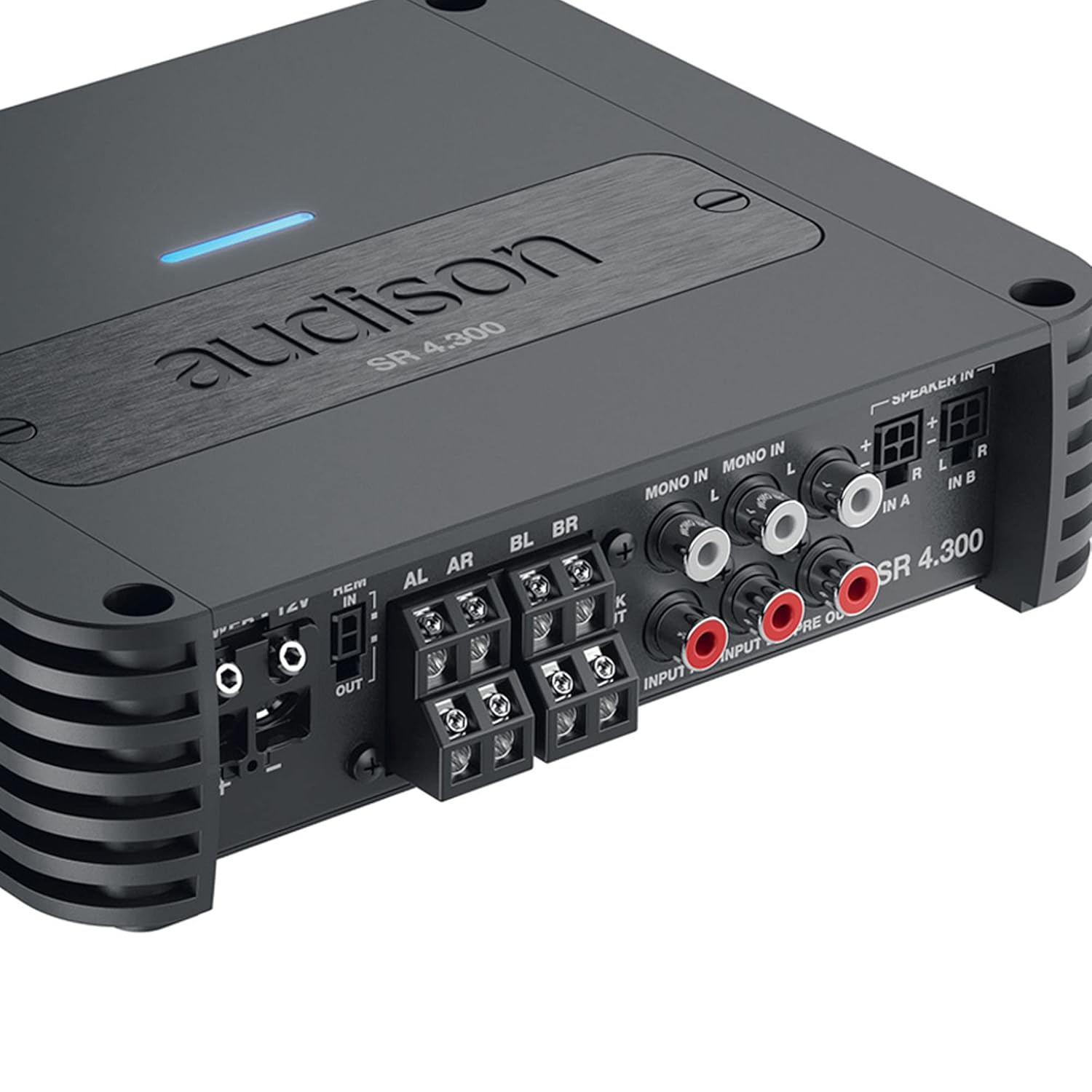
Description: This close-up image focuses on the input and output section of the Audison SR 4.300 amplifier. It shows the RCA input jacks (MONO IN, IN A, IN B), speaker-level inputs, and pre-out connections. The power and remote turn-on terminals are also visible, along with the speaker output terminals.
5.3. Power Connections
- Connect the main power cable (positive +12V) to the amplifier's +12V terminal. Ensure an appropriate fuse (1 x 30A) is installed close to the vehicle's battery.
- Connect the ground cable to the amplifier's GND terminal and to a clean, unpainted metal point on the vehicle chassis.
- Connect the remote turn-on wire from your head unit to the amplifier's REM IN terminal. If using Speaker-In inputs with an OEM head unit, the ART (Automatic Remote Turn-On/Off) feature can be utilized, eliminating the need for a separate remote wire.
5.4. Signal Inputs
- RCA Inputs: For aftermarket head units, connect RCA cables from the head unit's pre-outs to the amplifier's RCA-In terminals (IN A, IN B).
- Speaker-Level Inputs: For OEM head units without RCA outputs, connect the speaker wires directly to the amplifier's Speaker-In terminals. The built-in USS (Universal Speakers Simulator) ensures compatibility.
5.5. Speaker Outputs
Connect your speakers to the amplifier's speaker output terminals (AL, AR, BL, BR). Ensure correct polarity (+/-) for each speaker. The amplifier supports 2 Ohm stable operation.
6. Operating Instructions
Once installed, configure the amplifier settings using the controls on the top panel (refer to Figure 2).
- Input Mode: Select the appropriate input mode (e.g., 2-channel, 4-channel) based on your system configuration.
- Filter Settings: Adjust the High-Pass (HP), Low-Pass (LP), or Band-Pass (BP) filters for each channel pair to optimize sound reproduction for your speakers.
- Gain Adjustment: Carefully set the gain levels for channels A and B to match the output voltage of your head unit. Start with the gain at minimum and slowly increase until desired volume is achieved without distortion.
7. Maintenance
The Audison SR 4.300 amplifier requires minimal maintenance to ensure long-term performance.
- Keep the amplifier clean and free from dust and debris. Use a soft, dry cloth for cleaning.
- Ensure that the heat sinks are not obstructed to allow for proper cooling.
- Periodically check all connections for tightness and corrosion.
8. Troubleshooting
If you experience issues with your amplifier, refer to the following common troubleshooting steps:
- No Power: Check the main fuse, power connections (+12V, GND, REM), and ensure the vehicle battery is charged.
- No Sound: Verify all input and output signal connections. Check head unit settings and amplifier gain levels. Ensure speakers are properly connected and functional.
- Distorted Sound: Reduce gain levels. Check for proper filter settings. Ensure speaker impedance matches amplifier capabilities.
- Amplifier Overheating: Ensure adequate ventilation around the amplifier. Check speaker impedance. Reduce volume levels.
If problems persist, consult an authorized Audison service center.
9. Specifications
| Parameter | Value |
|---|---|
| Model Number | SR4.300-FBA |
| Power Supply Voltage / Fuse | 11 ÷ 15 VDC / 1 x 30A |
| Operating Power Supply Voltage | 6.5V ÷ 17 VDC |
| Idling Current | 1.6 A |
| Idling Current when off | 0.03 mA |
| Consumption @ 14.4 VDC, 2Ω, Max Musical Power | 25 A |
| Package Dimensions | 10.2 x 7.91 x 3.7 inches |
| Weight | 4 Pounds |
| Manufacturer | Audison |
| Mounting Type | Surface Mount |
10. Warranty and Support
Audison products are manufactured to the highest quality standards. For warranty information, please refer to the warranty card included with your product or visit the official Audison website. For technical support or service inquiries, please contact your authorized Audison dealer or distributor.


