
1. Introduction
The MAXTOOLS JS1000 is a professional portable emergency jump starter designed for 12V vehicles. It provides a robust 1380A starting current with a 4140A peak current, making it suitable for a wide range of automotive applications, including cars, utility vehicles, and more. Equipped with an AGM lead battery and specialized clamps with integrated LED lights, this unit offers reliability and ease of use in various conditions.

Image 1.1: MAXTOOLS JS1000 Professional Jump Starter
2. Safety Information
Please read and understand all safety instructions before operating the MAXTOOLS JS1000. Failure to follow these instructions may result in electric shock, fire, or serious injury.
- Always wear eye protection and protective clothing when working with batteries.
- Ensure the work area is well-ventilated.
- Do not smoke or allow sparks or flames in the vicinity of the battery or jump starter.
- Avoid touching battery terminals or clamps together to prevent short circuits.
- Keep the jump starter away from children and unauthorized personnel.
- Do not attempt to jump start a frozen battery.
- If battery acid comes into contact with skin or eyes, flush immediately with plenty of clean water and seek medical attention.
- Only use the jump starter for 12V lead-acid batteries.
3. Product Components
Familiarize yourself with the key components of your MAXTOOLS JS1000 jump starter:

Image 3.1: MAXTOOLS JS1000 Key Features
- Indestructible PE Casing: Provides lifetime durability and protection for internal components.
- Robust AGM Battery: A high-performance, fuse-protected Absorbed Glass Mat battery for reliable power delivery.
- Radaflex Cables: Super flexible and durable cables for easy connection.
- Professional Clamps with LED Light: Fully insulated clamps with integrated LED lighting for safe and convenient use in low-light conditions.
- Precise Voltmeter: For monitoring the unit's battery status.
- Fuse-Protected 12V Output: A 12V auxiliary power outlet for charging other devices, protected by a 16A fuse.
4. Initial Setup & Charging
Before first use, and for optimal performance, the MAXTOOLS JS1000 must be fully charged.
- Upon receiving the product, charge the unit for at least 24 hours.
- Connect the provided charging cable to the unit's charging port and plug it into a standard wall outlet.
- Monitor the voltmeter or charging indicator (if present) to confirm charging is in progress.
- Once fully charged, disconnect the charging cable.
Important: Regular charging is crucial for battery longevity. Recharge the unit every three months to ensure it operates at full power for many years.
5. Operating Instructions
5.1. Jump Starting a Vehicle
The MAXTOOLS JS1000 is designed for easy and effective jump starting of various 12V vehicles, including utility cars, sedans, pick-ups, campers, vans, motorboats, and tractors.

Image 5.1: Vehicle Compatibility
- Ensure the jump starter is fully charged.
- Turn off the ignition of the vehicle to be jump started and ensure all accessories (lights, radio, etc.) are off.
- Connect the red positive (+) clamp to the positive (+) terminal of the vehicle's battery.
- Connect the black negative (-) clamp to a clean, unpainted metal part of the vehicle's chassis, away from the battery and fuel lines. Do not connect directly to the negative (-) battery terminal unless specified by the vehicle manufacturer.
- Once connected, attempt to start the vehicle. If it doesn't start immediately, wait a few minutes before trying again. Do not crank the engine for more than 5 seconds at a time.
- After the vehicle starts, disconnect the black negative (-) clamp first, then the red positive (+) clamp.
- Allow the vehicle's engine to run for at least 20 minutes to recharge its battery.
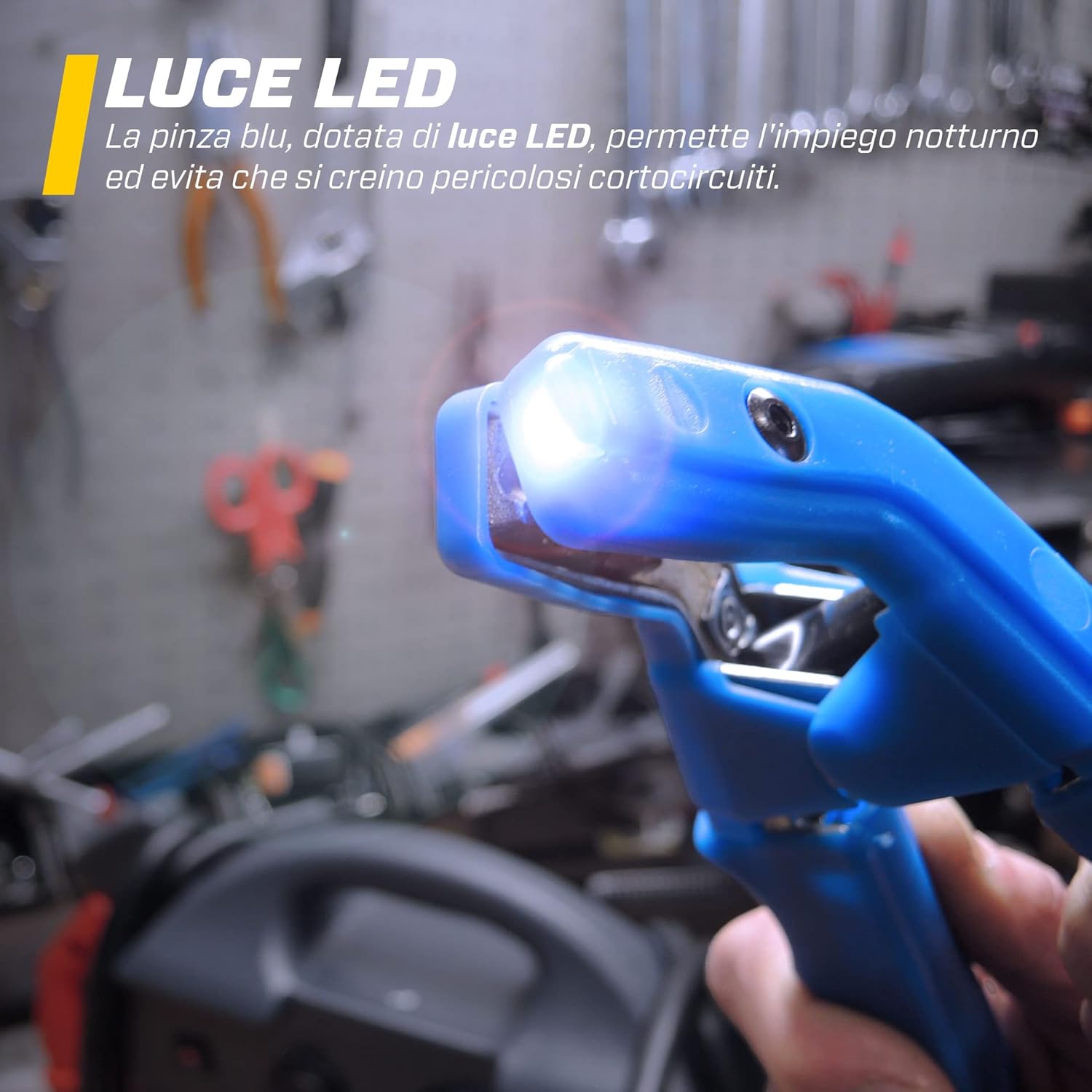
Image 5.2: Connecting the Jump Starter
5.2. Using the LED Light
The integrated LED light on the clamps facilitates correct operation in dark environments.

Image 5.3: LED Light on Clamp
- To activate the LED light, press and hold the button located on the clamp.
- The light will remain on as long as the button is pressed. This design prevents accidental prolonged use and excessive battery discharge.
6. Maintenance & Storage
Proper maintenance ensures the longevity and performance of your MAXTOOLS JS1000.
- Regular Charging: Recharge the unit every three months, even if not in use, to maintain the AGM battery's health.
- Cleaning: Keep the unit and clamps clean and free from dirt, grease, and moisture. Use a dry cloth for cleaning.
- Storage: Store the jump starter in a cool, dry place, away from direct sunlight and extreme temperatures. Ensure clamps are properly stored to prevent accidental contact.
- Cable Inspection: Periodically inspect the Radaflex cables and clamps for any signs of damage, wear, or corrosion. Replace if necessary.
7. Troubleshooting
If you encounter issues with your MAXTOOLS JS1000, refer to the following common problems and solutions:
| Problem | Possible Cause | Solution |
|---|---|---|
| Vehicle does not start | Jump starter battery is low; Incorrect clamp connection; Vehicle battery severely discharged or faulty. | Recharge the jump starter; Ensure clamps are securely connected to correct terminals; Allow more time for charging before attempting to start; Consult a professional if vehicle battery is faulty. |
| LED light does not turn on | Button not pressed firmly; Jump starter battery is critically low. | Press and hold the LED button firmly; Recharge the jump starter. |
| Jump starter not charging | Charging cable not properly connected; Faulty power outlet; Internal issue. | Check all connections; Try a different power outlet; Contact customer support if the issue persists. |
8. Technical Specifications
| Feature | Specification |
|---|---|
| Model | JS1000 |
| Brand | MAXTOOLS |
| Starting Current | 1380A |
| Peak Current | 4140A |
| Voltage | 12 Volts |
| Battery Type | AGM Lead-Acid (VRLA) |
| Battery Capacity | 22 Ampere-hours (Ah) |
| Product Dimensions (L x W x H) | 15.1 x 8.1 x 3.2 cm |
| Item Weight | 10.5 Kilograms |
| Cable Length | 125 cm (approx.) |
| Auxiliary Output | 12V, Fuse-protected (16A) |
| Certifications | CE |
9. Warranty & Support
For warranty information, customer care, manuals, tutorials, and spare parts, please refer to the official MAXTOOLS website.

Image 9.1: MAXTOOLS Support Information
Official Website: www.max-tools.eu
Please retain your proof of purchase for any warranty claims.


