
UGREEN 80154
UGREEN USB C to 3.5mm Audio Adapter Instruction Manual
Model: 80154 | Brand: UGREEN
1. Introduction
Thank you for choosing the UGREEN USB C to 3.5mm Audio Adapter. This adapter allows you to connect your USB Type-C devices to traditional 3.5mm audio accessories, ensuring high-fidelity sound and versatile connectivity. Please read this manual carefully to ensure proper use and optimal performance.

Image: The UGREEN USB C to 3.5mm Audio Adapter, showcasing its compact design and braided cable.
2. Key Features
- Durable USB C to 3.5mm Audio Adapter: Connects USB Type-C phones, tablets, and laptops to 3.5mm headphones, car radios, speakers, and Hi-Fi systems for listening and calling.
- Optimal Hi-Fi Sound Quality: Supports up to 24bit/96KHz audio output, surpassing standard 16bit/48Khz adapters. Features powerful noise reduction for higher fidelity sound.
- Convenient In-Line Control: Supports all 3.5mm earphones with in-line control, including volume adjustment and call management.
- More Everlasting Durability: Constructed with a robust nylon braided cable and premium aluminum alloy material to prevent scratches and rust, ensuring a long lifespan of 20,000+ bends.
- Slim and Portable: Easy to carry around due to its compact and lightweight design.

Image: Visual representation of the adapter's Hi-Fi audio capabilities, supporting 24bit/96KHz.

Image: Illustration of the 30AWG thicker copper wires for maximum conductivity and less signal loss.

Image: Close-up of the premium aluminum alloy case, highlighting its anti-oxidation properties.

Image: Depiction of the nylon braided cable undergoing stress tests, demonstrating its 20,000+ bend lifespan.
3. Compatibility
The UGREEN USB C to 3.5mm Audio Adapter offers wide compatibility with most USB-C enabled phones, tablets, and laptops. This includes, but is not limited to:
- iPhone: 16 Pro Max/16 Pro/16 Plus/16/15 Pro Max/15 Pro/15 Plus/15 series
- Samsung Galaxy: S25/S25+/S25 Ultra/S24/S24+/S24 Ultra/S23/S23 Ultra/S23+/S22/S22 Ultra/S22+/S21/S21 Ultra/S21+/S20 Ultra/S20+/S20 series
- Google Pixel: 9 Pro XL/9/9 Pro/8/8 Pro/7/7 Pro/6/Pixel 6 Pro series
- iPad: mini/iPad Pro/iPad Air (2024 models and newer)
- Mac: iMac, Macbook Pro/Macbook Air, Mac mini
- Gaming Consoles: PS5, Switch 2
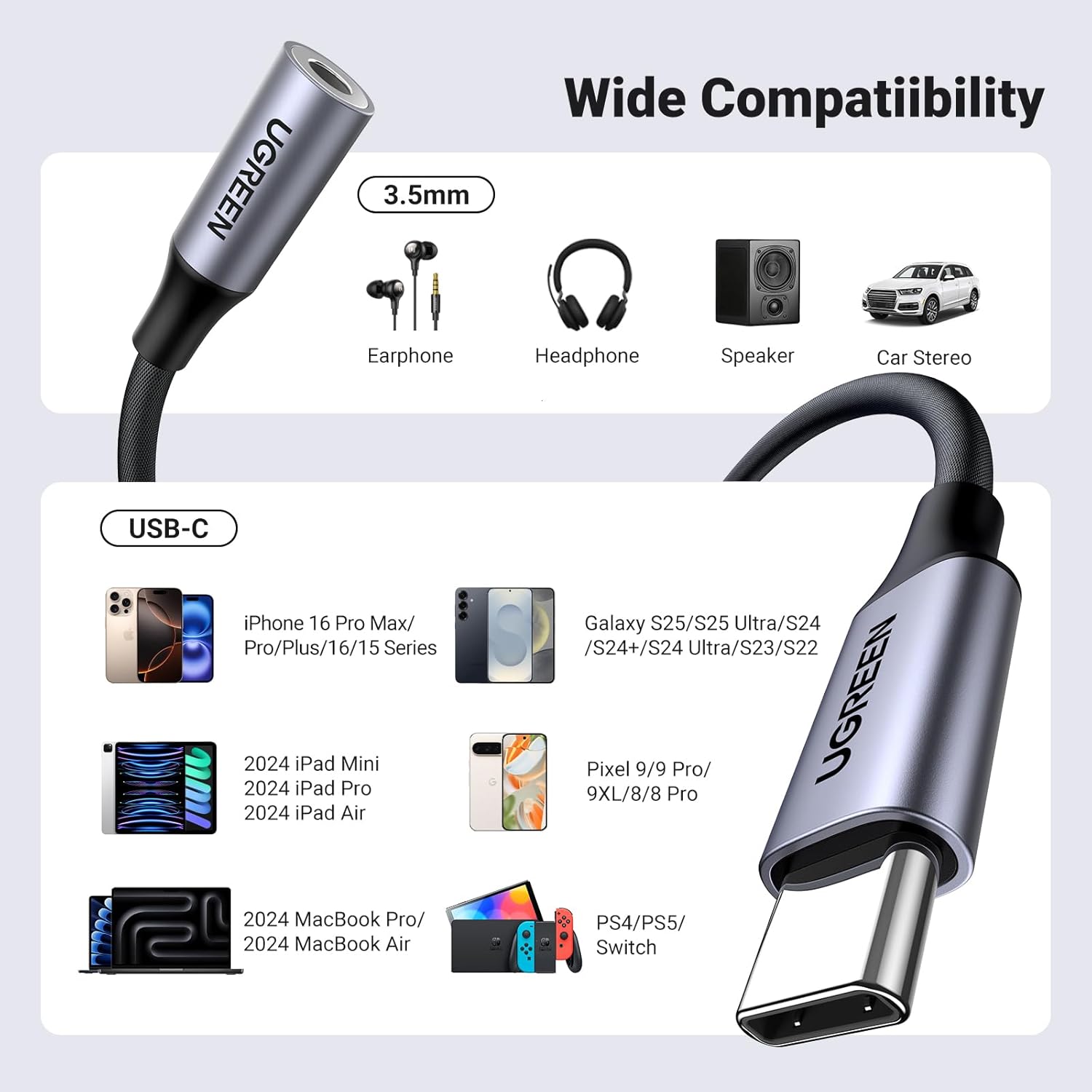
Image: A visual chart illustrating the wide range of compatible devices, including various smartphones, tablets, and gaming consoles.
4. Setup
Setting up your UGREEN USB C to 3.5mm Audio Adapter is straightforward:
- Connect your 3.5mm headphones or audio cable into the 3.5mm jack of the adapter.
- Plug the USB-C connector of the adapter into the USB-C port of your compatible device (phone, tablet, laptop, etc.).
- Your device should automatically recognize the adapter. You can now play audio through your connected 3.5mm device.

Image: A diagram showing the connection points for the USB C to 3.5mm adapter, indicating support for microphone, music, calling, and in-line control.
5. Operating Instructions
Once connected, the adapter functions as a direct audio output for your USB-C device.
- Audio Playback: Simply play any audio content (music, videos, podcasts) on your device, and the sound will be routed through the connected 3.5mm headphones or speakers.
- In-Line Control: If your 3.5mm headphones feature in-line controls (e.g., volume buttons, play/pause, call answer/end), these functions will typically work through the adapter.
- Calling: For headphones with an integrated microphone, the adapter supports voice calls, allowing you to communicate clearly.

Image: A woman enjoying music outdoors with headphones connected via the UGREEN adapter.

Image: A woman using her phone for navigation in a car, with audio connected through the adapter to the car's stereo system.

Image: A woman watching a movie on her tablet, with headphones connected via the UGREEN adapter for an immersive experience.
Video: Official UGREEN video demonstrating the USB C to 3.5mm Audio Adapter's Hi-Fi sound quality and various use cases.
6. Maintenance
To ensure the longevity and optimal performance of your UGREEN USB C to 3.5mm Audio Adapter, follow these maintenance guidelines:
- Cleaning: Use a soft, dry cloth to wipe the adapter clean. Avoid using harsh chemicals or abrasive materials.
- Storage: Store the adapter in a cool, dry place away from direct sunlight and extreme temperatures. Avoid tightly coiling the cable to prevent damage to the internal wires.
- Handling: Always grasp the connector ends when plugging in or unplugging the adapter. Avoid pulling on the cable itself, as this can damage the internal connections.

Image: Close-up of the adapter's robust and durable design, highlighting its bend lifespan and strain relief.
7. Troubleshooting
If you encounter issues with your UGREEN USB C to 3.5mm Audio Adapter, try the following solutions:
| Problem | Possible Cause | Solution |
|---|---|---|
| No audio output | Loose connection, incompatible device, or device settings. | Ensure both ends of the adapter are fully plugged in. Verify your device is listed in the compatibility section. Check your device's audio output settings to ensure the adapter is selected. Restart your device. |
| Microphone not working | Headphones without microphone, incompatible microphone type, or device settings. | Confirm your headphones have an in-line microphone. Ensure the adapter is fully inserted. Check your device's microphone input settings. Note: Some specialized microphones may not be supported. |
| Sound quality is poor or distorted | Low-quality audio source, damaged cable, or interference. | Try a different audio source or file. Inspect the adapter cable for any visible damage. Avoid using the adapter near strong electromagnetic interference. |
| Adapter not recognized by device | Outdated device software, or a faulty port. | Ensure your device's operating system is up to date. Try plugging the adapter into a different USB-C port on your device, if available. |
8. Specifications
| Feature | Detail |
|---|---|
| Product Dimensions | 5.71 x 2.36 x 0.67 inches |
| Item Weight | 0.32 ounces |
| Item Model Number | 80154 |
| Manufacturer | Ugreen Group Limited |
| Date First Available | January 12, 2020 |
| Connector Type | USB Type C (Male) to 3.5mm Auxiliary (Female) |
| Audio Output | Up to 24bit/96KHz |
| Material | Nylon Braided Cable, Aluminum Alloy Case |
| Color | Grey |

Image: An illustration detailing the built-in Smart DAC Chip, highlighting its 24bit/96KHz capability and 480Mbps sync speed.
9. Warranty and Support
UGREEN products come with a standard manufacturer's warranty. For specific warranty details, technical support, or customer service inquiries, please refer to the warranty card included with your product or visit the official UGREEN website. You can also contact UGREEN customer support through your purchase platform.
Please retain your proof of purchase for warranty claims.
Related documents80154


Ask a question about this manual
Ask about setup, troubleshooting, compatibility, parts, safety, or missing instructions. Manuals+ will review the question and use this page’s manual context to help answer it.