
Aufo M1
Aufo M1 Wireless Earbuds User Manual
Model: M1
1. Introduction
This manual provides detailed instructions for the proper use and maintenance of your Aufo M1 Wireless Earbuds. Please read this manual thoroughly before using the product to ensure optimal performance and longevity.

Image: Aufo M1 Wireless Earbuds and their charging case. The earbuds are black with a blue LED ring, and the charging case is also black with three indicator lights on the front.
2. What's in the Box
Verify that all items are present in the package:
- Aufo M1 Wireless Earbuds (Left and Right)
- Wireless Charging Case
- Ear Cushions (various sizes)
- User Manual
3. Product Overview
The Aufo M1 Wireless Earbuds are designed for comfort and high-quality audio, featuring Bluetooth 5.0 connectivity, touch controls, and IPX7 waterproofing. Each earbud weighs only 4g, ensuring a lightweight and secure fit for various activities.

Image: An infographic highlighting key features of the Aufo M1 earbuds, including Bluetooth 5.0, Transparency Mode, Ergonomics, Wireless Charging, Touch Control, HiFi Stereo Sound, IPX7 Waterproof, and Auto Pairing.

Image: A person wearing an Aufo M1 earbud while resting, demonstrating the comfortable and secure fit for extended wear.
Earbud Components:
- Touch Control Area: For managing playback, calls, and modes.
- Microphone: Built-in for calls and voice assistant.
- Ear Tip: Replaceable for comfortable fit.
Charging Case Components:
- Earbud Charging Slots: Internal contacts for charging the earbuds.
- LED Indicators: Display charging status of the case and earbuds.
4. Setup
4.1 Initial Charging
Before first use, fully charge the earbuds and the charging case.
- Place the earbuds into the charging case. Ensure they are correctly seated; the indicator lights on the earbuds should illuminate.
- Place the charging case on a compatible wireless charging pad.
- The LED indicators on the charging case will show the charging status. Once fully charged, the indicators will typically turn solid or off.
A full charge provides approximately 4.5 hours of music playback for the earbuds, with the charging case offering multiple additional charges for over 18 hours of total listening time.
4.2 Pairing with a Device
The Aufo M1 earbuds feature one-step automatic pairing.
- Open the charging case. The earbuds will automatically power on and enter pairing mode.
- On your device (smartphone, tablet, etc.), enable Bluetooth.
- Search for available Bluetooth devices and select "Aufo M1" (or similar name) from the list.
- Once connected, a voice prompt will confirm successful pairing.
The earbuds will automatically reconnect to the last paired device when removed from the case, provided Bluetooth is enabled on the device.
5. Operating Instructions
5.1 Touch Controls
The Aufo M1 earbuds utilize touch controls for various functions. The control actions are generally mirrored on both earbuds unless specified.

Image: A table illustrating the touch control functions for the left and right earbuds, including actions for play/pause, skip forward/back, volume up/down, voice assistant, and transparency mode.
| Function | Left Earbud Action | Right Earbud Action |
|---|---|---|
| Play/Pause / Answer Call | 1 Tap | 1 Tap |
| Skip Forward/Back | 2 Taps (Back) | 2 Taps (Forward) |
| Volume Up/Down | Tap and hold 1.5s (Down) | Tap and hold 1.5s (Up) |
| Voice Assistant | 3 Taps | 3 Taps |
| Transparency Mode | 4 Taps | 4 Taps |
5.2 Transparency Mode
Transparency Mode allows ambient sounds to pass through, enabling you to hear your surroundings without removing the earbuds. This is useful for situational awareness or when interacting with others.

Image: Three scenarios demonstrating the use of Transparency Mode: when waiting for a flight, walking on the road, and talking with people.
To activate or deactivate Transparency Mode, perform 4 taps on either earbud.
6. Maintenance
Proper maintenance ensures the longevity and performance of your Aufo M1 earbuds.
- Cleaning: Regularly clean the earbuds and charging case with a soft, dry, lint-free cloth. Do not use harsh chemicals or abrasive materials.
- Ear Tips: Remove ear tips periodically and clean them with water and mild soap. Ensure they are completely dry before reattaching.
- Charging Contacts: Gently clean the charging contacts on both the earbuds and the case with a dry cotton swab to prevent charging issues.
- Storage: When not in use, store the earbuds in their charging case to protect them from dust and damage. Store in a cool, dry place.
- Water Exposure: While the earbuds are IPX7 waterproof, avoid prolonged submersion in water. Dry them thoroughly after exposure to water or sweat before placing them back in the charging case.

Image: Aufo M1 earbuds submerged in water, illustrating their IPX7 waterproof rating. Icons below indicate suitability for various activities like running, swimming, surfing, cycling, hiking, yoga, and jumping.
7. Troubleshooting
If you encounter issues with your Aufo M1 earbuds, refer to the following common solutions:
| Problem | Possible Solution |
|---|---|
| Earbuds not pairing/connecting |
|
| Only one earbud working |
|
| Earbuds not charging |
|
| Low volume or poor sound quality |
|
8. Specifications
| Feature | Detail |
|---|---|
| Model | M1 |
| Brand | Aufo |
| Connectivity Technology | Bluetooth 5.0 |
| Ear Placement | In Ear |
| Control Method | Touch |
| Water Resistance Level | IPX7 Waterproof |
| Microphone | Built-In |
| Power Source | Battery |
| Earbud Weight | 4g (each) |
| Charging Case Weight | 43g |
| Earbud Dimensions | 1.14in x 0.63in x 0.59in (approximate, derived from image) |
| Charging Case Dimensions | 2.4in x 1.5in x 1.02in (approximate, derived from image) |
| Battery Life (Earbuds) | Up to 4.5 hours |
| Total Battery Life (with Case) | Over 18 hours |
| Wireless Charging | Supported for case |
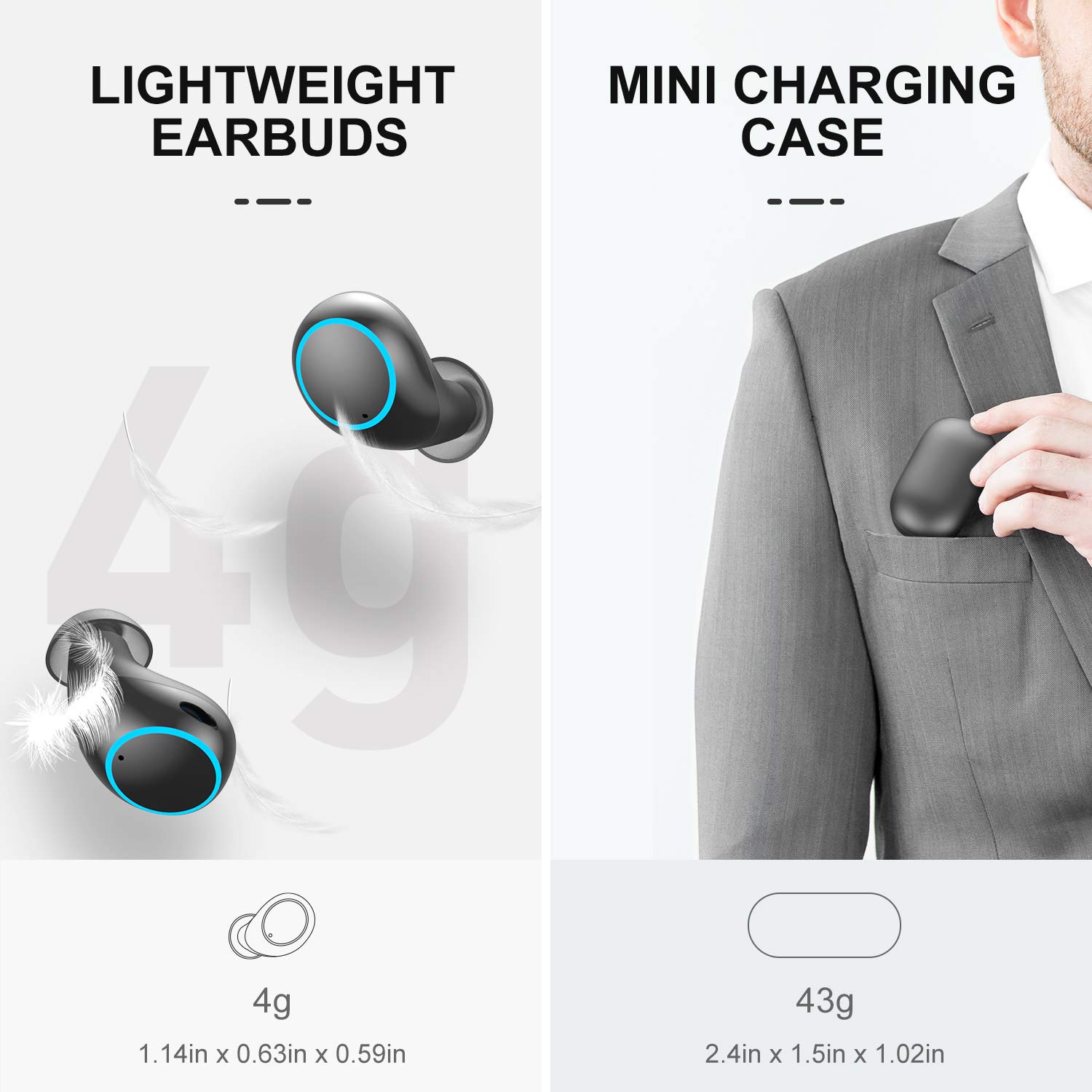
Image: Depicts the lightweight nature of the earbuds (4g each) and the compact size of the charging case (43g), along with their approximate dimensions.
9. Safety Information
- Do not disassemble or modify the product.
- Avoid extreme temperatures (hot or cold).
- Keep away from children and pets.
- Do not use the earbuds at excessively high volumes for extended periods to prevent hearing damage.
- Exercise caution when using earbuds in situations requiring awareness of surroundings (e.g., driving, cycling), even with Transparency Mode enabled.
10. Warranty and Support
Aufo products are designed for reliability and performance. For warranty information, technical support, or customer service inquiries, please refer to the contact details provided on the product packaging or the official Aufo website.
Please retain your proof of purchase for warranty claims.