
COSTWAY 0.9Cu.ft, 900W
COSTWAY Retro Countertop Microwave Oven
Model: 0.9Cu.ft, 900W - Instruction Manual
1. Introduction
This manual provides essential information for the safe and efficient operation of your new COSTWAY Retro Countertop Microwave Oven. Please read these instructions thoroughly before use and retain them for future reference.
The microwave oven features a 0.9 cubic feet capacity and 900W output power, designed for convenient food preparation. It includes multiple power levels, auto-cooking functions, and a child lock for enhanced safety.
2. Safety Information
Always follow basic safety precautions when using electrical appliances to reduce the risk of fire, electric shock, injury to persons, or exposure to excessive microwave energy.
- Do not attempt to operate this oven with the door open as this can result in harmful exposure to microwave energy.
- Do not place any object between the oven front face and the door or allow soil or cleaner residue to accumulate on sealing surfaces.
- Do not operate the oven if it is damaged. Ensure the door closes properly and there is no damage to the door, hinges, latches, or sealing surfaces.
- Only qualified service personnel should adjust or repair this appliance.
- Ensure proper ventilation around the unit.
3. Setup
3.1 Unpacking and Placement
- Remove all packaging materials and accessories. Inspect the oven for any damage such as dents or a broken door. Do not install if the oven is damaged.
- Place the microwave oven on a flat, stable surface that can support its weight and the heaviest food item likely to be cooked in it.
- Ensure adequate ventilation. Leave a minimum of 3.0 inches (7.5cm) of space between the oven and any adjacent walls. A minimum of 12 inches (30cm) is required above the oven.
- Do not block air vents.
3.2 Turntable Assembly
The microwave includes a glass turntable for even heating.
- Place the roller ring in the depression on the oven floor.
- Place the glass turntable on top of the roller ring, ensuring it sits securely.

Image: The glass turntable rotating inside the microwave, illustrating 360-degree even heating.
3.3 Power Connection
Plug the power cord into a standard 120V AC, 60Hz grounded electrical outlet. Ensure the outlet is properly grounded.
4. Operating Instructions
The microwave oven features two mechanical knobs and two buttons for operation.

Image: A close-up view of the microwave's control panel, highlighting the two adjustable knobs and two buttons for operation.
4.1 Power Levels
The microwave offers 5 power levels to suit various cooking needs:
- Defrost: For thawing frozen foods.
- M.Low (40P): Medium-low power.
- M.High (80P): Medium-high power.
- High (100P): Full power for fast cooking.
- Speed Cooking: For quick heating.
Use the top mechanical knob to select the desired power level.

Image: A visual representation of the five microwave power levels, indicating their relative intensity and suggested uses.
4.2 Time Setting
The bottom mechanical knob allows you to set the cooking time from 0 to 60 minutes. The LED display will show the remaining cooking time.

Image: A step-by-step guide illustrating the process of preparing food, setting the time and power level using the knobs, initiating heating, and finally enjoying the cooked meal.
4.3 Auto Cooking Function
The oven includes a customizable auto-cooking mode with default menus for common foods. To use:
- Select the desired menu (e.g., Popcorn, Pizza, Potatoes) using the appropriate setting.
- Enter the menu weight selection.
- Press the 'Start' button to begin cooking.

Image: The microwave displaying icons for eight pre-set auto-cooking functions, including Popcorn, Beverage, Potato, Meat, Reheat, Pizza, Vegetable, and Fish.
4.4 Child Lock
To prevent unsupervised use by children, activate the child lock function:
- Press and hold the 'Pause/Cancel' button for 3 seconds to set or cancel the child lock.

Image: The microwave with a prominent child lock icon and text explaining how to activate or deactivate the feature by holding the 'Pause/Cancel' button for 3 seconds.
4.5 Auto Reminder
When the cooking procedure has finished, three beeps will sound to alert you. Please remove the food after heating to stop any further beeping.
4.6 Door Operation
Always press the 'Pause/Cancel' button before opening the door during operation.
5. Maintenance
5.1 Cleaning the Turntable
The glass turntable is detachable for easy cleaning. Remove it after each use and wash with mild soap and water. Ensure it is completely dry before placing it back in the oven.
5.2 General Cleaning
Wipe the interior and exterior surfaces of the microwave oven with a soft, damp cloth. Do not use abrasive cleaners or harsh chemicals.
6. Troubleshooting
- Oven not starting: Ensure the power cord is securely plugged in. Check the circuit breaker. Make sure the door is closed properly.
- Food not heating: Verify that the power level and time are set correctly. Ensure the door is fully closed.
- Unusual noises: Check if the turntable is correctly positioned on the roller ring.
- 'Beep' sound after cooking: This is an auto-reminder. Remove food from the oven to stop the sound.
- Door not opening: Ensure the 'Pause/Cancel' button has been pressed if the oven was in operation.
7. Specifications
| Feature | Specification |
|---|---|
| Brand | COSTWAY |
| Model | 0.9Cu.ft, 900W |
| Overall Dimensions (L×W×H) | 19.5" × 14" × 11" |
| Turntable Diameter | 10.5" |
| Capacity | 0.9 Cubic Feet |
| Output Power | 900 Watts |
| Voltage | 120 Volts |
| Material | Steel + Glass |
| Installation Type | Countertop |
| Special Feature | Child Safety Lock |
| Certifications | ETL certified, UL certified power cord |
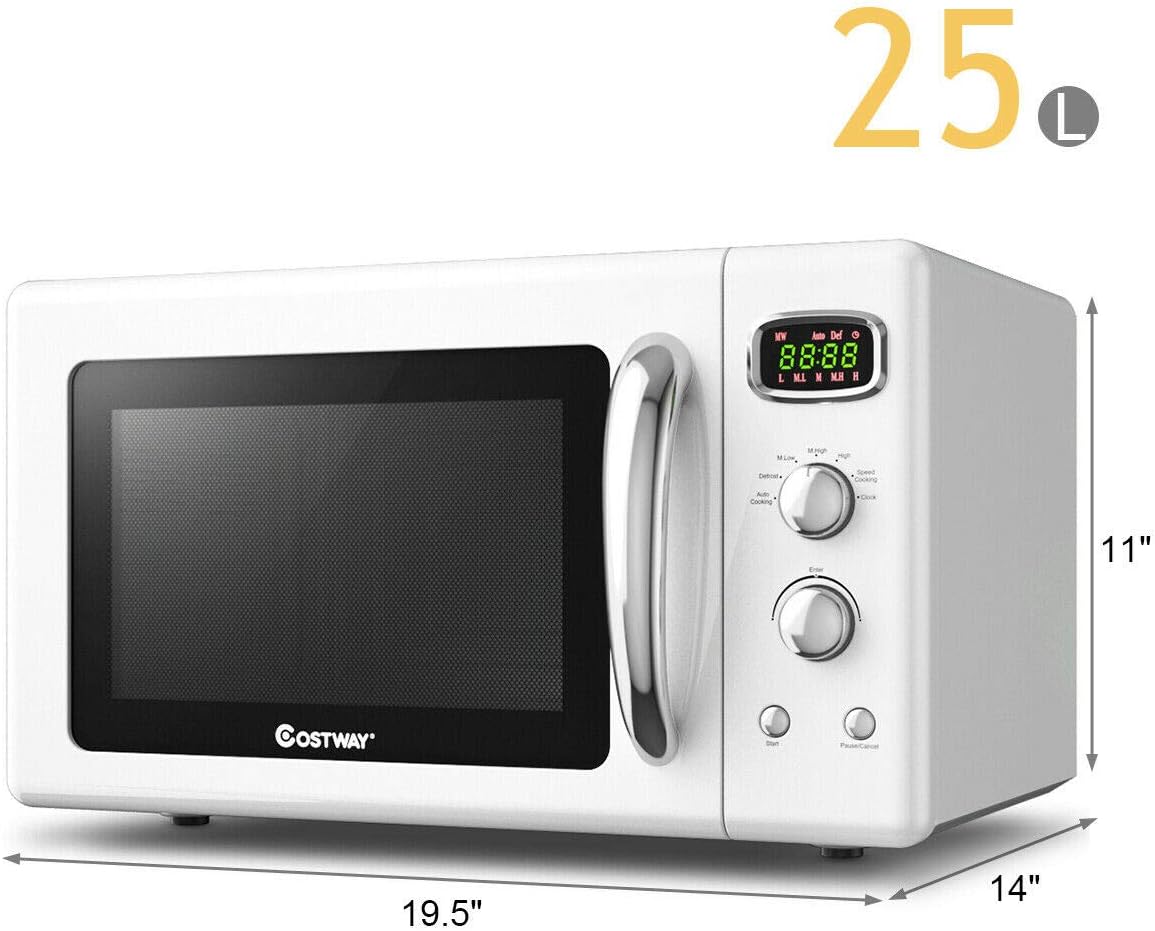
Image: A diagram illustrating the external dimensions of the microwave oven: 19.5 inches wide, 14 inches deep, and 11 inches high.
8. Official Product Video
Video: An official product video from COSTWAY demonstrating the Retro Countertop Microwave Oven, highlighting its features such as 5 micro power levels and defrost function.
9. Warranty and Support
This product is typically covered by a manufacturer's warranty. For specific warranty details, including duration and coverage, please refer to the warranty card included with your purchase or contact COSTWAY customer support directly. Additional protection plans may be available for purchase separately.
For technical assistance, troubleshooting, or service inquiries, please contact COSTWAY customer support through their official website or the contact information provided in your product documentation.
Ask a question about this manual
Ask about setup, troubleshooting, compatibility, parts, safety, or missing instructions. Manuals+ will review the question and use this page’s manual context to help answer it.