
Introduction
The Rollibot M6 2-in-1 Electric Floor Scrubber is designed to simplify your floor cleaning routine. This cordless device functions as both a wet mop and a dry mop, capable of scrubbing, polishing, and waxing various hard floor surfaces. Its dual-head rotating mop pads efficiently tackle dirt and grime, leaving your floors sparkling clean without streaks or marks. The lightweight and agile design ensures ease of use, making it suitable for everyday cleaning tasks.
Product Features
- 2-in-1 Functionality: Seamlessly switch between wet mopping and dry mopping for versatile cleaning.
- Dual Rotating Mop Pads: High-speed rotating pads (up to 190 RPM) effectively clean and polish various hard floor types.
- Integrated Water Spray: Control the release of water or cleaning solution with a convenient spray button.
- LED Headlights: Illuminate dark areas to ensure no dirt is missed.
- Lightweight Design: Weighing only 5.5 pounds, it's easy to maneuver with one hand.
- Rechargeable Battery: Provides up to 50 minutes of cleaning time on a single charge.
- Quiet Operation: Operates at approximately 65dB, comparable to a normal conversation.

Image: The Rollibot M6 in action, highlighting its LED lights and dual rotating pads for effective cleaning.
What's Included
The Rollibot M6 package includes all necessary components for immediate use:
- Mop Head Unit
- Handle Assembly (multiple sections)
- Rechargeable Battery
- Charging Adapter
- Microfiber Mop Pads (multiple sets for wet and dry use)
- Debris Bin
- Water Measuring Cup
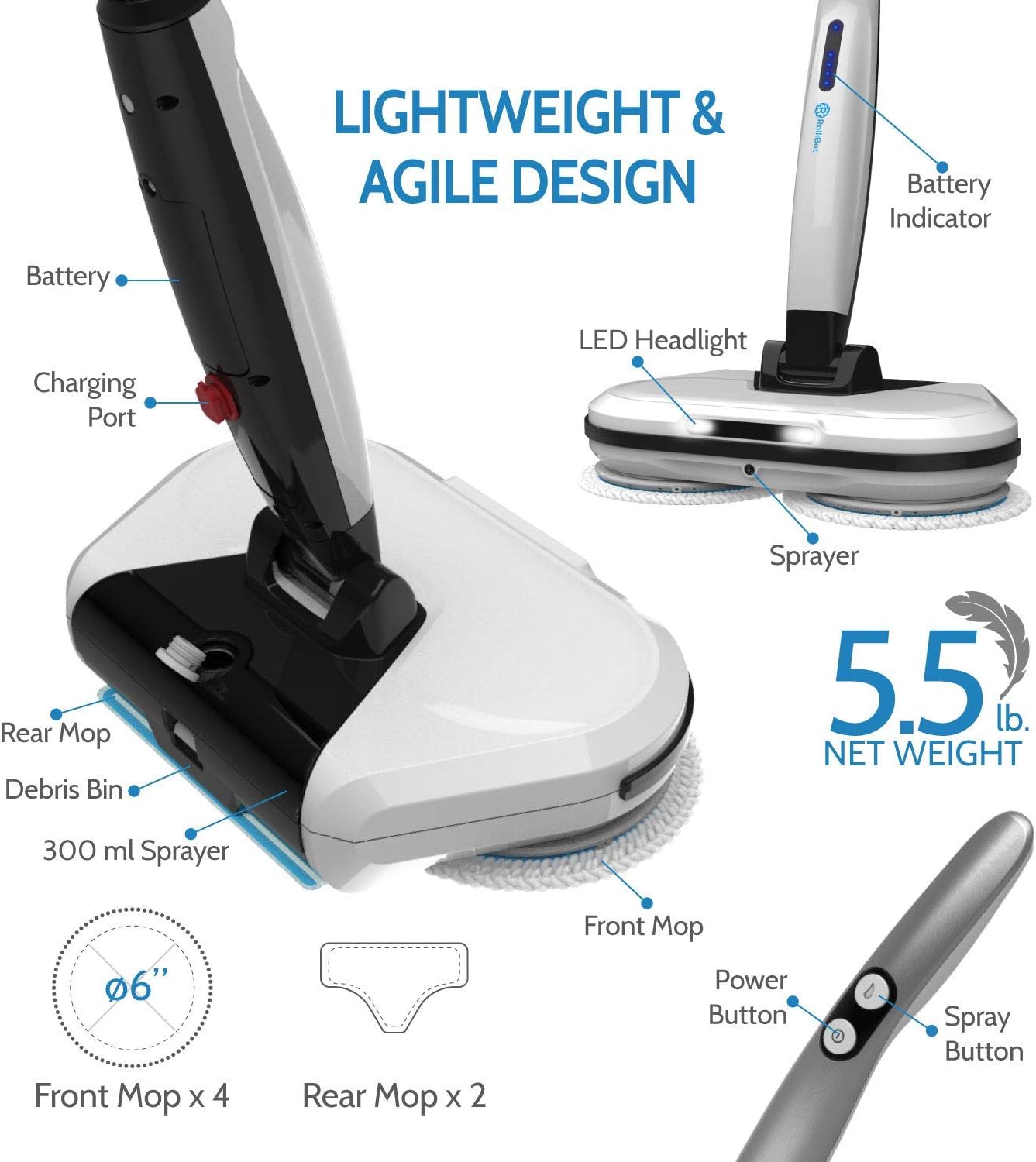
Image: All components of the Rollibot M6, including the mop head, handle sections, battery, and cleaning pads.
Assembly
Follow these steps to assemble your Rollibot M6:
- Attach Mop Pads: Secure the desired microfiber mop pads to the bottom of the mop head unit. The pads attach via Velcro.
- Insert Battery: Slide the rechargeable battery into the designated slot in the main body of the mop head unit until it clicks into place.
- Assemble Handle: Connect the handle sections by aligning the male and female connectors and pushing them together until they lock.
- Attach Handle to Mop Head: Insert the assembled handle into the top of the mop head unit, ensuring the electrical connectors align and it locks securely.
Video: A detailed demonstration of how to assemble the Rollibot M6, including attaching pads, inserting the battery, and connecting handle sections.
Charging
Before first use, fully charge the Rollibot M6 battery. Subsequent charges should also aim for a full charge to maintain battery health.
- Locate the charging port on the handle assembly.
- Connect the charging adapter to the port and plug it into a standard electrical outlet.
- The LED indicator lights on the handle will show the charging status. A full charge typically takes approximately 2 hours.
- Once fully charged, disconnect the adapter.

Image: The Rollibot M6 handle showing the battery indicator lights during charging.
Operating Instructions
The Rollibot M6 offers both dry and wet cleaning modes.
Dry Mopping
For dry mopping, attach the appropriate dry mop pads. This mode is ideal for picking up dust, pet hair, and light debris.
- Ensure the water tank is empty.
- Press the power button once for slow speed or twice for high speed.
- Guide the mop across the floor to collect debris. The dual rotating heads will sweep debris into the rear debris bin.
Wet Mopping, Polishing, and Waxing
For wet cleaning, polishing, or waxing, use the wet mop pads and fill the water tank.
- Attach the wet mop pads to the mop head.
- Open the water tank cap and fill the tank with water or a water-based cleaning solution (do NOT use essential oils or oil-based solutions as they may clog the sprayer). The tank holds up to 300mL.
- Press the power button to select your desired speed.
- Press the spray button on the handle to dispense liquid onto the floor as you clean.
- Guide the mop across the floor. For stubborn spots, hold the mop over the area for a longer period.

Image: Close-up of the Rollibot M6's dual-head spinning mop pads and integrated spray function.
Maintenance
Regular maintenance ensures the longevity and optimal performance of your Rollibot M6.
Cleaning Mop Pads
The microfiber mop pads are reusable and machine washable.
- Remove the dirty mop pads from the mop head.
- Wash the pads in a washing machine with similar colors. Do not use bleach or fabric softener.
- Air dry the pads completely before reattaching or storing.
Emptying Debris Bin
After dry mopping, empty the debris bin to prevent accumulation.
- Locate the debris bin at the rear of the mop head unit.
- Press the release button or tab to detach the bin.
- Empty the collected debris into a trash receptacle.
- Reattach the debris bin securely.
Storage
Store the Rollibot M6 in a cool, dry place. Ensure the battery is fully charged before storing for extended periods to prolong its lifespan.
Video: Demonstration of cleaning the mop pads and emptying the debris bin, highlighting the ease of maintenance.
Troubleshooting
If you encounter issues with your Rollibot M6, refer to the following common solutions:
- Mop not turning on: Ensure the battery is fully charged and correctly inserted. Check the charging adapter for proper connection.
- Sprayer not working: Verify the water tank is filled with a water-based solution. The pump might need priming; lift the handle, tilt the mop head downward, and press the spray button a few times. Avoid oil-based solutions that can cause clogs.
- Mop pads not spinning or making unusual noise: Check if the mop pads are correctly attached and free from obstructions. Remove and reattach them. If the issue persists, inspect the rotating mechanism for any foreign objects.
- Short battery run time: Ensure the battery is fully charged before each use. Battery performance can decrease over time; consider purchasing a replacement battery if needed.
- Ineffective cleaning: Ensure mop pads are clean and suitable for the task (wet for scrubbing, dry for dusting). For deep cleaning, pre-clean the floor and then use the Rollibot M6 for maintenance.
Specifications
| Feature | Detail |
|---|---|
| Brand | Rollibot |
| Model Name | M6 |
| Special Feature | Scrubber Functionality |
| Surface Recommendation | Tile, Laminate, Wood, Linoleum, Marble |
| Included Components | Mop Head, Handle, Battery, Charger, Mop Pads, Debris Bin |
| Form Factor | Upright |
| Color | White |
| Power Source | Battery Powered (Lithium Ion) |
| Voltage | 120 Volts (AC) |
| Item Weight | 7.93 pounds |
| Battery Life | Up to 50 minutes (low speed) / 40 minutes (high speed) |
| Charging Time | Approx. 2 hours |
Warranty and Support
Rollibot products are designed for quality and durability. For warranty information, technical support, or to purchase replacement parts, please refer to the contact information provided in your product packaging or visit the official Rollibot website. Our customer service team is dedicated to assisting you with any inquiries or issues you may have.