
1. Introduction
Thank you for choosing the Astron VS-70M-AP Desktop Variable Voltage Linear Power Supply. This robust and reliable power supply is designed to provide a stable and adjustable DC voltage output for various electronic applications. It features a variable output from 2 to 15VDC, with a continuous current rating of 57 Amps and a peak current of 70 Amps. Integrated meters allow for precise monitoring of voltage and amperage, and Anderson Power Poles provide convenient output connections. Please read this manual thoroughly before operating the unit to ensure safe and efficient use.
2. Important Safety Information
WARNING: Failure to follow these safety instructions may result in electric shock, fire, or serious injury.
- Always connect the power supply to a properly grounded AC outlet (105-125VAC).
- Do not operate the unit in wet or damp conditions. Keep away from liquids.
- Ensure adequate ventilation. Do not block ventilation openings. The unit is fan-cooled.
- Do not open the power supply casing. There are no user-serviceable parts inside. Refer all servicing to qualified personnel.
- Before making any connections to the output terminals, ensure the power supply is turned off.
- Avoid short-circuiting the output terminals. The unit features fold-back current limiting and crowbar over-voltage protection, but proper handling is essential.
- Use appropriate gauge wiring for your application to handle the current output.
3. Product Overview
The Astron VS-70M-AP is a high-performance linear power supply designed for demanding applications. Key features include:
- Variable Voltage Output: Adjustable from 2 to 15VDC.
- High Current Capability: 57 Amps continuous, 70 Amps peak.
- Integrated Meters: Separate analog meters for voltage and amperage.
- Anderson Power Poles: Convenient and secure output connections.
- Advanced Protection: Fold-back current limiting and crowbar over-voltage protection.
- Fan Cooled: Ensures stable operation under heavy loads.
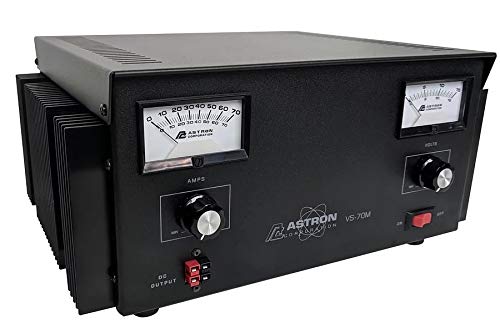
Figure 1: Front view of the Astron VS-70M-AP Power Supply, showing the voltage and amperage meters, voltage adjustment knob, and output terminals.
4. Setup
- Unpacking: Carefully remove the power supply from its packaging. Inspect for any signs of shipping damage.
- Placement: Place the unit on a stable, level surface. Ensure there is ample space around the unit for proper ventilation, especially around the fan and heat sink areas. Do not place it near heat sources or in direct sunlight.
- AC Power Connection: Connect the supplied three-conductor power cord to the AC input receptacle on the rear of the power supply. Plug the other end into a standard 105-125VAC, 60Hz grounded wall outlet.
- Output Connections: With the power supply turned OFF, connect your load device to the output terminals. The VS-70M-AP features 1/4"-20 screw type terminals and Anderson Power Poles for versatile connections. Ensure correct polarity (red for positive, black for negative) and secure connections. Use wiring appropriate for the expected current draw.
5. Operation
- Power On: After all connections are made, turn the power switch to the 'ON' position. The meters should illuminate, and the voltage meter will display the current output voltage.
- Adjusting Voltage: Use the 'VOLTAGE ADJUST' knob on the front panel to set the desired output voltage between 2VDC and 15VDC. Observe the voltage meter for precise adjustment.
- Monitoring Current: The amperage meter will display the current being drawn by your connected load. Ensure the current draw does not exceed the continuous rating of 57 Amps for extended periods. The unit is protected against excessive current.
- Fan Operation: The internal cooling fan will activate automatically as needed to maintain optimal operating temperature, especially under higher loads.
- Power Off: When finished, turn the power switch to the 'OFF' position before disconnecting any loads.
6. Maintenance
- Cleaning: Keep the power supply clean and free of dust. Use a soft, dry cloth for cleaning the exterior. Do not use liquid cleaners or solvents.
- Ventilation: Regularly check that the ventilation openings are not obstructed by dust or debris. A clogged fan or vents can lead to overheating.
- Storage: When not in use for extended periods, store the power supply in a cool, dry place, away from direct sunlight and extreme temperatures.
- No User Serviceable Parts: The unit contains no user-serviceable parts. Any internal maintenance or repair must be performed by qualified service personnel. Opening the case will void the warranty.
7. Troubleshooting
| Problem | Possible Cause | Solution |
|---|---|---|
| No power/Unit does not turn on | No AC input power; Faulty power cord; Internal fuse blown | Check AC outlet and power cord connection. Try a different outlet. If problem persists, contact service. |
| No output voltage | Output short-circuited; Over-voltage protection activated; Voltage knob set to minimum | Check output connections for shorts. Turn off, then on again. Adjust voltage knob. |
| Output current is lower than expected | Load resistance too high; Current limiting activated | Verify load requirements. Ensure load is not drawing more current than the unit can supply. |
| Unit overheats | Insufficient ventilation; Excessive load | Ensure clear airflow around the unit. Reduce load if operating continuously at maximum capacity. |
If you encounter a problem not listed here or if the suggested solutions do not resolve the issue, please contact Astron customer support for assistance.
8. Specifications
| Feature | Specification |
|---|---|
| Model Number | VS-70M-AP |
| Input Voltage | 105-125VAC |
| Output Voltage | 2-15VDC (Externally Adjustable) |
| Continuous Duty Current @13.8VDC | 57 Amps |
| Peak Current (ICS) @13.8VDC | 70 Amps |
| Ripple | Less than 5mV Peak to Peak (full load and low line) |
| Load Regulation | 0.08% from 0 to Full Continuous Load |
| Efficiency | 77% |
| Operating Temperature | -10 to 55°C |
| Output Terminals | 1/4"-20 Screw Type and Anderson Power Poles |
| Cooling | Fan Cooled |
| Protection | Fold Back Current Limiting, Crowbar Over Voltage Protection |
| Dimensions (L x W x H) | 13.75 x 11 x 6 inches |
| Item Weight | 45.4 Pounds |
| Enclosure Material | Metal |
| Certifications | UL, FCC, RoHS |
9. Warranty and Support
Astron warrants this product against defects in materials and workmanship for a period of one (1) year from the original date of purchase. This warranty does not cover damage caused by misuse, abuse, accident, unauthorized modification, or improper installation. Any attempt to open or service the unit by unauthorized personnel will void the warranty.
For technical support, warranty claims, or service inquiries, please contact Astron customer service through the official Astron website or your authorized dealer. Please have your model number (VS-70M-AP) and proof of purchase available when contacting support.