
1. Introduction
This manual provides essential information for the safe and effective operation of your NWOUIIAY 12V 6A Smart Car Battery Charger, model YK002042it. This intelligent charger is designed for 12V lead-acid batteries, including Wet, MF, GEL, VRLA, Flooded, and AGM (EFB) types, with capacities ranging from 4AH to 100AH. It features an LCD screen for real-time data display, automatic charging, and a pulse repair function.

Image 1.1: NWOUIIAY 12V 6A Smart Car Battery Charger
2. Safety Information
WARNING: Read all safety instructions before using this product. Failure to follow these instructions may result in electric shock, fire, or serious injury.
- Battery Type Compatibility: This charger is strictly for 12V lead-acid batteries (Wet, MF, GEL, VRLA, Flooded, AGM, EFB) from 4AH to 100AH. DO NOT charge lithium batteries or any other battery types, as this may cause fire, explosion, or damage to the charger.
- Ventilation: Ensure adequate ventilation during charging. Batteries can produce explosive gases.
- Eye and Skin Protection: Always wear eye protection and protective clothing when working with batteries. Battery acid is corrosive.
- Connection Order: Connect the charger to the battery terminals before plugging it into the power outlet. Disconnect from power before disconnecting from the battery.
- Reverse Polarity: The charger includes reverse polarity protection. However, always ensure correct connection (red to positive, black to negative) to prevent sparks.
- Short Circuit: Avoid short-circuiting the battery clamps.
- Water Exposure: Do not expose the charger to rain or excessive moisture.
- Children and Pets: Keep the charger and battery out of reach of children and pets.
Integrated Safety Protections:
The NWOUIIAY charger is equipped with multiple safety features to ensure secure operation:
- Over-voltage Protection: Prevents damage from excessive voltage.
- Reverse Connection Protection: Safeguards against incorrect positive and negative terminal connections.
- Short Circuit Protection: Automatically shuts off in case of a short circuit.
- Over-current Protection: Protects against excessive current flow.
- Over-temperature Protection: Prevents overheating of the device.
- Low Voltage Protection: Ensures safe operation even with low battery voltage.

Image 2.1: Security Guarantees of the Charger
3. Product Overview and Features
The NWOUIIAY 12V 6A Smart Car Battery Charger is designed for ease of use and efficient battery maintenance. Key features include:
- Intelligent Digital Display (LCD): The charger features an LCD screen that automatically cycles through and displays real-time information such as temperature, charging current, battery voltage, and electric quantity (charge level).
- Automatic Charging: The device intelligently detects battery status and automatically adjusts charging parameters. It does not require manual adjustment.
- Auto-Stop Function: Once the battery is fully charged, the charger automatically stops the charging process to prevent overcharging.
- Pulse Repair Function: A one-button repair function helps diagnose and restore tired batteries, potentially extending their lifespan.
- CPU Precision Control: Ensures accurate and efficient charging.
- High-Frequency Transformer: Utilizes a pure copper high-frequency transformer for powerful and fast charging.
- Cooling Fan: An integrated cooling fan provides better heat dissipation, contributing to a longer service life for the charger.

Image 3.1: Intelligent Features and LCD Display

Image 3.2: Detailed LCD Display Information

Image 3.3: Cooling Fan for Heat Dissipation
4. Setup
Follow these steps to correctly set up your battery charger:
- Identify Battery Terminals: Locate the positive (+) and negative (-) terminals on your 12V battery. The positive terminal is usually marked with a plus sign and is larger, while the negative terminal is marked with a minus sign.
- Connect Red Clamp: Attach the red (+) charger clamp securely to the positive (+) terminal of the battery.
- Connect Black Clamp: Attach the black (-) charger clamp securely to the negative (-) terminal of the battery.
- Connect to Power: Plug the charger's power cord into a standard 100-240V AC electrical outlet. The charger will automatically begin its operation.
Important: Always connect the clamps to the battery first, then plug the charger into the power outlet. When disconnecting, unplug the charger from the power outlet first, then remove the clamps from the battery.

Image 4.1: Charger Connected to a Battery
5. Operating Instructions
5.1 Automatic Charging
Once properly connected to the battery and power outlet, the charger will automatically detect the battery's status and initiate the charging process. The LCD screen will display the charging progress, including current voltage, current, and temperature.

Image 5.1: Intelligent Charging and Auto-Stop
5.2 Battery Voltage Detection
To check the residual voltage of a battery without charging, connect the charger clamps to the battery terminals without plugging the charger into the AC power outlet. The LCD screen will display the current battery voltage, allowing you to monitor its state.
5.3 Pulse Repair Function
The charger includes a 'Repair' button. Pressing this button activates the pulse repair mode, which can help to desulfate and recondition older or underperforming batteries, potentially improving their capacity and extending their life. Follow the on-screen indicators for the repair process.
6. Maintenance
The NWOUIIAY charger is designed for minimal maintenance. After a battery is fully charged, the device automatically reduces current and enters a battery maintenance mode, preventing overcharging and keeping the battery in optimal condition. If the battery voltage drops below 12.5V during this mode, the charger can automatically restart the charging function without user intervention.
- Cleaning: Keep the charger clean and free from dust and debris. Use a dry cloth for cleaning.
- Storage: Store the charger in a dry, cool place when not in use.
- Cable Inspection: Periodically inspect the power cord and battery clamps for any signs of damage. Do not use the charger if any components are damaged.
7. Troubleshooting
If you encounter issues with your NWOUIIAY charger, refer to the following common problems and solutions:
| Problem | Possible Cause | Solution |
|---|---|---|
| Charger display shows 'FUL' or '100%' but battery is still low. | Battery voltage is extremely low (below 8V-10V), preventing the charger from initiating a normal charge cycle. | Try connecting the low battery in parallel with a known good, charged 12V battery for 15-30 minutes using jumper cables. This can 'boost' the voltage enough for the smart charger to recognize and begin charging the low battery. Alternatively, use a traditional charger to provide an initial boost. |
| Charger does not turn on or display anything. | No power, faulty outlet, or damaged charger. | Check if the power outlet is working. Ensure the power cord is securely plugged in. Inspect the charger for visible damage. If the issue persists, contact customer support. |
| 'Fault' indicator is lit. | Reverse polarity, short circuit, or other internal fault. | Immediately disconnect the charger from power and battery. Check clamp connections for correct polarity (red to +, black to -) and ensure no short circuits. Reconnect carefully. If the fault persists, the battery or charger may be damaged. |
| Charger gets excessively hot. | Poor ventilation, internal fault, or charging a severely discharged battery. | Ensure the charger is in a well-ventilated area and its cooling fan is not obstructed. If overheating continues, disconnect immediately and contact customer support. |
8. Specifications
Detailed technical specifications for the NWOUIIAY 12V 6A Smart Car Battery Charger:
| Feature | Specification |
|---|---|
| Brand | NWOUIIAY |
| Model Number | YK002042it |
| Input Voltage | 100-240V AC, 50-60Hz |
| Output Voltage | 12V DC |
| Output Current | 6A (72W MAX) |
| Compatible Battery Types | 12V Lead-Acid (Wet, MF, GEL, VRLA, Flooded, AGM, EFB) |
| Battery Capacity Range | 4AH - 100AH |
| Working Temperature | -10°C to 45°C (14°F to 113°F) |
| Product Dimensions | 22 x 11.2 x 6.5 cm |
| Product Weight | 0.49 kg |
| Color | Yellow |
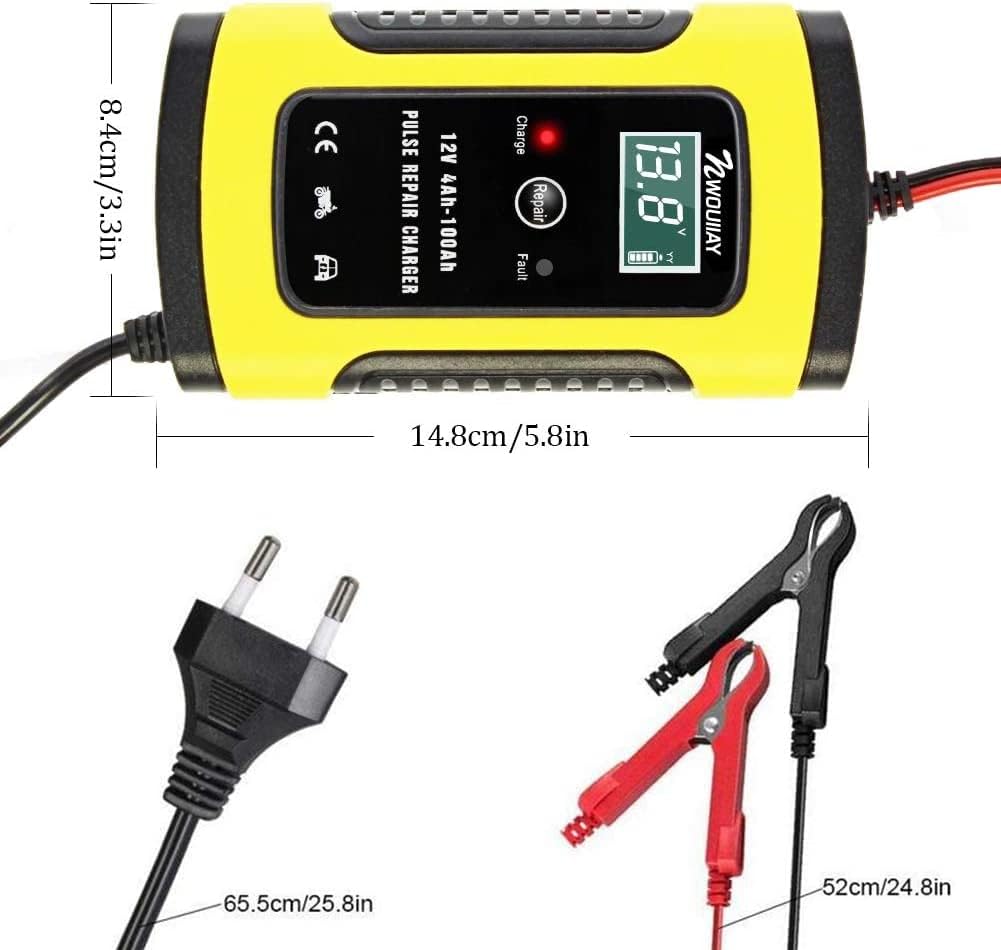
Image 8.1: Product Dimensions and Cable Lengths

Image 8.2: Application Examples
9. Warranty and Support
Specific warranty details are not provided in this manual. For warranty information, technical support, or service inquiries, please refer to the product packaging or contact NWOUIIAY customer service through their official channels or the retailer where the product was purchased.