
1. Introduction
The Corsair Scimitar RGB Elite is a high-performance wired gaming mouse designed for MOBA and MMO games. It features a customizable design, advanced optical sensor, and durable construction to enhance your gaming experience. This manual provides essential information for setting up, operating, and maintaining your mouse.
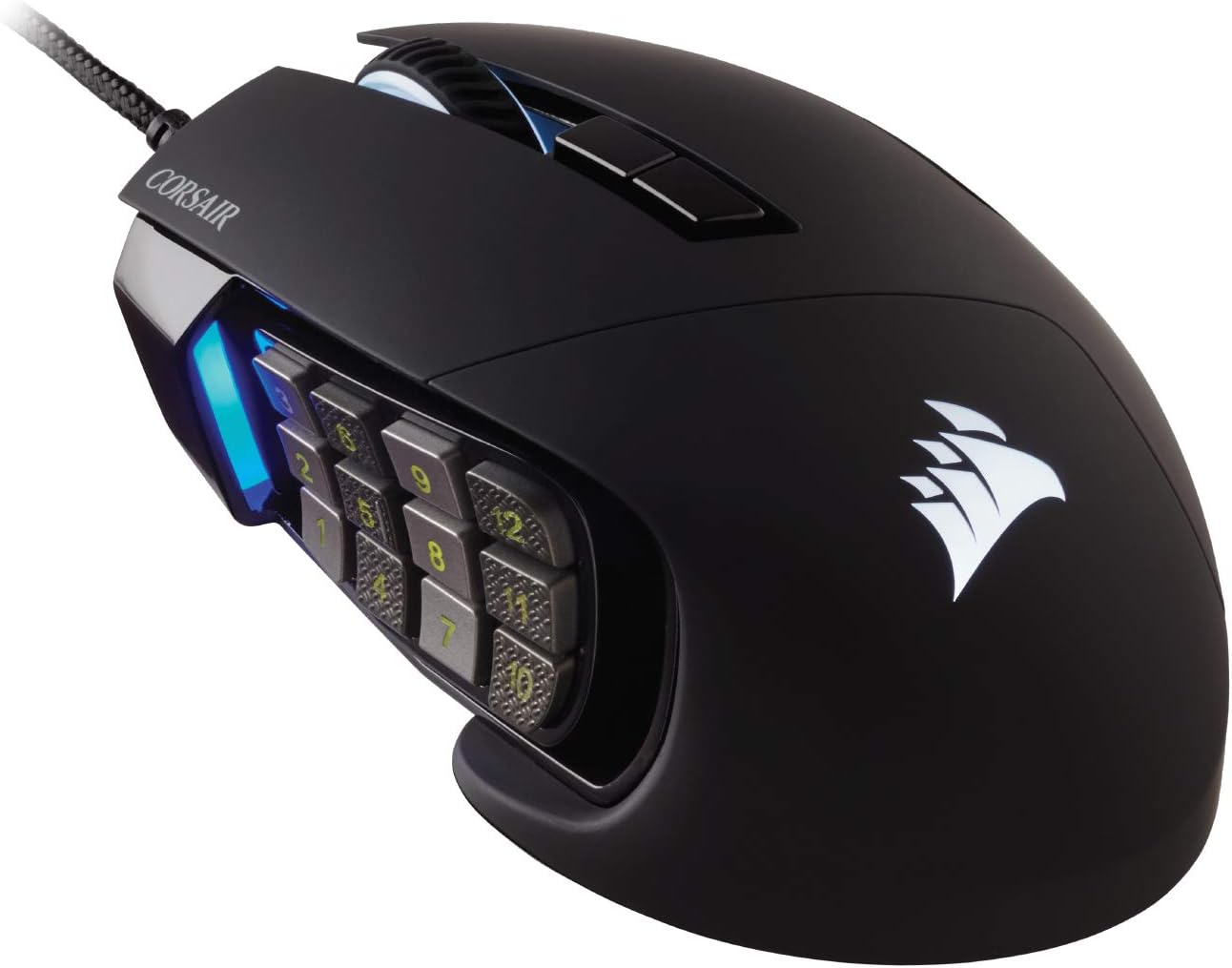
Figure 1: Corsair Scimitar RGB Elite Wired Gaming Mouse
2. Setup
2.1 Unboxing and Initial Connection
Carefully remove the mouse and its accessories from the packaging. The package includes the Corsair Scimitar RGB Elite mouse and a warranty guide.
Video 1: Unboxing and physical overview of the Corsair Scimitar RGB Elite mouse, demonstrating its design and cable management.
To begin using your mouse:
- Connect the USB cable of the mouse to an available USB 2.0 or USB 3.0 port on your computer.
- The mouse will automatically install necessary drivers.
2.2 Software Installation (iCUE)
For full customization and advanced features, install the Corsair iCUE software:
- Visit the official Corsair website (www.corsair.com/icue) to download the latest iCUE software.
- Follow the on-screen instructions to complete the installation.
- Launch iCUE to configure your mouse settings.
3. Features
3.1 17 Fully Programmable Buttons
The Scimitar RGB Elite is equipped with 17 fully programmable buttons, including a 12-button side panel. These buttons are ideal for executing complex macros and frequent actions in MOBA and MMO games, providing a significant advantage in gameplay.

Figure 2: The mouse features 17 programmable buttons, including a 12-button side panel for extensive customization.
3.2 Patented Key Slider Control System
Customize the position of the 12 side buttons to perfectly fit your grip. The patented Key Slider Control System allows you to reposition the button cluster by up to 8mm, ensuring comfortable access to all buttons regardless of your hand size or grip style.

Figure 3: The Key Slider allows for precise adjustment of the side button panel to match your hand and grip.
3.3 Native 18,000 DPI Optical Sensor
Equipped with a custom PixArt PMW3391 optical sensor, the mouse offers native 18,000 DPI, adjustable in 1 DPI resolution steps. This provides highly accurate and customizable tracking for precise control in any gaming scenario.

Figure 4: Diagram illustrating the mouse's 18,000 DPI precision optical sensor.
3.4 Ultra-Durable Construction
The Scimitar RGB Elite is built for longevity, featuring 50 million click-rated Omron switches, a sturdy scroll wheel, and a braided cable. This robust construction ensures the mouse can withstand the demands of extended gaming sessions.
3.5 Comfortable Contoured Shape
The mouse is sculpted to fit the contours of your palm, providing comfort regardless of hand size or grip style. A dedicated right-side finger rest offers additional support during long periods of use.

Figure 5: The ergonomic, contoured shape of the mouse is designed for maximum comfort during use.
4. Operating the Mouse
4.1 Customizing with iCUE Software
The Corsair iCUE software unlocks the full potential of your Scimitar RGB Elite. With iCUE, you can:
- Control dynamic RGB lighting with near-limitless combinations of colors and effects.
- Assign macros and remap any of the 17 programmable buttons.
- Adjust DPI sensitivity in 1 DPI steps.
- Calibrate the sensor to your surface for optimal tracking performance.
- Create and save multiple onboard profiles for different games or applications.

Figure 6: The mouse's dynamic RGB backlighting and iCUE software for comprehensive customization.
Video 2: An official overview of the Corsair Scimitar RGB Elite, highlighting its patented Key Slider, programmable buttons for in-game abilities, durable construction, and 18K DPI optical sensor.
5. Maintenance
To ensure the longevity and optimal performance of your Corsair Scimitar RGB Elite mouse, follow these maintenance guidelines:
- Cleaning: Use a soft, lint-free cloth to gently wipe the surface of the mouse. For stubborn dirt, slightly dampen the cloth with water. Avoid harsh chemicals or abrasive materials.
- Sensor Care: Keep the optical sensor on the underside of the mouse clean. Use a cotton swab or compressed air to remove any dust or debris that may affect tracking performance.
- Cable Management: Avoid sharp bends or excessive pulling on the braided USB cable to prevent damage.
- Storage: When not in use, store the mouse in a clean, dry environment away from extreme temperatures.
6. Troubleshooting
If you encounter issues with your Corsair Scimitar RGB Elite, try the following steps:
- Mouse Not Responding: Try unplugging and re-plugging the USB cable. Test the mouse on a different USB port or another computer to rule out port or system issues.
- Tracking Issues: Ensure the optical sensor is clean and free of debris. Try using the mouse on a different surface or recalibrate the sensor using the iCUE software.
- Buttons Not Working: Check iCUE software to ensure buttons are correctly mapped and not disabled. Update iCUE to the latest version.
- RGB Lighting Problems: Verify RGB settings in iCUE. Ensure the software is up-to-date.
- Software Not Detecting Mouse: Restart your computer. Reinstall the iCUE software. Ensure your operating system is up-to-date.
For further assistance, refer to the Corsair support website or contact customer service.
7. Specifications
| Feature | Detail |
|---|---|
| Brand | Corsair |
| Model | Scimitar RGB Elite |
| Color | Black |
| Connectivity Technology | Wired (USB) |
| Movement Detection Technology | Optical (PixArt PMW3391) |
| DPI | Native 18,000 DPI (adjustable in 1 DPI steps) |
| Programmable Buttons | 17 (including 12 side buttons) |
| Switch Type | Omron (50 million click-rated) |
| Special Feature | Patented Key Slider Side Panel |
8. Warranty and Support
Your Corsair Scimitar RGB Elite mouse comes with a manufacturer's warranty. Please refer to the included Warranty Guide for detailed information regarding warranty terms and conditions.
For technical support, FAQs, and additional resources, please visit the official Corsair support website: support.corsair.com.


