
Hilitand BEM-6C
BERM® BEM-6C Digital Electronic Counter User Manual
Model: BEM-6C | Brand: Hilitand
1. Introduction
This manual provides detailed instructions for the installation, operation, and maintenance of the BERM® BEM-6C Digital Electronic Counter. This device is designed for accurate counting applications in various industrial and commercial settings.
Key features include a large 6-digit LCD display, high counting speed, low power consumption, and strong anti-interference performance.

Figure 1: Front view of the BERM® BEM-6C Digital Electronic Counter, showing the 6-digit LCD display and two control buttons (Power and Reset).
2. Product Specifications
| Feature | Specification |
|---|---|
| Product Model | BEM-6C |
| Power Supply Type | Built-in battery |
| Battery Model | AA R6P |
| Battery Voltage | 1.5V |
| Battery Capacity | 1500mA |
| Counting Range | 0-999999 (6 digits) |
| Max Counting Frequency | 50Hz |
| Min Count Pulse Width | 1 ms |
| Max Resistance On | ≤1KΩ |
| Min Resistance Off | ≥500KΩ |
| Clear Mode | Panel / External |
| Operating Temperature | -5 ℃ ~ 40 ℃ |
| Dimensions | 64 x 38 x 38 mm / 2.52 x 1.5 x 1.5 inches |
| Opening Hole Size | 61 x 36 mm / 2.4 x 1.42 inches |
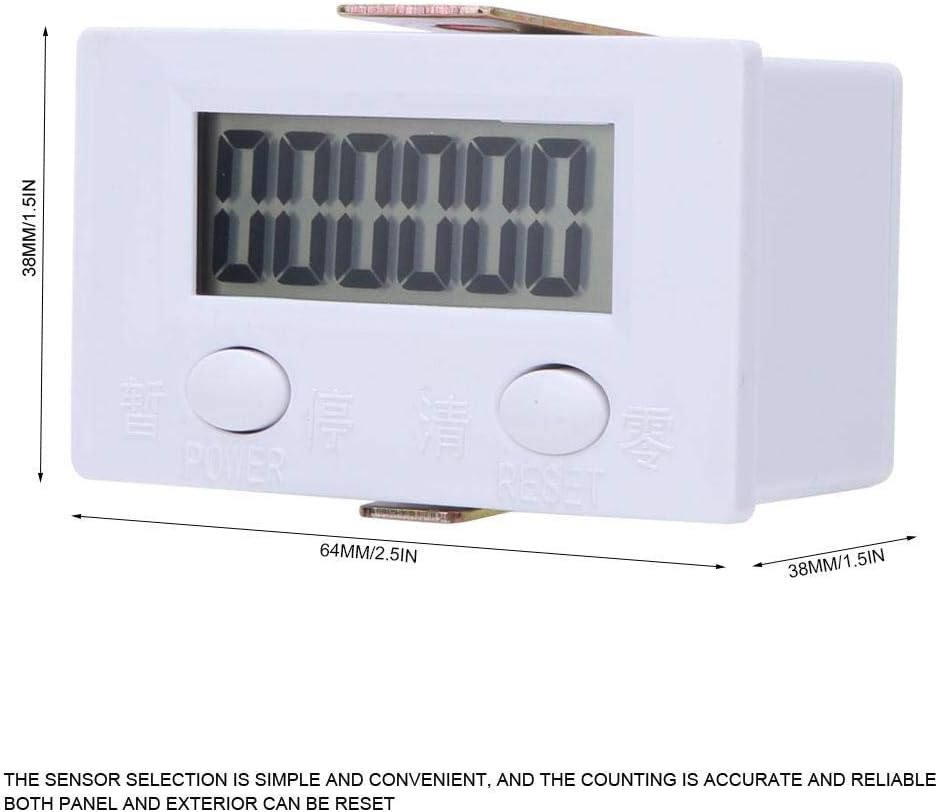
Figure 2: Dimensions of the BERM® BEM-6C Digital Electronic Counter, showing measurements of 64mm (2.5in) length and 38mm (1.5in) height/depth.
3. Setup and Installation
The BEM-6C counter is designed for easy installation. Follow these steps for proper setup:
- Panel Mounting: Ensure the opening hole size in your panel matches the counter's dimensions (61 x 36 mm). Insert the counter into the opening from the front.
- Secure Fastening: Use the included mounting brackets to secure the counter firmly in place from the rear of the panel.
- Wiring Connections: Connect the counting signal input to the terminals labeled "COUNT" (+ and -). Ensure correct polarity. The counter operates by detecting contact closure or pulse signals.
- Reset Wiring (Optional): For external reset functionality, connect a momentary switch to the "RESET" terminals (+ and -).

Figure 3: Rear view of the counter, showing the "RESET" and "COUNT" wiring terminals. Proper connection to these terminals is crucial for operation.
Note: The counter uses a built-in battery and does not require external power for its operation, only for the counting signal input.
4. Operating Instructions
4.1 Power On/Off
The counter is powered by an internal battery. To activate the display, press the POWER button located on the front panel. The display will show the current count.
4.2 Counting Operation
The counter increments its value when a signal is received through the "COUNT" input terminals. This signal is typically a contact closure or a pulse. Ensure your sensor or signal source is correctly connected to these terminals.
The counter is designed for high-speed counting, with a maximum frequency of 50Hz and a minimum pulse width of 1ms.
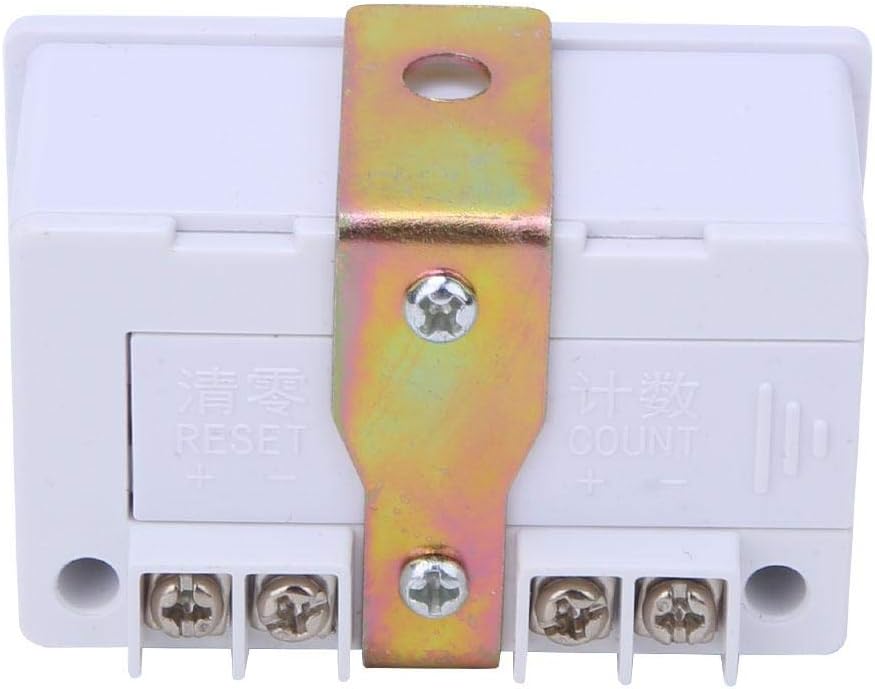
Figure 4: The BERM® BEM-6C counter integrated into an industrial automation setup, demonstrating its application in counting operations.
4.3 Resetting the Count
The counter can be reset in two ways:
- Panel Reset: Press the RESET button on the front panel. The display will clear to 0.
- External Reset: If an external reset switch is connected to the "RESET" terminals, activating this switch will clear the count.
5. Maintenance
The BERM® BEM-6C Digital Electronic Counter is designed for long-term, reliable operation with minimal maintenance. However, adhering to the following guidelines will ensure optimal performance:
- Cleaning: Use a soft, dry cloth to clean the display and casing. Avoid abrasive cleaners or solvents, which can damage the plastic and LCD screen.
- Environmental Conditions: Ensure the counter operates within the specified temperature range (-5 ℃ to 40 ℃). Avoid exposure to excessive moisture, dust, or corrosive environments.
- Battery Life: The built-in battery has a long lifespan. If the display becomes dim or unresponsive, it may indicate a low battery. Battery replacement should be performed by qualified personnel.
- Connection Integrity: Periodically check all wiring connections to ensure they are secure and free from corrosion. Loose connections can lead to inaccurate counts or intermittent operation.

Figure 5: The counter shown in a clean, controlled environment, emphasizing the importance of proper operating conditions for longevity.
6. Troubleshooting
If you encounter issues with your BERM® BEM-6C Digital Electronic Counter, refer to the following troubleshooting guide:
| Problem | Possible Cause | Solution |
|---|---|---|
| Display is blank or dim. | Low or depleted internal battery. | Press the POWER button. If still dim, the battery may need replacement. Contact customer support. |
| Counter not incrementing. | Incorrect wiring of COUNT input; Sensor malfunction; Signal too weak or too fast. | Verify COUNT input wiring polarity and connection. Test the sensor independently. Ensure signal frequency and pulse width are within specifications (50Hz max, 1ms min). |
| Counter resets unexpectedly. | Interference on RESET line; Faulty external reset switch; Internal malfunction. | Check external RESET wiring for shorts or interference. Disconnect external reset to isolate the issue. If problem persists, contact customer support. |
| Inaccurate counting. | Signal noise; Incorrect sensor selection; Environmental interference. | Ensure signal is clean and stable. Use shielded cables if necessary. Verify sensor type is appropriate for the application. |

Figure 6: Close-up view of the counter's LCD display, which should show clear digits during operation. A blank or dim display indicates a potential issue.
7. Warranty and Support
Hilitand products are manufactured to high-quality standards. While specific warranty details are not provided in this manual, please refer to your purchase documentation or the Hilitand official website for warranty information.
For technical support, troubleshooting assistance beyond this guide, or warranty claims, please contact Hilitand customer service. You can often find contact information on the product packaging or the retailer's website where you purchased the item.
Hilitand is committed to providing professional industrial products and customer satisfaction.

Figure 7: Hilitand brand logo, representing the manufacturer of the BERM® BEM-6C Digital Electronic Counter.
Ask a question about this manual
Ask about setup, troubleshooting, compatibility, parts, safety, or missing instructions. Manuals+ will review the question and use this page’s manual context to help answer it.