
1. Introduction
The ANENG V04A is a battery-powered, auto-ranging, True RMS digital multimeter featuring a 4000-count LCD display. This device is designed for accurate measurement of various electrical parameters. Please read this manual thoroughly before operation to ensure safe and correct usage.
2. Safety Information
Warning:
- When the measured voltage exceeds 36V DC or 25V AC, exercise extreme caution to avoid electric shock.
- Incorrect use of measurement modes or ranges can lead to inaccurate readings or damage to the device.
- If "OL" is displayed on the screen, it indicates that the input is outside the measurable range.
- Low battery power can result in incorrect readings. Replace batteries promptly when the low battery indicator appears.
3. Product Overview
The ANENG V04A Digital Multimeter is a versatile tool for electrical measurements. It includes features such as Non-Contact Voltage (NCV) detection, a flashlight, and backlight for improved usability in various environments.

Figure 3.1: ANENG V04A Digital Multimeter with test leads and packaging.
3.1 Key Features
- True RMS: Provides accurate readings for non-sinusoidal waveforms.
- Auto-Ranging: Automatically selects the correct measurement range.
- 4000 Counts LCD Display: Clear digital readout.
- Non-Contact Voltage (NCV) Detection: For identifying live wires without direct contact.
- Flashlight and Backlight: For operation in low-light conditions.
- Data Hold: Freezes the current reading on the display.
- Auto Power Off: Conserves battery life.
- Diode Test and Continuity Check: Essential for circuit diagnostics.
- Temperature Measurement: Supports both Celsius and Fahrenheit.
3.2 Component Identification
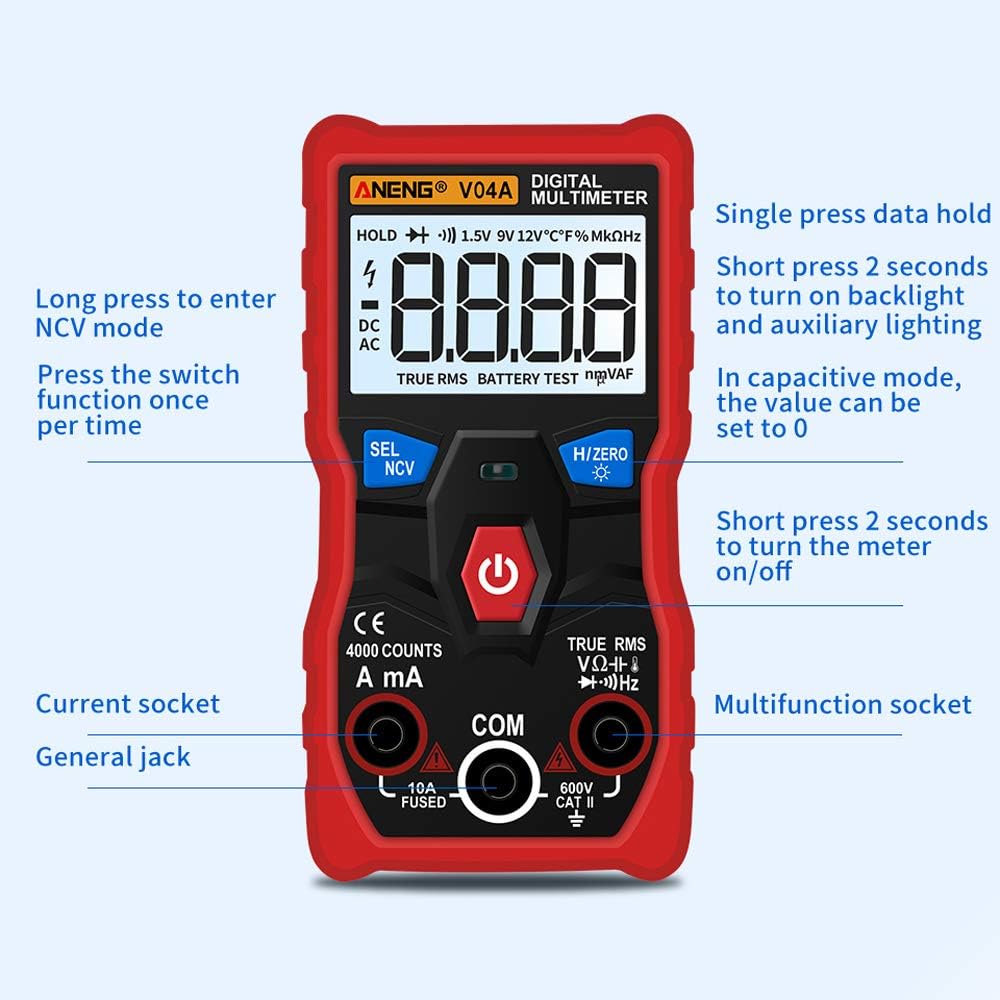
Figure 3.2: Front panel layout with labeled buttons and input jacks.
- 1. Display: 4000 counts LCD.
- 2. SEL/NCV Button: Selects measurement functions or enters NCV mode.
- 3. H/ZERO Button: Data hold or zeroing for capacitance.
- 4. Power Button: Turns the multimeter on/off.
- 5. A/mA Input Jack: For current measurements (up to 10A).
- 6. COM Input Jack: Common terminal for all measurements.
- 7. VΩHz Input Jack: For voltage, resistance, frequency, capacitance, diode, and continuity measurements.
4. Setup
4.1 Battery Installation
The ANENG V04A requires two AAA batteries for operation. Batteries are not included with the product.
- Locate the battery compartment cover on the back of the multimeter.
- Use a screwdriver to open the battery compartment.
- Insert two AAA batteries, ensuring correct polarity (+ and -).
- Replace the battery compartment cover and secure it with the screw.
Note: Replace batteries when the low battery indicator appears on the display to ensure accurate readings.
5. Operating Instructions
5.1 Power On/Off and Auto Shutdown
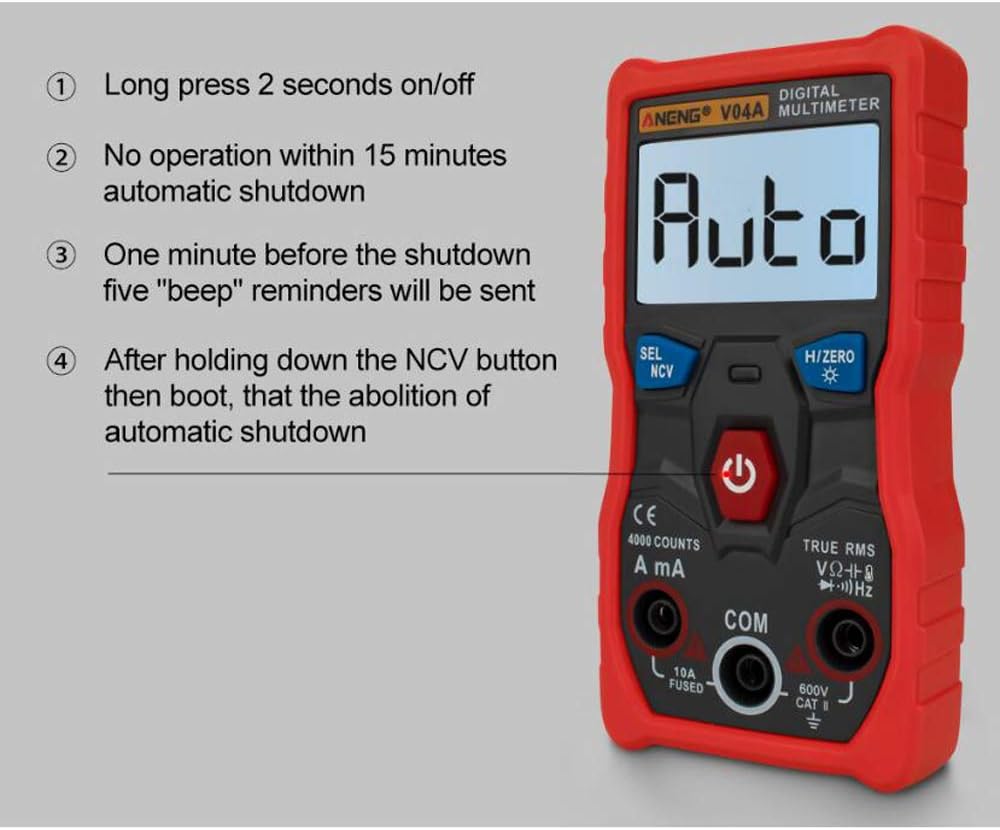
Figure 5.1: Power control and auto shutdown features.
- 1. Power On/Off: Long press the power button (labeled with a circle and vertical line) for 2 seconds to turn the device on or off.
- 2. Automatic Shutdown: The multimeter will automatically shut down after 15 minutes of no operation to conserve battery.
- 3. Shutdown Reminder: One minute before automatic shutdown, five "beep" reminders will be emitted.
- 4. Disable Auto Shutdown: To disable automatic shutdown, press and hold the NCV button while powering on the device.
5.2 Function Selection

Figure 5.2: Using the SEL/NCV button for mode selection.
- 1. NCV Mode: Long press the SEL/NCV button to enter Non-Contact Voltage detection mode.
- 2. Function Switching: Short press the SEL/NCV button to switch between different functions within a measurement category (e.g., diode, continuity, temperature, capacitance, frequency).
- Note: NCV cannot be measured in current mode.
5.3 Data Hold and Zeroing

Figure 5.3: H/ZERO button functions.
- 1. Data Hold: Short press the H/ZERO button to hold the current reading on the display. Press again to release.
- 2. Capacitance Zeroing: When in capacitance measurement mode, press the H/ZERO button to reset the reading to zero.
5.4 Flashlight and Backlight

Figure 5.4: Rear flashlight for illuminating work areas.
- Activate: Press and hold the H/ZERO button for 2 seconds to turn on both the flashlight and the display backlight simultaneously.
- Deactivate: Press and hold the H/ZERO button for 2 seconds again to turn them off.
5.5 Non-Contact Voltage (NCV) Measurement

Figure 5.5: Using the NCV feature to detect voltage without contact.
To use the NCV function, long press the SEL/NCV button. Bring the top of the multimeter near a live wire or electrical outlet. The device will indicate the presence of AC voltage without direct contact.
5.6 General Measurement Procedures
For all measurements, ensure the test leads are correctly inserted into the appropriate input jacks (COM and VΩHz for most measurements, A/mA for current). The multimeter will automatically select the range. Use the SEL/NCV button to cycle through specific functions if needed (e.g., AC/DC voltage, diode, continuity).
- DC Voltage (V): Connect leads in parallel to the DC voltage source.
- AC Voltage (V): Connect leads in parallel to the AC voltage source.
- Resistance (Ω): Connect leads across the component to measure resistance. Ensure power is off.
- DC Current (A/mA): Connect leads in series with the circuit. Ensure the circuit is broken and the multimeter becomes part of the path.
- AC Current (A/mA): Connect leads in series with the circuit.
- Capacitance (F): Connect leads across the capacitor. Ensure the capacitor is discharged before testing.
- Frequency (Hz): Connect leads to the signal source.
- Temperature (°C/°F): Use the included thermocouple probe (if applicable) and select the temperature function.
- Continuity: Connect leads across the circuit or component. A beep indicates continuity.
- Diode Test: Connect leads across the diode. The display will show the forward voltage drop.
6. Maintenance
6.1 Cleaning
Wipe the multimeter casing with a damp cloth and mild detergent. Do not use abrasives or solvents. Ensure the device is off and disconnected from any power source before cleaning.
6.2 Battery Replacement
Refer to Section 4.1 for battery installation instructions. Replace batteries promptly when the low battery indicator appears to maintain measurement accuracy.
6.3 Storage
When not in use for extended periods, remove the batteries to prevent leakage. Store the multimeter in a cool, dry place, away from direct sunlight and extreme temperatures.
7. Troubleshooting
7.1 Digital Multimeter mV File Appears Non-Zero
If the mV reading does not return to zero, consider the following:
- Environmental Factors: Significant changes in ambient temperature or humidity, or the presence of strong electric or magnetic fields, can cause non-zero readings.
- Device Fault: In rare cases, the multimeter itself may have a fault.
To check if the non-zero reading is due to environmental interference:
- Set the multimeter to the mV range.
- Insert the red and black test leads into their respective input jacks.
- Short-circuit the red and black test leads together.
- If the multimeter displays "0000", the non-zero phenomenon is likely due to environmental interference.
While environmental interference may not always affect the usability of the multimeter, it is recommended to eliminate such factors to ensure optimal measurement accuracy and prevent erroneous results.
8. Specifications
| Measurement Type | Range | Accuracy |
|---|---|---|
| DC Voltage (V) | 4.000V, 40.00V, 400.0V, 600V | ±(0.5%+3) |
| AC Voltage (V) | 4.000V, 40.00V, 400.0V, 600V | ±(1%+3) |
| Resistance (Ω) | 4.000K, 40.00K, 400.0K, 4.000M, 40.00M | ±(1.5%+3) |
| DC Current (A/mA) | 40.00mA, 400.0mA, 4.000A, 10.00A | ±(1%+3) |
| AC Current (A/mA) | 40.00mA, 400.0mA, 4.000A, 10.00A | ±(2%+3) |
| Capacitance (F) | 4.000nF, 40.00nF, 400.0nF, 4.000uF, 40.00uF, 400.0uF, 4.000mF | ±(4%+4) |
| Frequency (Hz) | 4.000Hz, 40.00Hz, 400.0Hz, 4.000KHz, 40.00KHz, 400.0KHz, 4.000MHz, 10.00MHz | ±(1%+2) |
| Temperature (°C) | -20°C to 1000°C | ±(3%+5) |
| Temperature (°F) | -4°F to 1832°F | ±(3%+5) |
8.1 General Specifications
- Display: 4000 counts
- Ranging: Auto
- Material: ABS+PVC
- Update Rate: 3 times/second
- Low Battery Indication: Yes
- True RMS: Yes
- Data Hold: Yes
- Backlight: Yes
- Flashlight: Yes
- Auto Power Off: Yes
- Driving Mode: AAA x2 (Batteries not included)
- Product Size: 119.5mm x 60mm x 28.5mm (4.70in x 2.35in x 1.12in)
- Working Environment Temperature: 0°C to 40°C (32°F to 104°F)
- Humidity of Working Environment: Less than 70%
- Continuity: Yes
- Diode Measurement: Yes
- NCV (Non-contact voltage detection): Yes


