
XAXAZON DH-CS01
XAXAZON DH-CS01 1000ml Electric Dehumidifier User Manual
Model: DH-CS01
1. Introduction
Thank you for choosing the XAXAZON DH-CS01 Electric Dehumidifier. This device is designed to reduce excess humidity in small to medium-sized spaces, helping to prevent mold, mildew, and musty odors. Please read this manual thoroughly before operating the dehumidifier to ensure safe and efficient use.
2. Important Safety Instructions
- Always place the dehumidifier on a stable, level surface.
- Ensure the power cord is not damaged or pinched.
- Do not immerse the unit, power cord, or plug in water or other liquids.
- Keep the unit away from heat sources, direct sunlight, and flammable materials.
- Do not block the air inlet or outlet vents. Maintain at least 0.5 meters (20 inches) clearance from walls and other objects.
- Unplug the dehumidifier before cleaning, maintenance, or when not in use for extended periods.
- This appliance is not intended for use by persons (including children) with reduced physical, sensory or mental capabilities, or lack of experience and knowledge, unless they have been given supervision or instruction concerning use of the appliance by a person responsible for their safety.
- Do not attempt to repair or modify the unit yourself. Contact qualified service personnel for repairs.
3. Product Overview
The XAXAZON DH-CS01 is a compact and efficient dehumidifier featuring Peltier technology, a 1000ml water tank, and a quiet operation suitable for various small spaces.

Figure 1: XAXAZON DH-CS01 Electric Dehumidifier. This image displays the overall design of the white dehumidifier with its transparent water tank, showing the unit from the front.
3.1 Key Features
- Efficient Humidity Removal: Utilizes Peltier technology to remove up to 450ml of moisture per day.
- Quiet Operation: Operates at approximately 39 dB, suitable for bedrooms and offices.
- Automatic Shut-off: The unit automatically turns off when the water tank is full.
- 7-Color LED Light: Features an optional LED light with continuous color changes or a lockable single color.
- Portable Design: Compact and lightweight with a handle for easy transport.

Figure 2: Benefits of effective dehumidification. This image illustrates how the dehumidifier helps mitigate issues like black mildew, water condensation, musty odors, dust mites, wood product damage, and respiratory problems by cleaning the air and reducing humidity.
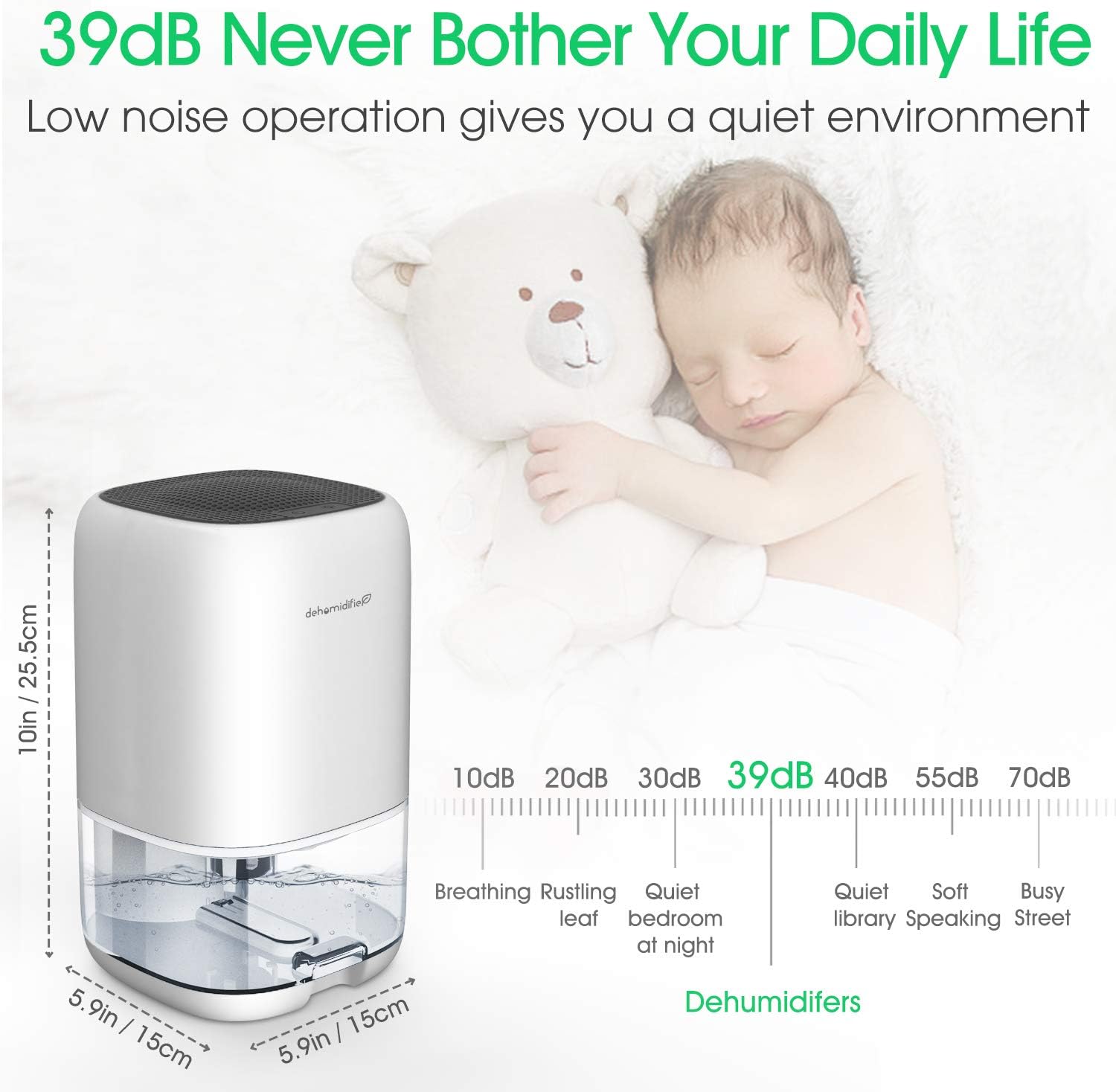
Figure 3: Noise level comparison. This image shows the dehumidifier's operating noise level of 39dB, comparing it to sounds like breathing (10dB), rustling leaves (20dB), and a quiet bedroom at night (30dB), indicating it will not disturb daily life.

Figure 4: High-efficiency dehumidification. This image highlights the dehumidifier's coverage area of 5-15m² and its maximum daily water removal capacity of 450ml (16oz) in an environment of 30°C (86°F) and 80% relative humidity.
4. Setup
- Unpack the Dehumidifier: Carefully remove the unit and all packaging materials from the box.
- Choose a Location: Place the dehumidifier on a firm, level surface in the desired room. For optimal performance, ensure there is at least 0.5 meters (20 inches) of clear space around the air inlet and outlet vents to allow for proper airflow. Avoid placing it directly against a wall or in a confined space.
- Connect Power: Plug the power adapter into the dehumidifier's power input port, then plug the other end into a suitable electrical outlet (220V).
- Initial Check: Ensure the water tank is correctly seated in the unit before turning it on.
5. Operating Instructions
5.1 Power On/Off
- To turn on the dehumidifier, press the power button located on the top panel. The unit will start operating, and the LED light will automatically cycle through its 7 colors.
- To turn off the dehumidifier, press the power button again.
5.2 LED Light Control
The dehumidifier features a multi-color LED light that can be controlled independently.

Figure 5: Smart LED and Auto-Off features. This image demonstrates how to control the 7-color LED light (alternating, locking a color, turning off/on) and explains the automatic shut-off function when the water tank is full, indicated by a flashing red light.
- When the unit is powered on, the LED light will automatically cycle through 7 colors.
- Press the light control button (next to the power button) once to lock the current color.
- Press the light control button a second time to turn off the LED light.
- Press the light control button a third time to turn the LED light back on, resuming the cycling mode.
5.3 Automatic Shut-off
The dehumidifier is equipped with an automatic shut-off function for safety and convenience. When the 1000ml water tank reaches its maximum capacity, the dehumidifier will automatically turn off, and a red warning light will flash to indicate that the tank needs to be emptied.
6. Maintenance
Regular maintenance ensures the longevity and efficient operation of your dehumidifier.
6.1 Emptying the Water Tank
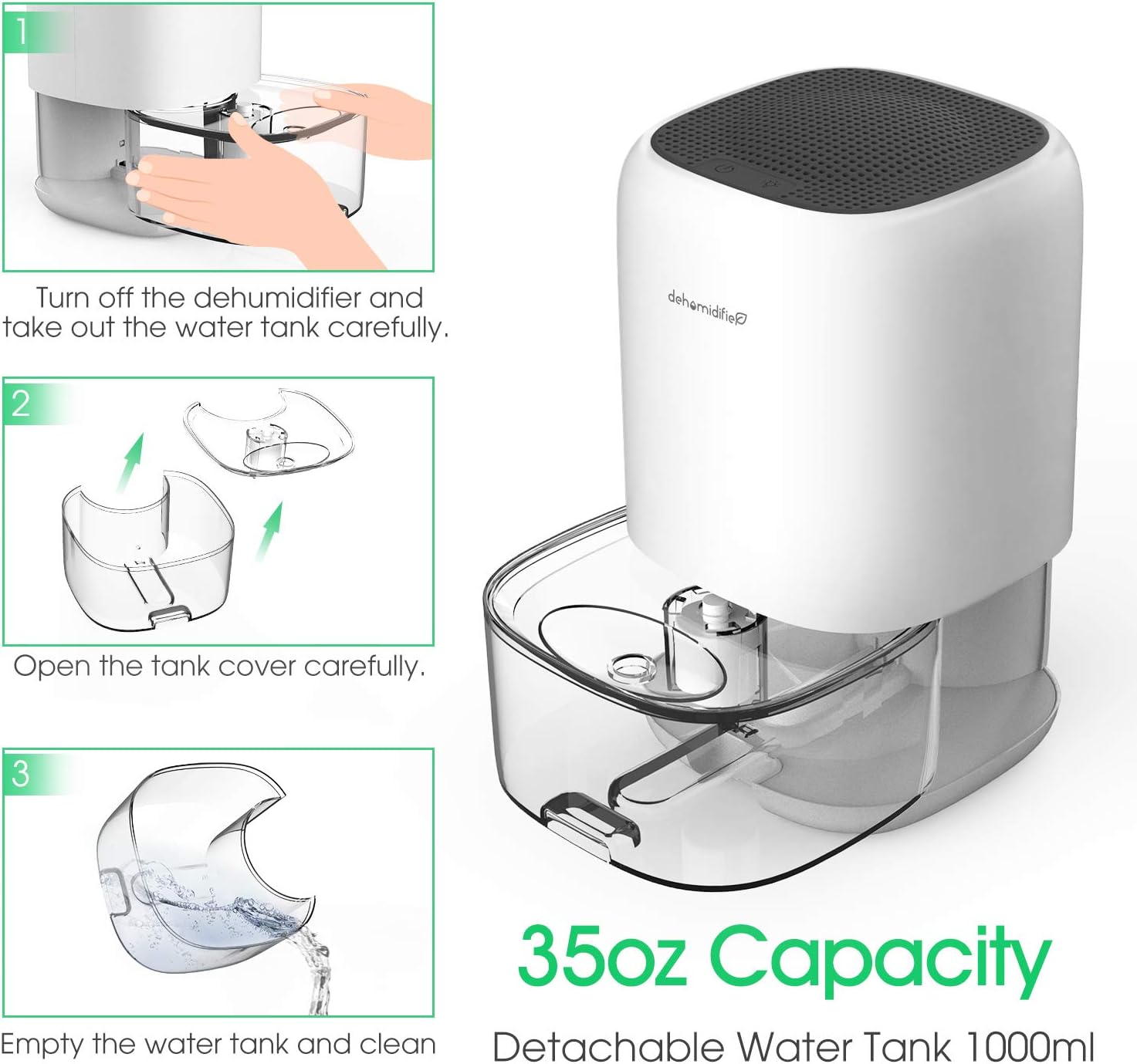
Figure 6: Water tank removal and emptying. This image provides a three-step visual guide: 1. Turn off the dehumidifier and carefully remove the water tank. 2. Open the tank cover. 3. Empty the water tank and clean it.
- Turn off the dehumidifier and unplug it from the power outlet.
- Carefully pull out the water tank from the front of the unit.
- Open the tank cover.
- Empty the collected water into a sink or drain.
- Rinse the water tank with clean water. Do not use harsh detergents or abrasive cleaners.
- Close the tank cover and reinsert the water tank firmly into the dehumidifier until it clicks into place.
6.2 Cleaning the Unit
- Wipe the exterior of the dehumidifier with a soft, damp cloth.
- Do not use abrasive cleaners or solvents, as these may damage the surface.
- Ensure the air inlet and outlet vents are free from dust and debris. You can use a soft brush or vacuum cleaner to gently clean these areas.
6.3 Cleaning the Air Filter
The dehumidifier is equipped with an air filter to prevent dust from entering the unit. Regularly clean the filter to maintain optimal performance.
- Turn off and unplug the dehumidifier.
- Locate the air filter (typically at the back or side intake).
- Gently remove the filter.
- Clean the filter with a soft brush or vacuum cleaner to remove accumulated dust. For a more thorough cleaning, you may rinse it under running water. Ensure the filter is completely dry before reinserting.
- Reinsert the clean, dry filter back into its position.
7. Troubleshooting
If you encounter issues with your dehumidifier, please refer to the following common problems and solutions:
| Problem | Possible Cause | Solution |
|---|---|---|
| Dehumidifier does not turn on. | No power supply. Power button not pressed. Water tank not correctly inserted. | Check if the power cord is securely plugged into the unit and the outlet. Press the power button. Ensure the water tank is fully and correctly seated. |
| No water collected or low dehumidification. | Room temperature too low (below 41°F/5°C). Humidity level too low. Air vents blocked. Unit placed too close to a wall. | Dehumidifiers are less effective in low temperatures. Ensure room humidity is above 45% RH. Clear any obstructions from air vents. Relocate the unit at least 0.5 meters from walls. |
| Unit turns off automatically, red light flashing. | Water tank is full. | Empty the water tank as described in Section 6.1. Reinsert the tank correctly. |
| Unit is noisy. | Fan obstruction. Unit not on a level surface. | Check for any foreign objects in the fan area. Ensure the unit is on a stable, level surface. |
If the problem persists after trying these solutions, please contact customer support.
8. Specifications
| Feature | Specification |
|---|---|
| Model Number | DH-CS01 |
| Brand | XAXAZON |
| Dimensions (L x W x H) | 15 x 15 x 25.6 cm |
| Weight | 1.3 Kilograms |
| Water Tank Capacity | 1000 Milliliters |
| Dehumidification Capacity | Max. 450 ml/day (at 30°C, 80% RH) |
| Power Consumption | 40 Watts |
| Voltage | 220V |
| Noise Level | 39 Decibels |
| Recommended Coverage Area | 5 - 15 m² |
| Material | Plastic, filter media |
| Special Features | 7-color LED light, Automatic shut-off |
9. Warranty and Support
9.1 Warranty Information
Specific warranty details for the XAXAZON DH-CS01 Dehumidifier may vary by region and retailer. Please refer to the warranty card included with your purchase or contact your point of sale for detailed information regarding warranty coverage and terms.
Information regarding the availability of spare parts for this product is currently unavailable.
9.2 Customer Support
For technical assistance, troubleshooting not covered in this manual, or warranty claims, please contact the retailer or manufacturer's customer service. Please have your model number (DH-CS01) and purchase date ready when contacting support.
Ask a question about this manual
Ask about setup, troubleshooting, compatibility, parts, safety, or missing instructions. Manuals+ will review the question and use this page’s manual context to help answer it.