
Introduction
Thank you for purchasing the VOYZ VZ-A8828 True Wireless Bluetooth PA Speaker System. This system is designed to provide high-quality audio output with versatile connectivity options, including Bluetooth wireless streaming, USB/SD playback, FM radio, and auxiliary input. This manual provides essential information for the safe and efficient operation of your speaker system.
Important Safety Information
California Proposition 65 Warning: This product may expose you to chemicals known to the State of California to cause cancer and birth defects or other reproductive harm. For more information, please visit the official Proposition 65 Warnings Website.
Always follow basic safety precautions when using this product to reduce the risk of fire, electric shock, and injury to persons.
- Do not expose this appliance to rain or moisture.
- Do not block any ventilation openings.
- Do not install near any heat sources.
- Only use attachments/accessories specified by the manufacturer.
- Refer all servicing to qualified service personnel.
Package Contents
Please ensure all items are present in the package:
- VOYZ VZ-A8828 PA Speaker System (1 or 2 units, depending on purchase)
- Remote Control
- Power Adapter/Cable
- User Manual (this document)
Product Features
- 600 Watt Peak Power Output
- 8-inch Subwoofer and 1-inch Tweeter
- Bluetooth Wireless Streaming
- True Wireless Stereo (TWS) Dual Pairing Capability
- USB Flash & SD Memory Card Readers
- AM/FM Radio with Digital LCD Display
- Aux-In (3.5mm) and RCA (L/R) Stereo Line Input Connectors
- 1/4'' Microphone Input for Karaoke
- Built-in Amplifier and 2-Channel Mixer
- Adjustable Mic Level, Input Level, Volume, Treble, and Bass Controls
- Convenient Carry Handles and 35mm Speaker Stand Mount
- Engineered Heavy Duty ABS Housing
Controls and Connections
Familiarize yourself with the control panel located on the rear of the speaker.
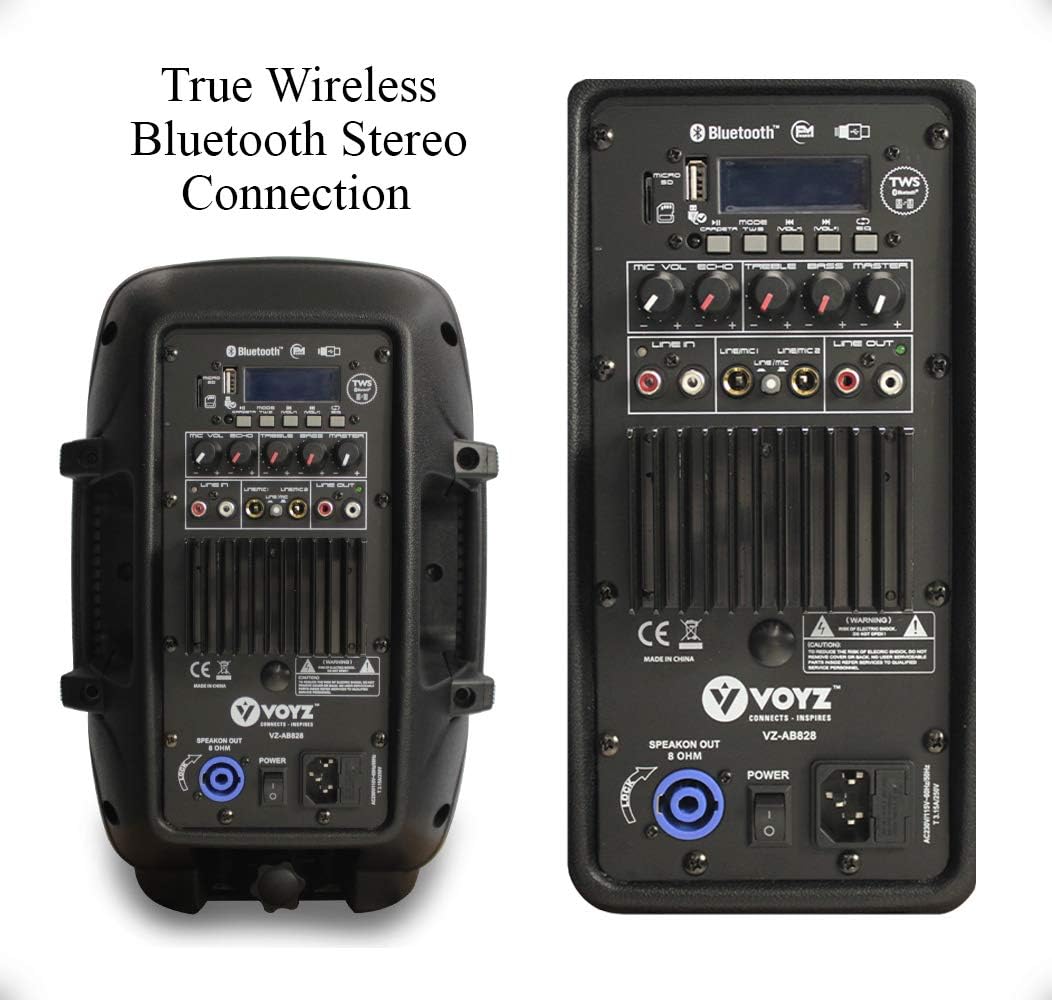
Image: Rear panel of the VOYZ VZ-A8828 PA speaker. This view displays the various input and output ports, including USB, SD card slot, Bluetooth controls, microphone input, line inputs, and power switch.
- USB/SD Card Slots: Insert USB flash drives or SD cards for media playback.
- Bluetooth/Mode Controls: Buttons for Bluetooth pairing, mode selection (Bluetooth, USB, SD, FM, Aux), and playback controls (Play/Pause, Skip).
- TWS Button: For True Wireless Stereo pairing of two VZ-A8828 speakers.
- Mic Level: Adjusts the volume of the connected microphone.
- Echo: Adjusts the echo effect for the microphone.
- Treble/Bass: Adjusts the high and low frequencies of the audio output.
- Master Volume: Controls the overall output volume of the speaker.
- Line In (3.5mm Aux): Connect external audio devices using a 3.5mm audio cable.
- Line In (RCA L/R): Connect external audio devices using RCA cables.
- Line Out (RCA L/R): Output audio to another speaker or audio system.
- Mic Input (1/4''): Connect a wired microphone.
- Power Switch: Turns the speaker system ON or OFF.
- AC Power Input: Connect the power cable to an electrical outlet.
- Speakon Out (8 Ohm): Connect an external passive speaker (if applicable, check model compatibility).
Setup
1. Speaker Placement
Place the speaker on a stable, flat surface or mount it on a 35mm speaker stand. Ensure adequate ventilation around the unit.
2. Power Connection
- Connect the provided power cable to the AC Power Input on the rear panel of the speaker.
- Plug the other end of the power cable into a standard electrical outlet (110/220V selectable, ensure correct voltage is selected if applicable).
3. Initial Power On
Flip the Power Switch to the "ON" position. The digital LCD display will illuminate, indicating the speaker is powered on.
Operating Instructions
Bluetooth Pairing (Single Speaker)
- Ensure the speaker is powered on.
- Press the "MODE" button on the speaker's control panel or remote control until "BLUETOOTH" mode is selected. The display will show "BLUE" and a blinking Bluetooth icon, indicating it's ready for pairing.
- On your mobile device (smartphone, tablet, etc.), enable Bluetooth and search for available devices.
- Select "VOYZ" or "VZ-A8828" from the list of devices.
- Once connected, the speaker will emit a confirmation tone, and the Bluetooth icon on the display will stop blinking. You can now stream audio wirelessly.

Image: Illustration of a smartphone connecting to two VOYZ speakers via Bluetooth, demonstrating wireless audio streaming.
True Wireless Stereo (TWS) Pairing (Two Speakers)
To achieve a stereo sound experience, you can pair two VOYZ VZ-A8828 speakers together wirelessly.
- Ensure both VZ-A8828 speakers are powered on and in Bluetooth mode. Do not connect either speaker to your mobile device yet.
- On one of the speakers (this will be your primary speaker), press and hold the "TWS" button for a few seconds. The speaker will emit a pairing tone.
- The two speakers will automatically search for and connect to each other. Once connected, you will hear a confirmation tone, and the display on both speakers will indicate TWS mode.
- Now, on your mobile device, enable Bluetooth and search for available devices. You will see only one "VOYZ" or "VZ-A8828" entry.
- Select this entry to connect your mobile device to the primary speaker. Audio will now play in stereo across both speakers.

Image: Two VOYZ VZ-A8828 speakers demonstrating the dual wireless stereo pairing feature, with a smartphone indicating connection.
USB/SD Card Playback
- Insert a USB flash drive or SD card into the corresponding slot on the rear panel.
- The speaker will automatically switch to USB or SD mode and begin playing compatible audio files (MP3, WMA). If not, press the "MODE" button to select the correct source.
- Use the playback control buttons (Play/Pause, Previous, Next) on the speaker or remote control to manage your music.
FM Radio Operation
- Press the "MODE" button until "FM" mode is selected.
- Press and hold the "Play/Pause" button to initiate an automatic scan for available FM radio stations. The speaker will save detected stations.
- Use the "Previous" and "Next" buttons to navigate through the saved stations.
Auxiliary Input (3.5mm / RCA)
- Connect your external audio device (e.g., MP3 player, laptop) to the "Line In" (3.5mm or RCA) port on the speaker's rear panel using an appropriate audio cable.
- Press the "MODE" button until "AUX" or "LINE" mode is selected.
- Control playback and volume from your connected device. Adjust the Master Volume on the speaker as needed.
Microphone Input (Karaoke)
- Connect a 1/4'' microphone to the "Mic Input" jack on the rear panel.
- Adjust the "Mic Level" knob to control the microphone's volume.
- Use the "Echo" knob to add an echo effect to your vocals.
Adjusting Sound
Use the "Treble" and "Bass" knobs on the control panel to fine-tune the audio output to your preference. The "Master Volume" knob controls the overall loudness of the system.
Maintenance
- Cleaning: Use a soft, dry cloth to clean the exterior of the speaker. Do not use liquid cleaners or abrasive materials.
- Storage: When not in use for extended periods, store the speaker in a cool, dry place, away from direct sunlight and extreme temperatures.
- Ventilation: Ensure that the speaker's ventilation openings are not blocked to prevent overheating.
- Power Cable: Regularly inspect the power cable for any damage. If damaged, replace it with an approved cable.
Troubleshooting
| Problem | Possible Cause | Solution |
|---|---|---|
| No power | Power cable not connected; Power switch off; Outlet not working. | Ensure power cable is securely connected; Turn power switch ON; Test outlet with another device. |
| No sound output | Master Volume too low; Incorrect input mode selected; Audio source issue. | Increase Master Volume; Press MODE button to select correct input; Check audio source device and cables. |
| Bluetooth not pairing | Speaker not in Bluetooth mode; Device Bluetooth off; Speaker already paired to another device. | Press MODE to select Bluetooth; Enable Bluetooth on your device; Disconnect from other devices and try again. |
| TWS pairing fails | Speakers not in Bluetooth mode; One speaker already paired to a mobile device. | Ensure both speakers are in Bluetooth mode and not connected to any mobile device before initiating TWS pairing. |
| USB/SD playback not working | Incorrect mode selected; Incompatible file format; Corrupt USB/SD card. | Select USB/SD mode; Ensure files are MP3/WMA; Try a different USB/SD card. |
Specifications
| Feature | Detail |
|---|---|
| Max Power Output | 600 Watt |
| RMS Power Output | 350 Watt |
| Amplifier Class | AB |
| Subwoofer Size | 8-inch |
| Tweeter Size | 1.0-inch Titanium |
| Impedance | 8 Ohm |
| Frequency Response | 46Hz-20kHz (Subwoofer), 600Hz-20kHz (Tweeter) |
| Sensitivity | 96dB (Subwoofer), 110dB (Tweeter) |
| Voice Coil | 50mm, 2-inch (Subwoofer), Kapton (Tweeter) |
| Digital Audio File Compatibility | MP3, WMA |
| Maximum SD/USB Flash Memory Support | 32GB |
| T.H.D. | 1% |
| S/N Ratio | 72dB |
| Crossover Frequency | 2.2kHz |
| Voltage Selectable | 110/220V |
| Material | Acrylonitrile Butadiene Styrene (ABS), Steel |
| Connectivity Technology | Bluetooth, USB |
| Connector Type | Aux |
| Number of Channels | 2 |
Warranty and Support
VOYZ products are built to last. If your item shows any defect, please contact the seller or manufacturer for repair or exchange. Please retain your proof of purchase for warranty claims.
For further assistance or technical support, please refer to the contact information provided with your purchase or visit the official VOYZ website.