
Cecotec 04218
Cecotec Bamba PrecisionCare Pro Clipper Titanium Go User Manual
Model: 04218
Introduction
Thank you for choosing the Cecotec Bamba PrecisionCare Pro Clipper Titanium Go. This professional and ergonomic hair clipper is designed for high-performance grooming, featuring durable stainless steel blades with titanium coating and a powerful motor. With its long-lasting lithium battery and versatile comb attachments, it offers precise and comfortable cutting for various hair lengths. Please read this manual carefully before use to ensure proper operation and maintenance of your device.
Important Safety Warnings
Always read all instructions carefully before using the appliance. Keep this manual for future reference.
- Do not immerse the appliance in water or other liquids.
- Keep the appliance away from children.
- Ensure the power cord is not damaged before use.
- Do not use the appliance if it has been dropped or damaged.
- Only use the provided accessories and charger.
- Unplug the appliance before cleaning.
Product Overview
The Cecotec Bamba PrecisionCare Pro Clipper Titanium Go is equipped with high-quality components for superior performance.

Figure 1: The Cecotec Bamba PrecisionCare Pro Clipper Titanium Go, showcasing the main unit and the eight included comb attachments. These combs allow for a wide range of cutting lengths.
Components:
- Hair Clipper Unit
- Titanium-coated Stainless Steel Blades
- Lithium Battery (2000 mAh)
- 8 Comb Attachments (3, 6, 10, 13, 16, 19, 22, 25 mm)
- Charging Cable (for corded and cordless use)
- Cleaning Brush
- Lubricating Oil
- Travel Bag
Setup
1. Initial Charging
Before first use, fully charge the clipper. Connect the charging cable to the clipper and a suitable power source. The battery indicator on the clipper will show the charging progress. A full charge provides approximately 2 hours of cordless operation.

Figure 2: The digital display on the clipper indicating the remaining battery power. This feature helps you monitor usage and charging needs.

Figure 3: The clipper resting on a surface, with its display clearly showing a high battery percentage, indicating it's ready for extended use.
2. Attaching Comb Attachments
Select the desired comb attachment (from 3mm to 25mm) based on your preferred cutting length. Align the comb with the clipper head and gently push until it clicks into place. Ensure it is securely fastened before use.
Operating Instructions
1. Powering On/Off
Press the power button to turn the clipper on. Press it again to turn it off.
2. Adjusting Cutting Length
The clipper offers cutting lengths from 1.5 mm to 25 mm. Use the provided 8 comb attachments for specific lengths (3, 6, 10, 13, 16, 19, 22, 25 mm). Additionally, a precise adjustment lever allows for fine-tuning the blade position for intermediate lengths or closer cuts without a comb.
3. Corded and Cordless Use
The clipper can be used both wirelessly (powered by its internal battery) or corded (while connected to the power adapter). This "non-stop" function ensures you can always complete your grooming session.
4. Hair and Beard Trimming
For best results, ensure hair is clean and dry. Move the clipper against the direction of hair growth. Use smooth, even strokes.

Figure 4: A user demonstrating the precise trimming capability of the clipper around the sideburn area, highlighting its ergonomic design for detailed work.
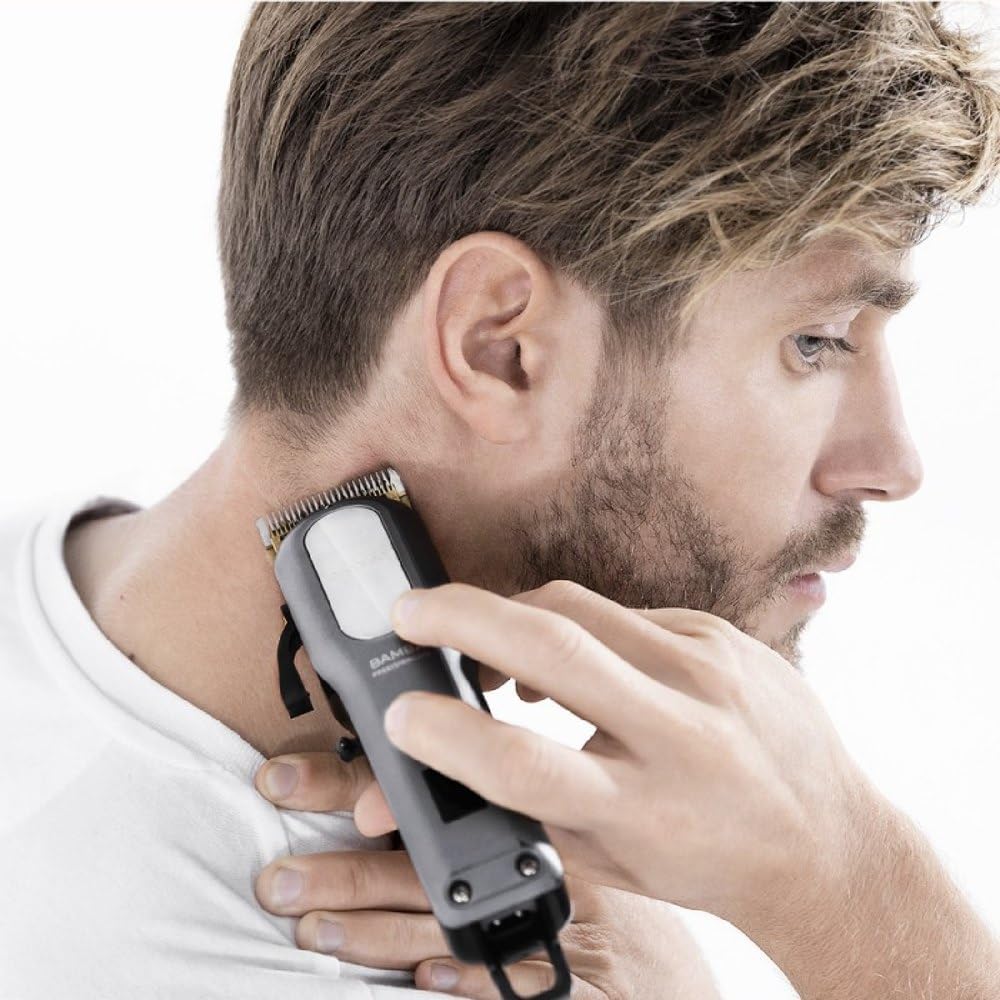
Figure 5: The clipper being used to neatly trim the neckline, showcasing its effectiveness for maintaining a clean and professional look.
Maintenance
1. Cleaning the Blades
After each use, turn off and unplug the clipper. Remove any comb attachments. Use the provided cleaning brush to remove hair clippings from the blades. For a more thorough cleaning, the blades can be rinsed under running water, but ensure the main unit is not submerged. Dry thoroughly before reattaching or storing.
2. Oiling the Blades
Regularly apply a few drops of the included lubricating oil to the blades. Turn the clipper on for a few seconds to distribute the oil evenly. This helps maintain blade sharpness and ensures smooth operation.
3. Storage
Store the clipper and its accessories in the provided travel bag in a dry, cool place, away from direct sunlight and moisture.
Troubleshooting
If you encounter any issues with your Cecotec Bamba PrecisionCare Pro Clipper, please refer to the following common solutions:
- Clipper not turning on: Ensure the battery is charged. If using corded, check the power connection.
- Blades pulling hair: Clean and oil the blades. Ensure no hair is trapped.
- Reduced cutting performance: Blades may need cleaning or oiling. Ensure the correct comb attachment is used and properly secured.
- Battery not charging: Check the charging cable and power adapter for damage. Ensure the connection is secure.
If the problem persists after trying these steps, please contact Cecotec customer support.
Specifications
| Brand | Cecotec |
| Model Number | 04218 |
| Product Name | Bamba PrecisionCare Pro Clipper Titanium Go |
| Blade Material | Stainless Steel with Titanium Coating |
| Power Source | Battery Powered (Lithium 2000 mAh) |
| Battery Autonomy | Up to 2 hours |
| Cutting Lengths | 1.5 mm to 25 mm |
| Comb Attachments | 8 combs (3, 6, 10, 13, 16, 19, 22, 25 mm) |
| Dimensions (L x W x H) | 5.2 x 4.5 x 19.3 cm |
| Weight | 700 grams |
| Special Feature | Cordless operation, Adjustable lever |
Ask a question about this manual
Ask about setup, troubleshooting, compatibility, parts, safety, or missing instructions. Manuals+ will review the question and use this page’s manual context to help answer it.