
Introduction
This manual provides detailed instructions for the installation, operation, and maintenance of your Sprwinautummer CarPlay 6.5in MIB RCD330 Touchscreen unit. Designed as a replacement for various VW models, this unit enhances your driving experience with modern connectivity features like Apple CarPlay and Bluetooth.
The unit is a 100% OEM component, ensuring compatibility and quality. Please read this manual thoroughly before installation and use to ensure proper functionality and safety.
Setup and Installation
Package Contents
- 1X 6.5 in MIB2 RCD330 Plus CarPlay Unit (6RD 035 187 B)
- 1X Camera Adapter (Free)
- 1X Antenna Adapter (Free)
Installation Overview
Installation of this unit is designed to be plug-and-play for compatible VW models. Basic tools such as a T25 bit and plastic pry tools are recommended for removing the existing head unit and bezel. Exercise caution to avoid damaging vehicle components during removal and installation.

Image: The RCD330 unit shown with the included camera adapter (yellow RCA) and antenna adapter (blue connector).
Initial Power-On and Language Selection
Upon initial power-on, the unit may take a few seconds to boot up. You may need to select the desired language from the system settings. The unit supports English (US) and other languages.
Video: Demonstrates initial power-on, language selection, and basic navigation of the unit's interface.
Operating Instructions
Apple CarPlay Functionality
Connect your iPhone via the USB port to activate Apple CarPlay. CarPlay allows you to access compatible apps such as Maps, Music, Phone, and Messages directly on the unit's touchscreen display.

Image: The unit displaying the Apple CarPlay home screen with various application icons.

Image: Apple CarPlay displaying a map for navigation, with search and destination options.

Image: The Messages interface within Apple CarPlay, showing a list of recent conversations.
Bluetooth Connectivity
The unit features built-in Bluetooth with an integrated microphone, eliminating the need for external modules. Key Bluetooth functions include:
- Displaying phone book contacts.
- Direct dialing from the radio display.
- Adding favorite phone numbers.
- Viewing recent contacts.
- A2DP Bluetooth music playback.

Image: Screenshots showing the radio tuning interface and the Bluetooth phone interface with contact options.
Media Playback
The unit supports various media sources:
- SD Card: Insert an SD card into the dedicated slot for media playback.
- USB: Connect USB devices for media playback or Apple CarPlay.
- AUX: Use the auxiliary input for external audio devices.

Image: A diagram highlighting the SD Card, Aux, and USB ports on the front of the unit.
Parking System (OPS) and Rear View Camera (RVC)
The unit supports Optical Parking System (OPS) for vehicles equipped with 4 or 8 original parking sensors. This feature assists drivers by providing visual feedback on obstacles during parking and maneuvering.
Rear View Camera (RVC) functionality is supported. Please note: The radio does not support RGB cameras. If your vehicle has an RGB camera, a compatible adapter (such as the included camera adapter) or a new camera with RCA output will be required.
Maintenance
To ensure the longevity and optimal performance of your RCD330 unit, follow these general maintenance guidelines:
- Keep the touchscreen clean using a soft, lint-free cloth. Avoid abrasive cleaners.
- Ensure proper ventilation around the unit to prevent overheating.
- Regularly check for and install any available software updates to improve performance and add new features. System information and update options can be found in the 'Setup' menu.
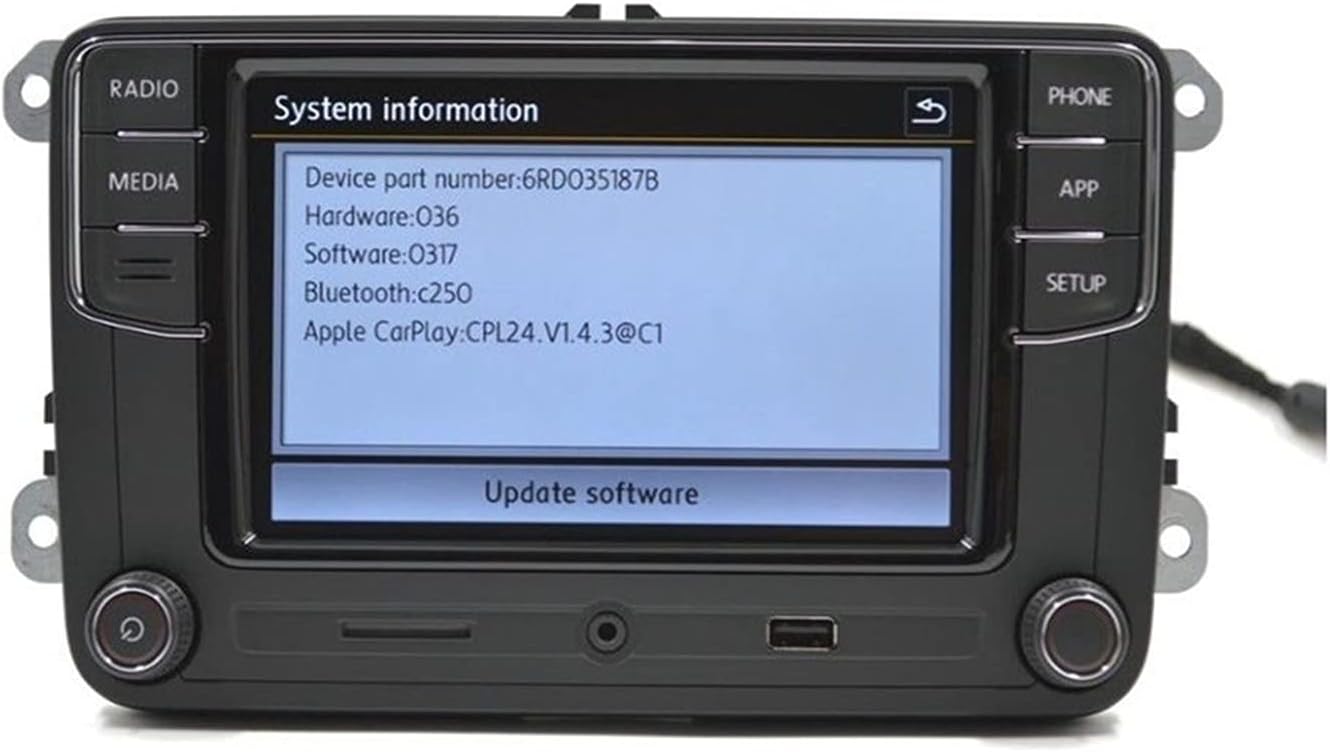
Image: The system information screen, showing device part number, hardware, software, and Apple CarPlay version, with an option to update software.
Troubleshooting
Common Issues and Solutions
- Radio keeps turning ON and OFF: This issue may indicate a gateway problem in your vehicle, requiring a higher version gateway to match the radio. You can provide your VIN/chassis number to the seller for a recommended gateway part number.
- Rear View Camera not working: Ensure your camera is compatible (not RGB). An adapter or a new camera with RCA output may be necessary.
- Battery Drain: In rare cases, an incompatible gateway or wiring issue can lead to parasitic battery drain. If you experience this, consult a qualified automotive technician to diagnose the electrical system.
- AM Radio Reception: Due to regional frequency differences, AM radio functionality may be limited or non-existent in some areas. Consider using alternative audio sources like Bluetooth or CarPlay for radio content.
Specifications
| Feature | Specification |
|---|---|
| Brand | Sprwinautummer |
| Model Name | RCD330 |
| Manufacturer Part Number | 6RD 035 187 B |
| Screen Size | 6.5 Inches |
| Special Feature | Touchscreen |
| Connectivity Technology | Bluetooth |
| Audio Output Mode | Stereo |
| Mounting Type | Dashboard Mount |
| Item Weight | 3.8 pounds |
| Product Dimensions | 11.73 x 9.72 x 6.97 inches |
Warranty and Support
This unit is a 100% OEM component and can be tested at authorized VW service centers. For any technical support, troubleshooting assistance beyond this manual, or inquiries regarding product compatibility, please contact the seller directly. Ensure you have your product details and vehicle information ready for efficient support.


