
Introduction
The ART PS4x4PROUSB is a professional power distribution system designed to provide clean, protected power to your audio, video, or computer equipment. It features advanced power filtering, surge protection, and convenient metering to ensure the safe and reliable operation of your connected devices. This manual provides essential information for the proper setup, operation, and maintenance of your PS4x4PROUSB unit.
Safety Information
Please read and understand all safety instructions before operating the PS4x4PROUSB. Failure to do so may result in electric shock, fire, or damage to the unit or connected equipment.
- Do not expose this appliance to rain or moisture.
- Do not open the unit. There are no user-serviceable parts inside. Refer all servicing to qualified service personnel.
- Ensure the power source voltage matches the unit's requirements (115VAC).
- Do not overload the unit. The maximum output wattage is 1800 Watts.
- Always connect the unit to a grounded power outlet.
- Keep ventilation openings clear to prevent overheating.
Setup
1. Unpacking
Carefully remove the PS4x4PROUSB unit and all accessories from its packaging. Inspect the unit for any signs of damage that may have occurred during shipping. If damage is found, contact your dealer immediately.
2. Rack Mounting
The PS4x4PROUSB is designed for standard 1U rack mounting. Secure the unit into your equipment rack using appropriate rack screws. Ensure adequate ventilation around the unit.
3. Connecting Power
Connect the integrated AC power cable from the PS4x4PROUSB to a grounded 115VAC power outlet. Ensure the power switch on the front panel is in the OFF position before connecting to the main power supply.

Figure 1: Rear panel of the PS4x4PROUSB, illustrating the AC IN connection and the eight switched power outlets.
4. Connecting Devices
The PS4x4PROUSB provides nine power outlets: eight on the rear panel and one on the front panel. Additionally, two USB charging ports are available on the front. Connect your equipment to these outlets. The rear outlets are switched, meaning they are controlled by the main power switch. The front outlet and USB ports may have independent control or be always-on, depending on the specific model variant.
Operating Instructions
1. Front Panel Controls

Figure 2: Front panel of the PS4x4PROUSB with rack lights off.
- Power Switch: Located on the front panel, this switch controls the power to the rear outlets.
- Input Voltage/Current Metering Display: An easy-to-read digital display provides real-time monitoring of the input voltage and current draw, allowing you to confirm your system is operating within safe parameters.
- USB Charging Ports: Two USB ports are available for charging compatible devices.
- Rack Lights: Pull-out lights are integrated into the front panel to illuminate your rack-mounted gear. These lights typically have a dimmer control.

Figure 3: Front panel with rack lights extended and illuminated.
2. Rear-Mounted Gooseneck Light
The PS4x4PROUSB includes a rear-mounted gooseneck light source. This flexible light can be positioned to illuminate the connections and wiring at the back of your rack, simplifying setup and troubleshooting in low-light environments.
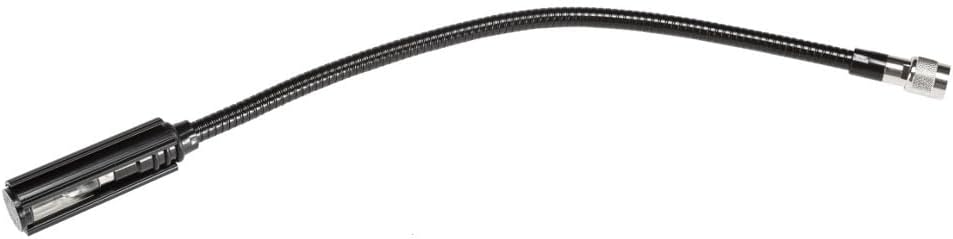
Figure 4: The detachable gooseneck light.
3. Advanced Power Filtering (APF)
The unit incorporates ART’s Advanced Power Filtering (APF) technology. This system utilizes both common mode and differential mode topologies in series to minimize unwanted noise and interference, providing cleaner power to your sensitive equipment.
4. Surge Protection
The PS4x4PROUSB provides surge protection to safeguard your connected gear against power spikes and surges. In the event of a significant power surge, the protection circuit will activate to prevent damage to your equipment.
Maintenance
1. Cleaning
To clean the unit, use a soft, dry cloth. Do not use abrasive cleaners, solvents, or waxes. Ensure the unit is powered off and disconnected from the main power supply before cleaning.
2. General Care
Regularly inspect the power cable and connections for any signs of wear or damage. Ensure the unit is placed in a well-ventilated area to prevent overheating. Avoid spilling liquids on the unit.
Troubleshooting
- No Power to Outlets:
- Check if the main power switch on the front panel is in the ON position.
- Verify that the power cable is securely connected to both the PS4x4PROUSB and a live wall outlet.
- Check the circuit breaker on the unit (if present) and reset if tripped.
- Ensure the wall outlet is functioning by plugging in another device.
- Noise or Interference:
- While the unit features Advanced Power Filtering, some external interference sources may still affect sensitive equipment. Ensure all audio cables are properly shielded and routed away from power cables.
- Test equipment individually to isolate the source of the noise.
- Surge Protection Indicator:
- If a surge protection indicator light (if present) changes color or turns off, it may indicate that the surge protection components have been compromised by a significant power event. In such cases, the unit may still provide power, but its surge protection capabilities might be reduced or non-existent. Contact customer support for further assistance.
Specifications
| Feature | Specification |
|---|---|
| Model Number | PS4x4PROUSB |
| Output Wattage | 1800 Watts |
| Maximum Input Voltage | 115 Volts (AC) |
| Number of AC Outlets | 9 (8 rear, 1 front) |
| USB Charging Ports | 2 |
| Form Factor | 1U Rack Mount |
| Product Dimensions (L x W x H) | 22 x 9.9 x 3 inches |
| Item Weight | 7.4 pounds |
| Cooling Method | Air |
| Special Features | Dual Metered Display (Voltage/Current), Advanced Power Filtering (APF), Pull-out Rack Lights, Rear Gooseneck Light |
Warranty and Support
ART products are designed for reliability and performance. For specific warranty information, please refer to the warranty card included with your product or visit the official ART website. For technical support, troubleshooting assistance, or service inquiries, please contact your authorized ART dealer or ART customer service directly. Keep your purchase receipt as proof of purchase for warranty claims.