1. Introduction
The Teensy 4.0 is a powerful 32-bit microcontroller board featuring an ARM Cortex-M7 processor running at 600 MHz, powered by the NXP iMXRT1062 chip. It is designed for high-performance applications and offers compatibility with Arduino timing functions, allowing for dynamic clock speed changes without affecting serial baud rates, audio streaming sample rates, or other time-sensitive operations. This compact board comes with pre-soldered header pins for easy integration into your projects.

Figure 1: Top view of the Teensy 4.0 Microcontroller with pre-soldered headers.
2. Key Features
- High-Performance Processor: Equipped with an ARM Cortex-M7 processor at 600MHz, utilizing an NXP iMXRT1062 chip, making it a real-time microcontroller platform.
- Dual-Issue Superscalar Architecture: Capable of executing two instructions per clock cycle, enhancing processing efficiency.
- Tightly Coupled Memory (TCM): Features fast single-cycle access to memory via a pair of 64-bit wide buses, optimizing data and instruction fetching.
- Power Shut-Off Feature: Allows complete disabling of the 3.3V power supply by holding a pushbutton connected to the On/Off pin for 5 seconds, and re-enabling with a brief press.
- Compact Form Factor: Maintains the same size and shape as the Teensy 3.2, ensuring compatibility with existing projects and accessories.
- Pre-Soldered Headers: Comes with header pins already soldered for convenient plug-and-play use.
- Dynamic Clock Scaling: Hardware and software support allow for dynamic speed changes without affecting timing-sensitive functions like serial baud rates or audio sample rates.
- Cortex-M7 Branch Prediction: The first ARM microcontroller to use branch prediction, reducing overhead for loop execution to a single clock cycle after initial runs.
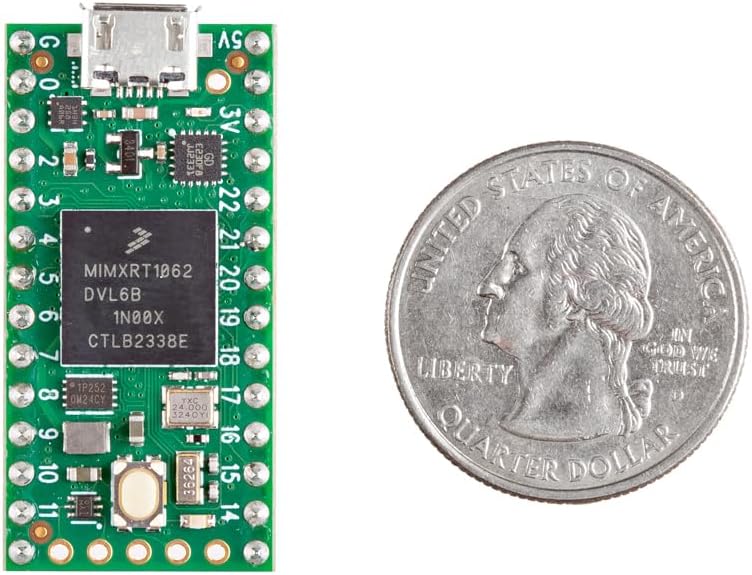
Figure 2: Teensy 4.0 size comparison, highlighting its compact design.
3. Setup Instructions
3.1 System Requirements
To use the Teensy 4.0, ensure your computer meets the following minimum requirements:
- PC computer with Windows 7, 8, 10 or later
- Ubuntu Linux 14.04 or later
- Macintosh OS-X 10.8 or later
- USB Micro-B Cable (not included)
3.2 Initial Connection
- Connect the Teensy 4.0 to your computer using a USB Micro-B cable. The board will draw power from the USB connection.
- Visit the official Teensy website at www.pjrc.com/teensy and navigate to the "Getting Started" section for detailed software installation and driver setup instructions.
- The Teensy 4.0 comes with pre-soldered header pins, allowing for direct insertion into breadboards or custom PCBs.
3.3 Power Shut-Off Feature
The Teensy 4.0 includes a power shut-off feature. By connecting a pushbutton to the On/Off pin, the 3.3V power supply can be completely disabled by holding the button for 5 seconds. A brief press of the button will turn the power back on.
4. Operating Instructions
The Teensy 4.0 is designed for advanced microcontroller projects. Its architecture allows for efficient execution and flexible operation.
4.1 Pinout Overview
The Teensy 4.0 offers a comprehensive set of pins for various functionalities. Refer to the pinout diagrams below for detailed information on digital, analog, PWM, audio, serial, I2C, SPI, and CAN bus pins.

Figure 3: Front side pinout diagram of the Teensy 4.0, showing digital, analog, PWM, audio, serial, I2C, SPI, and CAN bus pins.
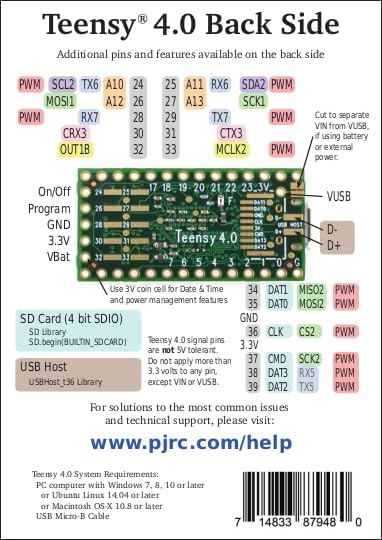
Figure 4: Back side pinout diagram of the Teensy 4.0, detailing additional pins, SD card interface, and USB Host connections.
4.2 Dynamic Clock Scaling
Unlike many traditional microcontrollers, the Teensy 4.0's hardware and Teensyduino's software support for Arduino timing functions are designed to allow dynamic speed changes. This means serial baud rates, audio streaming sample rates, and Arduino functions like delay() and millis(), along with Teensyduino's extensions like IntervalTimer and elapsedMillis, continue to function correctly even when the CPU clock speed is adjusted.
4.3 Memory Architecture
The Cortex-M7 processor in Teensy 4.0 utilizes a sophisticated memory architecture:
- ITCM Bus: Provides a 64-bit path for fetching instructions, ensuring rapid code execution.
- DTCM Bus: Consists of a pair of 32-bit paths, enabling the M7 to perform up to two separate memory accesses in the same cycle.
- Tightly Coupled Memory (TCM): 512KB of memory can be accessed as TCM. Teensyduino automatically allocates Arduino sketch code into ITCM and non-malloc memory to the fast DTCM for optimized performance.
- AXI Bus: Separate from the TCM buses, the main AXI bus accesses other memory and peripherals. Memory not accessed on the tightly coupled buses is optimized for DMA access by peripherals, facilitating efficient I/O operations.
4.4 Branch Prediction
The Cortex-M7 is the first ARM microcontroller to incorporate branch prediction. This feature significantly reduces the overhead associated with loop execution. After a loop has executed a few times, the branch prediction mechanism allows the branch instruction to run in only a single clock cycle, improving overall execution speed.
4.5 Audio Integration
The Teensy 4.0 supports digital audio functionalities. An optional audio adapter can be connected to expand its audio capabilities.
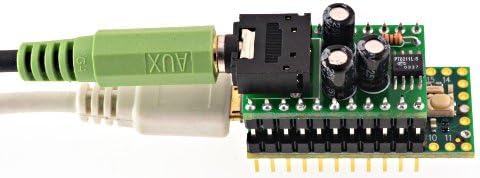
Figure 5: Teensy 4.0 connected to an audio adapter, demonstrating expansion capabilities.
5. Technical Specifications
| Feature | Specification |
|---|---|
| Processor | ARM Cortex-M7 (NXP iMXRT1062) |
| Clock Speed | 600 MHz |
| RAM | 512KB Tightly Coupled Memory (TCM) |
| Flash Memory Size | 1 MB |
| Operating System Compatibility | Arduino IDE |
| Wireless Type | Bluetooth (Note: This refers to potential expansion, not built-in functionality) |
| Item Model Number | TEENSY40_PINS |
| Item Weight | 0.317 ounces |
| Package Dimensions | 6.38 x 4.33 x 0.87 inches |
| Color | Black (PCB is green) |
| Manufacturer | PJRC |
| Date First Available | November 29, 2019 |
| Included Components | Main Board, Pre-Soldered Header Pins |

Figure 6: Dimensional drawing of the Teensy 4.0, showing physical measurements.
6. Maintenance
The Teensy 4.0 is a robust electronic component designed for long-term use. Proper handling and care will ensure its longevity.
- Handling: Always handle the board by its edges to avoid touching sensitive components. Electrostatic discharge (ESD) can damage electronic circuits, so use appropriate ESD precautions.
- Cleaning: If necessary, clean the board gently with a soft, dry brush or compressed air to remove dust. Avoid using liquids or abrasive materials.
- Storage: Store the Teensy 4.0 in a dry, cool environment, away from direct sunlight and extreme temperatures. Keep it in an anti-static bag when not in use.
- Power Precautions: Critical Warning: Do not apply 5V to any of the Teensy 4.0's pins unless specifically designed for 5V tolerance, as this can permanently damage the board. The board primarily operates on 3.3V logic.
7. Troubleshooting
If you encounter issues with your Teensy 4.0, consider the following common troubleshooting steps:
- Board Not Detected:
- Ensure the USB Micro-B cable is securely connected to both the Teensy and your computer.
- Verify that the necessary drivers are installed. Refer to the "Getting Started" section on www.pjrc.com/teensy.
- Try a different USB port or cable.
- Code Upload Issues:
- Confirm that the correct board type (Teensy 4.0) is selected in your Arduino IDE or development environment.
- Press the program button on the Teensy board to put it into bootloader mode before uploading.
- Check for compilation errors in your code.
- Unexpected Behavior / Board Damage:
- Review your wiring carefully. Applying 5V to pins not tolerant of it is a common cause of damage. The Teensy 4.0 operates primarily at 3.3V logic levels.
- Ensure power supply is stable and within the specified range.
- Further Assistance: For more complex issues or specific project-related questions, the Teensy community forum is a valuable resource. You can also visit the official support page.
8. Warranty and Support
8.1 Technical Support
For solutions to the most common issues, technical support, and community forums, please visit the official PJRC website:
The PJRC website provides extensive documentation, examples, and a vibrant community forum where users can ask questions and share knowledge.
8.2 Warranty Information
Specific warranty details for the Teensy 4.0 are provided by the manufacturer, PJRC. Please refer to the official PJRC website or contact their customer service for the most current warranty terms and conditions.