Introduction
This manual provides instructions for the ALLIMITY CT-90275 replacement remote control. This remote is designed to function as a direct replacement for various Toshiba TV models, offering immediate usability without complex programming. Please refer to the compatibility list to ensure your TV model is supported.
Compatible Toshiba TV Models:
- 32AV500U, 37AV500U, 26LV47, 26LV67, 37HL67S, 32HL67U, 32LV67U, 26HL47, 32HL67, 26HL67, 42HL67US, 37HL67, 42HL67, 65HM167, 57HM117, 65HM117, 37AV50U, 32HL67US
- 42HL117, 32HL17, 26AV52U, 32AV50U, 32LV67, 32HL17U, 32HL37U, 42HL17, 37HL17, 32HL37, 42HL67U, 19AV500U, 19AV501U, 19AV51U, 26AV500U, 26AV50U, 32LV17, 32LV37U, 32LV17U, 32LV37, 50HM67, 57HM167, 42AV500U, 37AV500E, 26AV500
Setup
The ALLIMITY CT-90275 remote control is designed for immediate use with compatible Toshiba TV models. No programming or pairing is required.
Installing Batteries
- Locate the battery compartment on the back of the remote control.
- Slide the battery compartment cover downwards and remove it.
- Insert two (2) AAA alkaline batteries, ensuring the positive (+) and negative (-) terminals match the diagrams inside the compartment.
- Replace the battery compartment cover by sliding it back into place until it clicks securely.

Figure 1: Battery installation for the CT-90275 remote control.
Once batteries are installed, the remote is ready for operation.
Operating Instructions
The ALLIMITY CT-90275 remote control provides full functionality for your compatible Toshiba TV. Point the remote directly at your television's infrared receiver for optimal performance.
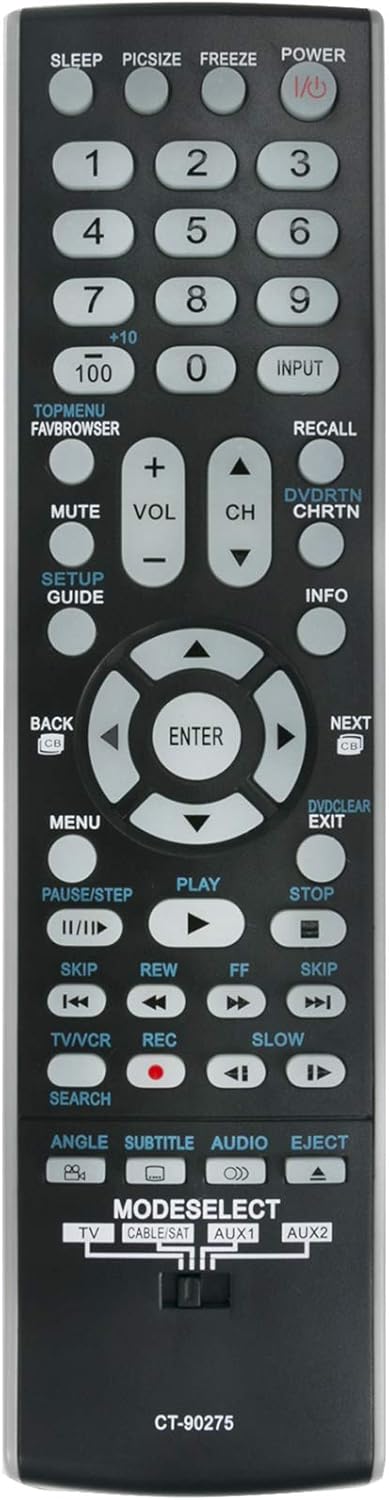
Figure 2: Front view of the CT-90275 remote control with button layout.
Key Functions Overview:
- POWER (I/O): Turns the TV on or off.
- Number Buttons (0-9, +10, 100): Directly select channels.
- INPUT: Cycles through available input sources (HDMI, AV, etc.).
- VOL (+/-): Adjusts the volume level.
- CH (Up/Down): Changes TV channels.
- MUTE: Mutes or unmutes the TV audio.
- MENU: Accesses the TV's main menu.
- Navigation Pad (Up/Down/Left/Right/ENTER): Navigates through menus and confirms selections.
- BACK: Returns to the previous menu or screen.
- EXIT: Exits the current menu or function.
- PLAY, PAUSE/STEP, STOP, REW, FF, SKIP: Control playback functions for connected devices (e.g., DVD player).
- TV/VCR: Switches between TV and VCR modes (if applicable).
- REC: Initiates recording (if supported by connected device).
- MODESELECT (TV, CABLE/SAT, AUX1, AUX2): Selects the device to control. Slide the switch to the desired mode.
- SLEEP: Sets a sleep timer for the TV.
- PICSZIZE: Adjusts picture size/aspect ratio.
- FREEZE: Freezes the current image on screen.
- SETUP/GUIDE: Accesses setup menu or TV guide.
- INFO: Displays information about the current program or input.
- DVD/RTN CHRTN: DVD functions / Channel Return.
- RECALL: Recalls the last viewed channel.
- SEARCH: Initiates search function.
- ANGLE, SUBTITLE, AUDIO, EJECT: Specific functions for DVD/Blu-ray players.
Maintenance
Battery Replacement
When the remote control's performance degrades or it stops responding, it is likely time to replace the batteries. Follow the battery installation steps outlined in the "Setup" section. Always replace both batteries simultaneously with new AAA alkaline batteries.
Cleaning
To clean the remote control, gently wipe its surface with a soft, dry cloth. For stubborn dirt, slightly dampen the cloth with water or a mild, non-abrasive cleaner. Avoid using harsh chemicals or excessive moisture, as these can damage the remote's electronics.
Storage
Store the remote control in a cool, dry place away from direct sunlight and extreme temperatures. If the remote will not be used for an extended period, it is recommended to remove the batteries to prevent leakage and potential damage.
Troubleshooting
If you experience issues with your ALLIMITY CT-90275 remote control, please refer to the following common solutions:
- Remote Not Responding:
- Ensure the batteries are correctly inserted with the proper polarity (+/-).
- Replace old batteries with new AAA alkaline batteries.
- Check for any obstructions between the remote control and the TV's infrared sensor.
- Confirm that the TV is powered on.
- Specific Buttons Not Working:
- Verify that the "MODESELECT" switch is set to the correct device (e.g., TV).
- Some buttons may be specific to certain TV models or connected devices.
- Intermittent Operation:
- Weak batteries can cause inconsistent performance. Replace them.
- Ensure you are within a reasonable range and line of sight to the TV.
If the issue persists after trying these steps, the remote control may be faulty or incompatible with your specific TV model, despite the general compatibility list. Please double-check your TV model against the provided list.
Specifications
| Model Number | CT-90275 |
| Brand | ALLIMITY |
| Product Dimensions | 2 x 0.6 x 7 inches |
| Item Weight | 1 ounces |
| Batteries Required | 2 AAA batteries |
| Connectivity Technology | Infrared (IR) |
| Compatible Devices | Television (Various Toshiba models) |
| Special Feature | No Programming Required |
Warranty Information
Specific warranty details for replacement remote controls can vary by retailer and purchase date. Please refer to your purchase documentation or contact the seller directly for information regarding warranty coverage and return policies.
Support
For further assistance or inquiries regarding the ALLIMITY CT-90275 remote control, please contact the retailer from whom the product was purchased. They can provide specific support related to your order and product. Ensure you have your order number and product details available when contacting support.


