
YUCHENGTECH Anti-static Ionizer Industrial Electrostatic Elimination Net + High Voltage Generator
YUCHENGTECH Anti-static Ionizer System User Manual
Model: Anti-static Ionizer Industrial Electrostatic Elimination Net + High Voltage Generator
Brand: YUCHENGTECH
1. Product Overview
The YUCHENGTECH Anti-static Ionizer Industrial Electrostatic Elimination Net, combined with its High Voltage Generator, is designed to effectively control and eliminate static electricity across large areas. This system is crucial for maintaining a static-free environment in sensitive industrial settings, such as clean rooms and manufacturing facilities, where electrostatic discharge (ESD) can damage components or interfere with processes.
The system operates by generating a balanced flow of positive and negative ions, which neutralize static charges on surfaces and objects within its coverage area. Its modular design allows for customization of the ion net size to suit specific spatial requirements.
2. Safety Information
WARNING: Please read all safety instructions carefully before installation and operation. Failure to follow these instructions may result in electric shock, fire, or serious injury.
- Grounding is Essential: The installation of this system must be properly grounded to ensure safe and effective operation. Do not operate the unit without a verified ground connection.
- Environment: Do not operate the Anti-static Net in flammable or explosive environments. This system is designed for use in controlled industrial settings, specifically under the efficient air outlet of Class 100 clean benches or Class 10K-100 clean rooms.
- High Voltage: The system operates with high voltage. Exercise extreme caution during installation, maintenance, and troubleshooting. Only qualified personnel should perform these tasks.
- Clearance: Maintain a minimum distance of 20mm between the Anti-static Net and any adjacent outlets or conductive surfaces to prevent arcing or short circuits.
- Power Disconnection: Always disconnect power to both the Anti-static Net and the High-voltage Generator before performing any installation, maintenance, or inspection.
- Authorized Personnel: Only trained and authorized personnel should install, operate, or service this equipment.
3. Product Components
The YUCHENGTECH Anti-static Ionizer System typically includes the following main components:
- Anti-static Ionizer Net: The primary component responsible for emitting ions to neutralize static charges.
- High-voltage Generator: Powers the ionizer net, providing the necessary high voltage for ion production.
- High-voltage Wire: Connects the ionizer net to the high-voltage generator.
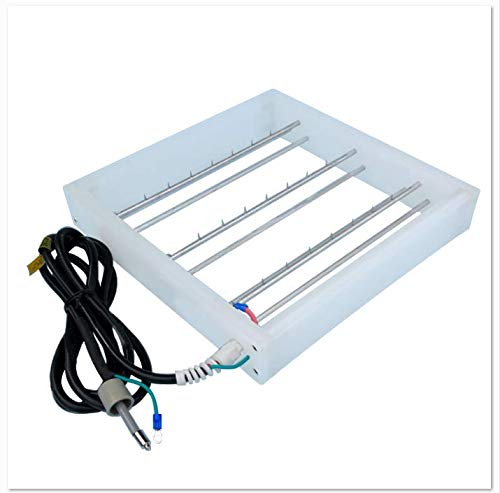
Figure 3.1: Anti-static Ionizer Net. This image shows the rectangular ionizer net with multiple parallel ion-emitting rods and its attached power cable, ready for connection.
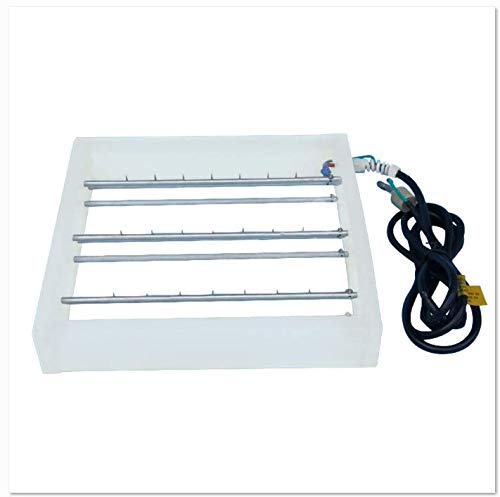
Figure 3.2: Side view of the Anti-static Ionizer Net. This perspective highlights the depth of the net and the arrangement of the ion-emitting rods.

Figure 3.3: High Voltage Generator. This image displays the compact, rectangular high-voltage generator unit with its control panel and power input/output ports.
4. Specifications
| Parameter | Value |
|---|---|
| Input Voltage | 110V |
| Operating Voltage | 4.6kV |
| Working Temperature | 0-50℃ (0-122℉) |
| Working Environment | Under efficient air outlet of Class 100 clean bench or Class 10K-100 clean room. |
| Standard Ion Net Dimensions | 300x300mm, 500x500mm, 1170x570mm (Custom sizes available upon request) |
| Standard High-voltage Wire Length | 3m (Custom lengths available upon request) |
4.1. Performance Test Results (Typical)
Note: Test data may vary depending on ambient air temperature and humidity during testing.
| Parameter | 300mm Test Distance | 600mm Test Distance |
|---|---|---|
| Test Voltage | 5KV-500V | |
| Ambient Temperature | 22℃ | |
| Test Humidity | 60%RH | |
| Neutralization Time (Positive) | 1.2s | 3.5s |
| Neutralization Time (Negative) | 1.3s | 3.6s |
| Residual Voltage (Positive) | 31V | 26V |
| Residual Voltage (Negative) | -30V | -25V |
Ion balance voltage and electrostatic elimination time comply with relevant industry standards.
5. Setup and Installation
Proper installation is critical for the safe and effective operation of the Anti-static Ionizer System. Ensure all safety precautions outlined in Section 2 are understood and followed.
- Site Preparation:
- Confirm the installation environment is a Class 100 clean bench or Class 10K-100 clean room with an efficient air outlet.
- Ensure the area is free from flammable or explosive materials.
- Verify that a suitable 110V power supply is available.
- Mounting the Anti-static Ionizer Net:
- Position the Anti-static Net securely under the efficient air outlet.
- Maintain a minimum clearance of 20mm between the Anti-static Net and any adjacent outlets or conductive surfaces to prevent arcing or short circuits.
- Use appropriate mounting hardware (not included) to ensure the net is stable and level.
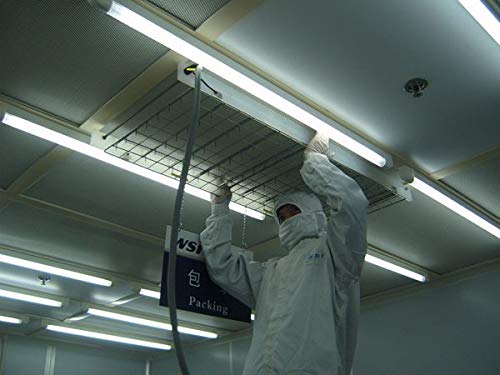
Figure 5.1: Example of Anti-static Ionizer Net installation. A technician in protective gear is shown installing the ionizer net into a ceiling grid, demonstrating typical placement in a controlled environment.
- Connecting the High-voltage Generator:
- Place the High-voltage Generator in a secure, accessible location, away from excessive heat or moisture.
- Connect the High-voltage Wire from the Anti-static Net to the designated high-voltage output port on the High-voltage Generator. Ensure a firm and secure connection.
- Grounding:
- Connect the grounding terminal on the High-voltage Generator to a reliable earth ground. This is a critical safety step.
- Verify the ground connection using appropriate testing equipment.
- Power Connection:
- Once all connections are secure and grounding is verified, connect the High-voltage Generator to the 110V power supply.
6. Operating Instructions
After successful installation and verification of all connections, the system is ready for operation.
- Power On: Activate the power switch on the High-voltage Generator. An indicator light (if present) should illuminate, indicating the unit is powered.
- Ion Emission: The Anti-static Net will immediately begin emitting a balanced stream of positive and negative ions into the surrounding air.
- Coverage: The ion airflow covers a wide area, effectively neutralizing static charges on objects and surfaces within its range. This system is designed to provide broad electrostatic elimination, comparable to multiple ionizing air bars.
- Continuous Operation: The system is designed for continuous operation in the specified clean room environments to maintain consistent static control.
- Power Off: To turn off the system, simply switch off the power on the High-voltage Generator.
7. Maintenance
Regular maintenance ensures the longevity and optimal performance of your Anti-static Ionizer System. Always disconnect power before performing any maintenance.
- Cleaning Ion Emitters: Periodically inspect the ion-emitting rods on the Anti-static Net for dust or debris accumulation. Gently clean them with a soft, lint-free cloth dampened with isopropyl alcohol if necessary. Do not use abrasive cleaners or solvents.
- Visual Inspection: Regularly inspect all cables, connections, and the units themselves for any signs of damage, wear, or loose connections.
- Performance Verification: For critical applications, periodically verify the system's performance using an electrostatic field meter to ensure effective static neutralization and ion balance. Refer to the typical test results in Section 4.1 for reference.
- Environmental Control: Ensure the working environment (temperature and humidity) remains within the specified ranges (0-50℃ and 60%RH for testing conditions) to maintain optimal performance.
8. Troubleshooting
This section provides solutions to common issues you might encounter. For problems not listed here, or if issues persist, contact YUCHENGTECH customer support.
| Problem | Possible Cause | Solution |
|---|---|---|
| System not powering on. | No power supply; loose power cable; faulty generator. | Check power outlet and cable connection. Ensure 110V supply. If problem persists, contact support. |
| Static charges not being neutralized effectively. | Ion emitters are dirty; improper placement; high humidity; faulty generator/net. | Clean ion emitters (see Section 7). Verify correct distance from work area. Check ambient humidity. Ensure proper grounding. |
| Unusual noise or smell from generator. | Internal fault; overheating. | Immediately disconnect power. Do not attempt to repair. Contact YUCHENGTECH customer support. |
| Ion Net not emitting ions (no airflow/feel). | High-voltage wire disconnected; faulty generator; blocked air outlet. | Check high-voltage wire connection. Ensure air outlet is clear. Verify generator is powered. |
9. Warranty and Support
For specific warranty terms and conditions, please refer to the documentation provided with your purchase or contact YUCHENGTECH directly. YUCHENGTECH products are typically covered by a manufacturer's warranty against defects in materials and workmanship.
Customer Support:
If you require technical assistance, have questions about installation, operation, or maintenance, or need to report a product issue, please contact YUCHENGTECH customer support. Provide your product model and purchase date when contacting support to expedite assistance.
Visit the official YUCHENGTECH store for more information: YUCHENGTECH Store on Amazon