
Introduction
This manual provides instructions for the installation, operation, and maintenance of the ForeverPRO 2260518B Cap Water Filter. This component is designed as a replacement part for various refrigerator models, ensuring proper sealing and function of your refrigerator's water filtration system.
Important Safety Information
- Always disconnect power to the refrigerator and turn off the water supply before attempting any installation or maintenance.
- Wear appropriate personal protective equipment, such as gloves, if necessary.
- Ensure all connections are secure to prevent water leaks.
- If you are unsure about any step, consult a qualified technician.
- Keep small parts away from children.
Compatibility
The ForeverPRO 2260518B Cap Water Filter is compatible with a wide range of refrigerators from various brands. It replaces part numbers 1058146, AH969168, EA969168, and PS969168.
Compatible brands include, but are not limited to: Whirlpool, Maytag, KitchenAid, Jenn-Air, Amana, Magic Chef, Admiral, Norge, and Roper.
For a detailed list of compatible models, please refer to the product listing or consult your refrigerator's manual. Examples of compatible models include ASD2520WRB00, ASD2522VRB00, ASD2522VRS00, ASD2522WEB00, and many others.
What's in the Box
- 1 x ForeverPRO 2260518B Cap Water Filter
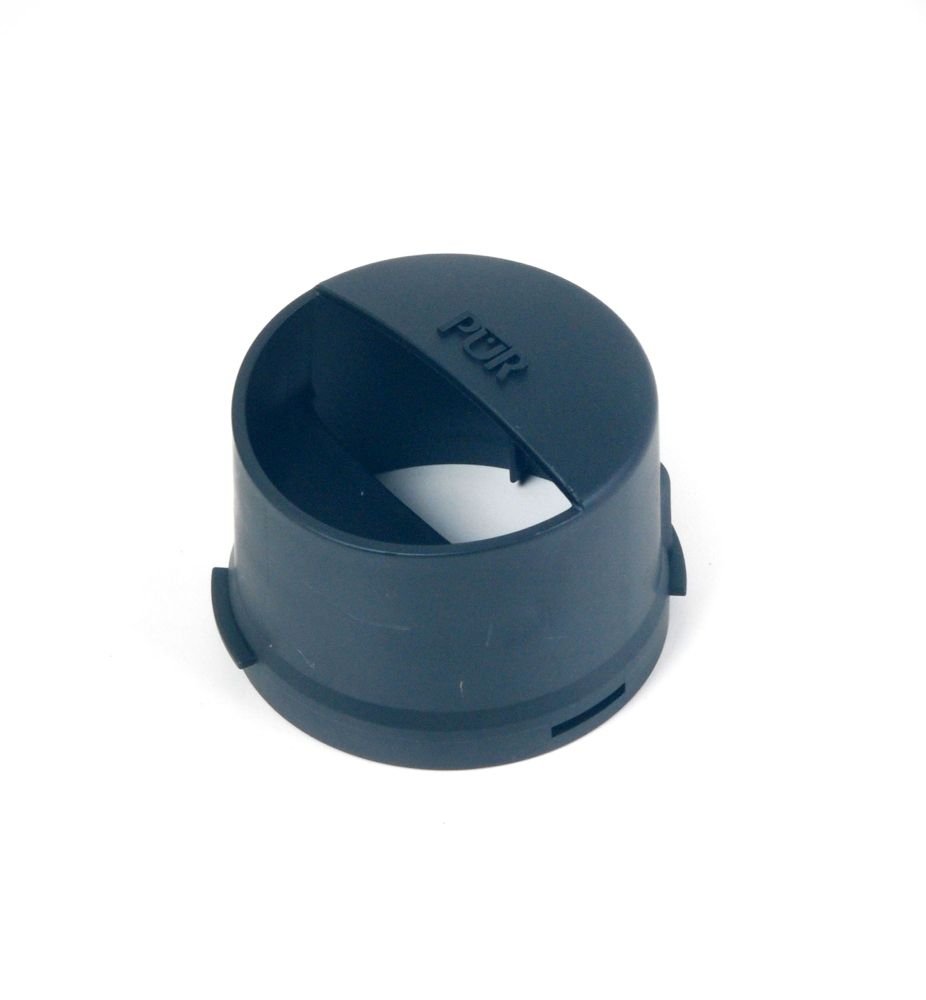
Image: The ForeverPRO 2260518B Cap Water Filter, typically a plastic cap designed to secure the water filter in a refrigerator. It features a specific shape and locking mechanism to ensure a tight seal.
Installation Instructions
Follow these steps to properly install the replacement water filter cap:
- Prepare the Refrigerator:
- Locate the water filter housing in your refrigerator. This is typically found in the upper right corner of the fresh food compartment, in the base grille, or behind the kickplate.
- Turn off the water supply to the refrigerator. This is usually done by turning a shut-off valve located behind the refrigerator or under the sink.
- If your refrigerator has an ice maker, turn it off.
- Remove the Old Cap (if applicable):
- If you are replacing an existing cap, grasp the old cap firmly.
- Depending on your model, you may need to twist it counter-clockwise or press a release button to disengage it from the filter or housing.
- Carefully pull the old cap straight out. Be prepared for a small amount of water to drip.
- Install the New Cap:
- Align the new ForeverPRO 2260518B Cap Water Filter with the filter housing or the water filter cartridge itself.
- Push the cap straight in until it is fully seated.
- Twist the cap clockwise until it locks into place. You should feel it click or stop firmly. Ensure it is securely fastened to prevent leaks.
- Restore Water Supply and Check for Leaks:
- Turn the water supply back on to the refrigerator.
- Carefully inspect the area around the newly installed cap for any signs of water leaks. If leaks occur, ensure the cap is properly seated and twisted into place. If leaks persist, re-check the installation steps or consult a technician.
- Flush the Water System:
- Dispense approximately 2-3 gallons of water through the refrigerator's water dispenser. This flushes air from the system and ensures proper water flow.
- If your refrigerator has an ice maker, turn it back on. Discard the first few batches of ice to ensure any air or impurities are cleared.
Operation
Once installed, the water filter cap operates passively by securing the water filter in place, allowing water to flow through the filter and to the dispenser/ice maker. Ensure the cap remains tightly sealed to prevent water bypass or leaks.
- Water Flow: After installation, verify that water dispenses normally and that the ice maker is producing ice.
- Leak Check: Periodically check the area around the filter cap for any signs of moisture or leaks.
Maintenance
The ForeverPRO 2260518B Cap Water Filter is a durable component designed for long-term use. Regular maintenance primarily involves ensuring its secure fit and inspecting for wear.
- Periodic Inspection: When replacing your water filter cartridge, inspect the cap for any cracks, damage, or signs of wear on the sealing surfaces.
- Cleaning: If necessary, the cap can be wiped clean with a damp cloth. Do not use harsh chemicals or abrasive cleaners.
- Replacement: Replace the cap if it shows signs of damage, does not seal properly, or if water leaks persist after re-installation.
Troubleshooting
| Problem | Possible Cause | Solution |
|---|---|---|
| Water Leakage | Cap not fully seated or twisted. Damaged cap or O-ring. | Ensure cap is pushed in completely and twisted clockwise until it locks. Inspect cap for damage; replace if necessary. Check the water filter cartridge for proper installation. |
| No Water Flow | Water supply off. Air in the system. Filter not installed correctly. | Check if the refrigerator's water supply is on. Flush the system by dispensing water for 2-3 minutes. Ensure the water filter cartridge is correctly installed with the cap. |
| Cap Does Not Fit | Incorrect cap model. Obstruction in housing. | Verify that the cap model 2260518B is correct for your refrigerator. Check the filter housing for any debris or obstructions. |
Specifications
- Part Number: 2260518B
- Replaces Part Numbers: 1058146, AH969168, EA969168, PS969168
- Included Components: Water Filter Cap
- Brand: ForeverPRO
- UPC: 194878013078
Warranty and Support
ForeverPRO stands by the quality of its products. This product comes with a "No Questions Asked Money Back Guarantee". For any support inquiries, questions, or to claim your guarantee, please contact ForeverPRO directly through the retailer where the product was purchased.
As a USA-based company, ForeverPRO is committed to providing high-quality replacement parts and customer satisfaction.