
Introduction
This manual provides essential instructions for the safe and effective use of your YUSTDA 24V AC/DC Adapter, model TNS30W-xy-z. This adapter is designed as a replacement power supply for the Brookstone Shiatsu F6 Full Foot Massager with Heat, model A-839. Please read this manual thoroughly before use and retain it for future reference.
Safety Precautions
- Indoor Use Only: This adapter is designed for indoor use in dry locations. Do not expose to water or high humidity.
- Proper Connection: Connect only to a grounded outlet. Ensure the adapter is fully inserted into the power outlet.
- Compatibility: Use this adapter only with compatible devices as specified (Brookstone Shiatsu F6 Full Foot Massager Model A-839). Using it with incompatible devices may cause damage or malfunction.
- Avoid Damage: Do not bend, twist, or pull the power cord excessively. Avoid placing heavy objects on the cord.
- Disconnection: Always grasp the plug, not the cord, when disconnecting from the power outlet.
- Inspection: Regularly inspect the adapter and cord for any signs of damage. If damaged, discontinue use immediately and contact support.
Package Contents
- YUSTDA 24V AC/DC Adapter (Model TNS30W-xy-z)
- Power Cord (10 feet)
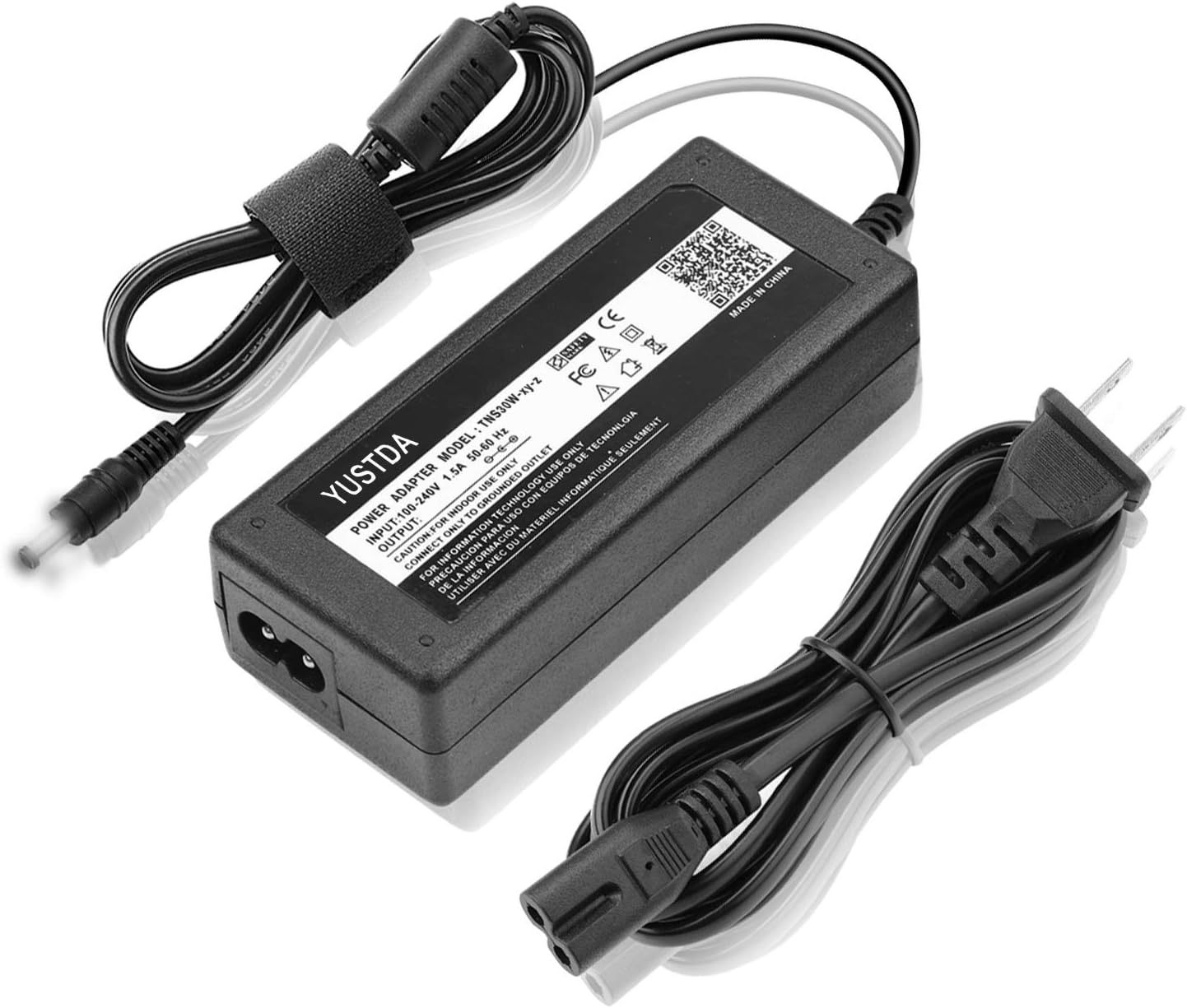
Image 1: The YUSTDA 24V AC/DC Adapter shown with its detachable power cord. The adapter block has product information and safety certifications printed on it. The barrel plug is visible at the end of the adapter's output cable.
Setup
- Connect the Power Cord: Insert the figure-8 connector of the power cord into the corresponding port on the YUSTDA AC/DC adapter block. Ensure a firm connection.
- Connect to Device: Insert the barrel plug connector from the adapter's output cable into the power input port of your Brookstone Shiatsu F6 Full Foot Massager.
- Connect to Power Outlet: Plug the other end of the power cord (the standard two-prong plug) into a suitable, grounded electrical wall outlet.
- Verify Connection: A blue LED indicator light on the adapter block will illuminate when power is supplied, indicating the adapter is receiving power and ready for use.

Image 2: Diagram illustrating the YUSTDA AC/DC adapter with its components. It shows the main adapter block, the input power cord (6ft), and the output cable with a barrel plug (4ft). A blue LED light is visible on the adapter block, indicating power status. An anti-interference magnetic ring is also shown on the output cable.
Operating Instructions
Once the YUSTDA AC/DC Adapter is correctly connected to your Brookstone Shiatsu F6 Full Foot Massager and a power outlet, the foot massager is ready for operation according to its own instruction manual. The adapter provides stable 24V DC power to the device.
- Ensure the adapter's blue LED is illuminated, confirming power supply.
- Operate your foot massager using its integrated controls.
- Disconnect the adapter from the wall outlet when the device is not in use for extended periods.
Maintenance
- Cleaning: Disconnect the adapter from the power source before cleaning. Use a soft, dry cloth to wipe the adapter. Do not use liquid cleaners or aerosols.
- Storage: Store the adapter in a cool, dry place away from direct sunlight and extreme temperatures. Avoid tightly coiling the cables to prevent damage.
- Cable Care: Periodically check the cables for any cuts, fraying, or exposed wires. If any damage is observed, discontinue use immediately.

Image 3: An illustration detailing the internal construction of a high-quality power cable, highlighting the copper wire conductors and the PVC insulation jacket for durability and safety.
Troubleshooting
| Problem | Possible Cause | Solution |
|---|---|---|
| Adapter not powering on (no blue LED) | No power from outlet; loose connection; faulty adapter. | Check wall outlet with another device. Ensure all connections are secure. Try a different outlet. If problem persists, contact support. |
| Device not receiving power | Incorrect barrel plug connection; device issue; adapter issue. | Ensure barrel plug is fully inserted into the device. Verify the adapter's blue LED is on. Consult your device's manual. |
| Adapter feels unusually hot | Overload; poor ventilation; internal fault. | Disconnect immediately. Ensure adequate ventilation around the adapter. Do not use if overheating persists. Contact support. |
| Sparking or burning smell | Electrical fault. | Immediately disconnect from power source. Do not use. Contact support. |
Specifications
- Model: TNS30W-xy-z
- Input: 100-240V AC, 1.5A, 50/60Hz
- Output: 24V DC, 3A
- Wattage: 24 Watts
- Connector Type: Barrel Plug
- Cable Length: 10 feet (total, including input and output cables)
- Special Features: Short Circuit Protection, Over-Temp Protection, Over Voltage Protection, Over Current Protection
- Dimensions (Adapter Block): Approximately 6.73 x 4.29 x 1.57 inches (Package Dimensions, actual block smaller)
- Weight: Approximately 9.1 ounces

Image 4: The YUSTDA AC/DC adapter highlighting its safety features: Over-Temperature Protection, Over Voltage Protection, Over Current Protection, and Short Circuit Protection, represented by shield icons.
Warranty and Support
For warranty information or technical assistance, please contact YUSTDA customer service. Refer to your purchase documentation for specific warranty terms.
Contact Email: epcustomerservice@yahoo.com

Image 5: The YUSTDA AC/DC adapter emphasizing its durable and compact design. The image shows the adapter block with a two-prong plug, illustrating its suitability for home, office, and travel.