
1. Introduction
Thank you for choosing the CVR D-802 Series Professional Power Amplifier. This high-performance amplifier is designed to deliver robust and clear audio for professional sound reinforcement applications. Featuring a compact 1U rack-mountable design, it offers significant power output with advanced protection circuitry. This manual provides essential information for the safe and efficient operation of your amplifier, including setup, operation, maintenance, and troubleshooting.

Figure 1.1: Front view of the CVR D-802 Professional Power Amplifier, showcasing its blue faceplate and ventilation grilles.
2. Safety Information
Please read and understand all safety instructions before operating this amplifier. Retain this manual for future reference.
- Electrical Safety: Always connect the amplifier to a grounded power outlet. Do not expose the unit to rain or moisture. Disconnect power before making any connections or performing maintenance.
- Ventilation: Ensure adequate airflow around the amplifier. Do not block ventilation openings. Maintain at least 4 inches (10 cm) of clear space around the unit.
- Placement: Place the amplifier on a stable, level surface or mount it securely in a standard 19-inch equipment rack. Avoid placing it near heat sources or in direct sunlight.
- Servicing: Do not attempt to service this unit yourself. Refer all servicing to qualified service personnel. Opening the amplifier enclosure may expose you to dangerous voltages.
- Cables: Use high-quality, shielded cables for all audio connections to minimize noise and interference. Ensure power cables are not pinched or walked on.
3. Setup
3.1 Unpacking and Inspection
Carefully remove the amplifier from its packaging. Inspect the unit for any signs of damage that may have occurred during transit. If damage is found, contact your dealer immediately.
3.2 Placement and Rack Mounting
The D-802 amplifier is designed for standard 19-inch rack mounting. Ensure the rack provides sufficient ventilation. If not rack-mounting, place the amplifier on a flat, stable surface with ample space for airflow around all sides.
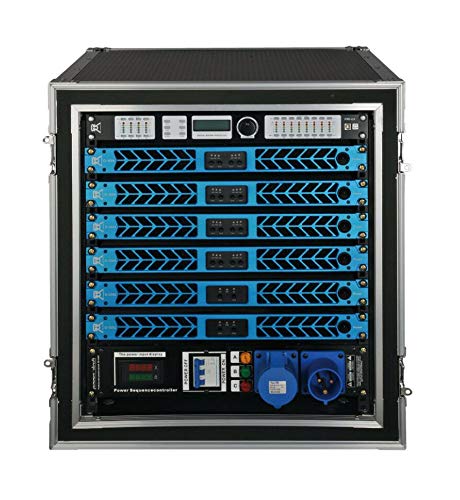
Figure 3.1: Multiple CVR D-Series amplifiers installed in a professional equipment rack, demonstrating proper rack mounting.
3.3 Connections
Before making any connections, ensure the amplifier is powered off and disconnected from the mains supply.
- Input Connections: Connect your audio source (mixer, preamplifier) to the amplifier's input connectors (XLR) on the rear panel. The D-802 features two input channels.
- Output Connections: Connect your loudspeakers to the amplifier's output connectors (Speakon) on the rear panel. Ensure the speaker impedance matches the amplifier's specifications (e.g., 8Ω, 4Ω, 2Ω).
- Power Connection: Once all audio connections are made, connect the supplied power cord to the amplifier's AC inlet and then to a suitable grounded power outlet.
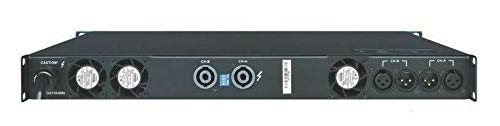
Figure 3.2: Rear panel of the CVR D-802 amplifier, highlighting the XLR input, Speakon output, and power connections.
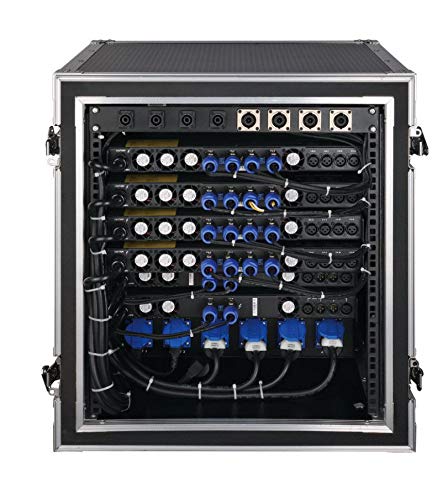
Figure 3.3: Detailed rear view of multiple CVR D-Series amplifiers within a rack, illustrating typical cabling for professional setups.
4. Operating Instructions
4.1 Powering On/Off
To power on the amplifier, ensure all connections are secure, then press the power switch on the front panel. The power indicator will illuminate. To power off, press the switch again.
4.2 Controls and Indicators
- Gain Controls: Adjust the input sensitivity for each channel using the gain knobs on the front panel. Start with the gain set to minimum and gradually increase to achieve the desired volume.
- Signal Indicators: LEDs on the front panel indicate signal presence and clipping. A green LED typically indicates signal presence, while a red LED (clip) indicates that the signal is too strong and may cause distortion. Reduce the input level if the clip LED illuminates frequently.
- Protection Indicators: These LEDs illuminate if the amplifier's protection circuitry is activated due to overheating, short circuits, or other faults. If a protection LED illuminates, power off the unit, identify and resolve the issue, then power on again.
5. Maintenance
Regular maintenance ensures the longevity and optimal performance of your amplifier.
- Cleaning: Use a soft, dry cloth to clean the exterior of the amplifier. Do not use liquid cleaners or solvents. Ensure ventilation grilles are free from dust and debris.
- Ventilation: Periodically check that the cooling fans are operating correctly and that air vents are not obstructed. Accumulated dust can impair cooling efficiency.
- Storage: If storing the amplifier for an extended period, disconnect it from power, clean it, and store it in a dry, dust-free environment.
6. Troubleshooting
If you encounter issues with your CVR D-802 amplifier, refer to the following common problems and solutions:
| Problem | Possible Cause | Solution |
|---|---|---|
| No power | Power cord disconnected, faulty outlet, blown fuse | Check power cord connection, try a different outlet, inspect fuse (if accessible and user-replaceable, otherwise contact service) |
| No sound output | Incorrect input/output connections, low gain, source issue, speaker fault | Verify all audio connections, increase gain, check audio source, test speakers with another amplifier |
| Distorted sound | Input signal too high (clipping), faulty cables, speaker impedance mismatch | Reduce input level, check/replace cables, ensure speaker impedance is within amplifier's rated range |
| Amplifier overheats / Protection LED on | Poor ventilation, excessive load, internal fault | Ensure proper ventilation, reduce load, power off and allow to cool, if problem persists contact service |
If the problem persists after attempting these solutions, please contact CVR customer support or a qualified service technician.
7. Specifications
| Feature | Specification |
|---|---|
| Model | D-802 |
| Output Power (RMS, 8Ω) | 800W x 2 |
| Output Power (RMS, 4Ω) | 1360W x 2 |
| Output Power (RMS, 2Ω) | 2310W x 2 |
| Bridged Power (RMS, 16Ω) | 1600W |
| Bridged Power (RMS, 8Ω) | 2720W |
| Bridged Power (RMS, 4Ω) | 4620W |
| Dimensions (W×H×D) | 19" x 1.73" x 18.35" (483×44×465mm) |
| Net Weight | 19 lbs 13 ozs (9 kg) |
| Product Dimensions (L x W x H) | 20 x 2 x 2 inches |
| Mounting Type | Surface Mount (Rack Mountable) |
| UPC | 653753250002 |
8. Warranty Information
The CVR D-802 Professional Power Amplifier comes with a manufacturer's warranty. Please refer to the warranty card included with your product or visit the official CVR website for detailed terms and conditions regarding coverage, duration, and service procedures. Keep your proof of purchase for warranty claims.
9. Customer Support
For technical assistance, service inquiries, or questions not covered in this manual, please contact CVR customer support. Contact information can typically be found on the official CVR website or on the product packaging.


