
Introduction
This manual provides comprehensive instructions for the safe and effective use of your Philips Hair Clipper Series 5000, model HC5612/15. Please read this manual thoroughly before first use and retain it for future reference. This hair clipper is designed for cutting hair and features DualCut and Trim-n-Flow Pro technology for efficient and even results.
Important Safety Information
To ensure safe operation, please observe the following:
- Avoid contact with eyes, skin, and water.
- Follow manufacturer's instructions for cleaning and maintenance.
- Do not use on infants or children without adult supervision.
- Keep the appliance dry.
- Do not use the appliance if it is damaged.
- This appliance is not intended for use by persons with reduced physical, sensory or mental capabilities, or lack of experience and knowledge, unless they have been given supervision or instruction concerning use of the appliance by a person responsible for their safety.
Package Contents
Verify that all items are present in the package:
- 1 Philips Series 5000 Hair Clipper (Model HC5612/15)
- 1 Cleaning brush
- 1 Beard comb
- 2 Hair combs (one for 3-15mm, one for 16-28mm)
- 1 Power adapter

Image: The Philips Hair Clipper Series 5000 (HC5612/15) shown with its three included comb attachments: a beard comb, a short hair comb (3-15mm), and a long hair comb (16-28mm).
Setup
1. Charging the Clipper
Before first use, fully charge the clipper. Connect the power adapter to the clipper and plug it into a wall outlet. The charging indicator light will illuminate. A full charge provides up to 75 minutes of cordless use.
2. Attaching a Comb
Select the desired comb attachment (beard comb, 3-15mm hair comb, or 16-28mm hair comb). Align the comb with the clipper head and push it firmly until it clicks into place. Ensure the comb is securely attached before use.
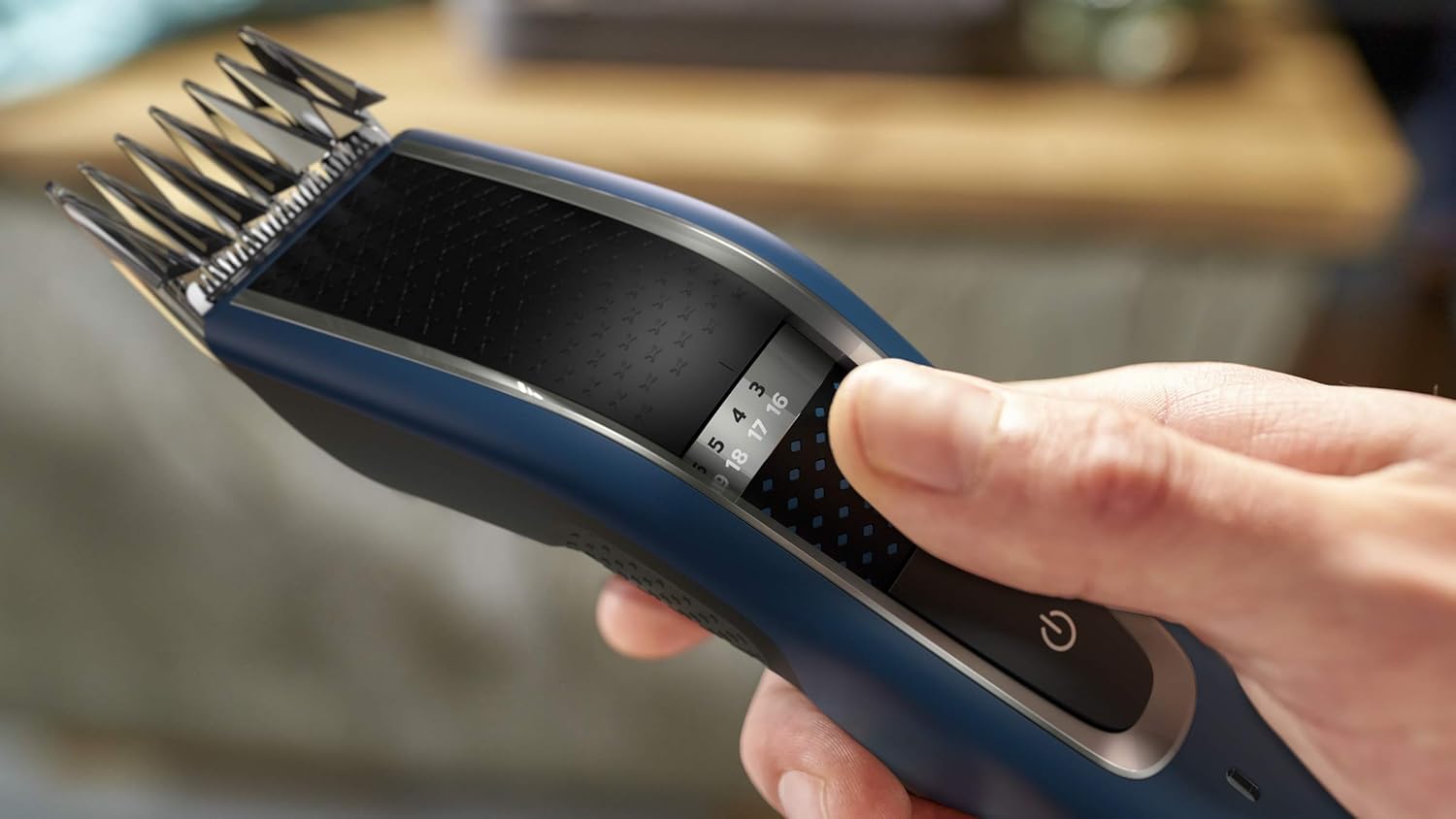
Image: A hand demonstrating how to adjust the length setting using the zoom wheel on the clipper body.
Operating Instructions
1. Powering On/Off
Press the power button located on the front of the clipper to turn it on or off.
2. Adjusting Length Settings
The clipper offers 28 length settings, from 0.5mm to 28mm. Rotate the zoom wheel on the clipper body to select your desired hair length. The selected length will be displayed on the clipper.
3. Hair Clipping
Ensure hair is clean and dry. Start with a longer length setting if you are unsure, and gradually reduce it. Move the clipper against the direction of hair growth for an even cut. The DualCut and Trim-n-Flow Pro technologies are designed to prevent hair from getting stuck in the comb, allowing for efficient clipping.

Image: A man using the Philips Hair Clipper to trim his hair, demonstrating typical usage.

Image: A close-up diagram illustrating the Trim-n-Flow Pro technology, showing how cut hair is guided away from the comb for continuous clipping.
Maintenance and Cleaning
1. Cleaning the Clipper
The Philips Hair Clipper Series 5000 is 100% washable. After each use, remove the comb attachment and rinse the clipper head and comb under running water. Use the included cleaning brush to remove any stubborn hair particles. Ensure the clipper is completely dry before storing or recharging.

Image: The Philips Hair Clipper being cleaned under running water, highlighting its washable design.
2. Blade Maintenance
The blades of this clipper are designed for zero maintenance, meaning they do not require oiling.
Troubleshooting
- Clipper does not turn on: Ensure the clipper is charged. Connect it to the power adapter and allow it to charge for at least 10 minutes before attempting to turn it on.
- Clipper is not cutting effectively:
- Check if the comb attachment is securely fastened.
- Clean the blades and comb thoroughly to remove any trapped hair.
- Ensure the clipper is fully charged.
- Unusual noise during operation: Turn off the clipper and inspect the blades and comb for any obstructions or damage. If the issue persists, contact Philips customer support.
Specifications
| Model Number | HC5612/15 |
| Brand | PHILIPS |
| Power Source | Battery Powered (1 Lithium Ion battery required) |
| Cordless Use Time | Up to 75 minutes |
| Length Settings | 28 settings (0.5mm to 28mm) |
| Blade Material | Stainless Steel |
| Washable | Yes, 100% washable |
| Dimensions (L x W x H) | 6.9 x 14 x 22.4 cm |
| Item Weight | 301 Grams |
| Color | Blue |
| Country of Origin | Indonesia |
Warranty and Support
For warranty information, product registration, or technical support, please visit the official Philips website or contact Philips customer service in your region. Keep your purchase receipt as proof of purchase.
You can find more information and support at the Philips Store on Amazon.


