
1. Introduction
This manual provides detailed instructions for the installation, operation, and maintenance of the DEWIN CONN873 Sensorless Brushless Three-Phase BLDC Motor Speed Controller. This device is designed for precise speed regulation of three-phase brushless DC motors operating within a DC 5V-36V range, supporting both clockwise (CW) and counter-clockwise (CCW) rotation.
2. Product Overview
The DEWIN CONN873 controller is a compact and efficient unit featuring a main control board housed in a protective casing, along with external components for speed and direction control.

Figure 2.1: DEWIN CONN873 Brushless Motor Speed Controller with its protective casing open, revealing the circuit board with heat sinks and connection terminals.

Figure 2.2: Dimensions of the DEWIN CONN873 controller, showing approximate measurements of 10cm (3.94 inches) in length, 4cm (1.57 inches) in width, and 6.8cm (2.68 inches) in height.

Figure 2.3: Close-up view of the B100K potentiometer, used for adjusting motor speed.

Figure 2.4: Close-up view of the ON-ON toggle switch, rated 6A 125VAC, used for controlling motor direction (CW/CCW).
3. Specifications
| Feature | Specification |
|---|---|
| Brand | DeWin |
| Model | CONN873 |
| Input Voltage | DC 5V-36V |
| Material | Metal |
| Application | Three-phase sensorless brushless DC motors |
| Speed Control | Potentiometer |
| Direction Control | Toggle Switch (CW/CCW) |
| Manufacturer Part Number | CONN873 |
| UPC | 738613669429 |
4. Safety Information
- Always disconnect power before making any connections or disconnections.
- Ensure the input voltage is within the specified range (DC 5V-36V). Exceeding this range can damage the controller.
- Verify correct polarity for power connections (DC+ to positive, DC- to negative). Incorrect polarity will damage the unit.
- Avoid short circuits between motor phases or between phases and ground.
- Operate the controller in a well-ventilated area to prevent overheating.
- Keep the device away from moisture, dust, and corrosive substances.
- This product is intended for use by individuals familiar with electronic components and motor control systems.
5. Setup
Follow these steps to correctly set up your DEWIN CONN873 motor speed controller:
- Identify Components: Familiarize yourself with the controller board, potentiometer, and toggle switch.
- Power Supply Connection: Connect your DC power supply (5V-36V) to the terminals labeled DC+ (positive) and DC- (negative) on the controller board. Ensure correct polarity.
- Motor Connection: Connect the three phase wires of your BLDC motor to the terminals labeled A, B, and C on the controller board. The order of connection for A, B, C may affect the initial direction of rotation.
- Potentiometer Connection: The potentiometer is pre-wired and connects to the designated port on the controller board. This will control the motor speed.
- Direction Switch Connection: The toggle switch is pre-wired and connects to its designated port. This switch controls the motor's rotation direction.
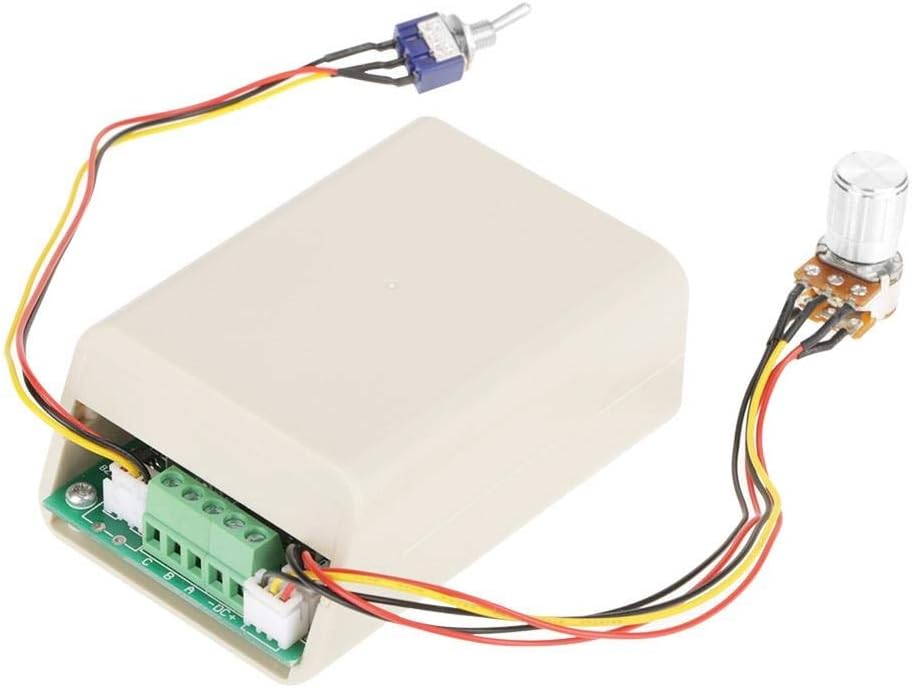
Figure 5.1: Wiring diagram showing connections for power supply (DC+, DC-) and motor phases (A, B, C) to the controller board. The potentiometer and toggle switch are also shown connected.
6. Operating Instructions
Once the controller is properly wired, follow these steps to operate your BLDC motor:
- Power On: Apply power to the controller within the DC 5V-36V range.
- Set Direction: Use the toggle switch to select the desired rotation direction (CW or CCW). It is recommended to change direction only when the motor is stopped or at very low speed to prevent mechanical stress.
- Adjust Speed: Rotate the potentiometer knob to adjust the motor speed. Turning the knob clockwise typically increases speed, while counter-clockwise decreases it.
- Power Off: To stop the motor, turn the potentiometer to its minimum setting, then disconnect the power supply.
7. Maintenance
The DEWIN CONN873 controller is designed for reliable operation with minimal maintenance. Adhere to the following guidelines:
- Keep Clean: Regularly clean the controller and its casing to prevent dust and debris accumulation, which can hinder heat dissipation. Use a soft, dry cloth.
- Inspect Connections: Periodically check all wiring connections to ensure they are secure and free from corrosion or damage.
- Environmental Conditions: Ensure the operating environment remains within recommended temperature and humidity ranges to prolong the lifespan of the electronic components.
- Avoid Overload: Do not operate the motor or controller beyond their specified current and voltage limits, as this can lead to overheating and permanent damage.
8. Troubleshooting
If you encounter issues with your DEWIN CONN873 controller, refer to the following troubleshooting guide:
| Problem | Possible Cause | Solution |
|---|---|---|
| Motor does not start | No power supply Incorrect power polarity Loose connections Motor or controller fault | Check power supply and voltage Verify DC+ and DC- connections Secure all wiring connections Test motor independently; contact support if controller is faulty |
| Motor runs erratically or at incorrect speed | Potentiometer issue Motor phase wiring incorrect Motor not compatible (e.g., brushed DC motor) | Check potentiometer connection and function Re-check motor phase connections (A, B, C) Ensure a three-phase sensorless BLDC motor is used |
| Motor does not change direction | Toggle switch issue Motor phase wiring | Check toggle switch connection and function Ensure motor phase wiring is correct and allows for reversal |
| Controller overheats | Overload Poor ventilation Short circuit | Reduce motor load Ensure adequate airflow around the controller Check for any short circuits in wiring |
9. Warranty and Support
DEWIN products are manufactured to high-quality standards. For warranty information or technical support, please refer to the documentation included with your purchase or contact your retailer. Please have your model number (CONN873) and purchase date available when seeking support.