
Introduction
This instruction manual provides essential information for the proper installation, operation, and maintenance of your Toshiba IES16 Circuit Card. The IES16 is a component designed for integration into compatible Toshiba Stratagy PBX systems, enhancing their functionality. Please read this manual thoroughly before attempting any installation or operation.
Safety Precautions
- Always disconnect power to the host system before installing or removing the circuit card.
- Wear an anti-static wrist strap to prevent electrostatic discharge (ESD) damage to the card and other components.
- Handle the circuit card by its edges only; avoid touching the components or connectors.
- Ensure the installation environment is clean, dry, and free from excessive dust or extreme temperatures.
Setup and Installation
The Toshiba IES16 Circuit Card is designed for installation into a compatible slot within a Toshiba Stratagy PBX system. Follow these general steps for proper installation:
- Prepare the System: Power down and unplug the Toshiba Stratagy PBX system from its power source.
- Access the Card Slots: Open the system chassis according to the host system's manual to access the available expansion slots.
- Identify the Slot: Locate an appropriate and available expansion slot for the IES16 card. Refer to your PBX system's documentation for slot compatibility.
- Insert the Card: Carefully align the IES16 circuit card with the chosen slot. Apply even pressure to both ends of the card until it is fully seated in the connector. Do not force the card.
- Secure the Card: Use the retaining bracket or screw to secure the card firmly in place within the chassis.
- Connect Cables: Connect any necessary network or communication cables to the appropriate ports on the IES16 card (e.g., NETWORK, COM1).
- Close and Power On: Close the system chassis, reconnect the power, and power on the PBX system.
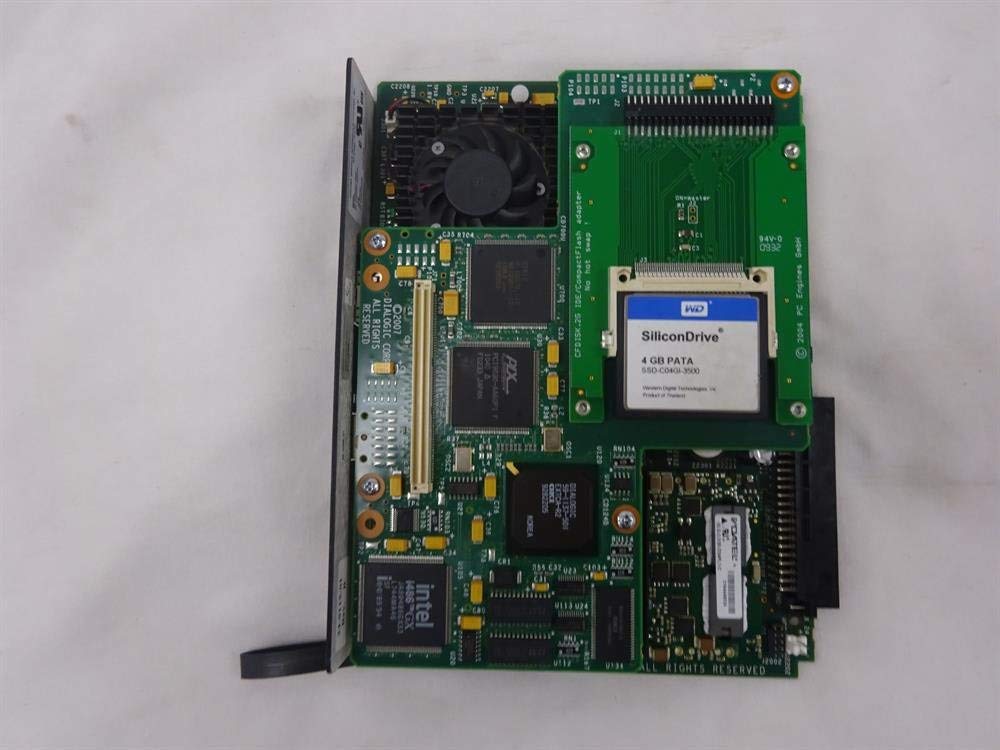
Figure 1: Front view of the Toshiba Stratagy IES 16 circuit card, showing the network, shutdown, port status, and COM1 connectors, along with the 'Flash ROM' slot. The Intel 1486GX processor is visible on the board.

Figure 2: Close-up view of the Toshiba Stratagy IES 16 circuit card, highlighting the 'Stratagy IES 16 XPE' branding on the front panel and various components on the board.
Operating the IES16 Circuit Card
The IES16 circuit card functions as an integral part of your Toshiba Stratagy PBX system. Its operation is managed by the host system's software and configuration. Users typically interact with the functionality provided by the card through the PBX system's interface, rather than directly with the card itself.
Indicator Lights
The front panel of the IES16 card features several indicator lights to provide status information:
- POWER: Indicates that the card is receiving power.
- PORT STATUS: Indicates the operational status of the communication ports. Refer to your system's manual for specific light patterns and their meanings.
- NETWORK: Indicates network activity or connection status.
- SHUTDOWN: May indicate a system shutdown sequence or error state.
For detailed configuration and operational procedures related to the IES16 card's functions (e.g., voice processing, call routing), please consult the comprehensive documentation for your specific Toshiba Stratagy PBX system.

Figure 3: Angled view of the Toshiba Stratagy IES 16 circuit card, focusing on the 'Stratagy IES 16' branding on the front panel.
Maintenance
The Toshiba IES16 Circuit Card is designed for reliable operation with minimal user maintenance. Adhering to the following guidelines will help ensure its longevity:
- Keep Clean: Periodically inspect the host system's interior for dust accumulation. Use compressed air to gently remove dust from the card and surrounding components, ensuring the system is powered off and unplugged first.
- Environmental Control: Ensure the operating environment maintains stable temperature and humidity levels as specified for the host PBX system. Avoid exposure to direct sunlight, excessive heat, or moisture.
- Proper Handling: If the card needs to be removed or re-seated, always follow the safety precautions outlined in the Setup section.
- No User-Serviceable Parts: The IES16 card contains no user-serviceable parts. Do not attempt to repair or modify the card yourself, as this may void any applicable warranty and could damage the component.

Figure 4: Top-down view of the Toshiba Stratagy IES 16 circuit card, showing the overall layout of the board, including the Sandisk compact flash card, Intel processor, and various other chips and connectors.
Troubleshooting
If you encounter issues with your Toshiba IES16 Circuit Card, consider the following troubleshooting steps:
- Card Not Recognized:
- Ensure the card is fully seated in its expansion slot. Power down the system, re-seat the card, and power on again.
- Verify that the card is installed in a compatible slot as per your PBX system's manual.
- No Network Connectivity:
- Check the network cable connection to the IES16 card and to the network switch/router.
- Observe the NETWORK indicator light on the card. If it's off, check the cable and network source.
- Status Lights Indicate Error:
- Refer to your Toshiba Stratagy PBX system's manual for the specific meaning of indicator light patterns on expansion cards.
- A power cycle of the entire PBX system may resolve temporary glitches.
- System Instability:
- Ensure the card is securely fastened and not loose within the chassis.
- Verify that the system's power supply is adequate for all installed components.
If these steps do not resolve the issue, it is recommended to contact a qualified technician or the seller for further assistance.
Specifications
| Feature | Detail |
|---|---|
| Product Name | Toshiba IES16 Circuit Card |
| Model | IES16 |
| Manufacturer | Toshiba |
| Product Dimensions | 15 x 12 x 10 inches |
| Item Weight | 4 pounds |
| ASIN | B081K7CGR5 |
| Date First Available | November 15, 2019 |
Warranty and Support
This Toshiba IES16 Circuit Card is a renewed product. Specific warranty terms for renewed items typically vary by seller. For any warranty claims, technical support, or inquiries regarding the product's condition and functionality, please contact the original seller, Wholesale Telecom, directly. Amazon's return policy for this item allows for returns within 90 days of receipt for a refund or replacement.