
Sonew Sonewqc9m4gfa1o
Sonew Digital Touch Password Security Lock (Model: Sonewqc9m4gfa1o) - Instruction Manual
Comprehensive guide for installation, operation, and maintenance of your Sonew Digital Touch Password Security Lock.
1. Product Overview
The Sonew Digital Touch Password Security Lock is an electronic, anti-theft combination lock designed for various applications. It offers keyless security with a customizable 1 to 15-digit password, making it ideal for securing cabinets, toolboxes, drawers, mailboxes, and school lockers.

Image 1.1: Front view of the Sonew Digital Touch Password Security Lock, showing the numeric keypad and 'OK' button.
Constructed from durable zinc alloy, this lock provides robust security and precision. Its touch-sensitive interface ensures ease of use, and the design eliminates the need for traditional keys, reducing the risk of loss.
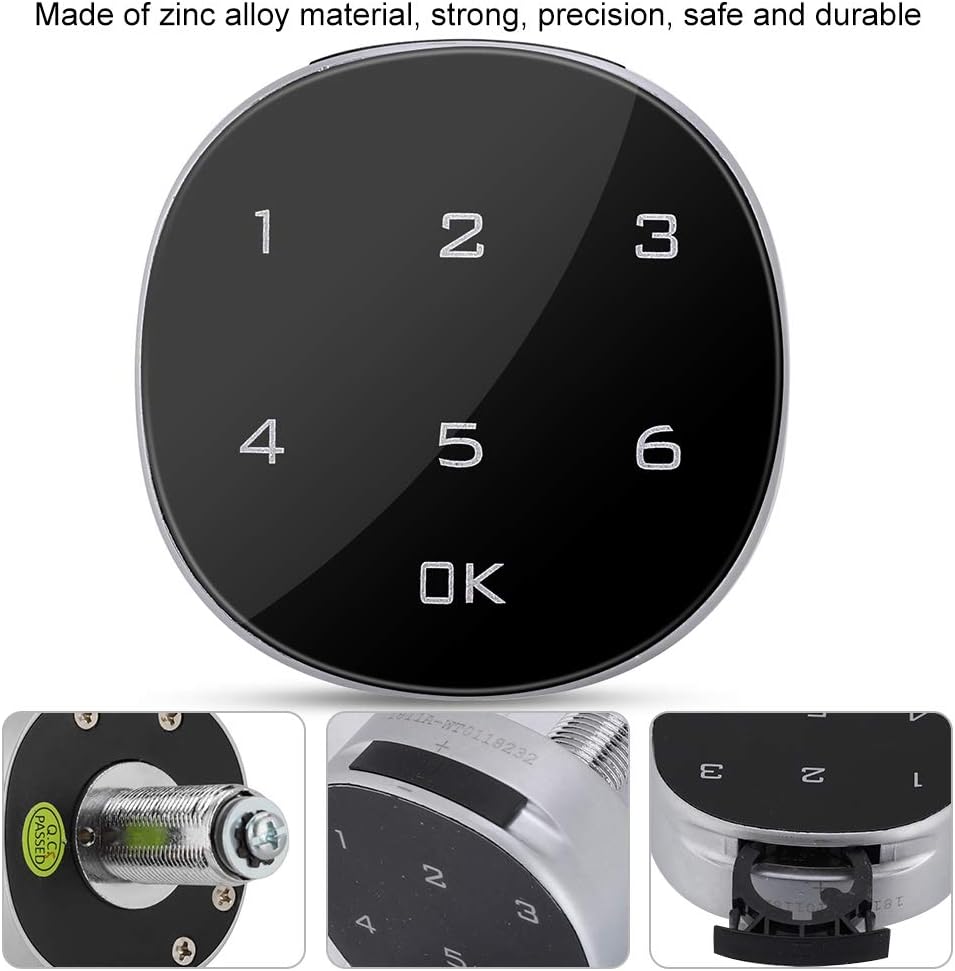
Image 1.2: Close-up view of the lock, highlighting its zinc alloy material and internal locking mechanism.

Image 1.3: Examples of the lock's versatility, shown on toolboxes, cabinets, drawers, and lockers.
2. Package Contents
- 1 x Sonew Digital Touch Password Security Lock
- 1 x Mounting Nut
- 1 x Lock Plate
- 1 x Installation Tool (Wrench)
- 1 x Instruction Manual (this document)

Image 2.1: The lock unit displayed with its accompanying mounting nut, lock plate, and installation wrench.
3. Specifications
| Feature | Detail |
|---|---|
| Brand | Sonew |
| Model Number | Sonewqc9m4gfa1o |
| Material | Zinc Alloy |
| Color | Black |
| Lock Type | Electronic Combination Lock |
| Combination Length | 1 to 15 digits |
| Product Dimensions (L x W x H) | Approx. 57.5 x 57.5 x 20 mm (Refer to Image 3.1 for details) |
| Weight | 170 grams |
| Power Source | Button cell battery (e.g., CR2032, not included) |
| Recommended Usage | Toolboxes, drawers, mailboxes, school lockers, cabinets |
Note: The product dimensions provided in some listings (1x1x1 cm) are generic. Please refer to the detailed dimensional drawing for accurate measurements.

Image 3.1: Technical drawing showing the dimensions and mounting details of the lock.
4. Installation
The Sonew Digital Touch Password Security Lock is designed for easy installation without the need for complex tools or screws. It is suitable for cabinet thickness between 0.5mm and 12mm.
4.1 Preparation
- Ensure the surface where the lock will be installed is clean and dry.
- Measure the thickness of the cabinet door/drawer to ensure it falls within the compatible range (0.5mm - 12mm).
- Identify the desired location for the lock.
4.2 Drilling the Hole
- Based on the dimensional drawing (Image 3.1), drill a circular hole for the main body of the lock. The diameter of the hole should accommodate the threaded shaft of the lock.
- Drill smaller holes for the anti-rotation pins if your model includes them, or for mounting screws if you choose to use them (though the lock is designed for screw-less installation).
4.3 Mounting the Lock
- Insert the main body of the lock through the drilled hole from the front side of the cabinet/drawer.
- From the inside of the cabinet/drawer, place the lock plate over the threaded shaft.
- Thread the mounting nut onto the shaft and tighten it securely using the provided installation tool (wrench). Do not overtighten.
- Ensure the lock is firmly attached and does not wobble.

Image 4.1: The digital lock shown installed on a locker, demonstrating its application.
5. Operation
5.1 Initial Use
Upon first use, the lock is typically set to a default password. The product information states the original dial is set to 1-2-3-4. You should change this immediately after installation for security.
5.2 Unlocking
- Touch the keypad to activate it.
- Enter your 1 to 15-digit password.
- Press the OK button.
- If the password is correct, the lock will disengage, allowing you to open the cabinet/drawer.
5.3 Locking
To lock the cabinet/drawer, simply close it. The lock will automatically engage after a few seconds, or you may need to press OK to manually lock it, depending on the specific model's configuration.
6. Setting/Changing Password
It is highly recommended to change the default password immediately after installation and periodically thereafter to maintain security.
6.1 Changing the Password
- Open the lock using the current password.
- Locate the reset button or switch on the inside of the lock unit (often a small button or lever). Refer to the internal view of the lock if available.
- Press and hold the reset button (or move the switch to the 'set' position).
- While holding the reset button, enter your new 1 to 15-digit password on the keypad.
- Press the OK button to confirm the new password.
- Release the reset button (or move the switch back to the 'lock' position).
- Test the new password with the cabinet/drawer open first to ensure it works correctly before closing and locking.
Important: Remember your new password. There is typically no master key or override for digital combination locks. If you forget your password, you may need to reset the lock to factory settings (if supported) or replace it.
7. Maintenance
- Cleaning: Wipe the keypad and lock body with a soft, dry cloth. Avoid abrasive cleaners or solvents that could damage the finish or electronic components.
- Battery Replacement: Electronic locks typically require a button cell battery (e.g., CR2032) for operation. If your lock stops responding or shows signs of low power, replace the battery. The battery compartment is usually located on the inside of the lock unit.
- Environmental Conditions: Avoid exposing the lock to extreme temperatures, humidity, or direct water contact, as this can damage the electronic components.
8. Troubleshooting
| Problem | Possible Cause | Solution |
|---|---|---|
| Lock does not respond to keypad input. | Dead or low battery. | Replace the battery (e.g., CR2032, typically located on the inside unit). |
| Lock does not open after entering correct password. | Incorrect password entered; Lock mechanism jammed; Battery too low to operate mechanism. | Double-check the password and ensure it's entered correctly. Gently try to open the cabinet/drawer. If the issue persists, replace the battery. |
| Cannot set a new password. | Reset button not pressed correctly; Incorrect procedure followed. | Review Section 6.1 "Changing the Password" and ensure all steps are followed precisely. Ensure the reset button is held for the entire duration of password entry. |
| Lock feels loose after installation. | Mounting nut is not sufficiently tightened. | Carefully re-tighten the mounting nut using the provided wrench. Do not overtighten. |
9. Warranty and Support
Sonew products are manufactured to high-quality standards. For specific warranty information, please refer to the documentation provided at the time of purchase or contact your retailer. If you encounter any issues or require technical assistance, please contact Sonew customer support through the retailer's platform or the official Sonew website.
Please have your model number (Sonewqc9m4gfa1o) and purchase details ready when contacting support.
Ask a question about this manual
Ask about setup, troubleshooting, compatibility, parts, safety, or missing instructions. Manuals+ will review the question and use this page’s manual context to help answer it.