
Introduction
This manual provides essential instructions for the proper setup, operation, and maintenance of your LipiWorld RC-A06-EN-12 4010 FHD LCD LED Remote Control. This remote is designed for specific Intex LED/LCD TV models. For optimal performance, please read these instructions carefully before use.
Important Note: This remote control is compatible only if its appearance and button layout exactly match your original Intex TV remote control. If the remotes do not match function-to-function, this product will not work with your television.

Image: Front view of the LipiWorld RC-A06-EN-12 remote control, showing its button layout.
Setup
1. Compatibility Check
Before installing batteries or attempting to use the remote, ensure it is compatible with your television. Compare the LipiWorld RC-A06-EN-12 remote with your original Intex TV remote. Both remotes must have an identical appearance and button functions for proper operation.
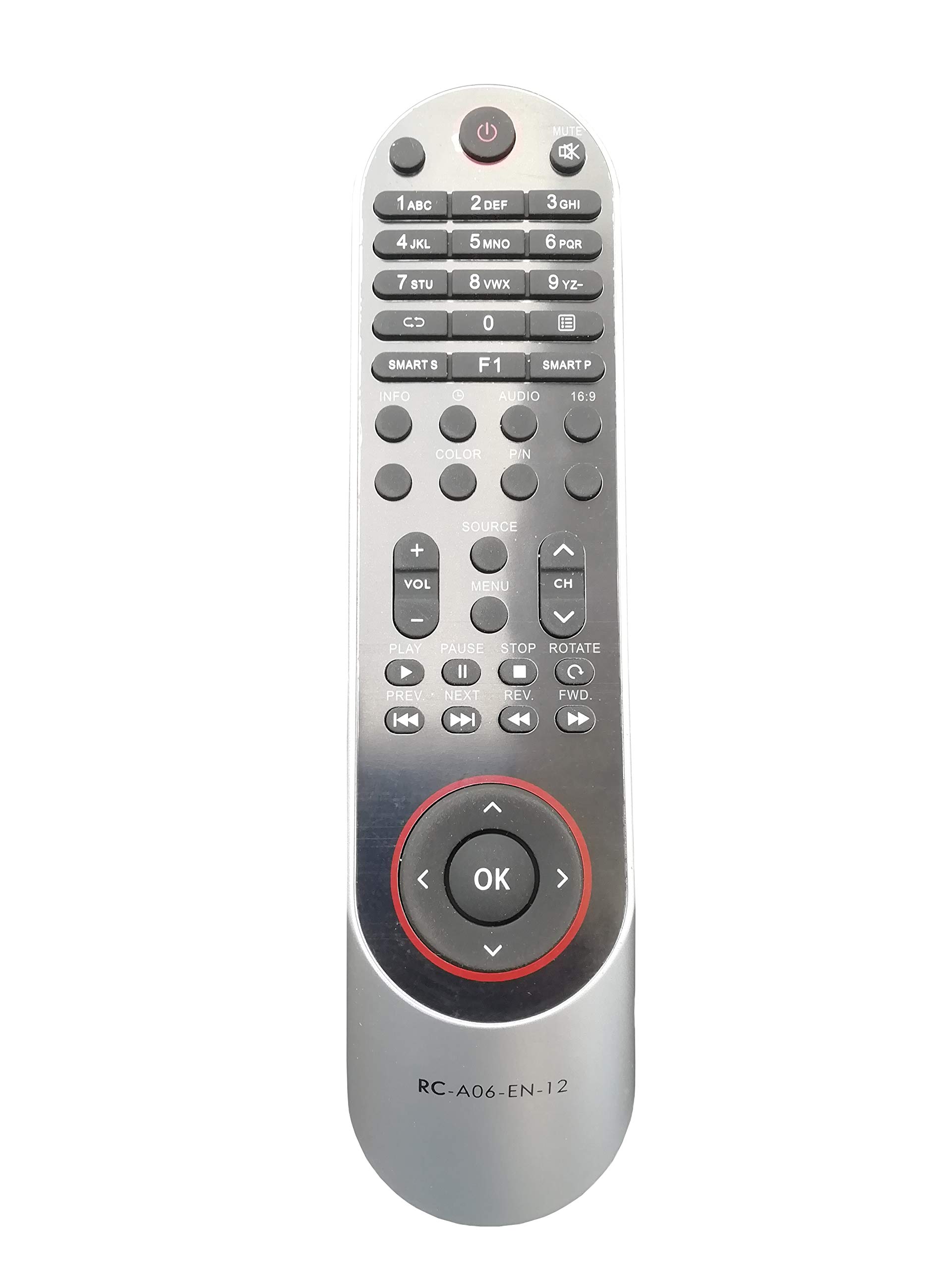
Image: Visual guide illustrating the importance of matching the new remote control exactly with the old/original remote control for compatibility.
2. Battery Installation
The remote control requires two AAA alkaline batteries (not included). Follow these steps to install them:
- Locate the battery compartment cover on the back of the remote control.
- Slide the cover downwards or press the latch to open it.
- Insert two AAA batteries, ensuring the positive (+) and negative (-) terminals align correctly with the markings inside the compartment.
- Replace the battery compartment cover, sliding it back into place until it clicks securely.
Always use fresh, new batteries for best performance.

Image: Illustration showing the battery compartment of a remote control and two fresh AAA batteries, emphasizing correct battery insertion.
Operating Instructions
Once batteries are installed and compatibility is confirmed, point the remote control directly at your Intex TV's infrared receiver. Press the desired buttons to control your television.
- Power Button: Press to turn the TV on or off.
- Number Buttons (0-9): Use to directly select channels.
- Volume Up/Down: Adjust the sound level.
- Channel Up/Down: Change channels sequentially.
- Mute Button: Temporarily silence the TV audio.
- Input/Source Button: Select different input sources (e.g., HDMI, AV).
- Navigation Buttons (Arrow Keys, OK/Enter): Navigate through TV menus and confirm selections.
- Menu Button: Access the TV's main menu.
- Exit/Back Button: Exit menus or go back to the previous screen.
Refer to your Intex TV's original user manual for specific functions of advanced buttons, if applicable.
Maintenance
- Battery Replacement: Replace batteries when the remote's range decreases or it becomes unresponsive. Always replace both batteries at the same time with new ones.
- Cleaning: Wipe the remote control with a soft, dry cloth. Do not use liquid cleaners or abrasive materials.
- Storage: If the remote will not be used for an extended period, remove the batteries to prevent leakage. Store in a cool, dry place.
- Handling: Avoid dropping the remote control or exposing it to extreme temperatures, humidity, or direct sunlight.
Troubleshooting
- Remote not working:
- Ensure the remote is pointed directly at the TV's IR sensor.
- Check if the batteries are inserted correctly with the correct polarity (+/-).
- Replace old batteries with fresh, new ones.
- Verify that the remote control is indeed compatible with your specific Intex TV model by comparing it to your original remote.
- Buttons unresponsive:
- Clean the remote's surface and buttons to remove any dirt or debris that might be obstructing button presses.
- Replace batteries.
- Short operating range:
- Replace batteries with fresh ones.
- Ensure there are no obstructions between the remote and the TV's IR sensor.
Specifications
| Brand | LipiWorld |
| Model Name | RC-A06-EN-12 |
| Compatible Devices | Intex LED/LCD Televisions (specific models, exact match required) |
| Connectivity Technology | Infrared (IR) |
| Controller Type | Button Control |
| Battery Type | AAA Alkaline (2 required) |
| Color | Black |
| Special Feature | Ergonomic Design |
Warranty Information
This LipiWorld remote control comes with a 3-month warranty from the date of purchase. The warranty covers manufacturing defects. It does not cover damage caused by misuse, accidental damage, battery leakage, or unauthorized repairs.
For warranty claims, please retain your purchase receipt and contact LipiWorld customer support.
Support
If you encounter any issues not covered in the troubleshooting section or require further assistance, please contact LipiWorld customer support. Please have your product model number (RC-A06-EN-12) and purchase details ready when contacting support.
For the most up-to-date support information, please visit the official LipiWorld website or refer to your purchase documentation.