
1. Introduction
Thank you for choosing the TOOLCRAFT TPS-800 Digital Hot Air Rework Station. This manual provides essential information for the safe and efficient operation, maintenance, and troubleshooting of your device. Please read this manual thoroughly before using the hot air station and keep it for future reference.
2. Safety Instructions
Always observe the following safety precautions to prevent injury or damage to the device:
- Ensure the power supply matches the voltage requirements of the station (230V).
- The hot air nozzle and heated components can reach very high temperatures (up to 480°C). Avoid direct contact with skin.
- Use the station in a well-ventilated area to dissipate fumes from soldering and desoldering.
- Do not operate the station near flammable materials or gases.
- Always place the hot air gun in its holder when not in use to prevent accidental burns or damage.
- Disconnect the power plug from the outlet before cleaning or servicing the unit.
- Keep the device out of reach of children.
3. Product Overview and Components
The TOOLCRAFT TPS-800 is a digital hot air rework station designed for precise soldering and desoldering tasks. It features an integrated brushless fan for consistent airflow and a digital display for temperature and airflow control.

Figure 1: Overview of the TOOLCRAFT TPS-800 Hot Air Station and its included components, including the main unit, hot air gun, power cable, and various nozzles.
Main Components:
- Main Control Unit: Houses the power supply, control circuitry, and digital display.
- Hot Air Gun: The primary tool for applying heated air.
- Hot Air Gun Holder: Provides a safe resting place for the hot air gun when not in use, often triggering a standby mode.
- Power Cable: Connects the unit to the mains power supply.
- Nozzles: Various sizes and shapes for different applications.
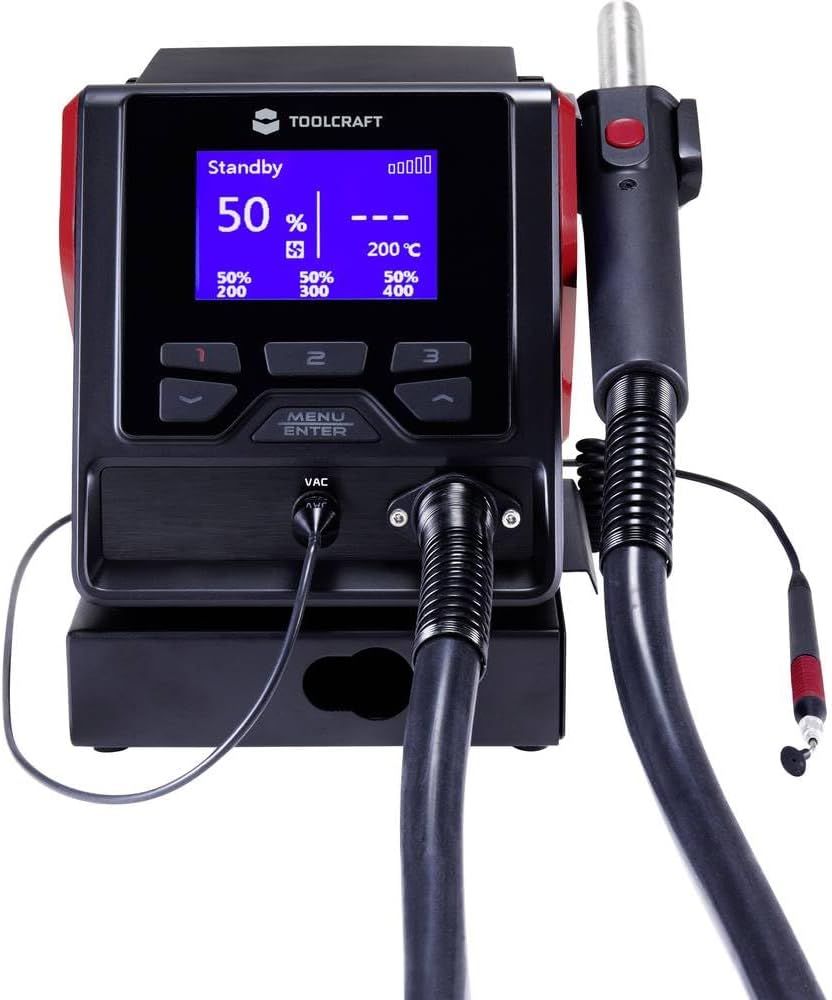
Figure 2: A close-up view of the digital display and control buttons on the TOOLCRAFT TPS-800 main unit, showing temperature and airflow settings.
4. Setup
- Unpacking: Carefully remove all components from the packaging. Inspect for any signs of damage.
- Placement: Place the main control unit on a stable, heat-resistant surface in a well-ventilated area.
- Connect Hot Air Gun: Connect the hot air gun cable to the designated port on the main unit. Ensure a secure connection.
- Attach Nozzle: Select the appropriate nozzle for your task and securely attach it to the hot air gun.
- Connect Power: Plug the power cable into the main unit and then into a grounded 230V AC power outlet.
5. Operating Instructions
5.1 Power On/Off
Press the main power switch (usually located on the front or rear of the unit) to turn the station on. The digital display will illuminate.
5.2 Setting Temperature and Airflow

Figure 3: The TOOLCRAFT TPS-800 main unit with the hot air gun connected, illustrating the overall setup during operation.
- Use the Temperature Up/Down buttons to adjust the desired temperature. The range is typically 100°C to 480°C.
- Use the Airflow Up/Down buttons to adjust the fan speed/airflow volume. The unit features a brushless fan with up to 120 l/min airflow.
- The display will show the set temperature and actual temperature, as well as the airflow level.
5.3 Using the Hot Air Gun
- Once the desired temperature and airflow are set, remove the hot air gun from its holder. The heating element will activate.
- Direct the hot air stream towards the component to be worked on. Maintain a safe distance to avoid overheating the component or surrounding areas.
- After use, place the hot air gun back into its holder. The unit will automatically enter standby mode, cooling down the heating element and fan before shutting off.

Figure 4: The hot air gun securely placed in its dedicated holder, demonstrating the proper storage position when not actively in use.
5.4 Memory Presets
The unit may feature programmable memory channels (e.g., 1, 2, 3) to store frequently used temperature and airflow settings. Refer to the display and control buttons for specific instructions on saving and recalling these presets.
6. Maintenance
- Cleaning: Regularly clean the exterior of the unit with a soft, dry cloth. Ensure the unit is unplugged and cool before cleaning. Do not use abrasive cleaners or solvents.
- Nozzle Care: Keep the hot air nozzles clean and free of solder residue. Replace damaged or clogged nozzles to maintain optimal performance.
- Air Filter: Check and clean any air filters if present, to ensure proper airflow to the fan.
- Storage: Store the hot air station in a dry, dust-free environment when not in use.
7. Troubleshooting
| Problem | Possible Cause | Solution |
|---|---|---|
| No power | Power cable disconnected; power switch off; faulty outlet | Check power cable connection; turn on power switch; test outlet with another device |
| Hot air gun not heating | Hot air gun not properly connected; heating element failure; in standby mode | Ensure secure connection; remove gun from holder to exit standby; contact support if element failure suspected |
| Low airflow | Airflow setting too low; clogged nozzle; blocked air intake | Increase airflow setting; clean or replace nozzle; ensure air intake is clear |
| Temperature unstable | Sensor issue; environmental factors | Ensure stable environment; contact support if issue persists |
8. Specifications
| Feature | Specification |
|---|---|
| Brand | TOOLCRAFT |
| Model Number | TO-5799258 |
| Power | 1000 Watts |
| Voltage | 230 Volts |
| Temperature Range | 100 - 480 °C |
| Airflow Volume | Up to 120 l/min (Brushless fan) |
| Product Dimensions (L x W x H) | 22.6 x 19.3 x 15 cm |
| Weight | 3.62 Kilograms |
| Included Components | 1 piece (Main unit, hot air gun, power cable, nozzles) |
9. Warranty and Support
For warranty information and technical support, please refer to the documentation provided with your purchase or contact your retailer. Keep your proof of purchase for any warranty claims.