
1. Product Overview
The DiHines 25W USB Type C Fast Charger is designed to provide rapid and efficient charging for a wide range of USB-C compatible devices, including Samsung Galaxy smartphones and tablets. This kit includes a 25W Power Delivery (PD) 3.0 wall charger block and a durable 10-foot (3-meter) USB-C to USB-C cable, enabling both fast charging and high-speed data transfer.

Figure 1: DiHines 25W USB Type C Fast Charger and 10ft USB-C to USB-C Cable.
2. Key Features
- 25W Power Delivery 3.0: Provides a maximum output of 25W, capable of charging compatible devices from 0% to 100% in approximately 60 minutes.
- Extended 10-Foot USB-C Cable: The included 3-meter (10-foot) USB-C to USB-C cable offers extended reach for convenient charging and usage.
- High-Speed Data Transfer: Supports data transfer speeds up to 480Mbps, allowing for quick synchronization of files.
- Multi-Protection System: Built-in safeguards protect against short circuits, over-current, over-voltage, over-heating, and over-charging.

Figure 2: Internal view of the charger block, highlighting the multi-protection system for safe charging.
3. Compatibility
This charger is broadly compatible with most USB-C enabled devices, optimized for Samsung Galaxy models supporting Super Fast Charging.
Compatible Devices Include:
- Samsung Galaxy Smartphones: S25, S25 Ultra, S25+, S24, S24 Ultra, S24 Plus, S23, S23 Ultra, S23+, S22, S22+, S22 Ultra, S21, S21+, S21 Ultra, S21 FE, S20, S20+, S20 Ultra, S20 FE, S10, S10+, S10e, S9, S9+, S9 Active, S8, S8+, S8 Active, Note 20, Note 20 Ultra, Note 10, Note 10+, Note 9, Note 8, Galaxy Z Fold 3, Galaxy Z Flip 3.
- Samsung Galaxy Tablets: Tab S8, Tab S7, Tab S6, Tab S5e, Tab A8.
- Other USB-C Devices: Google Pixel series, and various laptops with USB-C charging ports (e.g., ThinkPad X390, Google PixelBook, HP Spectre Folio).
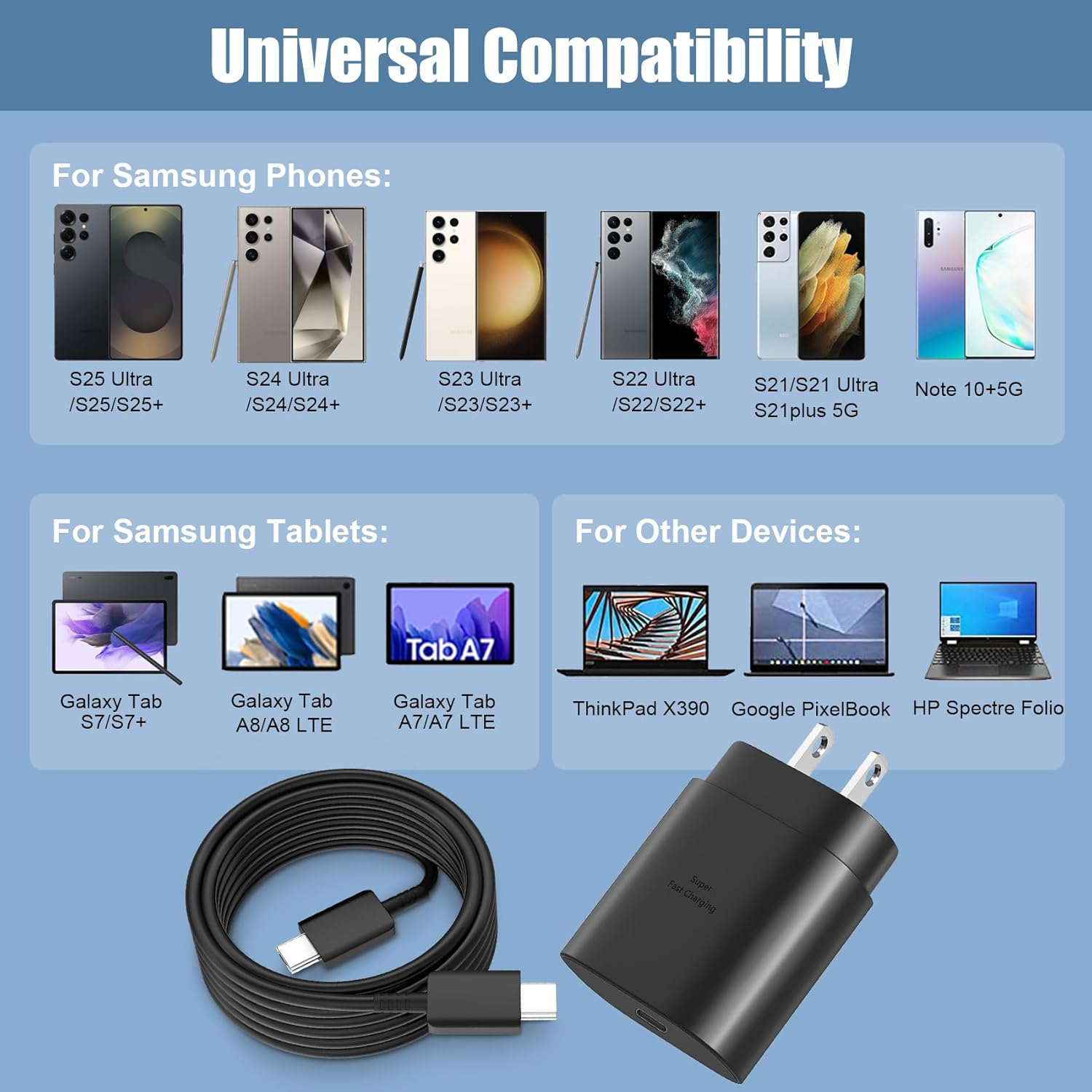
Figure 3: Universal Compatibility with various devices.
4. Setup and Operation
4.1. Package Contents
- 1 x DiHines 25W PD USB Type C Super Fast Charger Block
- 1 x 10-foot (3-meter) USB-C to USB-C Charging Cable
4.2. Connecting the Charger
- Insert the USB-C end of the charging cable into the USB-C port on the charger block.
- Plug the charger block into a standard wall outlet.
- Connect the other USB-C end of the cable to your compatible device's charging port.
4.3. Charging Your Device
Once connected, your device should begin charging automatically. For devices that support Power Delivery (PD) 3.0, the charger will deliver up to 25W for super-fast charging. Charging speed may vary based on device battery level, device usage during charging, and environmental factors.

Figure 4: Device charging with 25W Super Fast Charger.

Figure 5: Using the 10-foot USB-C cable for extended reach.
5. Maintenance
To ensure the longevity and optimal performance of your DiHines charger:
- Keep the charger and cable dry. Avoid exposure to liquids or high humidity.
- Do not expose the charger to extreme temperatures.
- Clean the charger and cable with a soft, dry cloth. Do not use harsh chemicals or abrasive materials.
- Avoid bending or twisting the cable excessively, especially near the connectors, to prevent internal damage.
- Unplug the charger from the wall outlet when not in use for extended periods.
6. Troubleshooting
Common Issues and Solutions:
- Device not charging:
- Ensure the charger is securely plugged into a working wall outlet.
- Verify that the USB-C cable is firmly connected to both the charger block and your device.
- Try using a different wall outlet.
- Test the charger with a different compatible device or try a different USB-C cable to isolate the issue.
- Slow charging:
- Ensure your device supports 25W Power Delivery (PD) 3.0 for optimal fast charging.
- Close background applications on your device that may be consuming significant power.
- Avoid using your device heavily while charging, as this can slow down the charging process.
- Check if the cable or charger block is damaged.

Figure 6: Charging speed comparison.
- Charger or device getting hot:
- It is normal for chargers and devices to become slightly warm during fast charging.
- If the heat is excessive or accompanied by unusual smells, immediately unplug the charger and discontinue use.
- Ensure adequate ventilation around the charger and device during charging.
7. Specifications
| Feature | Detail |
|---|---|
| Model Number | US052100-2U |
| Input Voltage | 100-240V (Standard AC) |
| Output Power | 25W Max (PD 3.0) |
| Output Amperage | 3 Amps |
| Connector Type | USB Type C |
| Cable Length | 10 Feet (3 Meters) |
| Data Transfer Speed | Up to 480Mbps |
| Product Dimensions | 1.57 x 3.94 x 5.91 inches |
| Item Weight | 0.176 ounces |
| Color | Black |
| Special Features | Fast Charging, Short Circuit Protection, Travel-friendly |

Figure 7: High data transfer speed capability.
8. Support
For any questions or assistance regarding your DiHines 25W USB Type C Fast Charger, please contact our customer support team. We are available 24 hours to assist you.
Please refer to the product packaging or the retailer's website for specific contact information.