Introduction
This manual provides detailed instructions for the installation, operation, and maintenance of your ETINAS Car Underglow Lights Kit. This kit features addressable LED strips with dream color chasing effects, controlled via a smartphone application. Please read this manual thoroughly before installation and use to ensure proper function and longevity of the product.
Product Components
The ETINAS Car Underglow Lights Kit includes the following components:
- 6 x Waterproof Exterior Car Light Strips
- 1 x APP Controller
- Mounting hardware (e.g., zip ties, screws, adhesive tape)
- Power connection cables (hard wire and 12V cigarette adapter)

Image: Overview of the ETINAS Car Underglow Lights Kit, showing LED strips, controller, and power options.
Setup and Installation
Proper installation is crucial for the performance and durability of your underglow lights. Follow these steps carefully:
1. Preparation
- Clean the Surface: Thoroughly clean the mounting surfaces under your vehicle with isopropyl alcohol. Ensure the areas are free of dust, dirt, grease, and moisture. Allow the surface to dry completely.
- Plan Placement: Determine the optimal placement for each light strip to achieve desired coverage. The kit includes various strip lengths for different vehicle sections.
- Safety First: Ensure the vehicle is safely jacked up or on a lift. Disconnect the car battery's negative terminal before starting electrical connections.
2. Mounting the Light Strips

Image: Visual guide demonstrating the installation process, including jacking up the car, cleaning, applying strips, and wiring.
- Apply Strips: Peel off the backing from the 3M adhesive tape on each light strip and firmly press it onto the cleaned surface. For enhanced adhesion, especially in challenging environments, consider using an adhesion promoter before applying the strips.
- Secure with Buckles/Screws: Use the provided buckles and screws to further strengthen the attachment of the light strips, particularly in areas exposed to vibration or moisture.
- Route Cables: Carefully route the extension cables from the light strips, opening the inner fender if necessary to hide and protect them. Use zip ties to secure any extra cabling and prevent it from dangling or coming into contact with moving parts or high-temperature components like exhaust pipes and engines. If cables must be near high-temperature areas, use high-temperature resistant sleeves.
3. Power Connection
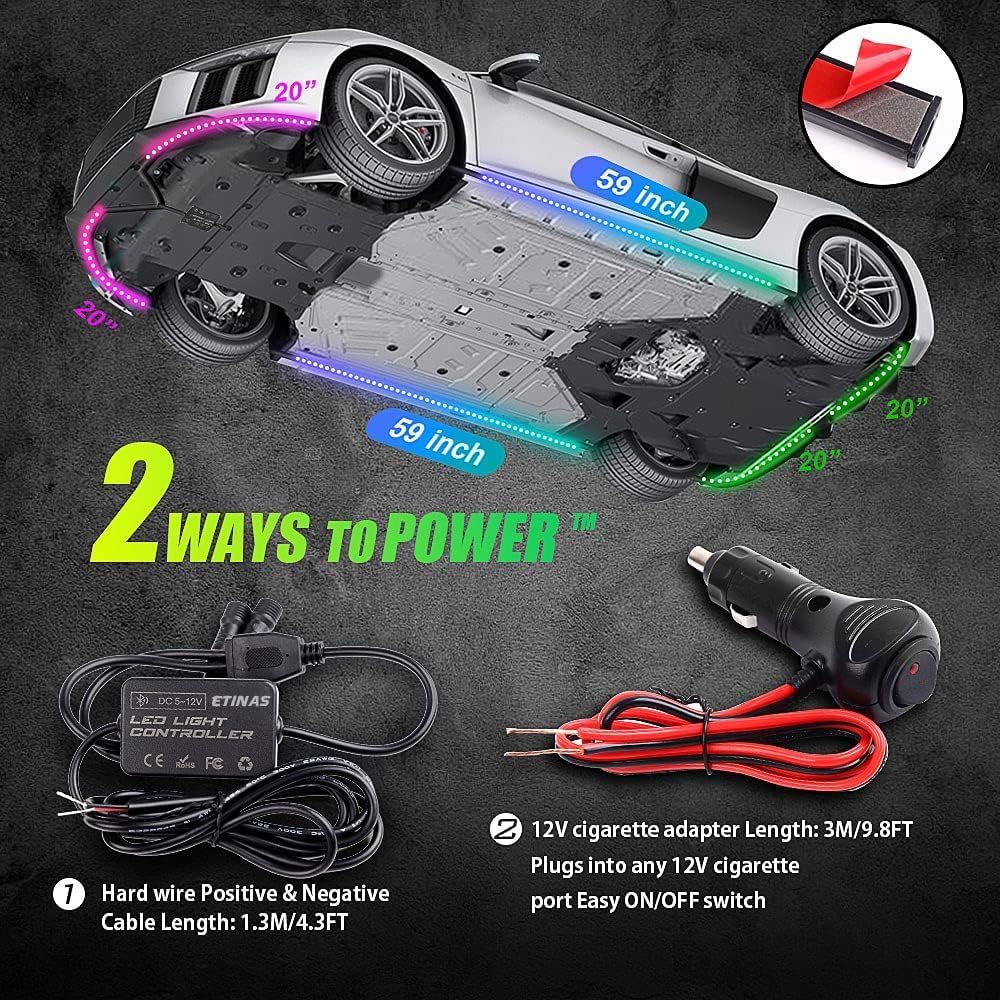
Image: Illustration of the two power options for the LED controller: direct wiring to the car battery and a 12V cigarette lighter adapter.
- Connect Strips to Controller: Connect the light strips to the controller. Ensure the arrows on the connectors align for correct polarity.
- Connect Controller Power:
- Option 1 (Hard Wire): Route the controller's power cord through the bottom of the car. Connect the red wire (positive) to the positive position of a fog lamp or a fused 12V accessory power source. Connect the black wire (negative) to the car battery's negative terminal or a suitable ground point on the chassis. Ensure the voltage input is 12V 5A.
- Option 2 (Cigarette Adapter): Plug the 12V cigarette adapter into any 12V cigarette port. This option includes an easy ON/OFF switch.
- Secure Controller: Paste the controller in an easy-to-access and secure location using its adhesive tape.
- Final Check: Before reconnecting the battery, double-check all connections for security and correct polarity.
Operation
Your ETINAS Car Underglow Lights are controlled via a dedicated smartphone application.
Smartphone APP Control (LED Hue)

Image: The LED Hue application interface on a smartphone, demonstrating color selection, brightness, and chasing effect controls.
- Download the APP: Download the "LED Hue" application from Google Play Store (for Android 4.4 or above) or Apple App Store (for iOS 10.0 or above).
- Connect via Bluetooth: Ensure your smartphone's Bluetooth is enabled. Open the LED Hue app; it should automatically detect and connect to the light controller. No network management or complex settings are required.
- Control Features:
- Color Chasing Modes: Explore over 120 built-in color chasing modes, offering dynamic effects like skipping, dancing, and twinkling. You can mark your favorite effects for quick access.
- Static Colors: If chasing modes are not desired, you can DIY a static color from 16 million available colors.
- Brightness Adjustment: Adjust the light brightness from 1% to 100%.
- Speed Adjustment: Control the speed of chasing effects.
- On/Off: Easily turn the lights on or off directly from the app.
Maintenance
To ensure the longevity and optimal performance of your ETINAS Car Underglow Lights, follow these maintenance guidelines:
- Regular Inspection: Periodically check the light strips for any signs of water ingress, damage, or aging.
- Temperature Check: After parking at night, carefully touch the light strips to check for any abnormal temperature, which could indicate an issue.
- Rainstorm Days: It is recommended to temporarily close or turn off the light strips during heavy rainstorms to minimize potential exposure to extreme moisture, despite their IP68 waterproof rating.
- Cleaning: Gently clean the light strips with a soft, damp cloth. Avoid using harsh chemicals or abrasive materials that could damage the waterproof coating or LEDs.

Image: The IP68 waterproof rating ensures durability against water and dust, but care during extreme weather is still advised.
Troubleshooting
If you encounter issues with your ETINAS Car Underglow Lights, refer to the following common problems and solutions:
| Problem | Possible Cause | Solution |
|---|---|---|
| Lights do not turn on. |
|
|
| Lights flicker or display incorrect colors. |
|
|
| Lights fall off or adhesive fails. |
|
|
| APP cannot connect to the controller. |
|
|
Specifications
| Feature | Detail |
|---|---|
| Brand | ETINAS |
| Model | AM0009 |
| Color | Black (housing) |
| Form Factor | Strip |
| Recommended Use | Vehicle Exterior (Underbody) |
| Included Components | 6 PCS Waterproof Exterior Car Lights, 1 APP controller |
| Special Feature | Multi-Color, Addressable LED, Chasing Effects |
| Item Weight | 1.11 Kilograms (2.44 pounds) |
| Material | Plastic or composite material (e.g., aluminum or silicone) |
| Water Resistance Level | IP68 Waterproof |
| Remote Control Included? | No (APP controlled) |
| Number of Pieces | 6 |
| Automotive Fit Type | Universal Fit |
| UPC | 755520627106 |
| Date First Available | November 26, 2019 |
Warranty and Support
The ETINAS Car Underglow Lights Kit typically comes with a one-year warranty from the date of purchase, covering manufacturing defects. Please retain your proof of purchase for warranty claims.
For technical support, troubleshooting assistance beyond this manual, or warranty inquiries, please refer to the contact information provided with your product packaging or visit the official ETINAS website. Specific contact details are not available in this document.