
1. Introduction
The INNOREL MT70 Professional Multifunctional Video Tripod is designed for photographers and videographers seeking a versatile, durable, and portable support solution. This tripod features a fast flip lock design for quick height adjustments, a half-ball leveling base for easy panoramic shots, and the ability to convert into a monopod. Constructed from lightweight, high-strength aluminum alloy, it offers excellent stability for DSLR cameras, camcorders, and video rigs.
Please read this manual thoroughly before using the product to ensure proper operation and to maximize its lifespan.
2. Safety Information
To prevent damage to the product or injury to yourself or others, please observe the following safety precautions:
- Always ensure all locks and buckles are securely fastened before mounting equipment or moving the tripod.
- Do not exceed the maximum load capacity of 44 lbs (20 kg). Overloading can cause instability and damage.
- Be cautious when adjusting the tripod legs, especially when extending or collapsing them, to avoid pinching fingers.
- Do not leave the tripod unattended with heavy equipment mounted, especially in windy conditions or on uneven terrain.
- Keep the tripod away from extreme temperatures, corrosive materials, and excessive dust or moisture.
- When carrying the tripod, ensure it is fully collapsed and secured in its bag to prevent accidental deployment or damage.
- Regularly inspect the tripod for any signs of wear, damage, or loose components. Do not use if damaged.
3. Product Components and Packing List
Familiarize yourself with the various parts of your INNOREL MT70 tripod.

Figure 3.1: Key Components of the INNOREL MT70 Tripod.
This diagram illustrates the main features: the 3/8" screw for camera attachment, adjusting knobs for head movement, the removable monopod leg, angle adjustment mechanisms, stainless steel spikes with non-slip rubber feet for varied terrain, and the fast flip locks for leg extension.
Packing List:
- 1. Tripod Bag x 1
- 3. Main Body x 1
- 5. Short Central Column x 1
- 7. Allen Key x 4
- 9. Warranty Card x 1
- 2. Packaging Carton x 1
- 4. Strap of Tripod Bag x 1
- 6. Stainless Steel Spike x 3
- 8. Flip Lock Adjusting Tool x 1
- 10. Instruction Manual x 1
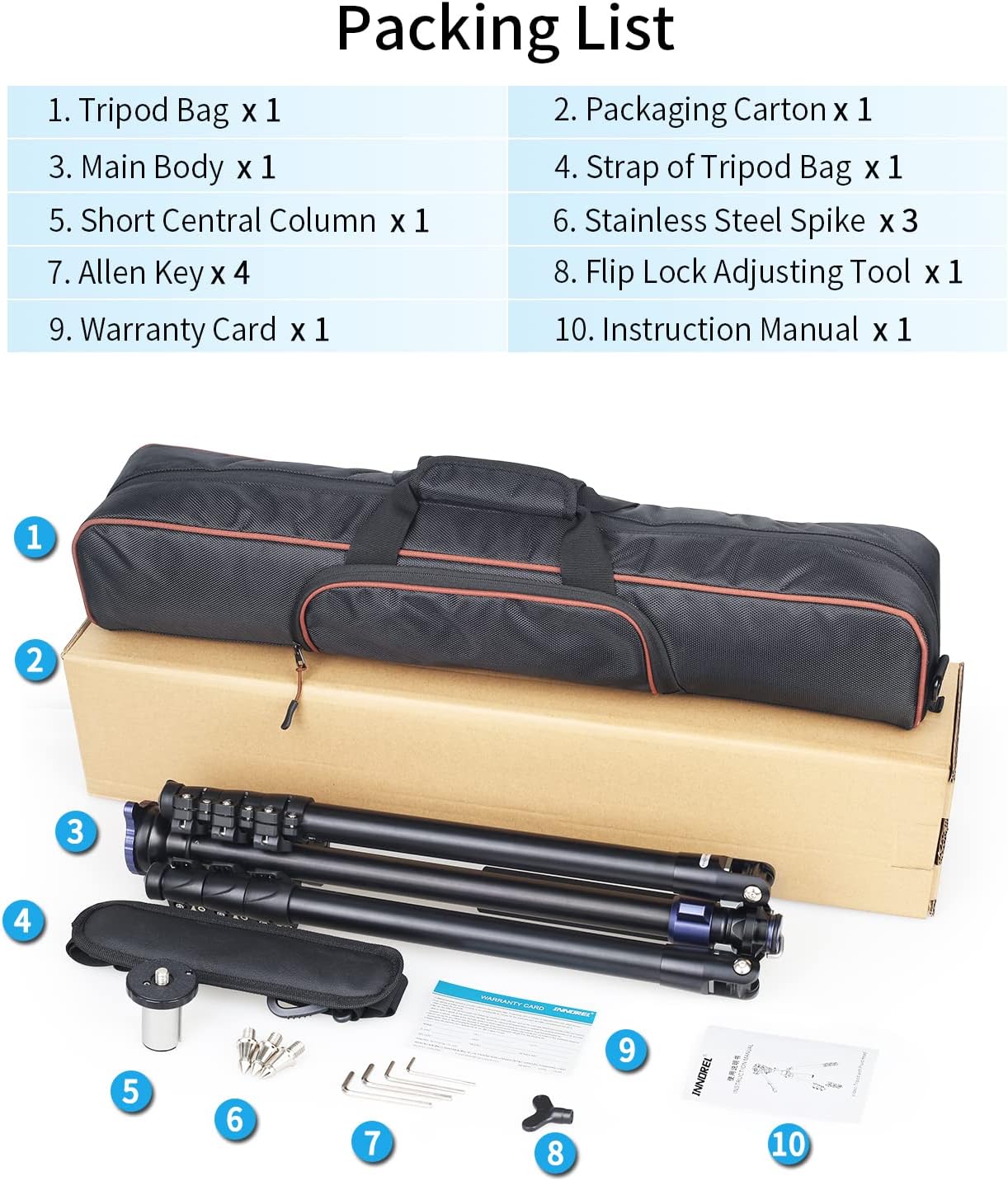
Figure 3.2: Contents of the INNOREL MT70 Package.
This image displays all the components you should find inside the product packaging, corresponding to the packing list provided.
4. Setup and Assembly
4.1 Unpacking
- Carefully remove all components from the packaging carton.
- Check the packing list (Section 3) to ensure all items are present and undamaged.
- Retain the packaging for future storage or transport.
4.2 Deploying the Tripod
- Place the tripod on a flat, stable surface.
- Release the leg angle adjustment locks on each leg and spread the legs to the desired angle. The tripod offers multiple angle settings for stability on various terrains.
- Extend the tripod legs by opening the fast flip buckles on each section. Extend from the thickest section downwards. Securely close each flip buckle after extending to lock the leg section in place.
- Extend the central column by loosening its locking knob, raising it to the desired height, and then tightening the knob.
4.3 Leveling the Tripod Head
The INNOREL MT70 features a built-in half-ball leveling base, allowing for quick and precise leveling of the camera without adjusting the tripod legs.

Figure 4.1: Half Ball Leveling System.
This image demonstrates how the half-ball platform and its locking lever enable rapid leveling of the camera head, which is particularly useful for achieving perfectly level panoramic shots on uneven ground.
- Loosen the half-ball locking lever located at the base of the central column.
- Adjust the camera head until the built-in bubble level indicates it is perfectly level. The platform can tilt up to 25° in any direction.
- Once level, securely tighten the half-ball locking lever to fix the position.
5. Operating Instructions
5.1 Using as a Tripod
- Attach your camera or equipment to the 3/8" screw on the quick release plate. Ensure it is securely fastened.
- Mount the quick release plate with your equipment onto the tripod head and lock it in place.
- Adjust the height of the legs and central column using the flip locks and central column knob as described in Section 4.2.
- Utilize the half-ball leveling system (Section 4.3) for precise leveling.
- Adjust the pan and tilt movements of the fluid head using the dedicated knobs for smooth camera operation.
5.2 Converting to a Monopod
The INNOREL MT70 can be easily converted into a monopod for situations requiring greater mobility or when space is limited.

Figure 5.1: Monopod Conversion.
This illustration details the steps to transform the tripod into a monopod: detach the designated leg, remove the central column, and then combine them with the video head to form a stable monopod.
- Identify the tripod leg with the foam grip. This leg is detachable.
- Unscrew this leg from the tripod main body.
- Remove the central column from the tripod main body.
- Screw the detached leg onto the bottom of the central column.
- The video head remains attached to the top of the central column, completing the monopod assembly.
- The monopod can extend to a maximum height of over 72 inches (185 cm).

Figure 5.2: Monopod Height Adjustments.
This visual guide displays the range of heights achievable with the monopod configuration, from its minimum collapsed height to its maximum extended height, highlighting its adaptability for different shooting scenarios.
5.3 Multiple Postures and Low-Angle Shooting
The MT70 tripod allows for various shooting postures, including low-angle and inverted setups, to accommodate diverse creative needs.
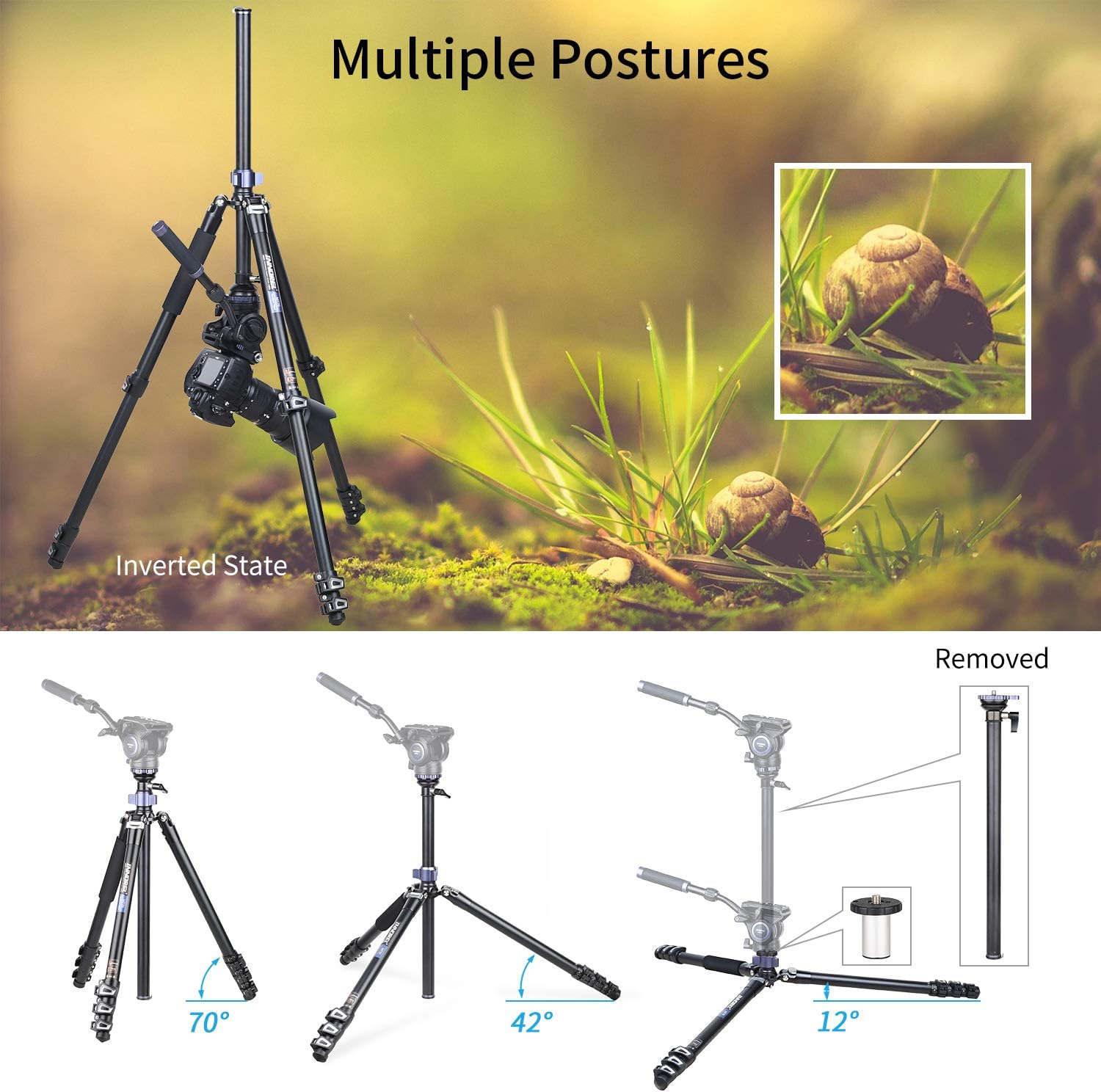
Figure 5.3: Versatile Shooting Postures.
This image illustrates the tripod's flexibility, showing how it can be set up at different leg angles (70°, 42°) and even in an inverted position. The inverted state is particularly useful for extreme low-angle shots or macro photography, as demonstrated by the accompanying example image of snails.
- Standard Angles: Adjust leg angles using the angle adjustment locks for stable setups at 70° or 42° spreads.
- Inverted State: For extremely low-angle shots or macro photography, the central column can be inverted. Remove the central column, flip it upside down, and reinsert it into the tripod body. This allows the camera to be positioned very close to the ground.
- Short Central Column: Use the included short central column for even lower shooting angles when the standard central column is too long.
6. Maintenance and Care
- Cleaning: Wipe down the tripod with a soft, damp cloth after each use, especially if used in dusty, sandy, or wet environments. Avoid harsh chemicals or abrasive cleaners.
- Lubrication: Moving parts, such as leg locks and central column, generally do not require lubrication. If movement becomes stiff, consult professional service.
- Storage: Store the tripod in its carrying bag in a cool, dry place, away from direct sunlight and extreme temperatures.
- Inspection: Periodically check all screws, bolts, and locks for tightness. Use the provided Allen keys and flip lock adjusting tool as needed.
- Avoid Over-tightening: Do not over-tighten knobs or locks, as this can strip threads or damage components.
7. Troubleshooting
| Problem | Possible Cause | Solution |
|---|---|---|
| Tripod is unstable. | Legs not fully extended or locked; uneven ground; overloaded. | Ensure all flip locks are securely closed. Adjust leg angles for wider stance. Use the half-ball leveling system. Reduce load if exceeding 44 lbs. |
| Leg sections difficult to extend/retract. | Dirt/debris in leg sections; flip locks too tight. | Clean leg sections. Use the flip lock adjusting tool to slightly loosen the flip locks if they are too stiff. |
| Camera head not level. | Half-ball locking lever not tightened; tripod on uneven surface. | Loosen half-ball locking lever, adjust using the bubble level, then re-tighten firmly. |
| Monopod conversion issues. | Incorrect leg detached; central column not properly attached. | Ensure the leg with the foam grip is detached. Follow monopod conversion steps in Section 5.2 carefully. |
8. Specifications
| Feature | Specification |
|---|---|
| Model Number | MT70 |
| Material | Aluminum Alloy, Stainless Steel |
| Max Height (Tripod) | 68.7 inches (183 cm) |
| Min Height (Tripod) | 19.5 inches (49.5 cm) |
| Folded Length | 21.7 inches (55 cm) |
| Number of Leg Sections | 4 |
| Max Loading Capacity | 44 lbs (20 kg) |
| Net Weight | 3.68 lbs (1.67 kg) |
| Mounting Screw | 3/8" |
| Half Ball Tilt Range | 25° |
| Monopod Max Height | Over 72 inches (185 cm) |
9. Warranty and Support
Your INNOREL MT70 Professional Multifunctional Video Tripod comes with a Warranty Card (included in the packing list). Please refer to the Warranty Card for specific terms and conditions of your product's warranty.
For technical support, troubleshooting assistance beyond what is covered in this manual, or warranty claims, please contact INNOREL customer service through their official website or the retailer from whom you purchased the product. Ensure you have your product model number (MT70) and proof of purchase ready when contacting support.
For more information and product updates, visit the official INNOREL store: INNOREL Amazon Store.
