
Introduction
This manual provides comprehensive instructions for the installation, operation, and maintenance of your SYKIK TPMS Real-Time Tire Pressure Monitoring System. This system is designed to monitor tire pressure and temperature for vehicles ranging from 4 to 22 wheels, including cars, RVs, and trucks, enhancing driving safety and tire longevity.
Safety Information
- Read all instructions carefully before installation and use.
- Do not attempt to disassemble or modify the device or sensors.
- Ensure sensors are securely installed to prevent air leakage.
- Always check tire pressure with a calibrated gauge periodically, as TPMS is a monitoring system, not a substitute for regular maintenance.
- Pay attention to all alarms and address them promptly.
Package Contents
Your SYKIK TPMS package includes the following components:
- TPMS Monitor Display Unit
- 10 Wireless Tire Pressure Sensors (expandable up to 22)
- Rechargeable Battery (for monitor)
- Cigarette Adapter Power Cable
- Antenna (2 sets for flexible installation)
- Sensor Installation Tool (wrench)
- User Manual
Product Overview
The SYKIK TPMS provides real-time monitoring of your vehicle's tire pressure and temperature. It features a clear display and various alert functions to ensure safe driving. The system is designed for versatility, supporting a wide range of vehicles.

Image: SYKIK TPMS monitor displaying tire pressure and temperature, alongside icons representing key features such as wireless monitoring, real-time alerts, anti-interference, and support for up to 22 tires.
Key features include:
- Real-time Monitoring: Continuously displays tire pressure and temperature for all connected tires.
- Wide Compatibility: Supports vehicles with 4 to 22 wheels, suitable for cars, RVs, and trucks.
- Wireless Sensors: External sensors transmit data wirelessly, capable of handling 0 to 225 psi.
- Advanced Alert System: Notifies you of high/low pressure, high temperature, fast air leakage, and low sensor/monitor battery.
- Dual Power Source: Monitor can be powered by its internal rechargeable battery or via the included cigarette adapter.
- Enhanced Signal Stability: Special antenna design minimizes interference for reliable data transmission.

Image: A SYKIK TPMS monitor positioned in a truck cabin, illustrating its real-time monitoring capabilities for large vehicles. The display shows current tire pressure and temperature readings.
Setup Instructions
1. Charging the Monitor
Before first use, fully charge the TPMS monitor using the provided cigarette adapter or a compatible USB power source. The monitor can also operate directly from the cigarette adapter.
2. Installing the Antenna
Attach one of the provided antennas to the monitor unit. For optimal signal reception, especially in larger vehicles, consider installing the external antenna outside the cab if necessary.
3. Installing the Sensors
- Identify the correct tire position for each sensor (e.g., front left, rear right). Sensors are typically labeled or pre-assigned.
- Remove the existing valve cap from the tire valve stem.
- Screw the TPMS sensor onto the valve stem clockwise until it is hand-tight.
- Use the provided wrench to tighten the sensor securely. Ensure it is tight enough to prevent air leakage but do not overtighten.
- Repeat for all tires.
Note: The system typically comes pre-paired. If sensors need to be re-paired or new sensors added, refer to the specific pairing instructions in the full manual (not detailed here).
4. Mounting the Monitor
Place the monitor in a location within your vehicle where it is easily visible to the driver but does not obstruct your view of the road. Ensure it is securely mounted to prevent movement during driving.
Operating Instructions
1. Powering On/Off
Press and hold the power button on the monitor to turn it on or off. The monitor will typically auto-start when connected to vehicle power and the ignition is on.
2. Display Information
The monitor cycles through the tire positions, displaying the current pressure (in PSI or Bar) and temperature (in °C or °F) for each tire. It updates readings every 3 seconds.
3. Understanding Alerts
The SYKIK TPMS is equipped with various alerts to notify you of abnormal tire conditions. When an alert is triggered, the monitor will display a specific icon, flash the relevant reading, and emit an audible alarm.
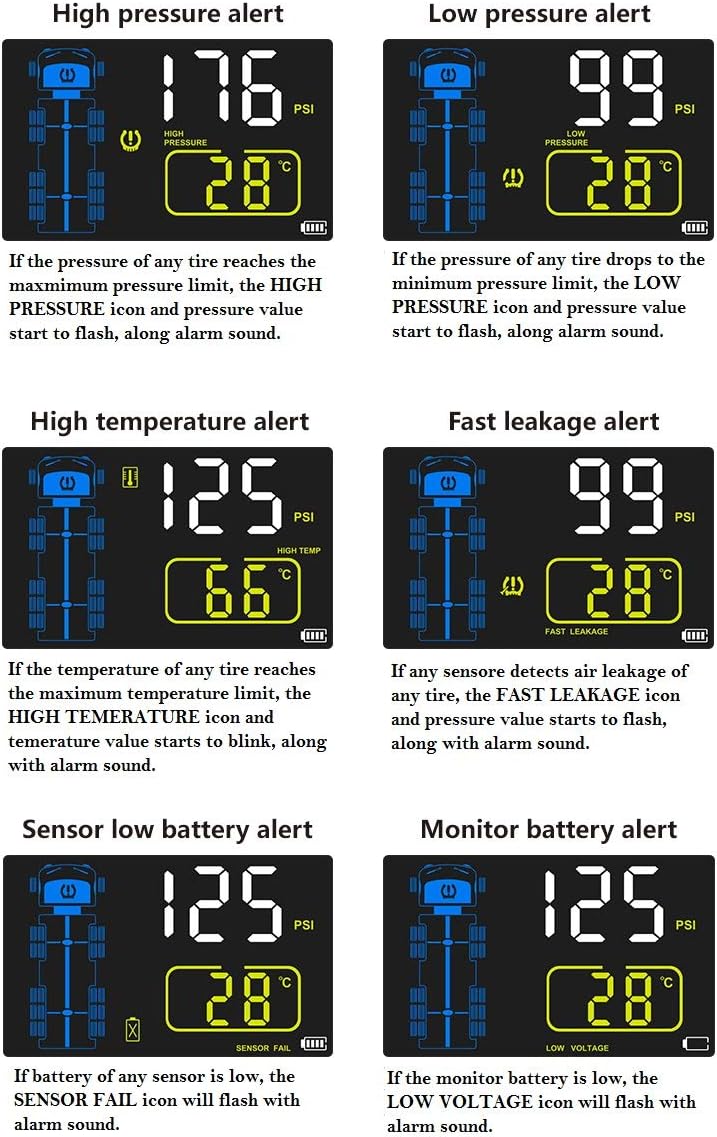
Image: Visual representation of different alert types on the SYKIK TPMS display. This includes icons and example readings for High Pressure Alert (e.g., 176 PSI), Low Pressure Alert (e.g., 99 PSI), High Temperature Alert (e.g., 125 PSI, 66°C), Fast Leakage Alert (e.g., 99 PSI), Sensor Low Battery Alert, and Monitor Battery Alert.
- High Pressure Alert: Triggered when tire pressure exceeds the preset maximum limit. The "HIGH PRESSURE" icon and pressure value will flash with an alarm sound.
- Low Pressure Alert: Activated when tire pressure drops below the preset minimum limit. The "LOW PRESSURE" icon and pressure value will flash with an alarm sound.
- High Temperature Alert: Occurs if any tire's temperature reaches the maximum preset limit. The "HIGH TEMP" icon and temperature value will blink with an alarm sound.
- Fast Leakage Alert: Detects rapid air loss. The "FAST LEAKAGE" icon and pressure value will flash with an alarm sound.
- Sensor Low Battery Alert: Indicates a sensor battery is low. The "SENSOR FAIL" icon will flash with an alarm sound.
- Monitor Battery Alert: Signals that the monitor's internal battery is low. The "LOW VOLTAGE" icon will flash with an alarm sound.
4. Adjusting Settings (e.g., Alarm Thresholds, Units)
Refer to the full product manual for detailed instructions on how to access and adjust settings such as high/low pressure thresholds, high temperature thresholds, and units of measurement (PSI/Bar, °C/°F). These settings are crucial for customizing the system to your vehicle's specific requirements.
Maintenance
1. Monitor Battery Charging
The monitor's internal rechargeable battery should be charged regularly, especially if not continuously powered by the vehicle's cigarette adapter. A full charge ensures uninterrupted monitoring.
2. Sensor Battery Replacement
When a "Sensor Low Battery" alert appears, the battery in the affected sensor needs replacement. The sensors use CR123A batteries. Carefully unscrew the sensor, replace the battery, and re-install it securely using the wrench.
3. Cleaning
Wipe the monitor and sensors with a soft, dry cloth. Do not use abrasive cleaners or solvents, as these can damage the components.
Troubleshooting
| Problem | Possible Cause | Solution |
|---|---|---|
| No signal/display for a specific tire or all tires. |
|
|
| Inaccurate pressure readings (e.g., 15-20 PSI off). |
|
|
| Monitor screen shuts off or is unresponsive. |
|
|
| Sensor installation tool broke. | Excessive force during installation. | Use appropriate force; contact support for a replacement tool if needed. |
Specifications
| Brand | SYKIK |
| Model Number | U901RV (also SRTP901) |
| Manufacturer | SYKIK |
| Supported Wheels | 4 to 22 wheels |
| Sensor Pressure Range | 0 to 225 psi |
| Batteries | 10 CR123A batteries required (included for sensors), Rechargeable battery for monitor |
| Item Weight | 652 g |
| Package Dimensions | 22.2 x 17 x 6.7 cm |
| First Available Date | 8 November 2019 |
Warranty and Support
Warranty Information
This SYKIK TPMS comes with a 3-Year US Warranty. Please retain your proof of purchase for warranty claims. The warranty covers manufacturing defects and malfunctions under normal use conditions.
Customer Support
For technical assistance, troubleshooting beyond this manual, or warranty inquiries, please contact SYKIK customer support. Refer to the product packaging or SYKIK's official website for the most current contact information.