
VBESTLIFE KX-T885
VBESTLIFE KX-T885 Corded Telephone User Manual
Model: KX-T885
Introduction
Thank you for purchasing the VBESTLIFE KX-T885 Corded Telephone. This manual provides detailed instructions for the setup, operation, and maintenance of your new telephone. Please read this manual thoroughly before using the product to ensure proper functionality and longevity.
Package Contents
Please check the package contents to ensure all items are present:
- VBESTLIFE KX-T885 Telephone Base
- Handset
- Coiled Handset Cord
- Telephone Line Cord

Figure 1: The VBESTLIFE KX-T885 telephone base, handset, and connecting cords.
Setup
Follow these steps to set up your VBESTLIFE KX-T885 telephone:
- Connect the Handset: Plug one end of the coiled handset cord into the handset and the other end into the jack labeled with a handset icon on the side of the telephone base.
- Connect the Telephone Line: Plug one end of the telephone line cord into the jack labeled with a telephone line icon (usually "LINE" or "TEL") on the back of the telephone base. Plug the other end into your wall telephone jack.
- Dual Interface Connection (Optional): The telephone features a dual interface. If you need to connect another device such as a fax machine, POS system, or another telephone to the same line, use the second telephone line jack on the telephone base.

Figure 2: The dual interface design allows connection to both the phone line and another device.
Operating Instructions
Basic Call Functions
- Making a Call: Lift the handset or press the H.F (Hands-Free) button. Dial the desired phone number using the keypad.
- Answering a Call: When the phone rings, lift the handset or press the H.F button to answer.
- Ending a Call: Place the handset back on the cradle or press the H.F button if in hands-free mode.
Caller ID Display
The telephone features a Caller ID display. When an incoming call is received, the caller's number will be shown on the LCD screen, provided you have subscribed to Caller ID service from your telephone provider.

Figure 3: The Caller ID feature displays the incoming call number.
Hands-Free Operation
To use the hands-free function, press the H.F button. You can then speak and listen without holding the handset. Press H.F again to end the call.
Mute Function
During a call, you can activate the mute function to temporarily disable your microphone, allowing you to speak privately without the other party hearing you. Deactivate the mute function to resume the conversation. Refer to the phone's on-screen prompts or additional documentation for specific button presses if not immediately apparent.

Figure 4: The Mute function allows for private conversations.
Speed Dial / Last Number Redial
- Speed Dial: The phone supports speed dial for frequently used numbers. Refer to the FLASH/SET button for programming instructions.
- Last Number Redial: To redial the last number called, lift the handset or press H.F, then press the RD/P (Redial/Pause) button.
Pause / Hold Function
During a call, press the HOLD button to put the call on hold. The other party will hear hold music or silence. To resume the call, press HOLD again or lift the handset.
Volume Adjustment
Adjust the earpiece or speaker volume during a call using the VOL button or the UP/DOWN navigation buttons, if applicable.
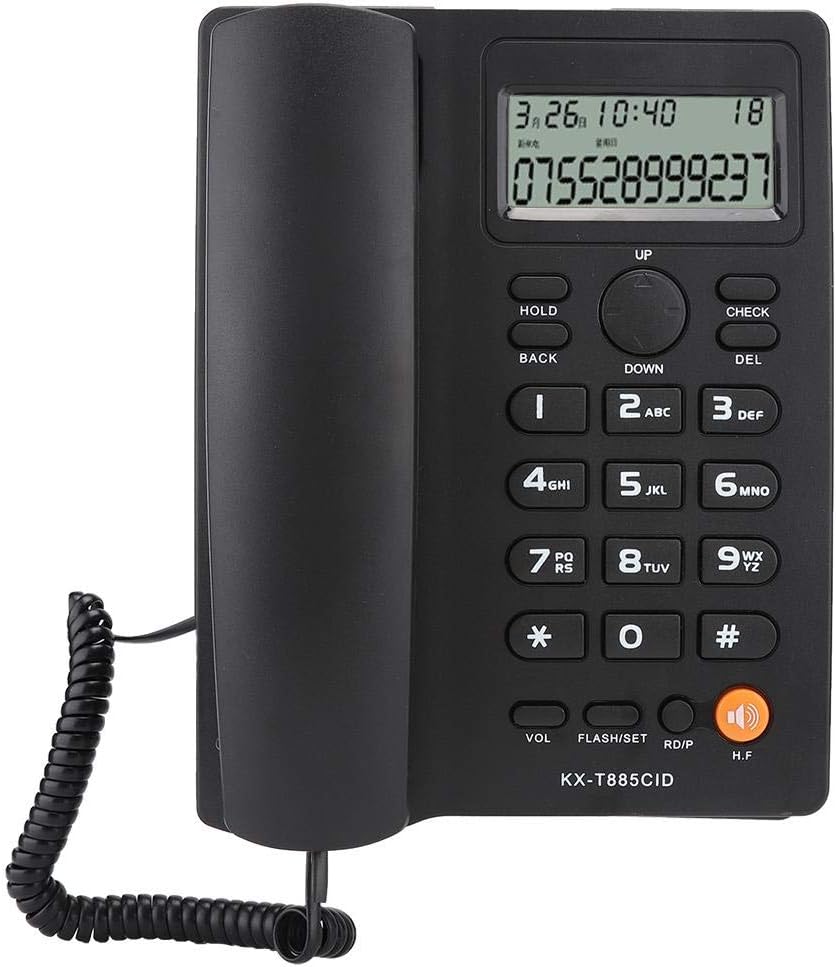
Figure 5: Overview of the telephone's keypad and display for operation.
Maintenance
To ensure the longevity and optimal performance of your telephone, follow these maintenance guidelines:
- Cleaning: Wipe the telephone's surface with a soft, damp cloth. Do not use abrasive cleaners or solvents, as they may damage the finish.
- Avoid Liquids: Keep the telephone away from water and other liquids. If liquid enters the unit, disconnect it immediately and contact support.
- Storage: Store the telephone in a cool, dry place when not in use for extended periods.
- Environmental Conditions: Avoid exposing the telephone to extreme temperatures, direct sunlight, or high humidity.
Troubleshooting
If you encounter issues with your VBESTLIFE KX-T885 telephone, please refer to the following common problems and solutions:
| Problem | Possible Cause | Solution |
|---|---|---|
| No dial tone | Telephone line cord is loose or disconnected. | Ensure the telephone line cord is securely plugged into both the phone and the wall jack. |
| Cannot hear caller | Volume is too low; Handset not properly connected. | Adjust the volume using the VOL button. Check handset cord connection. |
| Caller cannot hear me | Mute function is active; Handset not properly connected. | Deactivate the mute function. Check handset cord connection. |
| Caller ID not displayed | Caller ID service not subscribed; Incorrect line connection. | Contact your telephone service provider to ensure Caller ID service is active. Verify line connections. |
Specifications
| Feature | Description |
|---|---|
| Brand | VBESTLIFE |
| Model | KX-T885 |
| Color | Black |
| Phone Type | Corded |
| Material | Plastic |
| Power Source | Corded Electric (No battery required) |
| Dialer Type | Single Keypad |
| Answering System Type | Digital (Refers to Caller ID display) |
| Item Weight | 570 Grams |
| Caller ID | Yes |
| Features | Noise Reduction, Hands-Free, Speed Dial, Last Number Redial, Mute, Pause/Hold, Dual Interface |
Warranty and Support
For warranty information or technical support, please refer to the documentation provided with your purchase or contact VBESTLIFE customer service. Keep your purchase receipt as proof of purchase.
For further assistance, please visit the official VBESTLIFE website or contact their customer support channels.