1. Introduction
Thank you for purchasing the Vocal-Star VS-1200 Karaoke Machine. This multi-format system is designed to provide an immersive karaoke experience with features such as Bluetooth connectivity, HDMI output, recording capabilities, and scoring. This manual will guide you through the setup, operation, and maintenance of your VS-1200 to ensure optimal performance and enjoyment.

Image: The Vocal-Star VS-1200 karaoke machine, including the main unit, two wired microphones, and a remote control, displayed in front of its product packaging.
2. Package Contents
Please verify that all items listed below are included in your package. If any items are missing or damaged, please contact Vocal-Star customer support.
- Vocal-Star VS-1200 Karaoke Machine Unit
- Remote Control
- RCA Cable (Audio/Video)
- 2 x MP-508 Wired Microphones
- Party Songs Disc Set (Wired 1500 Songs version)
- Power Adapter

Image: An illustrative diagram highlighting the key features of the VS-1200, such as recording performance, copying discs to USB/SD, scoring mode, built-in equalizer, multi-format playback, TV connectivity, jukebox function, amplifier/mixer connections, digital key change, 5.1 audio outputs, songbook creator, headphone socket control, music/bass/treble control, Bluetooth, and four microphone inputs.
3. Setup
Follow these steps to set up your Vocal-Star VS-1200 Karaoke Machine.
3.1 Connecting to a TV/Display
The VS-1200 offers multiple ways to connect to your television or display for video and audio output.
- HDMI Connection: For the best audio and video quality, connect an HDMI cable (not supplied) from the HDMI OUT port on the VS-1200 to an available HDMI input on your TV.
- RCA Connection: Use the supplied RCA cable. Connect the red, white, and yellow plugs from the VS-1200's RCA output to the corresponding red (right audio), white (left audio), and yellow (video) input jacks on your TV.
3.2 Connecting Microphones
The VS-1200 features four microphone inputs.
- Insert the supplied MP-508 wired microphones into the MIC1/A and MIC2/B inputs on the front panel. Additional microphones can be connected to the MIC3 and MIC4 inputs if available.
- Ensure microphones are securely connected before use.

Image: A detailed view of the VS-1200's front panel, highlighting the microphone inputs and various control knobs for adjusting music bass and treble, headphone volume, and individual microphone bass, treble, and echo effects.
3.3 Power Connection
Connect the power adapter to the DC IN port on the rear of the VS-1200 and then plug it into a suitable power outlet. Press the POWER button on the front panel to turn on the unit.
4. Operating Instructions
4.1 Disc Playback (CDG/DVD)
Insert a karaoke disc (CDG or DVD) into the disc tray. The machine will automatically detect the disc type and begin playback. Lyrics will be displayed on your connected TV.
4.2 USB/SD Card Playback (MP3/MP3+G)
Insert a USB drive or SD card containing MP3 or MP3+G files into the respective ports on the front panel. Use the "DISC/USB/SD" button on the remote or front panel to switch to USB/SD mode. Navigate through your files using the navigation buttons (PREV/NEXT) and select a song to play.

Image: The VS-1200 unit positioned below a television screen, which displays a list of MP3+G songs from a connected USB drive, illustrating the Jukebox feature for easy song selection.
4.3 Bluetooth Connectivity
The VS-1200 allows you to stream music wirelessly from your smartphone, tablet, or laptop via Bluetooth.
- Press the "DVD/BLUET" button on the front panel or remote to switch to Bluetooth mode. The display will indicate "BLUET".
- On your smart device, go to Bluetooth settings and search for available devices. Select "VS-1200" from the list to pair.
- Once connected, you can play audio from your device through the VS-1200. You can use your phone/tablet as the screen for lyrics from online sources (e.g., YouTube) while the audio plays through the karaoke machine and connected speakers/TV.
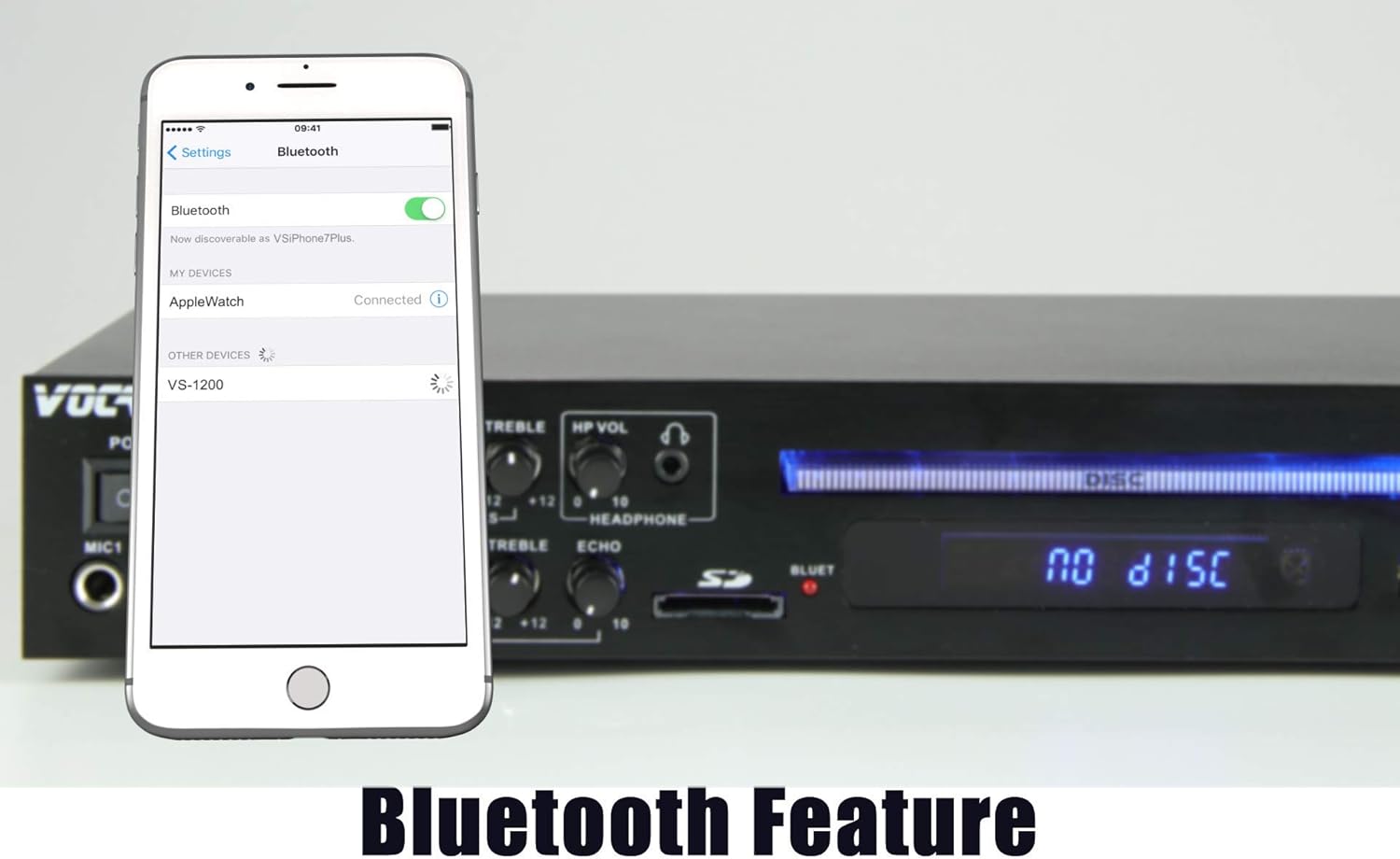
Image: A smartphone displaying its Bluetooth settings, with the 'VS-1200' device visible and ready for connection, positioned beside the Vocal-Star VS-1200 karaoke machine, demonstrating its wireless Bluetooth capability.
4.4 Recording Your Performance
You can record your singing performance directly to a USB drive.
- Ensure a USB drive is inserted.
- Press the "RECORD" button on the front panel or remote. The recording indicator will light up.
- Sing along to your chosen track.
- Press "RECORD" again to stop recording. Your performance will be saved as an audio file on the USB drive.
4.5 Scoring Your Singing
The VS-1200 can score your singing performance.
- During playback, press the "SCORE" button on the front panel or remote.
- The system will analyze your pitch and timing and display a score at the end of the song.
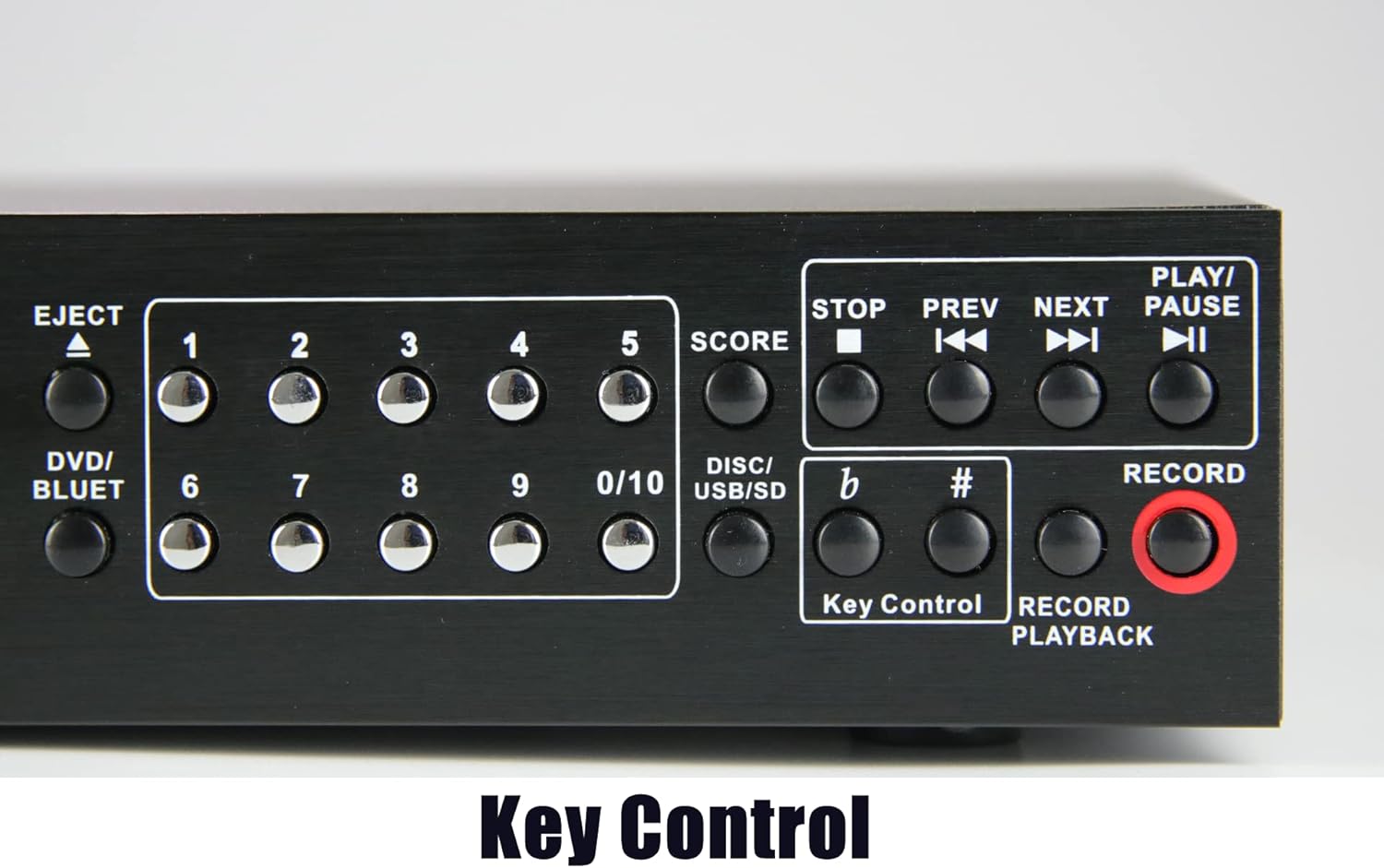
Image: A close-up view of the VS-1200's control panel, highlighting the buttons for scoring, standard playback controls (stop, previous, next, play/pause), key control for adjusting song pitch, and record/playback functions.
4.6 Key Control
Adjust the musical key of the song to better suit your vocal range.
- Use the "Key Control" buttons (sharp # and flat b) on the front panel or remote to raise or lower the pitch of the music.
4.7 Microphone and Music Controls
The VS-1200 provides independent controls for music and microphone audio.
- Music Controls: Adjust the BASS and TREBLE knobs in the "MUSIC CONTROLS" section to fine-tune the music's sound.
- Microphone Controls: Adjust the BASS, TREBLE, and ECHO knobs in the "MIC CONTROLS" section for each microphone input to enhance vocal quality and add effects.
- Headphone Volume: Use the "HP VOL" knob to adjust the volume for headphones connected to the headphone jack.
4.8 Songbook Creator
The VS-1200 can generate a text file song list from your USB/SD media.
- With a USB drive or SD card inserted, navigate to the USB/SD playback mode.
- The system can create a "SONGLIST.TXT" file on your memory device, which you can then view and edit on a PC. Refer to the on-screen prompts for this function.
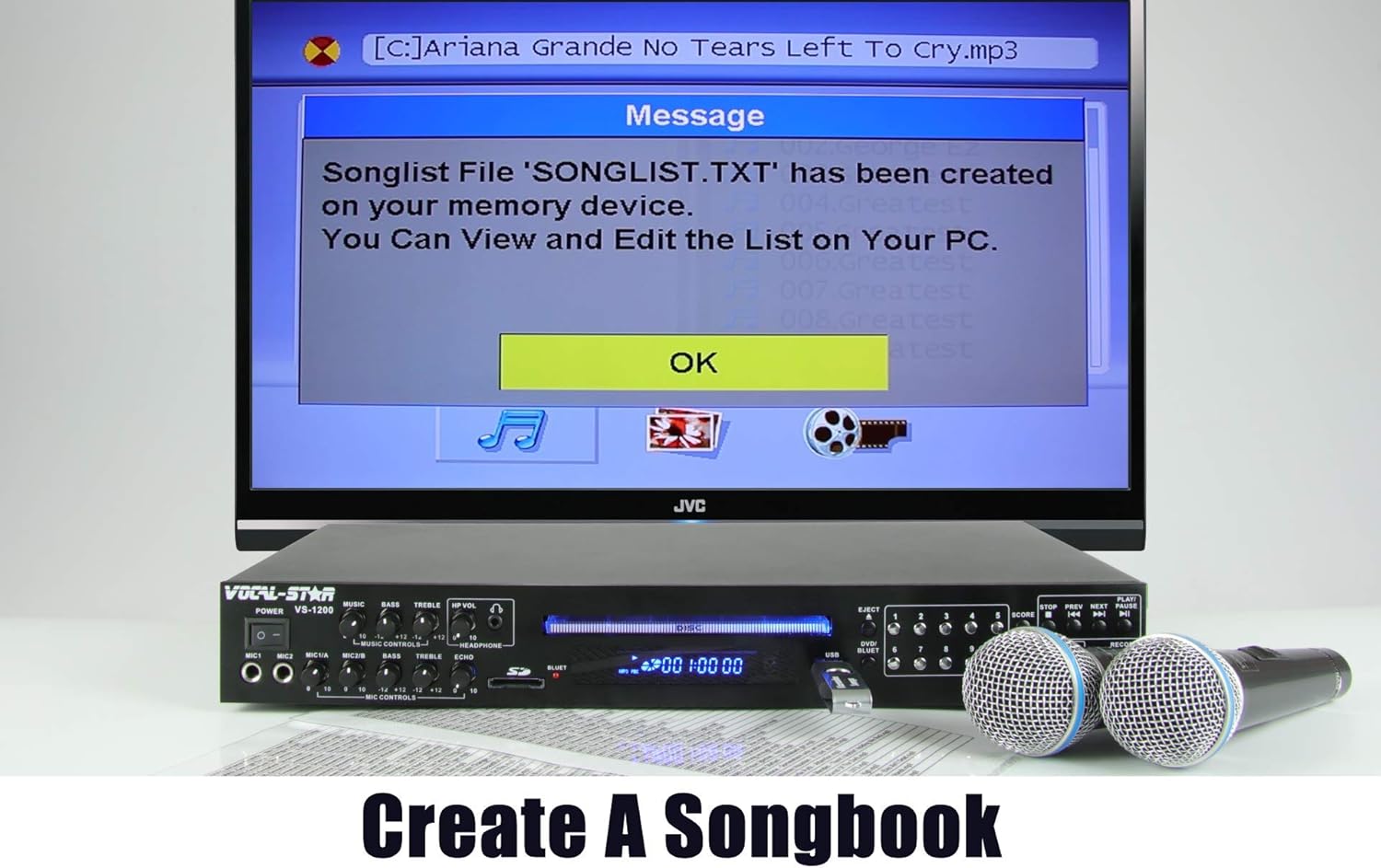
Image: The VS-1200 unit and microphones positioned below a television screen, which displays a message confirming that a 'SONGLIST.TXT' file has been created on the memory device, illustrating the Songbook Creator feature.
4.9 Lyrics Display
When playing CDG or MP3+G files, lyrics will be displayed on your connected TV. The words will change color to prompt you when to sing.

Image: A person singing into a microphone while looking at a television screen that displays karaoke lyrics, with the words changing color to indicate when to sing, demonstrating the visual aid provided by the VS-1200.
5. Maintenance
To ensure the longevity and optimal performance of your Vocal-Star VS-1200, follow these maintenance guidelines:
- Cleaning: Use a soft, dry cloth to clean the exterior of the unit. Do not use liquid cleaners or abrasive materials.
- Disc Tray: Keep the disc tray free of dust and debris. Avoid forcing discs into the tray.
- Ventilation: Ensure the ventilation openings on the unit are not blocked to prevent overheating.
- Storage: When not in use for extended periods, store the unit in a cool, dry place away from direct sunlight and extreme temperatures.
- Microphones: Store microphones properly to prevent damage to cables and capsules.
6. Troubleshooting
If you encounter issues with your VS-1200, refer to the following common problems and solutions:
| Problem | Possible Cause | Solution |
|---|---|---|
| No power | Power cable not connected; power outlet faulty. | Ensure power cable is securely connected. Try a different power outlet. |
| No sound output | Incorrect audio connection; volume too low; wrong input selected on TV/receiver. | Check HDMI/RCA connections. Increase volume on VS-1200 and TV. Select correct input source on TV/receiver. |
| No microphone sound | Microphone not connected; microphone volume too low; microphone faulty. | Ensure microphones are fully plugged in. Increase MIC VOL knob. Test with another microphone if available. |
| No lyrics on screen | Playing an audio-only disc (e.g., standard CD); incorrect video connection; disc/file not CDG/MP3+G format. | Ensure you are playing a CDG or MP3+G file. Check video connection (HDMI/RCA). |
| Bluetooth connection issues | VS-1200 not in Bluetooth mode; device not discoverable; interference. | Press "DVD/BLUET" button. Ensure Bluetooth is enabled on your device. Move closer to the unit. |
If the problem persists after trying these solutions, please contact Vocal-Star customer support for further assistance.
7. Specifications
Detailed technical specifications for the Vocal-Star VS-1200 Karaoke Machine:
- Model: VS-1200
- Product Dimensions: 43 x 22 x 6 cm
- Item Weight: 2 kg
- Colour: Wired 1500 Songs (refers to the included disc set)
- Compatible Devices: Tablet, iPhone, Laptop (via Bluetooth)
- Connectors: HDMI, Bluetooth, RCA (Audio/Video), USB, SD Card, 4 x Microphone Inputs, Headphone Output
- Media Formats: CDG, DVD, MP3, MP3+G
- Power Source: Corded Electric
- Voltage: 2.3E+2 Volts (AC)
- Manufacturer: Vocal-Star
- First Available Date: 7 Nov. 2019
8. Warranty and Support
Vocal-Star products are designed for reliability and performance. For warranty information and customer support, please refer to the documentation provided with your purchase or visit the official Vocal-Star website.
Customer Service: For technical assistance, troubleshooting, or warranty claims, please contact Vocal-Star customer support. Keep your purchase receipt as proof of purchase.
Online Resources: Additional support, FAQs, and product updates may be available on the Vocal-Star official website.


