
Introduction
This manual provides instructions for the safe and efficient operation of your Vineyuan BC-152 Li-ion Battery Charger. Please read this manual thoroughly before use and retain it for future reference.
The BC-152 charger is designed for use with ICOM two-way radios that utilize the BP-227 Li-ion battery pack. It provides a quick and reliable charging solution.
Package Contents
Verify that all items are present in your package:
- 1x BC-152 Charger Base
- 1x Power Adapter (AC/DC)

Image: The BC-152 charger base and its accompanying power adapter. The charger base is black with a "CHARGE" indicator light and "DESKTOP CHARGER BC-152" label. The power adapter is a standard US plug type with a DC output cable.
Safety Information
Please observe the following safety precautions to prevent damage to the charger, battery, or personal injury:
- Use only with specified Li-ion battery packs (BP-227).
- Do not attempt to charge non-rechargeable batteries.
- Do not open, jolt, short-circuit, or incinerate the battery or charger.
- Keep the charger away from water and moisture.
- Do not operate the charger if it has been damaged in any way.
- Unplug the charger from the power outlet when not in use or before cleaning.
Setup
- Connect the Power Adapter: Insert the DC plug of the power adapter into the power input jack located on the back of the BC-152 charger base.
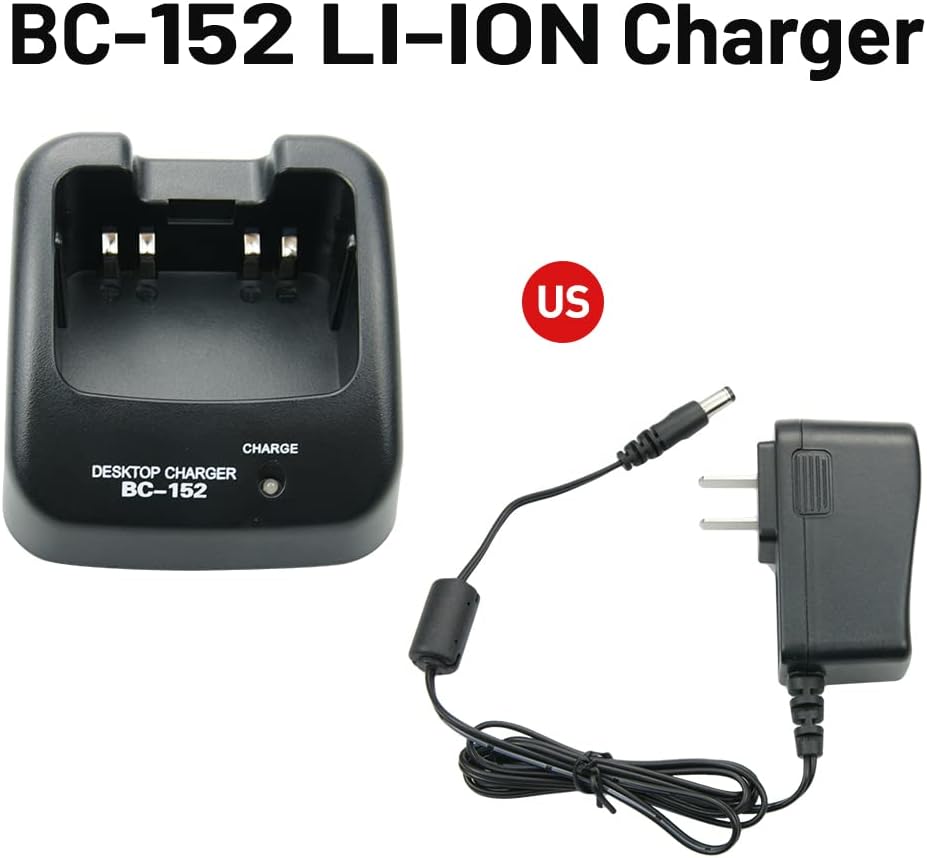
Image: The BC-152 charger base shown alongside its power adapter, illustrating how the adapter connects to the charger. The text "BC-152 LI-ION Charger" is visible.
- Plug into Power Outlet: Plug the AC end of the power adapter into a standard 110-240V AC wall outlet.
- Initial Indicator Check: When the charger is powered on without a battery, the charge indicator light may flash red/green. This is normal behavior.
Operating Instructions
- Insert Battery: Carefully insert the BP-227 Li-ion battery pack into the charging slot of the BC-152 charger base. Ensure the battery is seated correctly and makes proper contact with the charging terminals.

Image: A BP-227 Li-ion battery pack is shown inserted into the BC-152 desktop charger. The charger's indicator light is illuminated, indicating charging status.
- Charging Indicator:
- When the battery is charging, the indicator light will illuminate RED.
- Once the battery is fully charged, the indicator light will turn GREEN.
- Remove Battery: Once the indicator light turns green, the battery is fully charged. Remove the battery from the charger.
Compatible Radios: This charger is compatible with ICOM two-way radios such as IC-V85, IC-F50, IC-50V, IC-51, IC-51V, IC-60, IC-60V, IC-61, IC-61V, IC-61M, IC-M88, IC-M87 when used with the BP-227 battery.

Image: An Icom two-way radio is displayed next to the BC-152 charger base and its power adapter, demonstrating the intended use with compatible radio models.
Maintenance
- Keep the charger clean and dry. Use a soft, dry cloth to wipe the exterior.
- Do not use harsh chemicals or abrasive cleaners.
- Store the charger in a cool, dry place when not in use.
- Regularly inspect the power adapter cord for any signs of damage.
Troubleshooting
| Problem | Possible Cause | Solution |
|---|---|---|
| Charger indicator light not on. | No power to the charger. |
|
| Indicator light flashes red/green without battery. | Normal operation. | This is expected behavior when no battery is inserted. Insert a battery to begin charging. |
| Battery not charging (indicator remains off or flashes without turning red). |
|
|
Specifications
| Feature | Detail |
|---|---|
| Model | BC-152 |
| Input Voltage (Adapter) | 110-240V AC, 50/60Hz, 500mA |
| Output Voltage (Charger) | 12V DC, 1000mA |
| Compatible Battery Type | Li-ion (BP-227) |
| Dimensions (Charger Base) | Approximately 4.7"D x 2.9"W x 1.6"H (12cm D x 7.4cm W x 4.1cm H) |
| Item Weight | Approximately 7.6 ounces (215g) |

Image: A top-down view of the BC-152 charger base with measurements indicating its length, width, and height in both centimeters and inches.
Warranty and Support
For warranty information or technical support, please refer to the contact details provided by your retailer or the manufacturer, Vineyuan. Keep your purchase receipt as proof of purchase.
Manufacturer: Vineyuan
Model Number: V-CDQ-UN-(15)-BK